
Apache User Authentication

The Apache Web Server
Apache has been the most popular web server on the Internet since April of 1996. The Netcraft February 2000 Web Server Survey found that over 58% of the web sites on the Internet are using Apache, thus making it more widely used than all other web servers combined. This success can be attributed to the fact that Apache provides a robust and commercial-grade reference implementation of the Hypertext Transfer Protocol (HTTP). Also, it is reliable, configurable, highly scalable, well documented, open source and free.
First, you must have Apache and the htpasswd utility installed on your Linux machine. If you do not, you can download the latest copy of Apache (version 1.3.12 is available now) from the Apache Organization web site and install it on your machine. htpasswd comes with Apache.
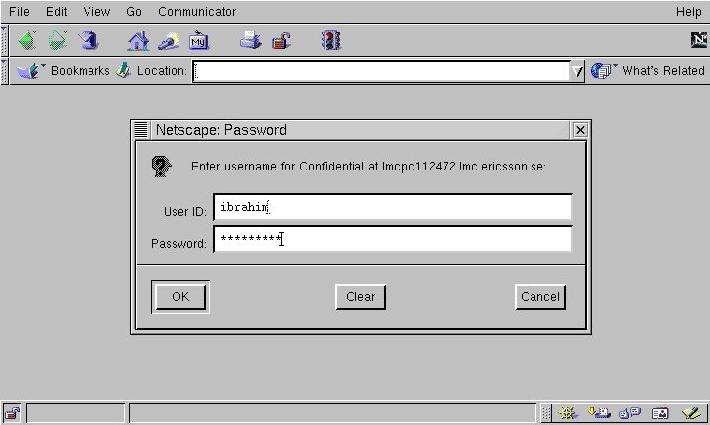
Figure 1. Sending User Credentials
Authentication is a simple yet very important principle—the client sends its name and password to the server (see Figure 1). Apache checks if the credentials are valid, and if so, returns the requested page (see Figure 2).
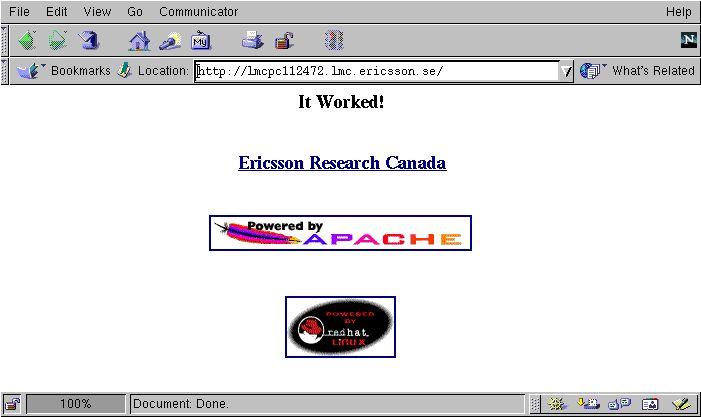
Figure 2. Access is Granted
If the user is not allowed to access the page or the supplied password is not valid, Apache returns a 401 status (i.e., unauthorized access). The browser will then ask the user to retry their user name and password (see Figure 3).

Figure 3. Failed Access
Restricting access to documents is usually done based on either the host name of the browser or user credentials (user name and password). The decision to adopt either method depends on your environment settings. For example, if you want to restrict documents within a limited environment such as a department, you can use the client host name. Otherwise, if you want to grant access on an individual basis, or if the people who are allowed access are dispersed, you would then require a user name and a password.
In order to set user authentication using a user name and a password, we need to follow two steps. First, we create a file containing the user names and passwords. Then, we inform the server which resources are to be protected and which users are allowed to access them.
The first step towards configuring authentication is to set up a list of users and their corresponding passwords. This list is saved in a file called, for example, users. This file should not be saved under the root directory for security reasons. Therefore, for my setup, I saved it under /etc/httpd. For an organized setting, you can create a directory under /etc/httpd, perhaps called users-files, and save the file in it. The file format is similar to the standard UNIX password file, consisting of a list of user names and an encrypted password for each, separated by a colon.
htpasswd is a utility supplied with the Apache package that allows us to create a user's file containing user passwords in order to add or modify them. On my machine, powered by Red Hat 6.1, Apache 1.3.9 and htpasswd were installed as part of the standard installation. To see how htpasswd works, type htpasswd at the shell prompt and the following messages will be returned:
Usage:
htpasswd [-cmdps] passwordfile username<\n>
htpasswd -b[cmdps] passwordfile username password
-c Create a new file.<\n>
-m Force MD5 encryption of the password.
-d Force CRYPT encryption of the password (default).
-p Do not encrypt the password (plaintext).
-s Force SHA encryption of the password.
-b Use the password from the command line rather than prompting for it.
On Windows and TPF systems the '-m' flag is used by default.
On all other systems, the '-p' flag will probably not work.
According to the usage statement, to create a new users file and add the user ibrahim to the file /etc/httpd/users, we type the following command:
htpasswd -c -b /etc/httpd/users ibrahim LJ*2000-ihThe -c flag is only used the first time we use htpasswd to create a new users file. When we run htpasswd with the -b flag (please see the Security Issues section), we will not be prompted to enter a password for ibrahim since it was passed from the command line. Other users can be added to the existing file in the same way, except that the -c argument is not needed since the file already exists. If this option is used when adding other users, the file is over written and the old users are lost.
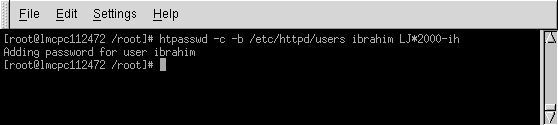
Sample User Password File
After I created a “web account” for myself, I added a few other accounts and my /etc/httpd/users file looked like:
ibrahim:40gvm/lYXsk4a
chady:XygEnj0pSDx9A
julie:3zwRhLJDrr/9s
carla:IfPYPtrekJLxE
karine:jeM9XkbalFaTA
Now that the password file has been created, the server must be notified that access will be restricted based on the user names and passwords found in this file (/etc/httpd/users). This protection method provides access control to individual files as well as to directories and their subdirectories. The directives to create the protected area can be placed either in a .htaccess file in the directory to be protected, or in a <Directory> section in the access.conf file (located in /etc/httpd/conf).
To restrict a directory from within a .htaccess file, first ensure that the access.conf file allows user authentication to be set up in a .htaccess file. This is controlled by the AuthConfig override. The access.conf file should include AllowOverride AuthConfig to allow the authentication directives to be contained in a .htaccess file. Now, to restrict a directory to any user listed in the password file, create a .htaccess file (inside the directory to be protected) containing the following directives:
AuthName "Confidential"
AuthType Basic
AuthUserFile /etc/httpd/users
require valid-user
The AuthName directive specifies a realm name for this protection. Once a user has entered a valid user name and password, any other resources within the realm name can be accessed with the same user name and password. This can be used to create several areas that share the same user name and password.
The AuthType directive tells the server which protocol is to be used for authentication. Another method, Digest, offering higher security features, is also available in the mod_digest module. Using MD5 Digest authentication is quite simple. Set up authentication using AuthType Digest and an AuthDigestFile instead of the normal AuthType Basic and AuthUserFile. Everything else should remain the same.
The AuthUserFile directive tells the server the location of the user file created by htpasswd. Similarly, when using a group file (described in the next section), use the AuthGroupFile directive to tell the server the location of a group's file.
Last, the require directive tells the server which user names from the file are valid for particular access methods. In this example, the argument valid-user tells the server that any user name in the password file can be used. However, we can configure it to allow only specific users. An example of this would be:
require ibrahim julie carla
This directive allows only ibrahim, julie and carla to access the documents after they enter a correct password. If any other user tries to access this directory, even with the correct password, they would be denied. This approach is very useful for two reasons:
Different areas of the server can be restricted to different people with the same password file.
If a user is allowed to access different areas, he has to remember only a single password.
In some cases, we want to allow only selected users to access a particular directory. A lazy way of doing this is by listing all the allowed user names on the require line. This is not encouraged since, if there are many users, the file will become quite large. Luckily, there is a nice way around this problem—using a group file which operates in a similar way to standard UNIX groups. Any particular user can be a member of any number of groups. We can then use the require directive line to restrict users to one or more particular groups. For example, we could create a group called research-staff containing users who are allowed to access the research department pages. To restrict access to just users in the research-staff group, we would use this directive:
require group research-staff
Multiple groups can also be listed, and require user can also be given, in which case any user in any of the listed groups, or any user listed explicitly, can access the resource. For example:
require group research-staff admin-staff
require user julia carla
allows any user in group research-staff or group admin-staff, or both users julia and carla, to access this resource after entering a valid password.
A group file consists of lines giving a group name followed by a space-separated list of users in that group. For example:
research-staff:chady karine
admin-staff:ibrahim julie
The AuthGroupFile directive is used to tell the server the location of the group file. The catch with using a group file is that the maximum line length within the group file is 8KB. However, to get around this limit, we can have more than one line with the same group name within the file.
Using a plaintext file to maintain user names and passwords is easy and straightforward. Nevertheless, employing this method with a large number of users causes a lot of processing at the server side to search the file for the credentials in question; this adds to the server load. Moreover, processing has to be done for every request inside the protected area; even though the user only enters their password once, the server has to re-authenticate them on every request due to the stateless nature of HTTP. Therefore, the server does not remember any information about a request once it has finished and must resend the user name and password on each request.
Much faster access is possible using DBM format files. This allows the server to do a very quick lookup of names, without having to read through a large text file. The slight drawback of this method is the complexity of managing DBM files as compared to managing plaintext files. There are various add-on modules which allow user information to be stored in databases. Aside from the DBM format (mod_auth_dbm), user and group lists can be stored in DB format files (mod_auth_db). Full databases can also be used such as mSQL (mod_auth_msql), Postgres95 (mod_auth_pg95) or any DBI-compatible database (mod_auth_dbi).
There are a couple of security considerations regarding the password files managed by htpasswd. First, files containing users' information such as /etc/httpd/users, should be outside the web space of the server—they must not be fetchable by a browser. Secondly, the use of the -b flag with htpasswd as shown in Figure 4, is discouraged since when used, the unencrypted password appears on the screen.
Authentication is vital and necessary for most web servers. Apache has proven its reliability, and has an excellent record of stable performance and trustworthy security. Using Apache's authentication features, we can combine a cost-effective way to secure our documents using the most popular web sever running on Linux.

Ibrahim F. Haddad (ibrahim.haddad@lmc.ericsson.se) is a senior member of technical staff at Ericsson Research Canada based in Montréal. He researches distributed-object technologies and web servers performance at Concordia University as a D.Sc. Candidate. Ibrahim would like to take this opportunity to thank his parents for all their help and support, not to mention the countless sacrifices, in the last twenty-five years.
