Kernel Korner
Most of the abstract functionality that is needed in a kernel is already in the Linux kernel. Linux has one of the best-designed buffer caches of any Unix-like operating system. A few things are left to be completed in the memory management and in the networking layer, but as more and more development is done, it seems (and reasonably so) that there are fewer and fewer projects that can be done by people with little operating systems knowledge and experience. Those who know enough to know what needs to be done with the memory management don't need to read documentation on how the kernel works; many of them find it faster to simply read the Linux source code.
That is not to say that there = are few projects in the Linux community that beginners can do; there are very many, but most of these projects are not within the kernel itself.
One project that relative beginners can accomplish, and which will never go out of fashion, is writing device drivers for new hardware. There is still hardware that Linux does not support, new hardware is being released by manufacturers all the time, and Linux users buy hardware and then want to use it with Linux.
Fortunately, the interface used to write device drivers is relatively simple and clean. By clean, I mean that there are not many exceptions to the rules or little tricks you have to play to get things to work. Over the next few columns (few is relative, I could spend a few years at this...) I will cover the information you need to know to write various kinds of device drivers.
Some of this information is already in the Linux Kernel Hackers' Guide, but I will expand on the information here. When I write something new here, it will eventually find its way into the Kernel Hackers' Guide; this is one way that Linux Journal supports the Linux Documentation Project.
In an almost contradictory way, I'm to initiate this Kernel Korner column with a description of how (and when!) to implement a device driver as a user program.
The first rule of adding code to the Linux kernel is don't. The code that is in the kernel cannot be swapped, and therefore takes up precious memory whether it is being used at the time or not. Many hardware devices can be driven by user-space programs which are kept nicely out of the way (either swapped out or not running at all) when the device is not being used. One prime example of devices that are implemented this way are video cards.
While the Linux startup code has options to initialize the video modes for many different kinds of cards, the actual device support for video cards in the Linux kernel proper is extremely limited, and is comprised of support for putting text on the screen on either monochrome (hercules-style) or color (CGA, EGA, VGA, and above) cards. No support for graphics is included.
XFree86 provides user-level drivers for many graphics cards within the X servers. These are only loaded when the X servers are running, and parts that aren't being used at the moment can be swapped out when necessary. In addition, by not making the device use a system-call interface to write, these drivers are faster because they are implemented in user space.
There are, of course, drivers that cannot be written as user-space drivers: most commonly, hardware that requires a driver that can service interrupts. We'll deal with these in a future installment.
Perhaps the most common way that a device driver communicates with hardware (at least on the PC architecture) is through the I/O bus. This is a bus which is completely separate from the memory bus, and which is accessed with special machine instructions. For a concrete example, let's use the parallel port. The parallel port driver is in the kernel for three reasons: it can be interrupt-driven, it manages contention, and it has historically been part of the kernel. It's also reasonably small, and very common, so it doesn't bloat the kernel very much. However, the parallel port can be driven from user space. Let's look at how this could be done.
The parallel port has three addresses on the I/O bus, and they are specified by a base address and two offsets. This is common for devices; many devices have several base addresses to choose from, and any other ports that are used are specified as offsets from the base. The three base addresses for the parallel port are given in linux/lp.h, and are (in hex) Ox3bc, Ox378, and Ox278. The status port is the next port above that, and the control port is above the status port. So if the base I/O port, to which characters are written, is Ox378, then the status port is Ox379 and the control port is Ox380.
Perhaps the most common way that a device driver communicates with hardware... is through the 1/0 bus.
You need enough documentation for a device to know how to talk to it. The 8255 chip is the chip that the parallel port is based on, and the documentation for that chip and for the parallel port interface describes the three ports.
The status port can report several conditions when it is read:
Bit | Condition |
Ox80 | If 0, printer is busy |
Ox40 | If 0, printer has ACKnowledged the character sent |
Ox20 | If 1, printer is out of paper |
OxlO | If 1, printer is on-line |
Ox08 | If 0, printer has in an error condition |
The control port controls several things when it is written:
Bit | Condition |
OxlO | Set to 1 to enable sending interrupts when the printer is ready |
Ox08 | Set to 1 to tell printer ready to talk |
Ox04 | Set to O to tell printer to initialize itself |
OxO1 | Set to 1 to prepare to send another byte to printer |
Unfortunately, not all printers agree about all the signals that can be sent, so the least common denominator has to be used. This means that I won't use all of the bits you see in the tables. Also, I obviously won't use the interrupt-enable bit, since interrupts can't be used from user-level programs.
I'm also not going to do any serious error detection; I want to show how simple it can be to write a simple driver that works (more or less). If you want to see how error detection could be handled, simply read include/linux/lp.h and drivers/char/lp.c in the Linux kernel source.
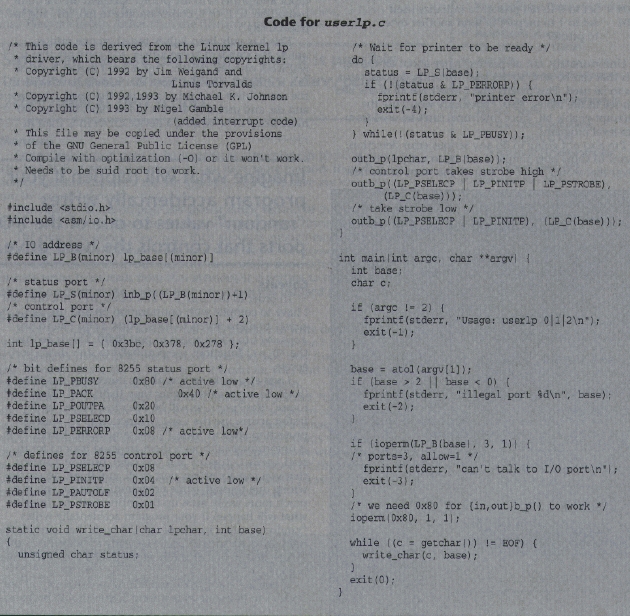
The program userlp.c (see sidebar) needs to be compiled with optimization fumed on and run as root (or setuid root) to work. It takes a file from the standard input and prints it to the printer specified on the command line: O, 1, or 2, corresponding to lpO, lpi, and lp2, respectively.
This has only been lightly tested on one printer, unlike the standard kernel driver, so I can't say that it will work on your printer. This doesn't matter, because this is only an example. Note that I could have written the same driver as a /bin/sh script that used /dev/port and dd, and probably done it in less time, but you are more likely to be writing a device driver in C than in /bin/sh.
In order to use inb_p() and ou tb_b(), not only did I have to compile with optimization on and use ioperm() to allow access to those ports, I also had to use ioperm() to allow access to port Ox80. This is because the *b_p () functions use port Ox80 to slow down port access.
I was also lucky in that all my ports were less than Ox3ff. To access ports higher than Ox3ff, you either need to use /dev/port (as will be described below) or, for fastest access, use the iopl() function to set your I/O protection level to “ring 3”, the same as the kernel. This is unfortunate (although there are good reasons for it; read kernel/ioport.h if you care), because it means that you can access any port at all, and if you access the wrong one through some programming error, you may much more easily mess up the entire machine. Imagine what will happen if your program accidentally writes “random” values to one of the I/O ports that controls the hard drive. At “ring 3”, code is nearly as powerful as the kernel, and so one of the advantages of a user-level driver is gone.
If you are going to do something as dangerous as use iopl() to put your code in ring 3, you should probably know how to read kernel source code, so I will simply refer you to kernel/ioport.h for details. System calls are called sys_name within the kernel, so look for sys iopl().
Note that I used the ioperm() function to read and write directly from and to the ports with the inb_p() and outb_b() functions, and that this function requires that the code run as root. Another option is to read and write from /dev/port. This is a little slower, but has the advantage that the code does not require root permissions to run; just read and write permission to /dev/port. Simply use lseek() to seek to the address of the port you want to read from or write to, and read() or write() a single byte to the file. If you want to read or write again, you need to use lseek() again. If you make a group called port and make /dev/port readable and writable by group port, then any user in group port can use user-space device drivers written in this way without the programs being setuid root.
Another way to access /dev/port is to use mmap() to map it into some memory space. Then you can write to ports directly at the memory address you map them to. See the section on memory mapping, below, to learn how to map files; the details (other than the filename) are the same. Since perl can use the mmap() call, it is possible to write device drivers that access /dev/port and /dev/mem as perl scripts.
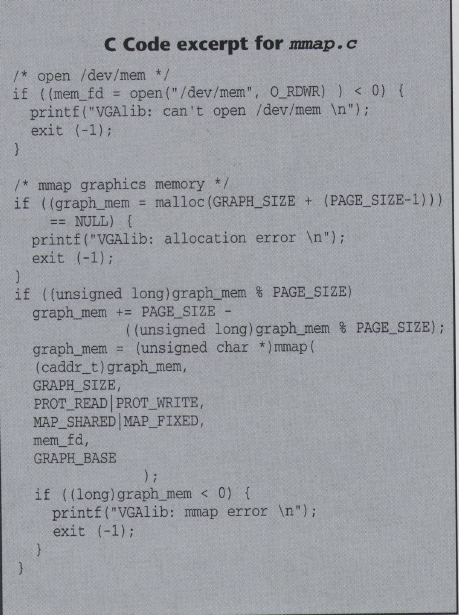
Other devices may need to be accessed at some place in physical memory. The first 3GB of physical memory (if you have more memory than that and don't know how to access the 4th gigabyte, you don't have my sympathy...) can be accessed through /dev/mem. The sidebar (at left on page 20) gives a rough version of the mmap() code from svgalib, which, like XFree86, is a user-space device driver for video cards:
The code first opens /dev/mem, then allocates enough memory to map the section of /dev/mem it wants into, and then maps /dev/mem over the already allocated memory. Once this has been successfully done, whenever that process writes to or reads from that memory, it is writing to or reading from physical memory at the address that /dev/mem was mapped to.
Since perl can use the mmap() call, it is possible to write device drivers that access /dev/port and /dev/mem as perl scripts. If you don't already use perl, it's probably not worth it, but if you do use perl, you may find the idea intriguing. If you try it, I'd like to know how it works for you, and if you have any hints, I may pass them on to the readers of this column. Similarly, it is technically possible (although in practice “too clever by half” and rather slow) to write a device driver as a shell script, by using dd to read and write ports. Just to be contrary, I worked on such a driver, and found that the chief problems are the lack of binary bit-wise operations and lack of real binary data. I am not distributing this shell script; anyone who seriously cares about playing in this way can cook up their own based on the userlp.c file presented in this column. If you get it to work reliably, please notify me, and I may print your version in a future Kernel Korner.
Michael K. Johnson is the editor of Linux Journal, and is also the author of the Linux Kernel Hackers' Guide. He welcomes your comments.