
Linux Apprentice: Linux Tools for the Web
I run a small consulting business in Michigan, and one of the services I provide to my clients is web site creation. I had been using my Windows machine for this work, but was not satisfied with the tools I was using. They lacked flexibility, and I had occasional lockups and other problems. Since I used Linux for all my day-to-day tasks (browsing, e-mail, etc.), I searched for Linux tools to do my web design work.
I wanted tools for editing HTML, updating client web sites easily and keeping track of revisions. I tried to select programs that had GPL or BSD licenses or an equivalent. Also, I wanted tools with flexibility, preferring to use several instead of one monster tool that tried to do everything. Finally, I wanted tools that would compile and run on my SuSE 6.1 system without requiring me to run GNOME or KDE.
I found a number of tools, and have been using them for a month now on several client sites: some I imported from my Windows environment and some I created under Linux. The tools available under Linux turned out very capable and easy to use; I was quickly able to be productive using them. Right now, the only thing I cannot do under Linux is use my scanner, but I expect that to change shortly. [All you need is a scanner with Linux support and the program xvscan. —Editor]
I prefer to use non-WYSIWYG (what you see is what you get) editors for the bulk of my HTML work, so I have been using Bluefish and August. While both of these editors are not up to version 1.0 yet (Bluefish is at 0.3.5 and August is at 0.52 beta), I have found that they run reliably and work well.
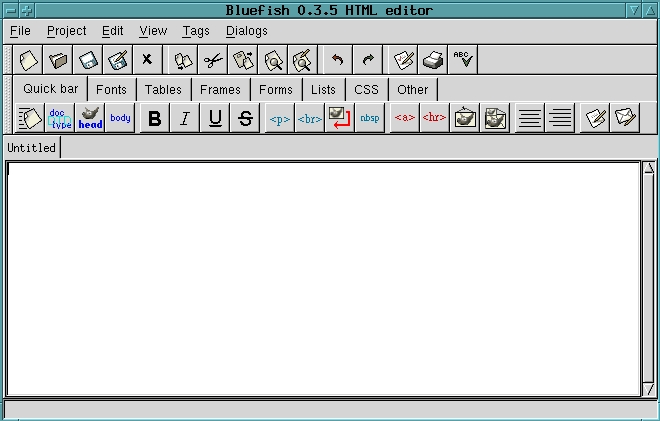
Figure 1. Bluefish Editor
Both of these editors allow you to work on multiple files at the same time. They both provide buttons to insert basic HTML tags such as headings, lists and text attributes. Bluefish uses a tabbed menu, which allows more tag selections via pushbuttons (see Figure 1) while August has a single push-button menu and uses drop-down menus for selecting other functions (see Figure 2). This makes for a cleaner interface and quicker selection of basic HTML tags. Both of these editors let you preview web pages using Netscape, and August also allows you to preview your page using Lynx.

Figure 2. August Editor
Bluefish allows you to group your pages in project files. The next time you want to edit them, all you have to do is open the project from the Project menu. Bluefish also offers basic wizards for such things as creating new pages and tables.
August does not provide a project menu, but you can open all the HTML pages in a directory using a command-line switch when you start it. August also allows you to create templates and your own tag combinations accessible via the user menu. I found the user-defined tag feature to have a few problems.
Bluefish requires the GTK libraries to compile. You also need the imlib libraries for the “Insert Picture” functions to work. August is a Tcl/Tk program and therefore does not have to be compiled.
Despite being pre-1.0 versions, both of these editors have worked well for me. I prefer Bluefish so far, but not for any specific reason.
Keeping remote web sites up to date manually can be a chore. Fortunately, there are tools that help automate this process. The two tools I have been comparing are weex and sitecopy. weex is currently at version 2.3.0, and sitecopy is at version 0.9.5.
To use them, first create a .rc file that contains site information such as the remote server (ftp.here.com), your username, password, source (local) directory and the remote directory to update. When the programs are run, they compare the contents of the local directory to the remote directory, then try to make the remote directory match the local directory.
weex offers very precise control over the files and directories that can be updated or deleted. For example, you can tell it to ignore specific directories on the local file system and other directories on the remote file system. You can provide it with a list of file names to ignore or use wild cards. When a file is ignored, it is not copied or deleted.
While sitecopy's file control is not as precise, it offers some features that weex does not. For example, sitecopy can determine whether a file needs updating by checking its timestamp or calculating its MD5 checksum. This is handy if a file's timestamp changes, because you checked it out of a revision control system.
sitecopy can also notify you if someone has changed files on the remote site after you have uploaded them. When this “Safe Mode” is active, sitecopy stores the modification time from the server when you upload a file. The next time sitecopy is run, it compares that stored time to the current modification time on the server. If the times do not match, sitecopy displays a warning message and will not overwrite the remote copy, allowing you to see what changes have been made. I have not tried this function yet.

Figure 3. weex Console Output
The console output of weex is more colorful and provides a bit more detail than that of sitecopy (see Figures 3 and 4). The weex command interface is also simpler: all you do is issue the weex command followed by the name of the site you wish to update. To run sitecopy, you issue the sitecopy command, followed by the action you wish to take (update, fetch, synchronize), followed by the site you wish to use. If you do not include an action command, sitecopy displays the files that are different between the local and remote directories.
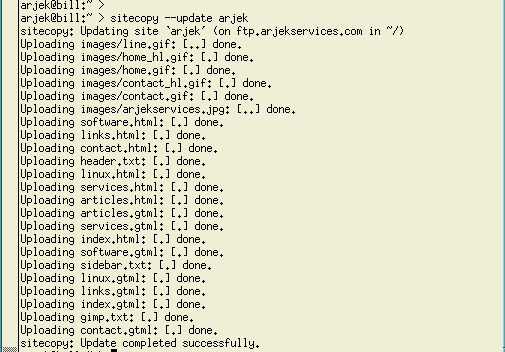
Figure 4. sitecopy Console Output
I have found the best way to use these tools is to create the directory structure on the remote machine before running them. It is also best to make a complete backup of your remote directory before running either of these programs, so you do not accidentally erase important administration or cgi-bin files.
sitecopy provides a nodelete option that prevents it from deleting files on the remote file system, and weex offers a test option that does something similar. I recommend you use these options the first few times you run the programs.
While I prefer the simpler command line and more colorful console output of weex, it does not always keep track of the files it uploads to subdirectories on the remote site. Consequently, it uploads some files again and again, even though they have not changed. It also seems to have problems when the remote system is running Windows NT, but after a bit of tweaking, I have gotten it to work.
sitecopy runs into a problem if it tries to create a directory that already exists on the remote machine. If the remote directory exists, sitecopy quits with an error message. Running sitecopy in fetch mode before update mode takes care of this.
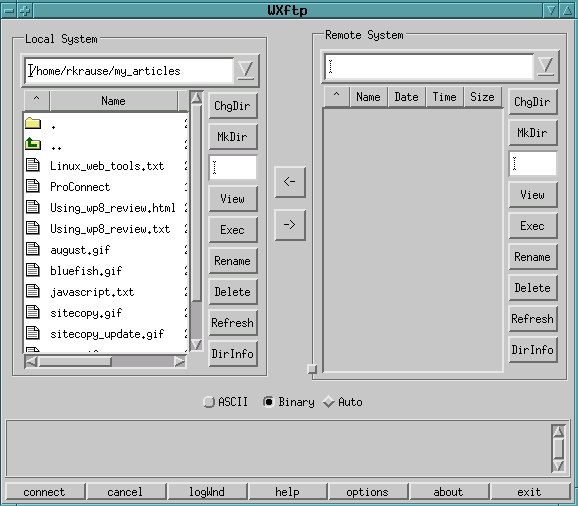
Figure 5. WXftp Main Window
For copying files manually or creating the initial remote directory structure, I use WXftp. This program provides a graphical front end to the ftp command (see Figure 5). It also stores user information for sites, so you do not have to enter addresses, usernames and passwords manually (see Figure 6). You can also configure it to switch to specific local and remote directories for each site you maintain. In addition to copying files, you can create and remove directories, delete files and execute commands on the remote system. I have been using version 0.4.4 and had no problems with it.
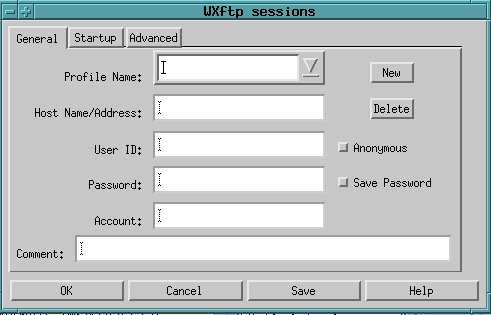
Figure 6. WXftp Sessions Window
Creating and maintaining HTML code can be a difficult and boring task. Updating things such as menus and e-mail addresses by hand on several pages for multiple sites can lead to mistakes. I found a program called GTML that helps ease this task. GTML is a pre-processor for HTML files. To use it, create your page with a .gtml extension that contains GTML commands along with HTML. When you are done, you run the .gtml file through the GTML program and it creates a file with an .html extension for you.
GTML allows you to do simple things such as include text files in your HTML files, and complex things such as conditional processing. It even supports embedded Perl code or system commands.
I frequently use GTML's #include directive to keep from typing contact or title blocks repeatedly on my pages. Also, if I have to change something like a contact e-mail address for a site, all I need to do is make the change in one text file and then re-run GTML over the site's .gtml pages instead of making the change in each .html file.
I have used the GTML conditional operators (if, elseif, else) to build side bar menus automatically. Each page is uniquely identified using the #define command (e.g., #define THIS_PAGE=home). I then create a text file that contains the GTML and HTML code for the menu. This code checks the page identifier, then determines which buttons are active and which button corresponds to the current page. The active buttons are generated as links to other pages, while the current page's button either does nothing or is highlighted. Then, I include this file in all the site's pages and run them through the GTML program. Now adding or removing menu buttons for a site is a simple matter of changing one text file and re-running GTML.
You can also define values to GTML in the command line. For example, you could call GTML with the following command:
gtml-DMY_EMAIL=me@
and all occurrences of MY_EMAIL will be replaced with me@somewhere.com in the resulting .html files. This makes it easy to generate things such as contact or copyright information for different sites using a single template.
According to its documentation, GTML can automatically generate Next, Previous, Up and Down links between related pages, as well as a table of contents. I have not used this feature yet.
I have been using GTML version 3.5.3 and have had no problems with it. Its command syntax is simple and straightforward. One thing to note is that GTML commands must be flush with the left margin in your files; otherwise, the pre-processor will not execute them and they will show up in your HTML files.
Once I am done creating my web pages, I run them through the weblint program, which checks the syntax of HTML documents and flags errors in much the same way lint works on C programs. weblint can check local files or files stored on the Web using Lynx. By default, weblint checks HTML code against the HTML 3.2 standard. The program also has flags to tell it to check HTML against Microsoft- and Netscape-specific extensions.
I have been using weblint version 1.020 without any problems. From what I've seen on the weblint web site, it appears that development of weblint may be halted at this time.
For doing graphics work, I chose the GIMP. Since I am not a graphic artist, I frequently use the Script-Fu extensions to create required graphics, then tweak them as necessary. Script-Fu extensions make short work of creating page headers and sidebar menus.
One feature I wish the GIMP offered is the ability to see how different factors (palette size, interlacing and JPEG quality) affect the resulting file size before saving the file. Perhaps there is a way to do something similar in the GIMP; if so, I have not found it yet.
I have been using version 1.0.4 of the GIMP and am completely satisfied with it.
There are a few other tools I use which I have not mentioned. For revision control, I use CVS. I am finally somewhat comfortable using it, although I found it a bit difficult to understand at first. While the accompanying manual explains the CVS commands well, I think it could use more examples. I have been using version 1.10 of CVS.
For working on the text files used in conjunction with GTML or for simple HTML editing, I use the vim editor. The recent versions provide nice syntax highlighting and make it easy to do quick editing. I am currently using vim/gvim version 5.6.
Another program I use occasionally is called linefeed, a little GTK utility that converts DOS/Windows text files to Linux/UNIX ones. The version I have been using is 0.1.0.
A month ago, I started looking for Linux tools that would allow me to create and manage web sites. My goals were to find open-source tools I could compile and use without too much difficulty. The tools I found and used have met my needs quite well. Even though several of them are not up to version 1.0, I find the Linux tools work better than the tools I had been using in the Windows world. I was also able to sample a much greater variety of Linux tools than I would have been able to in the Windows world.
Ralph Krause (rkrause@netperson.net) made the leap from a corporate salary to independent computer consultant this past summer. He divides his time between his business, his girlfriend Ann Marie, and his two dogs, Purdy and Dakota.

