
upFRONT
Welcome to another episode of typical brilliance. Yes, it's time for another round of Stupid Programming Tricks. We've been doing tricks for a while, and we can make some neat stuff, but are we as cool as the guys who wrote arcades such as Ms. PacMan, Arkanoid and Joust? Those were pretty fun video games, even if they were 2-D and took place on stationary backgrounds. The point is, software can be truly fun even if it's simple, and the most elegant game would likely be the simplest. (I imagine you can find Go enthusiasts who would agree.) Now, imagine if thousands of people across the world were playing a video game you wrote—that'd be pretty amazing.
The C language, libraries and GNU/Linux tools make it possible to develop software quickly, and game programming is one of the very best ways to learn how to code. It involves challenges of interface design, graphics and animation, real-time scheduling, collision detection, physics, sound, hardware interfaces (such as keyboard, joystick and mouse), as well as limitless creative scope. Best of all, game programming techniques are applicable to any kind of programming, from audio and video applications to user interfaces and indeed any program from “Hello World!” on up.
Programing an entire game is a mildly difficult project that could take a few days, but we'll look at one of the most basic elements, something applicable to any application involving graphics. We've already discussed how to initiate console graphics, how to scroll text across a screen and how to play music and sound. Now, we'll take a look at something simple but important: how to move an object smoothly over a background without damaging the background.
For our purposes, we'll start with the usual SVGAlib (you know, runs-as-root-not-very-safe SVGAlib), and initialize two screens: our virtual screen and our physical screen. The standard procedure, as you may remember from previous episodes, is to do all our drawing to the virtual screen (because it's much faster and flicker-free), then copy the virtual screen to the physical screen and hold it still for 1/60th of a second (the duration of a vertical refresh, which could even be 1/85th of a second on really fast equipment). For our background, we'll generate something cool by drawing a few lines and applying some sine equations to the pallette. As for the shape we intend to slide over the background, we'll use some equations to make a very funky square. Obviously, it's a small step to go from this situation to loading a custom-drawn background and an animated character, but we'll stick with our simple approach, largely because algorithms that generate graphics are inherently cool.
If you draw a background and then move your graphic across the screen, you'll leave a trail of pixels and ruin the background, which often happens periodically on slow computers running X. (You may remember the grey smears caused by moving a window, especially in Netscape and advanced window managers.) One solution is to redraw the entire background, then stamp your graphic in its new location. The problem with this approach is it severely wastes processor resources (you'll be redrawing the background at least 60 times every second), which makes for slow programs. Personally, I favor fast code and hack-job optimizations over structurally organized, procedural code; for example, loops instead of recursive algorithms. Redrawing the background often makes sense, if you're making changes to the entire background or if you do not have hardware scrolling capabilities. Suppose you have a 320x200x256 background (320 pixels wide, 200 pixels tall, with 256 8-bit colors), and you want to move only a 16x16 graphic across it. Think Ms. PacMan. Why not just draw the heroine and the ghosts? Why redraw the maze all the time, if it doesn't change? How much is actually moving?
The procedure we'll use is known as the cookie-cutter technique. It involves making a backup copy of the area onto which you want to stamp your graphic (on an Amiga, we'd call it “blitting” rather than “stamping”). Essentially, you make a backup copy of the target area, stamp your graphic over that area on the screen, hold it for a vertical refresh (so that the image is present long enough for the eye to register it), then replace the stamped area with the backup (cookie-cut) you made, stamping the background over your old image, and start again. As long as your graphic uses transparent or masked bits (instead of stamping solid black), you'll see your graphic sitting nicely on top of the background. It's the same situation as laying a graphic on the background of a web page, only here it's moving.
In our actual program, you'll notice we're using a physical screen and a virtual screen, when we could get by if we used only a physical screen (after all, copying a virtual screen to a physical screen is a more processor-intensive procedure than copying 16x16 pixels of background to a backup buffer, blitting a 16x16 image, and replacing the 16x16 background segment). The point is that drawing to a virtual screen is very fast, and if you ever want to do more than a single moving box, you'll be very happy you're already using the virtual screen. Extensibility is a good idea, especially when you leave things open for your own imagination.
The routine for moving the box will be simple. We'll use a sine for the x coordinate and a sine for the y coordinate (it'll look very smooth). We need to avoid accidentally drawing parts of the graphic out of bounds (which can lead to a segmentation fault), so the equations won't look exactly like 160*sin(x)+160 or 100*sin(x)+100, but they'll be fairly close. Sine equations are very useful, and chips these days are very fast at trig so you don't have to worry about optimizing, for example, by building a table of already-calculated sine values. For fun, we could also cycle the colors so that the image would look groovy, but you can try to implement this yourself, if your computer is fast enough. Here we go, and remember, this time we'll need the math library, so compile with
gcc -Wall -O2 joyousbox.c -lvgagl -lvga -lm -o\
  joyousbox
(recent gcc/egcs versions will automatically link the math library, but to be sure, we like to include it). See Listing.
—Jason Kroll
#include <vga.h>
#include <vgagl.h>
#include <math.h>
#include <stdlib.h>
#define GMODE G320x200x256
/* It's a good idea to keep these global */
GraphicsContext *virtualscreen;
GraphicsContext *physicalscreen;
int main(void)
{
  int c, d; /* counting */
  int x, y; /* box location */
  int *box; /* our box */
  int *cut; /* cookie cut */
  vga_init(); /* start svgalib */
  gl_enableclipping();
  vga_setmode(GMODE); /* set mode */
  gl_setcontextvga(GMODE);
  physicalscreen = gl_allocatecontext();
  gl_getcontext(physicalscreen);
  gl_setcontextvgavirtual(GMODE);
  virtualscreen = gl_allocatecontext();
  gl_getcontext(virtualscreen);
  /* now let's fix the palette up
   *  real pretty like!  */
  for (d=0; d<256; d++)
    gl_setpalettecolor(d, 32*sin(6.3*d/256.0)+31,
                       32*sin(6.3*(d-67)/256.0)+31,
                       32*sin(6.3*(d-133)/256.0)+31);
  /* generate our square, with a
   * transparent hole in the middle */
  box = malloc(16*16*BYTESPERPIXEL);
  cut = malloc(16*16*BYTESPERPIXEL);
  for (d=0; d<7; d++) /* loop to draw box */
    gl_fillbox(d,d,16-2*d,16-2*d, (d-6)*60);
  gl_getbox(0,0,16,16,box); /* get the box */
  /* draw the background stripes */
  for (d=0; d<HEIGHT; d++)
    gl_hline(0, d, WIDTH-1, d+1);
  /* the main loop. For fun, try adding a few
   * more boxes following the leader
   */
  for (c=d=0; d==0; d=vga_getkey()) {
    c++;
    x = 152*sin(c/37.0)+152;
    y = 92*sin(c/61.0)+93;
    gl_getbox(x,y,16,16,cut);
    gl_putboxmask(x,y,16,16,box);
    gl_copyscreen(physicalscreen);
    vga_waitretrace();
    gl_putbox(x,y,16,16,cut);
  }
  return 0;
}

Using Linux and Informix to register for conferences is a reality; it happened at ALS (Atlanta Linux Showcase) last year. I talked to Tim Costello, the man who made it happen, by e-mail on January 31. Tim is a Senior Systems Analyst for Conference Management Systems, LLC. This company specializes in convention services, e.g., registration, travel and hotel booking, message centers, booth locators, temporary staffing and related services.
Margie: Tell me a bit about yourself.
Tim: I have worked with CMS since April 1994. I have been in the computer industry since about 1984—before that, it was just a hobby—when I started doing some Dbase programming and general consulting for a local company.
When I first started college in 1986, I planned on an EE degree with a CS minor. In 1992, I graduated with a degree in Technical Theatre (Lighting and Sound Design) with a CS minor. After college, I worked as a consultant Monday through Thursday and did lighting for local events most Fridays through Sundays. Then in late 1993, I got a call from a friend who was touring with Disney's “Beauty and the Beast on Ice” in Europe. They needed an electrician ASAP, so for the next six months I toured Europe with Disney. At the end of the tour, I received a job offer from CMS, a consulting client of mine. So the day after I flew back from Barcelona, I was at work at CMS buying equipment for one of our early shows.
Margie: How long have you been involved in the Linux community?
Tim: I first started using Linux early in my tenure at CMS, so I would guess late 1994. I haven't contributed any programming to the community, but I answer questions in the newsgroups whenever I can and submit as many bug reports as possible.
Margie: How did you come to be taking care of ALS registration? Do you belong to ALE?
Tim: We submitted a proposal for registration services in response to a request from ALS. One stipulation in the Request For Proposal from ALS was the use of open-source software, which we were already using—we were a perfect fit. No, I am not part of ALE; CMS is based in Park Ridge, IL.
Margie: Have you done registration of shows before?
Tim: Convention registration is a core business for us. We do registration for several hundred shows a year, ranging from small corporate meetings to ones with over 20,000 attendees.
Margie: How did you come to pick Informix as your database of choice? How did the combination of Linux/Informix work for you? Have you used other systems to take care of registrations? How did Linux compare?
Tim: I'll answer all these questions in a group. When we first started doing registration, we used HP9000s/HP-UX and Informix—all purchased prior to my coming on board. During this time, I was using a Linux box as my office desktop and was the system administrator for both systems. As time went by, whenever we needed a new server, I would use a Linux box; e.g., our dial-in/fax server is a Linux box using mgetty-sendfax. Until Informix came around and ported to Linux, I was stuck with the HP9Ks. I was involved in the lobbying effort (I signed the e-petitions) to get Informix to port to Linux, and as soon as it was available as a public beta, I started testing with it. I find the Linux boxes easier to administer than the HPs, and on a price/performance curve, I find them much more attractive.
Margie: Would you have preferred to use some other system?
Tim: No. We began a move to SCO UNIX as a stop-gap when Informix was still publicly undecided about a port. Those systems were wiped and moved to Linux as soon as possible.
Margie: What do you feel are the main advantages to using Linux/Informix over other systems?
Tim: Ease of system administration and availability of assistance.
Margie: Drawbacks?
Tim: Commercial software availability, or the lack thereof. One of the other services we offer for conventions is a voice-messaging system, using Dialogic voice cards. I am currently forced to use Windows and Visual Basic to access them, and until a month or so ago, there seemed to be no hope unless I switched vendors—something I may still do, but I hate to waste my existing investment. However, when Intel recently acquired Dialogic, they announced they would support Linux!
Margie: Do you use Linux/Informix in other business situations? If so, tell us about them.
Tim: We use Linux for all our servers, web (with Apache), fax (with mgetty), file and print (with Netatalk) and database (with Informix).
Other open-source systems in use at our location are Python, PHP3 and Perl, among others. We use Red Hat and Linux-Mandrake on our servers, with some updates/patches.
Margie: What did you think about the ALS event itself?
Tim: I enjoyed every minute of it! Next year, we plan on additional people from our staff going to the show, so we can trade off working at registration. There were several sessions I would have liked to attend, but missed due to my duties at registration.
Margie: Thanks for your time. —Marjorie Richardson
Marc Torres leaving SuSE to head up Atipa. (http://www.linuxjournal.com/articles/briefs/054.html)
Andover.net's acquisition of QuestionExchange, a company offering technical support in an auction-type setting. Ask a question, accept bid, get your answer. (Linux Today, January 28)
IBM's big plans for Linux. Big Blue announced its line of network computer terminals can now run on Linux, and it will soon make key Java software components available to leading distributors of Linux. (Linux Today, January 31 and January 26)
Sun Microsystems' release of version 8 of Solaris for free. Well, there will be a $75 fee for the bundle of applications that comes with it. (Linux Today, January 28)
Kevin Mitnick finally getting out of jail. (http://www.linuxjournal.com/articles/culture/005.html)
Arrest of Jon Lech Johansen in Norway for breaking DVD encryption scheme. (http://www.linuxjournal.com/articles/culture/007.html)
Penguins in sweaters after oil spill. (http://www.phillipisland.net.au/)
On the first day of LinuxWorld Expo (the perfectly numbered 2/2/2000), I walked into the press room and was greeted by the sight of fourteen PCs, all with browsers open. Half of them were tuned in to Slashdot.
Nothing in the Linux world (Expo or otherwise) is more popular than this site, where CmdrTaco, Hemos, Roblimo and their cohorts feed readers a steady diet of “News for nerds. Stuff that matters.” But Slashdot is a source of news like a fireplace is a source of bricks. In fact, fireplace is a good analogy for the function Slashdot serves in the nerd community. Each news item is a log thrown into the fire. Combustion always follows—dozens to hundreds of comments break out.
Many of the comments either bear quotes or have signatures that are themselves worth quoting. Below are just a few.
—Doc Searls
If there is a God, you are an authorized representative. —Kurt Vonnegut, Jr.
0 1, just my two bits. —Cid Highwind
Those who will not reason, are bigots, those who cannot, are fools, and those who dare not, are slaves. —George Gordon Noel Byron (Lord Byron)
When the facts change, I change my mind. What do you do? —John Maynard Keynes
I'm not as good as I once was, but I'm as good once as I ever was. —Astro Jetson
Moderation is good, in theory. —Larry Wall
I can picture in my mind a world without war, a world without hate. And I can picture us attacking that world, because they'd never expect it. —Bad Mojo
There are three kinds of people: those who can count and those who can't. —Anonymous Coward
I've lost my faith in nihilism. —hey!
A year spent in artificial intelligence is enough to make one believe in God. —CrudPuppy
Eric Robison is a UNIX consultant of long standing whose one-man company, Clue Computing, had the good sense to register clue.com as a domain name in 1995.
Hasbro is a toy company of long standing that makes, among hundreds of other products, a board game called “Clue?”.
Like many big old companies, Hasbro was rather clueless about the matter of domain names until it was too late. When they discovered that Mr. Robison had already registered clue.com, they did what comes naturally to many big old clueless companies: they sued him. They also lost. Naturally, they appealed the judgment. So the fight is still on.
When we asked Mr. Robison for a few words about the case, he framed his response in the manner of the “LJ INDEX”. With his permission, we reproduce it here.
Years Clue Computing has been in this fight: 5
Dollars spent by Clue Computing on the fight: ~100,000 US
Highest advertised domain name sale price in 1995: ~$100,000 US
Highest advertised domain name sale price in 1999: $7,500,000 US
Total number of lawyers in law firms working for Clue Computing: 2
Total number of lawyers in law firms working for Hasbro: >1,000
Number of settlement offers made by Clue Computing: >5
Number of settlement offers made by Hasbro: 0
Closing stock price for Hasbro (HAS) for the week of 6/2/95: 35 1/4
Closing stock price for Hasbro (HAS) on 1/31/2000: 15 (the boycott must be working).
Cost of one share of Clue Computing, since its founding: $10 (okay, so we're not publicly traded...)
Number of domain names Hasbro had registered in 1995: about 20
Number today: probably over 100 (whois dies after 50, and they had over 60 before NSI turned off whois a few months ago. Hasbro also tends to hide their registrations under false names and third parties.)
Number of domain names Hasbro wishes to register: thousands, one per product or service they sell
Hasbro's management: the stupidest SOBs in the universe
Clue's management: the stubbornest SOB in the universe
—Doc Searls
The world's first multimedia computer (and what a computer it was, as any Amiga freak would love the chance to tell you) came out in 1985 with a 7.1MHz MC68k, 4096 colors, stereo sound, and was enough to convert even Commodore 64 fanatics. Oddly enough, Commodore acquired Amiga for $40 million back in July of '85, and then destroyed its hopes of success by hapless marketing ploys. Commodore itself died in 1995, and was sold to ESCOM for $12 million. Gateway ultimately acquired what remained of Amiga, and it looked as though they were poised to bring back the once and future queen. However, Gateway had bought Amiga for the patents, not for its devotees, and the new vaporware Amigas never materialized. (You remember the rumors—that it would be Linux-based, etc.)
Today, Amiga is owned by Amino Development Corporation which has changed its name to Amiga Corporation and plans yet again to resurrect the multimedia machine. However, you don't have to wait; Amiga will carry on. Rush on over to http://www.themes.org/ and you can download Amiga themes for your favorite window managers. Yes, that's right, the Amiga Workbench 2.x series (known as Picasso, presumably because the colors correspond with Picasso's blue period) can live again on your desktop. Pair it with GNOME and its new anti-aliasing feature, and you've got it. Fire up the GIMP, start up an ETerm and maybe load XClock; it'll be just like home. Well, until you try to load Video Toaster. But, hold on a while; what with DVDs, MP3s, a bit more sound support and the new wave of games (and the hardware support they will drive), we might actually have multimedia machines someday.
—Jason Kroll
Last month in my games column, I noted that the authoritarians had given up the MP3 war and lost control of the DeCSS situation. Unfortunately, some people don't know when to quit, and the industry is back at it again. This time, the Recording Industry Association of America has held secret meetings in Seattle in order to plot the demise of MP3 as well as other conniving ways to take control of technology out of the hands of users. The real news, however, was that the Motion Picture Association of America got in hot water over the raiding of DeCSS author Jon Lech Johansen's house by special police. The hacker community more or less collectively called for a boycott, ranging from DVDs to the entire motion picture industry and even extending to every single product, film-related or not, produced by any of the big seven (Disney, Sony, MGM, Paramount, Fox, Universal Studios and Warner Bros.). The 2600 community organized large protests outside movie theaters across the country. This charming graphic featured prominently in the thousands of flyers we distributed.

—Jason Kroll
Enthusiasts of Linux gaming, and those who realize games drive the hardware industry, will be pleased to hear that Tux Games (http://www.tuxgames.com/) is shipping its new Demo CD of six playable demos of popular Linux games for $7.50 with free shipping. Titles include Loki's Civilization: Call to Power, Eric's Ultimate Solitaire, Heroes of Might and Magic III, Myth 2: Soulblighter and Railroad Tycoon II, as well as a playable demo of MP Entertainment's Hopkins FBI. Yes, Linux has games, did you know? Check out http://www.happypenguin.org/ and http://www.linuxgames.com/ for general information on the state of the art in Linux gaming.
—Jason Kroll
Linux market share among Intel servers, as projected in a recent IDC report: 24.8%
Size of first Linux kernel: 71KB
Lines of kernel code in v2.0: 3/4 million
Number of penguins killed in the recent mystery spill near the Phillip Island Nature Park: 19
Amount of oil discharged in the Bass Strait: 1000 litres
Number of penguins rescued: 205
Amount of money donated to the Phillip Island rescue efforts by Linux users: $5,000 US
Number of the 25 species seriously affected by the 1989 Exxon Valdez oil spill that have recovered: 2
Amount of the $5 billion US Exxon was ordered to pay in punitive damages, that it has paid: 0
Number of years Kevin Mitnick spent in jail awaiting trial: 5
Number of e-mails received by Jason Kroll, in response to his on-line tome, “Free Kevin, Kevin Freed”: 77
Number of e-mails received by Mr. Kroll in response to his recent on-line article “Crackers and Crackdowns”, about the DeCSS fiasco: 623
Number of subscribers to PursuitWatch, an L.A. paging service that alerts customers when a high-speed chase is televised: 350
Number of days for the longest up time on a Linux system: 498
Amount of sales for Corel Linux in 1999: $3.2 million US
Percentage of embedded application developers who plan to use Linux as their host platform in the current year: 26
Percentage of IT professionals who consider Linux important or essential to their enterprise strategies: 49
Percentage of corporate PCs that will run Linux and other free operating systems within two years: 9
Current Linux corporate PC market share percentage: 4.5
Percentage of enterprises that plan to deploy Linux or FreeBSD as corporate e-commerce platforms: 17
Percentage of IBM servers of all sizes that now support Linux: 100
Number of IBM server lines that supported Linux one year ago: 1
Worldwide open-source UNIX (including Linux) growth rate for major enterprise server applications: 150% to 500%
1, 15: LinuxToday
2, 3, 14: http://www.pelourinho.com/linuxatlax/linuxtrivia/index.htm
8, 9, 13: Harper's Magazine
4-7: Phillip Island staff, http://www.penguins.org.au/
10-12: Jason Kroll
16: Electronic Market Forecasters
17: MERIT Advisory Council
18-23: Survey.com
Web Analysis Using Analog by Gaelyne R. Gasson is an introduction to this open-source program. Analog analyzes log files from your web servers and gives you many different reports, in your language of choice (it supports 35). Find out how you can obtain accurate statistics on web traffic to your sites with this easy-to-use program.
Shell Functions and Path Variables, Part 2 by Stephen Collyer is a continuation of the series that started in the March issue. This time, he takes a detailed look at the addpath function and how it is used.
Enlightenment Basics by Michael J. Hammel is a guide to getting and installing Enlightenment. It is an excellent precursor to Mr. Hammel's article in this issue on using Enlightenment (“Artists' Guide to the Desktop, Part 2”).
The Generation Gap by Brian R. Marshall is a serious discussion of the issues involved with the use of open-source software components in closed-source applications. Giving the pros and cons of this controversial subject, this article is not to be missed by those interested in the Open Source movement and all its ramifications.
From the beginning, Linux has been something of a hermit crab operating system, because it tends to inhabit boxes designed first for other operating systems. This has been especially true for clients. While special-purpose servers have been built around Linux for years, clients have mostly been Window boxes with Linux flowers, instead of the more familiar sort.
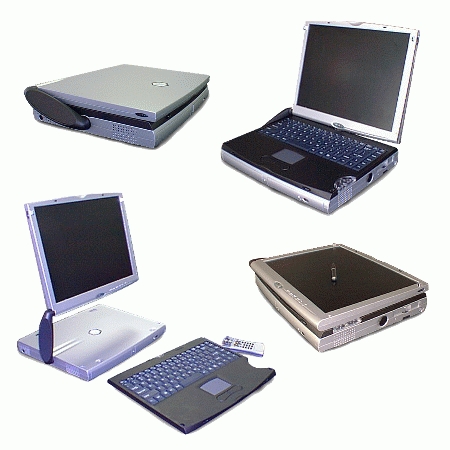
Portables have been especially vexing to Linux hardware manufacturers. All your familiar laptops are packed with arcane drivers and embedded characteristics that make running Linux somewhat of an iffy proposition.
Not any more. Now we are seeing a new generation of portables designed from the ground up to run Linux. One of the first out of the gate appears to be a remarkable new machine from Boxx, http://www.boxx.net/. Described as “the first portable/slim desktop hybrid computer designed from the ground up for Linux-compatible multi-platform computing”, it's a veritable arsenal for the road warrior.
Despite its extreme variety of physical features, its best talent may be its dual-boot capabilities. The user can install and run two x86-compatible operating systems, one off the primary hard drive and the other off the swappable device bay, key-selecting between the two—it's like having two computers in one.
Here are a few more features of Boxx computers:
Convertible from notebook to slim desktop, presentation easel and pen tablet configurations
Detachable wireless (IR) keyboard and wireless entertainment remote control
14.1 or 13.3-inch TFT XGA LCD screen with resistive touch-sensitive panel (laser-pointer pen stylus)
Swappable device bay allowing a second HDD, CDRW, DVD ROM, CD-ROM, LS 120, FDD or battery
3-D stereo sound with built-in active diaphragm subwoofer
Power system with three batteries (for up to 12 hours operating time)
Available in summer 2000
—Doc Searls
In a recent article, three flavors of Linux that work on PowerPC were listed, including NetBSD (often not recognized as a flavor of Linux, and for good reason—it isn't one!), MkLinux (an implementation that sits on top of the Mach kernel) and LinuxPPC (a typical Linux distribution for PPC). Three species? Diversity is a big evolutionary advantage, and Linux intends on stickin' around, so maybe you can see what's coming up 5th Avenue.
Linux for PowerPC is available from a number of sources, the latest of which is SuSE. The chameleon enthusiasts from Germany have delivered a beta of 6.3, and once the kinks get ironed out, we can look forward to lizards on our Apples. TurboLinux, even though it does not have a cute mascot of any kind, is nevertheless able to bring its Japanese, Chinese and English language distribution to users of the Motorola. Getting back to fuzzy furry animals, Terra Soft's Yellow Dog Linux is yet another offering for Apple PowerPCs and IBM RS/6000s.
PowerPC Linux resources: http://ppclinux.apple.com/
SuSE Linux: http://www.suse.com/
TurboLinux: http://www.turbolinux.com/
Yellow Dog Linux: http://www.yellowdoglinux.com/
NetBSD Project: http://www.netbsd.org/
MkLinux.org: http://www.mklinux.org/
LinuxPPC: http://www.linuxppc.com/
—Jason Kroll
A year ago, the term “Linux business” was something of an oxymoron. Business? With “free software”? Well, that was before the Red Hat IPO, which was when the world changed. By the time 1999 was out, “Linux business” included VA Linux, Andover.net, Cobalt and other relatively new publicly traded companies whose combined market value totaled in the dozens of millions of dollars.
Suddenly the question was, “Who are these guys going to buy with all this new market cap?” Red Hat started with Cygnus. VA started with Andover (which had its own spectacular IPO at about the same time as VA's). All eyes turned toward a pair of well-established PC software companies that had recently repositioned themselves as Linux businesses: Corel and Inprise/Borland.
Both looked like they would help fill out the product portfolios of either Red Hat or VA Linux. Neither Corel nor Inprise would be easy to buy: both were profitable, with revenues in the hundreds of millions despite relatively depressed market stock values. But it looked do-able.
Then, on February 7, the two companies did something no one expected: they merged with each other. The new company looked to boast total sales of over $400 million, profits of a quarter that sum, and a market cap at merger of $2.44 billion. It would be called Corel, finally retiring Inprise/Borland's identity crisis (though key Inprise products would still bear the Borland brand).
Olive branches were immediately extended to the rest of the Linux community. In an interview with Linux Journal, Dale Fuller (the Inprise interim president and CEO who will become chairman of Corel's board of directors) declared his intention to partner with all the other Linux players, as well as its growing legion of developers. “We want to work with all the distributions and with all the development communities,” he said. “They'll all need applications and development tools. That's our business. We're here to help.”
The true test will come when Corel finishes coming out with its complete office application suite, and Borland's Kylix project completes the Delphi and C++ Builder development products for Linux. With all those products ready, Linux will become truly competitive (as well as compatible) with Microsoft on the desktop. Will customers buy it? Stay tuned.
—Doc Searls
DataViews Corporation announced an open-architecture HMI software development tool for Linux, allowing developers to create highly customized user interfaces for the monitoring, control and simulation of dynamic data.
In cooperation with SuSE, the developers' group at Hans Reiser and Chris Mason have expanded the high-performance ReiserFS (file system) with a journaling function. The release for SuSE Linux 6.3 can be downloaded from ftp.suse.com:/pub/suse/i386/update/6.3/reiserfs
Corel Corporation announced its Corel LINUX OS desktop will be able to run Windows applications seamlessly over any connection. A release containing both Linux client and Windows NT server licenses for GraphOn Bridges is scheduled to ship in mid-2000.
The Linux Professional Institute (LPI) announced the immediate availability of the first exam in its Linux certification program. The exam, which covers Linux basics as part of the program's first level, is now available worldwide at testing centers affiliated with Virtual University Enterprises (VUE).
TSCentral, the Internet's most comprehensive business and professional event directory, has launched a new industry section devoted to Linux at http://www.linux.tscentral.com/.
QLogic Corporation, a provider of Fibre Channel host bus adapters, and SCSI connectivity solutions, announced it has purchased AdaptiveRAID from Borg Adaptive Technologies, Inc., a wholly owned subsidiary of nStor Corporation.
Microsoft and Caldera announced they have reached a mutually agreeable settlement of an antitrust lawsuit filed by Caldera in July 1996. The terms of the agreement are confidential.
Red Hat, Inc. announced the appointment of Michael Tiemann to the position of Chief Technical Officer. Tiemann is replacing Marc Ewing, co-founder and former CTO of Red Hat. Ewing will remain as a member of the board of directors of Red Hat, Inc.
To meet the growing demand for Linux solutions for the enterprise, Atipa Linux Solutions announced the opening of three new offices in New York, San Francisco and Austin.
Knox Software, a supplier of backup solutions for Linux, announced that Arkeia 4.2 has earned IBM Netfinity ServerProven1 Solution validation.
MontaVista Software Inc., developer of the Hard Hat Linux for embedded computers, announced it has hired Kristin Anderson as director of support.
Corel Corporation announced it has entered into an agreement to acquire up to a 30 percent stake in OE/ONE.com, a start-up company developing an “Information appliance” platform or thin-client Internet Appliance platform.
Digi International announced an agreement with Red Hat, Inc. to join in marketing programs that will enable distributors, resellers and integrators to offer Linux-based communications servers designed specifically to suit the needs of small- to medium-sized businesses.
A new strategic partnership has been established between Minolta and SuSE to facilitate printer support. Linux users can now enjoy high-quality output from the Minolta PagePro 8, 18 and 25 monochrome laser printers.
SpellCaster Telecommunications Inc. has acquired MediaGlobe Networks, giving it full ownership rights to a Linux-based server software family.
iNUX Inc. announced the release of a small business desktop computer utilizing Linux to deliver easy and intuitive access to a broad selection of pre-loaded and pre-configured applications and content.
Linsight, an on-line Linux information resource, announced E. J. Wells is now its co-director. Dave Whitinger, founder, believes promoting Wells within Linsight, which already provides an authoritative resource of all Linux upcoming events and available Linux training, implements a new beginning.
Collab.Net, provider of scalable services and infrastructure for the development of open-source software, announced the appointment of James Barry as Vice President of Strategic Initiatives, Frank Hecker as Systems Engineering Manager and Jason Robbins as Senior Software Engineer.
At the PHP Developers' Conference last week, the PHP Group made a number of decisions and established working guidelines for the continuation of code development for PHP.
SpellCaster Telecommunications Inc., a developer of ISDN and remote access technology for Linux, announced it is releasing the source code for its Babylon software under the GPL. Babylon provides point-to-point remote access to and from Linux systems using PPP.
Creative Computers announced the change of its name to IdeaMall and the launch of eLinux.com, which will provide products from distributors, multi-vendor Linux solutions and custom configurations of Linux systems through a secure web site.
Atipa announced that Marc Torres is now the Chief Technology Officer of Atipa Linux Solutions. He brings to Atipa thirteen years of multi-platform UNIX experience, including specialties in Network Management and Systems Architecture, having previously served as President of SuSE Inc.
GraphOn Corporation announced it is providing the National Research Council of Canada with GraphOn GO-Joe connectivity software to enable researchers around the world to access the hundreds of applications and databases at the Canadian Bioinformatics Resource over the Internet and Canada's CANARIE Optical IP advanced network, CA*net 3.
O'Reilly Network announced the launch of its technical portal, http://www.oreillynet.com/ and its new Linux DevCenter, http://oreilly.linux.com/.
Netizen, a Melbourne-based IT consultancy specializing in open-source software, announced it will be offering system support contracts for Linux, FreeBSD and other open-source systems for Australian clients.
Alpha Processor, Inc., a developer of high-performance Linux solutions, and Red Hat, Inc. announced a technical partnership to create a world-class center for the development of Linux clustering technology. The new clustering facility will be located in Research Triangle Park, North Carolina.
Factoid: Penguins' tongues are covered with many little spiky spines that all point backward into the throat, so that when a penguin catches a fish, it is gripped by the spines and cannot escape.
Trivia: What was the first Linux distribution to be certified Posix-compliant? Lasermoon Linux FT
Rumor: Linux Journal is being sold—and it's just that, a rumor.
Link of the Month: www.gnu.org/brave-gnu-world/brave-gnu-world.en.html
