
A Real-Time Data Plotting Program
This article describes the implementation of rtp (real-time plotter), a live x,y data plotting utility based on the Qt windowing library. rtp combines live updates with zoom in, auto-scaling, and auto-tracking modes. It is meant to be used where gnuplot is limited, such as the termination of a live data pipeline. However, rtp is small and does not attempt to cover gnuplot's large feature set for producing publishable data plots.
The rtp source code is released under the GPL and is available at metalab.unc.edu/pub/linux/science/visualization/rtp-1.0.0.tar.gz. I developed and tested it under Red Hat 6.0, with Qt 1.44. A README file is included in the package to help you build and use rtp. A screenshot of rtp is shown in Figure 1.
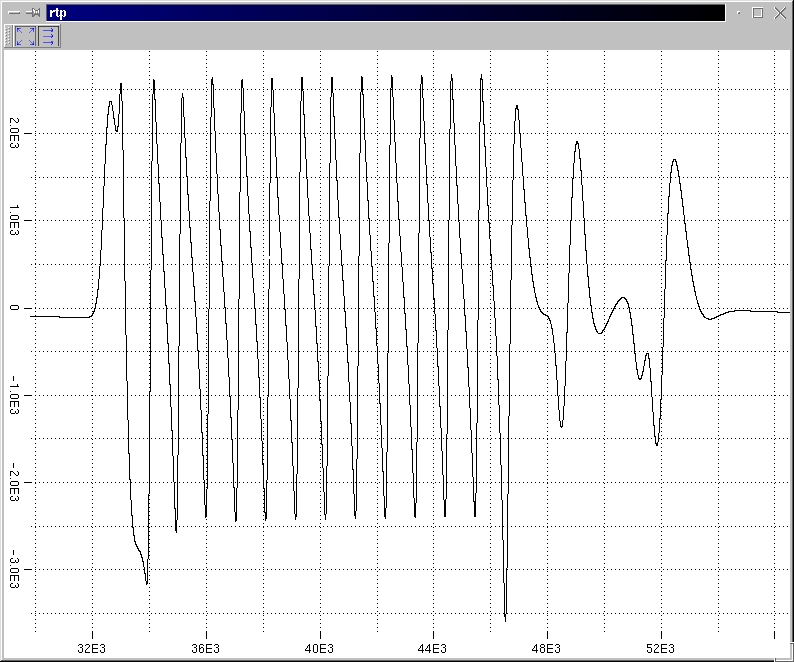
Figure 1. Rtp Screenshot
rtp provides real-time updates and basic mouse-driven resolution selection. However, it lacks gnuplot's ability to send formatted, titled plots to a printer. rtp is still a simple piece of software (1200 lines of code) that needs many features added. By describing its principles here, I hope to provide a useful, gentle example of an application based on the Qt library and the X Window System. I also hope to motivate some interested people to do more work on a Linux-based real-time, interactive data visualization system. This could be done either by extending rtp or as a completely new project.
Because all of rtp's data comes from STDIN (standard input), interaction with the user through the X Window System is limited to setting the viewing mode. It allows the user to change the viewing mode even as new data points are being processed. The viewing modes are as follows:
Auto scale: the scaling is adjusted when necessary to include all received data points. This is the default mode and can be selected by pressing a button on the toolbar.
Auto tracking: maintains a fixed scaling, but varies the viewport offset to track the latest points. This mode is selected by pressing a button on the toolbar. The scaling will be fixed at what it was before the toolbar button was pressed.
User-defined fixed: maintains a fixed viewport (both scale and offset), as defined by the user. This mode is selected when the user drags out a viewport in the plot window with the mouse.
I based rtp on the Qt library, because many others in the Linux community are using it (e.g., KDE) and because of its high-quality documentation. An HTML tree (guaranteed to be synchronized with the Qt source because it is automatically generated from the source code and comments) describes all of Qt's classes and functions. Dalheimer also wrote a book on Qt programming that is a very helpful introduction (see Resources).
The Qt library provides a GUI programming environment that is quite complete. When programming in the Qt environment, no reference to the underlying XLib library is necessary. Qt's functionality extends beyond the GUI domain to include container classes that implement several standard data structures.
Each of Qt's functional components is packaged as a C++ class, giving C++ wizards much to ponder and tinker with and those of us who like to write operational code a good tool set. For myself, having about a year of experience writing production C code with only a college course in C++, it was fairly easy to learn the Qt C++ framework.
The Qt library makes integration of independently developed classes easier through its C++ extensions: “signals” and “slots”. A signal is a class member function that is undefined at compile time. A slot is a member function that is specially designated for connection to a signal at runtime. For example, a GUI button class could have a Push signal. At runtime, a plot window's slot Render could be connected to the button's Push. From then on, code that calls the button's Push method effectively calls the plot window's Render method.
Code based on the signals and slots mechanism is easier to read and maintain than that dealing with runtime function-pointer tables. (I'd bet the implementation uses a function pointer or two.) Qt also takes care of annoyances such as stubbing non-connected signals to an empty function, so you don't get a segmentation fault from a null pointer.
The drawback of signals and slots is that they are non-standard C++ extensions using new syntax, so Qt code with signals and slots must be passed through a preprocessor provided with the Qt library before it can be compiled. Dalheimer's book explains signals and slots in sufficient detail for you to start using them.
In order to provide an acceptable user interface, rtp must quickly respond to GUI events (i.e., mouse events, etc.) at all times. This requirement would be easily met if all program activity were directed by GUI events. For example, an interactive drawing program is entirely GUI-driven, so its only responsibility is to execute relatively short sequences of code in response to GUI events.
rtp's architecture is complicated by two additional requirements, beyond the snappy GUI response. It must quickly update when new data points are available on STDIN. This feature is what differentiates rtp from other plot programs, such as gnuplot. It must also deal with the fact that rendering the data set often takes more time than is acceptable for a GUI delay. This precludes the use of a simple function call to render the whole plot.
Fundamentally, there are three “tasks” that rtp must multiplex, listed below from highest to lowest priority:
Respond quickly to GUI events. These events come as data from the X server on a socket.
Read data points from STDIN as they become available.
Render the data set into the plot window when it needs updating.
The Qt library provides mechanisms that support this processing structure. The first mechanism is the QSocketNotifier class. When we create a QSocketNotifier object, we pass it the file descriptor of interest. (The fancy name QSocketNotifier made me think the class was all tied in with network sockets, when in reality it can work with most any file descriptor.) In the case of rtp, this is the STDIN file descriptor (STDIN_FILENO). We then connect QSocketNotifier's activated signal to a particular slot that deals with new data.
The second mechanism is the QTimer class. This class is provided to support regularly scheduled background processing, as well as single-shot timed events. The Qt documentation tells us that by setting up a QTimer object with zero timeout, we can cause a function to be called whenever there are no events to process. Again, the mechanisms for connecting the QTimer to the actual function that does the background processing are signals and slots.
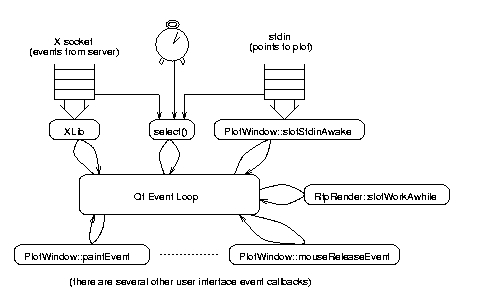
Figure 2. rtp Control Flow and Data Processing
Figure 2 illustrates rtp's control flow and data processing scheme. The Qt event loop is the control center for the application. It calls functions in the rtp application as events occur. Each arrow in the diagram represents a call into a function or library. Note that only the functions which have names starting with PlotWindow or RtpRender are actual rtp code. The rtp functions consist of X event callbacks (such as PlotWindow::paintEvent and friends), the QSocketNotifier callback (PlotWindow::slotStdinAwake) and the QTimer callback (RtpRender::slotWorkAwhile).
XLib is the lowest-level C library provided as an interface to an X server across a byte-stream socket. It manages both the input side of the socket, which provides events, and the output side which sends requests to the server. (Note that Figure 2 shows only the input side.) XLib also provides certain performance optimizations, such as filtering redundant events and delaying requests in an internal queue in order to group requests in large data blocks for efficient socket usage. For details, see Adrian Nye's classic XLib book in Resources.
The POSIX select system call is commonly used by applications that service more than one file descriptor (socket) in a single thread. select is used by applications, such as rtp, that must respond to data on any of several file descriptors and do not wish to waste CPU time by polling. Additionally, Qt uses select's timeout function to start QTimer-scheduled functions.
The select call in the Qt library is the only place (to my knowledge) where the rtp process can block. For newcomers to systems programming, I should explain what “blocking” means. A multitasking operating system such as Linux must be able to multiplex the execution of a large number of programs on a smaller number of processors. By trapping interrupts, Linux switches the processor(s) among running programs in a certain order. This makes it impossible for a single program to lock the system by entering an infinite loop.
Because Linux has pre-emptive multitasking, rtp could enter an infinite loop waiting for either an X event or a data point on STDIN without locking the system. However, the CPU time spent in this loop would unnecessarily degrade the performance of the rest of the executing programs. Therefore, most calls into the kernel for I/O will “block” the executing program until the I/O is complete. The program will be removed from the set of programs run by the CPU. Once the I/O is done, the program is marked as “runnable” and will re-enter the kernel's run queue to be switched in and out of the CPU along with other runnable programs.
select is Qt's way of saying, “I have nothing to do until an X event is available, an I/O event occurs on one of the QSocketNotifier objects, or a timeout from one of the QTimer objects expires.” From Qt's point of view, select waits for one of these events to occur, then returns.
The Qt documentation clearly describes how to use QSocketNotifier and QTimer to hook into select. However, it does not fully describe the priority levels of X events vs. other socket events vs. timer events. In writing a program such as rtp, it is important to understand these details, because the program's performance greatly depends on them.
In order to understand how the X socket, other sockets and timers are prioritized, we have to look into the Qt source. Troll makes the Qt source freely available (see Resources for the URL). The code we want is in /src/kernel/qapplication_x11.cpp, under the distribution tree. Note that while Qt source is freely redistributable, Troll's license prohibits modification, unlike the GPL.
The function QApplication::processNextEvent, which is called by the main event loop, services the X socket, QSocketNotifier sockets and QTimer timers. QApplication::processNextEvent first checks for an X event to process. If none is found, it enters the select system call.
After select returns, QApplication::processNextEvent dispatches events to all QSocketNotifier objects whose file descriptors are ready. It then dispatches events to all QTimers whose timeouts have been reached. The event loop for Qt 1.44 can be summarized as follows (fd stands for file descriptor):
while (1)
{
   if (X event pending) {
      dispatch X event;
      continue;
   }
      timeout = minimum of all QTimer times to
         next event;
      select (X fd, all QSocketNotifier fd's,
         timeout);
      dispatch events to all QSocketNotifier's with
        active sockets;
      dispatch events to all QTimer's with expired
         times;
}
Note that X events get highest priority, in the sense that as long as there are more X events, the loop will ignore the QSocketNotifier's and QTimer's events. However, when an X event is not available, it is possible that Qt will execute every QSocketNotifier and QTimer event before returning to X events. This means we must consider the sum of registered QSocketNotifier and QTimer event processing times as the worst-case user interface latency.
From here on, I will refer to the rtp code in some detail. You may want to download the code from the URL given earlier and print it out with line numbers.
All of rtp's non-automatic data structures are embedded within two primary C++ classes. PlotWindow is derived from Qt's QWidget and provides all user interface callbacks, as well as the STDIN callback. These classes are laid out in rtp.h. The important data members of PlotWindow are:
deque<DoubPt> _points: the entire set of raw (x,y) data points received from stdin. deque is a C++ Standard Template Library class that (among other things) gives the illusion of contiguous memory layout (array indices, fake pointers that you can increment to move through the deque) to a dynamically sized block-linked data structure. Points are kept in the order in which they are received.
QPixmap *_buffer: the pixmap that is copied into the plot window whenever the window is painted.
RtpMapping _map: holds the viewport boundaries, scale factors and offsets currently in effect for mapping received data points into the plot window.
QRect *_rubberBox: if non-NULL, defines the “rubber” box that the user is bounding with the mouse to define a new viewport. Once the user releases the mouse, the box will be deleted from the screen and the viewport will change.
The other important rtp class is RtpRender. Its important data members are:
QTimer _timer: activated to call RtpRender::slotWorkAwhile while a rendering is in progress. Inactive when rendering is not in progress.
unsigned int _pti: marks the position in points as successive calls to RtpRender::slotWorkAwhile progress through the data.
QPixMap *_privateBuff: *_buf. _privateBuff will be created for a private rendering (explained below). _buf is the pixmap actually drawn into by RtpRender::slotWorkAwhile. It will equal either _privateBuff for a private rendering or the main repaint pixmap for an on-line rendering.
Data points to plot come in on STDIN. As part of its initial setup, rtp sets the STDIN file descriptor mode to non-blocking so that any read of STDIN will not block the program. This allows us to read stdin in relatively large chunks, increasing efficiency. rtp then creates a QSocketNotifier for STDIN, registering PlotWindow::slotStdinAwake as the callback through the signal/slot mechanism. Here is the code, from line 454 of rtp.c:
fcntl(STDIN_FILENO, F_SETFL, O_NONBLOCK);
QSocketNotifier sn(STDIN_FILENO,
  QSocketNotifier::Read);
QObject::connect(&sn, SIGNAL(activated(int)),
  plotter, SLOT(slotStdinAwake()));
When slotStdinAwake (rtp.c, line 100) is called, we know there is at least one character of data on STDIN (because select returned with STDIN marked as ready, and all POSIX I/O is character-based). However, simply reading one character and then returning is very inefficient. For optimal efficiency, we want to read and process as many characters as possible.
However, the time spent in slotStdinAwake contributes to the user interface latency, because no X events can be processed until slotStdinAwake exits. If we processed as many STDIN characters as were available and STDIN was receiving points at a faster rate than they could be processed, we could risk locking out the UI (user interface) completely. So we have a classic tradeoff between efficiency and latency. The current version of rtp attempts to read and process 1024 characters of data per slotStdinAwake call. However, because the read call doesn't block, we may not actually process this many characters.
slotStdinAwake is uglified by the fact that it does its own buffering and doesn't use the STDIO library. I couldn't tell from the GNU libc information whether STDIO would work after O_NONBLOCK had been set on the descriptor. Rather than find out, I took the lazy approach and wrote my own buffering code.
When rtp parses a new x,y data point, it will map it into the current pixmap if it is within the current viewport's range. If the point is out of range and the plot mode is auto-scale or auto-tracking, the entire plot must be redrawn at a new scaling and offset. The code in Listing 1 (rtp.c, line 255) handles these cases.
The class RtpRender (defined in rtpRender.c) handles the details of drawing the set of data points into a pixmap. Because rendering the entire set can take significant time, RtpRender sets up a QTimer object with zero timeout to give all available CPU time to rendering while maintaining snappy UI response. RtpRender::slotWorkAwhile, the QTimer callback, munches on points for a fixed interval (100 msec at present), and then returns. The code in Listing 2 is the guts of RtpRender::slotWorkAwhile (rtpRender.c, line 274).
There are two types of rendering operations. A pre-emptive or on-line rendering draws points directly into the pixmap used for repaint events. A new on-line rendering is started by calling RtpRender::newOnlineRender. When this is called, any rendering that may be in progress is cancelled and the new rendering starts from scratch, drawing all received points. The code is in Listing 3 (rtpRender.c, line 77).
When RtpRender::newOnlineRender is called, a pointer to the pixmap used for repaint is passed in as the buf argument. _map is a data structure that contains the scale and offset factors for the new rendering and is returned to the calling code, so that new points from STDIN can be directly plotted even as the rendering progresses.
A non-preemptive or private rendering first creates a private pixmap, then draws the points into it. A private rendering is requested by calling RtpRender::quePrivateRender. The private rendering does not cancel the current rendering operation if one is in progress. It waits until the current rendering is complete before starting. The code is in Listing 4 (rtpRender.c, line 97).
Because the queuing mechanism is just a boolean flag, the private rendering queue is only one deep. When RtpRender::quePrivateRender is called, it will destroy any pending private rendering operation, but will not interfere with one already in progress. Note that _timer is an object of type QTimer. If the timer is already active, it means a rendering is already in progress.
rtp uses private rendering to update the plot when new data points force a viewport change in either the auto-scale or auto-tracking mode. On-line rendering is used to update the plot in response to user-initiated viewport changes, such as zooming into a moused region. The theory is new points come in quickly enough that we don't want to start over each time we get one. However, when the user changes the viewport, he has no interest in anything but the latest and greatest plot.
David Watt can be reached via e-mail at wattd@elcsci.com.


