
Cookie Cutters, Munchers and Crunchers
Bonjour, and welcome once again to my restaurant, “Chez Marcel”. Please, sit down. This month, the special is Internets and Intranets. The world, you see, has become a very small place, with every other person or business spinning a web site. Even Chez Marcel is considering opening the restaurant to the world, but François feels it would spoil the intimate nature of the place.
François! What are you doing sitting around? Wine for our guests. Vite! Vite!
While François is getting your Chablis, I would like to tell you about the features on tonight's menu—cookie cutters, munchers and crunchers. Now, I am well aware that my fellow columnist, Reuven Lerner, once provided you with a recipe for making cookies (see “At the Forge” in LJ issue 45). What I want to do today is share recipes for destroying or deleting cookies. After all, too many cookies can be quite fattening, non?
Before sampling our first item, it might be interesting to delve into a history and explanation of the cookie. Internet cookies are sometimes called “magic cookies” and should in no way be confused with “magic mushrooms”, since Internet cookies are not edible. Cookies are simply small text files transmitted to your browser (or system) when you visit a web site. Cookies do nothing on your system, other than sit there. This is because, as I mentioned before you finished off that last glass of wine, cookies are just text--no code or programs.
The whole idea behind cookies was that a server would give you a cookie as a marker to indicate where you had previously visited. That cookie might store a user name and password to access a particular web site. (Sites will often—but not always—have this information encoded so that somebody viewing your cookie file would see only what appears to be junk text. Have a look at your own cookie file.) When you next visit the site, the server would ask you whether it had served you any cookies, and your browser would reply by sending the cookies from before. In this way, the web site would recognize you, directing you to your virtual table. You see, no web site, no matter how clever, has François to recognize you as you walk in.
Originally, cookies were left by a site and picked up by the same site, allowing for a kind of interactive session. For example, after a long night of shopping at your favorite web store, you decide to pack it in and come back in the morning. The next day, the store's web site requests the cookies it left with you and “knows” that you had three pounds of cheese, two jars of Dijon mustard and a nice Cabernet in your shopping cart. Cookies can be quite useful, as you see.
The problem is that cookies can also be shared within larger domains, such as advertising rings. Using these shared cookies, advertisers can build a profile of your likes and dislikes, tailoring and targeting advertising to you specifically. After a while, every site you visit that deals with certain banner advertisers knows your weakness for Brie, and in no time, you are broke. Your privacy has been compromised, so that others may offer to sell you what you cannot resist. Many people object to this method of building user profiles, and consider the use of cookies to be quite unethical. If you are concerned about cookies, consider the following items from our menu.
The easiest way of all is simply to refuse all cookies in the browser itself. If you are using Netscape, click on “Edit”, then choose “Preferences”. In the window that pops up, look to the left-hand menu. Click on “Advanced” and select the level at which you want to handle cookies. Notice that you can refuse cookies entirely, accept them all at face value, or request that you be warned before the browser accepts them. (See Figure 1.) You can also further specify this behavior based on whether the cookie originated on the server of the page being viewed. In other words, no cookies from a banner advertising server or any other hosts being linked to by the site you are visiting.
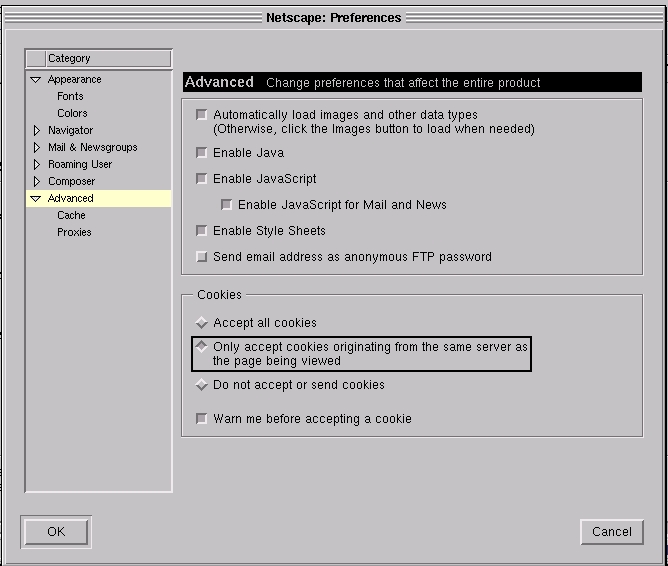
Figure 1. Netscape's Cookie Dialog
If you don't want to bother with selecting this cookie or that cookie, you may find the next items more to your taste. After all, clicking “OK” or “Cancel” over and over again when visiting a page that serves up dozens of cookies can be tiring. How do we avoid this?
You could do it the hard way. Each time you want to launch your browser, remove the cookies file from your user name's .netscape directory and start Netscape. Allow me to demonstrate, non?
rm -f ~/.netscape/cookies
The tilde character (~) is a way of referring to your home directory. The $HOME variable also works here. This simple command will do a nice job of cleaning things up. Then, just click on your Netscape icon, or start Netscape from the command line. You could also do what I did, and write a very simple shell script to do the job. Let's call it “netscape_clean”. It would look something like this:
#!/bin/bash
# This starts Netscape with a clean cookie file.
rm -f ~/.netscape/cookies
/usr/bin/netscape
Keep in mind that the path to the netscape executable may vary from system to system. On my system, it lives under /usr/bin.
As I mentioned earlier, cookies can be quite useful, so simply removing everything is not necessarily the way to go. Tech support web sites may not be able to process your queries, web stores and their shopping carts may simply not work, or content may be refused to you entirely. You may want to be more selective in what you destroy.
The recipe shown in Listing 1 requires a little Perl for added bite. You still need to run this outside of your current browser session. The difference here is you will be prompted, line by line, for cookies you wish to keep. If they appear to be what you want, simply answer with a capital “A” for “Accept” and continue on. The sharper eyes will note that to delete a cookie from the active file, you need only press RETURN or ENTER. Et voil<\#224>! A much leaner cookies file, filled with only nutritious information.
Of course, you do not have to do it this way, but my Perl script should serve as a great starting point for you to season to your tastes. One idea might be to add a check for the Netscape comment lines at the top of the file, so that you would not need to accept or delete these. They would simply be copied into the other file. Then again, perhaps not. They are simply comments, and my Netscape program re-adds them if they are missing.
After experimenting with the above recipe, I decided to strike out into the very heart of the Web itself in order to provide you, my esteemed guests, with an alternative recipe. My travels took me to LinuxBerg where a search on the word “cookie” brought me to Phil Darnowsky's “cookiecutter”, another Perl script that includes a “ban and allow” list. His script takes a different approach from my own creation, but the results are the same—no cookies you do not want.
Before I wrap up this month's column, might I suggest that your on-line privacy may be more important than simply deciding who can collect information on you via cookies. There are other ways to track your surfing habits and, to some degree, your identity, simply by asking your browser for information. For a demonstration of this, check out Privacy.Net's Anonymizer privacy analysis at http://privacy.net/anonymizer/. You may find it quite fascinating (and maybe a bit scary) to sample what a site can discover about you and the system you are running.
How does one block such information, you ask? One way is to run a proxy between your browser and the rest of the world. One example is the Internet Junkbusters Proxy, a program released under the GPL that is available for Linux and a number of other platforms.
You may also wish to completely block all your surfing from prying eyes by doing it behind a service provided for just such anonymity. This is where the Anonymizer comes into play. Using this company's service (they offer both a free and a premium service), you can enter the page you want to visit into the form provided and surf completely incognito.
These methods of securing your anonymity on the Web extend beyond the realm of the cookie, but the cookie remains a fascinating beast. If you want to know about all things cookie, you should pay Cookie Central a visit. This site contains a wealth of information about Internet cookies.
Well, mes amis, that terrible horloge on the wall tells me it is once again nearly closing time. Before you go, consider trying a fun little demonstration of the cookie—pay a visit to Privacy.Net's cookie page at privacy.net/cookies. I mention this one because, as part of the demonstration, they will “bake” your favourite cookie for you (in a virtual sense). Your chef admits to being a bit of a sucker for Fig Newtons, which was my choice. Your tastes may be different. Chocolate chip, perhaps?
Au revoir, mes amis. Remember, you are always welcome here at Chez Marcel. Bon Appétit!

