
Setting Up a Linux Gateway
Networks are extremely common these days—you see them in businesses, schools, even homes. Networking is popular because it allows users to share resources. You can share files, printers and a myriad of other devices in a network. Now, wouldn't it be great if you could share an Internet connection? With Linux, you can.
Setting up Linux as an Internet gateway is not difficult to do. A Linux gateway allows two or more computers to use the Internet at the same time. While doing so, only the gateway's IP address will be visible on the Internet. The rest of the computers will be “hidden” behind the gateway. This is called IP masquerading.
What can you do with this setup? Well, if you have four computers connected to the gateway, you can surf the Web from any of the four computers at the same time. You can run telnet sessions, go on IRC (Internet relay chat), read newsgroups, etc.—almost anything you can do on the Internet can be done. Of course, there are certain things that may need your attention, and I will discuss them as well as setting up both Linux and Windows machines to use the gateway.
First of all, you need a working TCP/IP network. I assume your network is up and running, and all your machines are able to “see” each other.
I will discuss setting up IP masquerading using Linux kernel 2.2.x and ipchains 1.3.x. If for some reason you are running an early kernel such as 1.x.x, please refer to Chris Kostick's articles on IP masquerading in issues 27 and 43 of Linux Journal.
Also, please make sure you have a copy of the Linux IP Masquerade mini HOWTO (http://ipmasq.cjb.net/) by Ambrose Au and David Ranch. It contains much more detailed information on setting up IP masquerading, including setting up Macintosh and Windows NT clients. It also contains a useful FAQ should you run into problems. This article is based on that mini HOWTO as well as personal experience.
I also assume you are familiar with basic Linux system administration, and that you know how to recompile your kernel and modify your init scripts.
The next thing to figure out is what you want to do. How many machines are on the network? Which machine do you wish to set up as the gateway? Which machines will be the clients? What operating system is each machine running? The answers to these questions can be complex and unique, so for the purposes of this article, we will use the setup shown in Figure 1. This is a three-node network with a Linux gateway (antioch), a Linux client (nazareth) and a Windows 95 client (lystra).
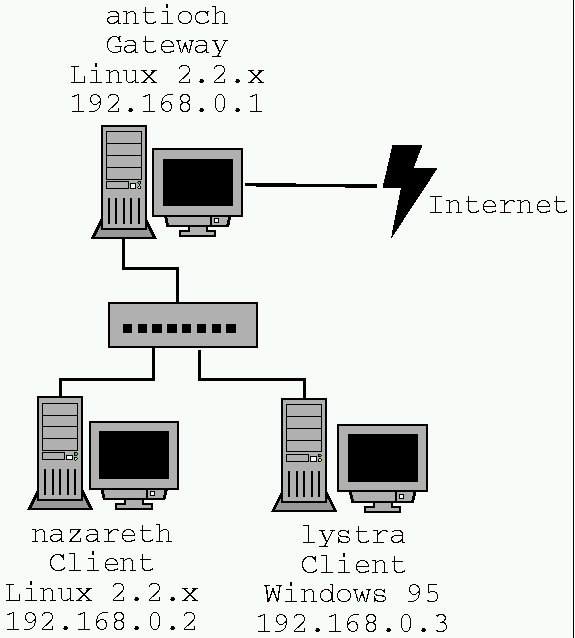
Figure 1. Gateway Setup
Let's start by setting up the gateway, which in our case is antioch (192.168.0.1). Antioch runs Linux 2.2.x, and in order for it to become a gateway, we need to turn on certain kernel options. My gateway has the kernel options shown in Table 1 turned on.
After booting our newly compiled kernel, we will have to load a few kernel modules using either insmod or modprobe:
/sbin/insmod ip_masq_user
/sbin/insmod ip_masq_raudio
/sbin/insmod ip_masq_ftp
/sbin/insmod ip_masq_irc
It would be wise to add these lines into one of your init scripts so they will run on every startup. There are other kernel modules related to IP masquerading; for a full list, type the command
/sbin/modprobe -l | grep ip_masqLinux 2.2 does not turn on IP forwarding by default. To find out whether IP forwarding is switched on, check the contents of the file /proc/sys/net/ipv4/ip_forward. If it is 0, IP forwarding is off; if 1, it is on.
# cat /proc/sys/net/ipv4/ip_forward
0
# echo "1" > /proc/sys/net/ipv4/ip_forward
# cat /proc/sys/net/ipv4/ip_forward
1
Again, it is wise to add the line which turns on IP forwarding (the one with the echo command) to one of your init scripts.
Now we come to an interesting situation. How do we know who gets to use the gateway and who doesn't? This is where ipchains comes in. My current policy is to deny access to the gateway from everybody unless explicitly allowed. For example, let's say we want only our client machines nazareth and lystra to access our gateway and no one else. In order to do this, we have to issue the following commands:
ipchains -P forward DENY
ipchains -A forward -s 192.168.0.2/255.255.255.0\
  -j MASQ
ipchains -A forward -s 192.168.0.3/255.255.255.0\
  -j MASQ
If, on the other hand, we want everybody on the network 192.168.0.* to use the gateway, we can issue these commands:
ipchains -P forward DENY
ipchains -A forward -s 192.168.0.0/255.255.255.0\
  -j MASQ
Note that we assume the netmask is 255.255.255.0. If your netmask is different, simply change the values accordingly. There are many other things you can do with ipchains; however, they are beyond the scope of this article. I trust that the two simple examples above will get you started. (See also “Building a Firewall with IP Chains” by Pedro Bueno, http://www.linuxjournal.com/lj-issue/issue68/3622.html.)
That's it! The gateway is now up and running. Remember to add the relevant lines to the startup scripts. Also remember to connect to the Internet before testing your gateway. Now let's set up the clients.
Setting up the Linux client (nazareth, 192.168.0.2) is very easy. All you need do is issue the following command on nazareth:
route add default gw antioch
Now try pinging an external site (let's say www.ssc.com) to see if it responds:
ping www.ssc.comIf it responds, you are in business! If it doesn't, check the FAQ included with the mini-HOWTO for solutions to frequently encountered problems.
Setting up the Windows client is a bit more troublesome. Here are the steps involved:
Go to the Control Panel and double-click Network.
Locate the icon that represents your TCP/IP protocol for your network interface card. Open up its Properties.
Click on the Gateway tab. Add 192.168.0.1 as the gateway.
Click on the DNS Configuration tab. Under DNS Server search order, add your ISP's DNS server IP addresses.
Press OK on all the dialog boxes.
Reboot the machine.
Again, test your gateway by accessing an external site (use ping or your web browser or whatever). If all goes well, you should be able to do most things you usually do on the Internet.
There are a few things you should be aware of when setting up your Linux gateway.
First of all, certain Internet applications may not work well with our setup. For a list of what works and what does not, see the latest version of the IP Masquerade mini HOWTO.
A few applications may require you to load specific kernel modules. In our case, for example, we have already loaded ip_masq_raudio, which will take care of any Real Audio connections. If you want to run Quake, VDOLive or CUSeeMe, you will need to load their respective kernel modules.
Another thing to keep in mind is that applications on your Linux client machine may not work properly if your gateway is not connected to the Internet. One such application may be sendmail. Therefore, if you know your gateway is off-line, you may want to remove your gateway's IP address from your Linux client's routing table. To do so, just issue the following command on the Linux client machine:
route del default

Lawrence Teo (lawrenceteo@usa.net) recently completed his Bachelor of Computing degree from Monash University, Australia. He has been using Linux since 1997 and has been glued to it since. His other interests include security, cryptography, webmastering and software development. Lawrence aspires to be a UNIX system administrator one day.
