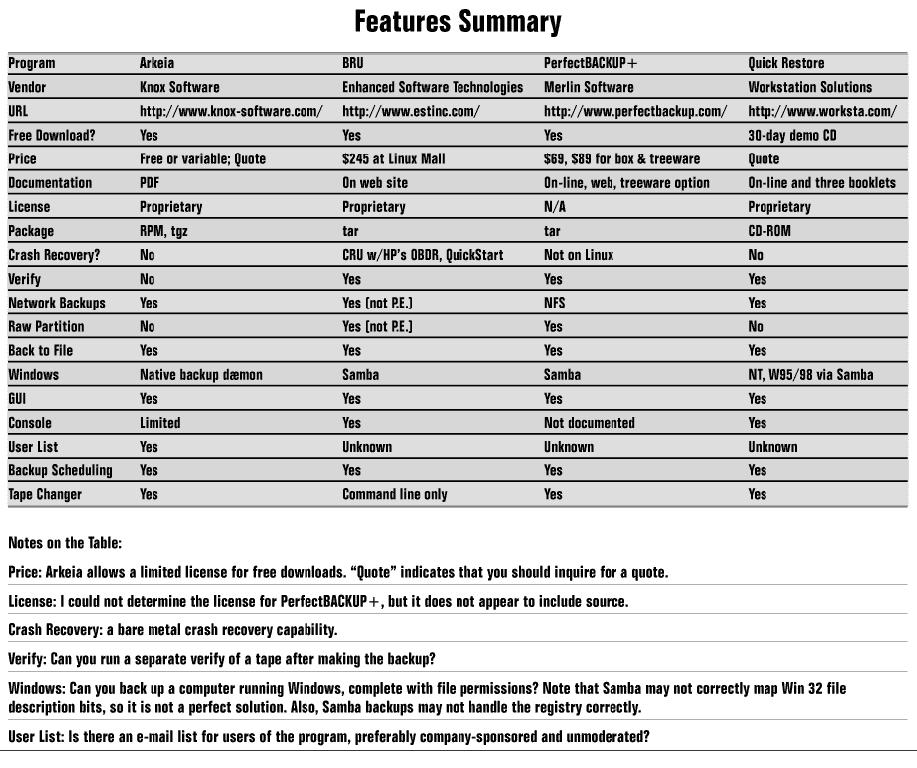
Comparison of Backup Products
Manufacturer: Merlin Software Technologies, Inc.
E-mail: info@merlinsoftech.com
Price: $69 US, $89 US for box and treeware
Manufacturer: Enhanced Technologies Software, Inc.
E-mail: info@estinc.com
Price: $245 US
Manufacturer: Knox Software Corp.
E-mail: sales@arkeia.com
Price: Free or variable; Quote
Manufacturer: Workstation Solutions
E-mail: info@worksta.com
Price: Quote
Reviewer: Charles Curley
Backup of data is probably the most neglected aspect of system administration in small businesses and home offices. Yet it can be critical. If your entire business is riding on the contents of your hard drive, and it goes belly-up, you are out of business. Worse, you may be legally liable. For example, you may be required to meet your payroll within a certain time after the end of the pay period.
For these reasons, what you spend on backup, including software and tapes, is a form of insurance. To give one example, I administer a home office with five computers (two Linux, two Windows 95, and one that multiboots between Linux, Windows NT and Windows 95), and two users. The network is standard 10-base T. I have two tape drives (a Conner/Seagate 4GB Travan and an HP DDS 3 DAT drive) and routinely use two of the products I discuss here.
Four backup programs for Linux are reviewed below: PerfectBACKUP+, Arkeia, BRU, and Quick Restore. The first three are available on the Web. Arkeia comes packaged with Red Hat, Mandrake and SuSE distributions of Linux. Quick Restore is available on CD only.
This is the only completely “no charge” program in the lot, and coming into such a program, I was not expecting much. I was surprised, for example, to see support for tape changers, something I would not expect to see on a low-end backup program. However, the program qualifies as “nagware” by giving you a “please register” window when you start up the program (see Figure 1).

Figure 1. The Main Window of PerfectBACKUP+
I was very pleased to see that it detected and correctly identified both of my SCSI tape drives. Whether this facility extends to other interfaces I cannot say. The two drives were not associated with the correct device files in /dev, so I hand edited that. A quibble indeed, compared to the setup problems I have had with other tape backup software.
One thing that is very nice about PerfectBACKUP+ is that the device selection menu identifies the drives by their names as provided by the device. That is very useful; it saves having to remember device names.
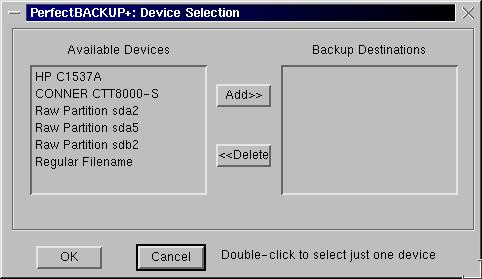
Figure 2. Selecting a Destination Drive for a PerfectBACKUP+
PerfectBACKUP+ provides some easy-to-use minimal acceptance tests, a facility I'd like to see on other backup software. One quibble here is that I'd like to see the software test with larger data sets to better exercise the tape drive. The data set is unfortunately so small as to make the data rate result meaningless.
Defining a backup set (or package, in PB's terminology) is easy: go down the Backup pull-down menu and define each characteristic in turn. Then select the Save As Package menu entry, and give it a name. You can then recall the package and run it all you want. I was able to define a small test backup set and make the backup easily.
Unfortunately, the restoration had problems. I got a cryptic message about “This backup was made from / and you are about to restore it to /test. If your backup was RELATIVE you might not want to do this.” Relative to what? Grepping the documentation, I found no explanation of what the term “relative” means. It then asked if I wanted to change the working directory. If I refused, it gave me a cryptic error message. If I accepted, and retyped the working directory I had previously selected, it made the restore where I had asked for it.
This is the kind of glitch that indicates inadequate testing. I can accept that sort of glitch in the GUI, as long as I can work around it. But I am left with the question: what else was not adequately tested? Also, PerfectBACKUP+ left defunct processes on my test computer. This is not encouraging.
Verification is easy. In addition, after the fact—weeks or months—you can pop a tape into a drive and verify it. You can verify the contents of the tape against the original files, or you can run a CRC checksum verification against the tape alone. This is useful for verifying the reliability of your tape drive: remounting a tape is a good test of the repeatability of head positioning, a major casualty of wear in lower-end tape drives like QIC tapes.
Unfortunately, I saw no way to verify a backup as part of the backup sequence. This is something I have been accustomed to seeing in PC backup software since Colorado Memory System's software provided it in the late 1980s.
There are two sets of documentation. One is in HTML, and you read it via Netscape. (What happens if you don't have Netscape?) The documentation screen shots indicate an xterm interface with mouse support; however, the provided interface is a full X GUI. The other documentation is available from pull-down menus on the GUI. It has no search function, and uses a fixed font which is vanishingly small if you have a high-resolution monitor. The two sets of documentation contain different material. Neither one documents the command-line interface, which is a pity.
I must reluctantly conclude that PerfectBACKUP+ is not yet ready for prime time. It needs serious testing in the GUI and a lot of cleanup in the documentation. Because it left defunct processes on my system during my tests, I don't trust it. PerfectBACKUP+ has some excellent features, like identifying drives by name. I hope Merlin fixes its problems and makes a more solid version available.
BRU is a modern replacement for tar (Tape ARchive). Many of the command line options for BRU are identical to those for tar, which means you can upgrade from tar to BRU fairly painlessly. In addition, XBRU, the GUI, is merely a front end: all XBRU does is build an appropriate command line and hand that off to the command-line executable.

Figure 3. The Main Screen of XBRU
One feature that is missing from BRU is the ability to use the GUI to build a command line, then export it for use in a script. This would be a very useful tool for the command-line-challenged.
The help is all on-line at EST, Inc.'s web site. This is great if you don't mind going on line to read your docs, because they are always the latest. What happens, though, when EST releases a new version? Will your help still point to the web pages for the version you have? Hey, guys: not everyone has a T1 connection to the Net.

Figure 12. Listing the Contents of a Volume in XBRU
Installation is straightforward. I got the demo version from the EST web site. It comes in a tar file. Copy it into its own directory, untar it and execute ./install. The installation script asks for information about your tape drives. It will ask you for the capacity (uncompressed) and rewind and non-rewinding device names. The devices ran with no further changes. However, there are sample device definition files for a number of drives on EST's web site.
You can run multiple XBRUs and simultaneously access different tape drives. This is great for backing up to multiple tape drives, but does not give the flexibility of Arkeia's flows.
Verification of a backup is very useful. EST thinks you should do it every time to verify the backup, and that's a good idea. Their autoscan feature makes it easy to build into scripts.
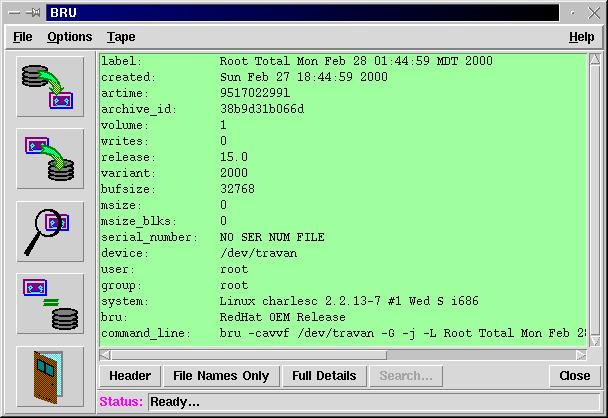
Figure 13. A Tape Header in XBRU
The professional version, which I did not review, will provide a database of files backed up, thereby eliminating the occasional need to read multiple tapes to find a given file.
One thing missing from BRU is support for tape changers. As I have not worked with tape changers, I can't comment on their reliability. But I'd rather have high enough capacity tape drives and arrange my backup schedule so I don't need a tape changer. Unfortunately (for system administrators, if not for users), the ability of hard drive manufacturers to wedge capacity into their products seems to exceed the ability of tape drive vendors to add capacity to theirs. So there may be a tape changer in your future.
Next in line is Arkeia, from Knox Software. Arkeia has a three-part design. The server resides on the machine to be backed up, and writes the backup with local file permissions and bits. The server backs up and restores files; the client runs one or more tape drives on a machine; and the user interface provides user control over the other two parts. The user interface comes in two flavors, command line and GUI.
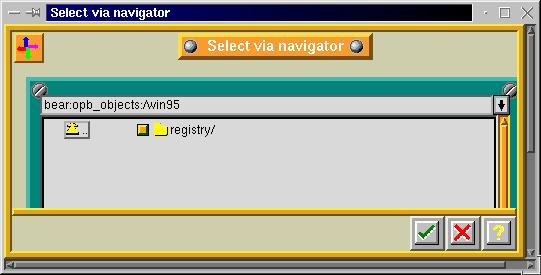
Figure 7. Selecting a Windows 95 Registry for Backup in Arkeia
One implication of this design is that Arkeia's Windows server, which runs as a native Windows process, can back up the registry as metadata, not as just another file. However, there has been some question about restoring registry backups on the Arkeia user's list, so if you run Windows in your shop, make sure you can do a full restore of the registry on a test computer before you are satisfied with Arkeia's performance.
There is nothing that says that any one component has to reside on the same machine as either of the other two. In my setup, I run both the user interface and the tape client on the same machine. I also run servers on that machine and each of the other four computers on the network.
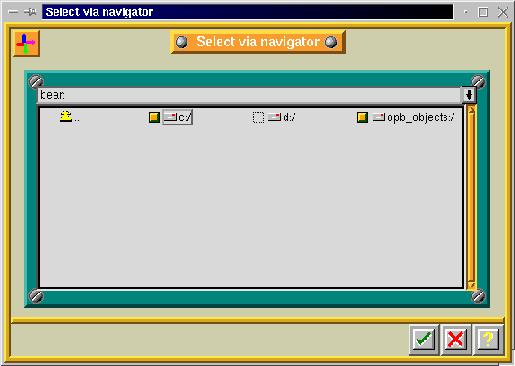
Figure 8. Selection Menu for the Root of a Windows 95 Computer in Arkeia
This architecture makes possible what Knox calls “flows”. Most backup software simply walks a list of directories to back up. (The brain-dead backup applet that comes with Windows NT is a classic example.) Arkeia has each server feed its data to the client, so that multiple machines are backed up simultaneously. In my environment, each of the five computers is represented by a “flow”. The result is very fast backups: to my HP DDS 3 DAT tape drive, I get backups at a sustained rate of 57MB a minute, or 12GB in under four hours. That data rate keeps the tape drive streaming, which is important for tape and drive longevity. While I haven't tried it, you should be able to back up multiple machines to multiple tape drives. Under those conditions, Arkeia should optimize data flow to keep all of the tape drives streaming.
Arkeia builds a database of files as it saves them to tape. This is great because you can browse the contents of your tape library without having to mount each tape in sequence. It also has a weakness: Arkeia does not back up that database itself. That means if the file system on which the database resides goes south, you have to restore it from tape by reading each tape since the last total backup. My solution to this weakness is to use BRU to back up that file system.
When I first reviewed Arkeia for Linux Journal (April 1999, http://www.linuxjournal.com/issue60/3166.html), I reported excellent customer support. While I have not used the customer support recently, I must report some grumbling on the list about it. This grumbling indicates that Knox's customer support has gone downhill since I wrote the review. Perhaps the folks at Knox think that a list is an adequate substitute for good customer support; it is not.
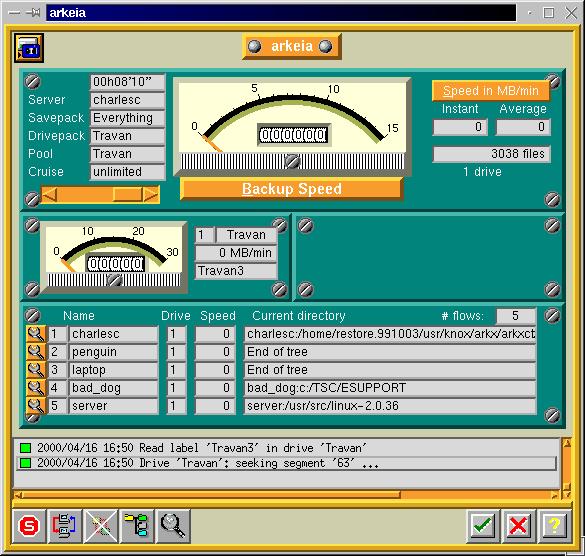
Figure 10. An Arkeia Backup in Progress
Setting up Arkeia initially is a lot of work. You first define everything down to the individual tapes, which are lumped into savepacks, then the drives, etc. Defining a backup is a matter of selecting the savepack and the files to be backed up. Once you have done that, you can run a backup at any time, manually or at pre-defined times. The complexity of initial setup is the price of Arkeia's extreme flexibility. A “wizard-style” interface would be easier to use than the potentially confusing menus Arkeia uses. Short of that, the manual walks you through the process of setting up and running null device backups to verify your installation.
Arkeia is probably the most ported of the lot. If you have more than Linux and Windows NT, look at Knox's web site for a list of supported OSes.
One thing missing from Arkeia is the ability to verify a tape. Neither verification by comparison nor by checksum is available. All I have been able to do is a partial restore to another location and then comparison against the original, a process that verifies only a portion of a tape. Of the four products reviewed here, Arkeia is the only one with no form of verification.

Figure 11. Arkeia's Main Window, Showing a Backup Job in Progress
Arkeia is priced on a per-seat basis. For a quote, visit the Arkeia web site. You can download a “personal” version. The latter is restricted to one tape drive and a fixed number of clients.
Far and away the high-end product here is Quick Restore, from Workstation Solutions, Inc.
Most Linux users are accustomed to downloading what they want from the Net and trying out the package then and there. Workstation Solution's evaluation process is quite different. Evaluation copies are available on CD only. When you request a CD, the company schedules an appointment to make the installation. At installation time, a technician walks you through the installation. The request process involves some e-mailing back and forth. During my efforts to get an evaluation copy, someone (probably me) dropped the ball, and it took me a while to get the CD and make an appointment. Intentional or not, this process has the effect of filtering out casual inquiries and casual users.
The actual installation process is straightforward. With most installation software, there is either no help, or the help doesn't answer the questions you want to ask. With a human being on the other end of the phone, you can ask any question at any point in the process, and get an answer. So this process represents a much more user-friendly process.
The main window (see Figure 11) is a simple six-button toolbar. Each button triggers a suitable separate window, in classic X programming style. One result is that you can quickly end up with a plethora of windows on your desktop. Another is that you can move from window to window easily, unlike the typical Windows application that only lets you use one window at a time.
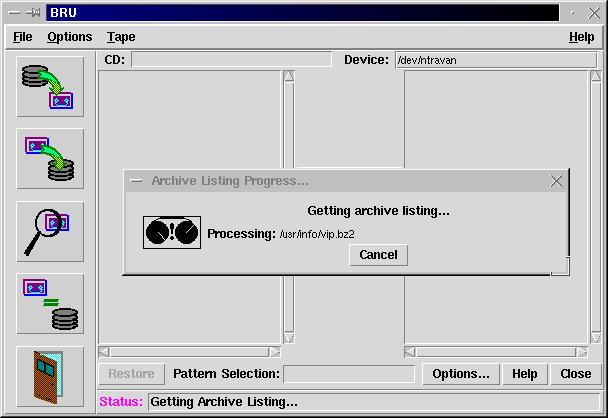
Figure 12. Selecting Files for Restoration
Restoration is GUI-driven (see Figure 12). As with Arkeia, the database of backed-up files is organized in a tree that reflects the same structure as the backed-up file systems. Click on one or more files to select them, then select the volume from which to restore, insert the appropriate tape (unless you have a tape changer) and away you go.
Figure 13. Editing a Dataset in Quick Restore
Unlike Arkeia, backups are defined with a scripting language (see Figure 13). Quick Restore has a built-in editor for the scripts. The bad news is that the editor is a brain-dead CUA interface editor, rather reminiscent of MS-DOS' EDIT.COM. The good news is that the files are plain vanilla ASCII text files you can edit with any editor. Alas, if there is a mechanism for selecting an external editor such as vi or emacs, I missed it in the documentation. The scripting language is clear and well documented. I was able to create data sets in quick order using emacs. The built-in editor has a validator, which you should use often as you edit.
Once you have defined a data set, it is necessary to schedule a backup with it. You can schedule backups daily, weekly, monthly or annually. There is no interactive backup facility; instead, you schedule one for a minute from now and wait. At the time I installed Quick Restore, the technician walked me through this process (except for editing with an external editor) with a small data set and a test backup.
Quick Restore also has a steep learning curve, but I think not as steep as Arkeia's. Again, that's the price you pay for flexibility. You can start using Quick Restore immediately by carefully substituting qtar for tar in your existing scripts.
Quick Restore also provides a number of command-line tools. One is qtar, which will read and write tar format, and supports its command-line options. These can be combined into shell scripts and sample scripts are provided. Indeed, the GUI is a front end for the command-line tools. It would be nice if the GUI could export command lines for use in scripts. Another tool will tell you a lot about your tape drive, including (if the drive supports it) whether it is time to clean the drive.
Quick Restore is clearly intended for large shops, server farms, data farms and similar high-data installations. It does not even support the Travan tape drive. It does support my DDS 3 tape drive, but the DDS 3 is in the low end of the tape drives it supports. The difference, apparently, is that the DAT drive is capable of a true random seek into the tape, where the Travan must be read sequentially to get to a target block.
I found both the on-line documentation and the printed documentation to be excellent. They are not duplicates, and each serves their place well. You should read the printed documentation before you install the software. I did not, and we got through the installation fine, but there is information in the manuals that might have helped. Indeed, the printed manual is a good introduction to backups in general.
Quick Restore, like Arkeia, runs a background process on each machine it backs up. At the moment, Quick Restore supports Linux, a number of Unixes and Windows NT. It will back up Windows 95/98 boxes but only over SMB mounts. This has the disadvantage of backing up the registry only as a standard file, which means the backup administrator has to remember to add it to backups. You should always back up the registry, as this is the only work-around for an incredibly bad operating system design bungle in Windows.
Of the four vendors whose products are reviewed here, only Workstation Solutions uses the Network Data Management Protocol (NDMP) to communicate between clients and servers. This emerging Internet standard should eventually (as more vendors sign up) allow interoperability between vendor products, and that should help greatly in heterogeneous environments.
Quick Restore is not cheap. Workstation Solutions quoted me $7,250.00 for a backup server, with an additional $1,595.00 (US) for an annual service contract. Linux and FreeBSD clients are no charge. NT clients cost $2,250.00, with an annual service contract at $495.00. There is no “home use” option like that for Arkeia. For that kind of money, customer support had better be excellent! Other than the installation walk-through, I have had no contact with Workstation Solutions' customer support, so I cannot tell you how good it really is.
PerfectBACKUP+ uses cpio format, while Quick Restore uses tar. Both were developed way back when, and may not provide the data integrity of more modern formats. BRU, on the other hand, clearly uses its own format. The advantage, according to EST, is better data integrity; the disadvantage is that you must use that tool to restore your data.
As far as I can determine, Arkeia has its own tape format. They do provide a command-line utility that allows you to recover a directory of a tape. You can then use this directory to restore from that tape.
The marketplace is wonderful. We see here solutions to the problem of backups from vendors in all price ranges and all levels of support; no Post-Awful “One Size Fits All” mentality.
One concern I have for backup programs is Windows NT backups. Windows 2000 has more file descriptor bits than Windows NT. For example, a file may be a sparse file. Also, Windows 2000 has file system data structures called reparse points. Are the backup programs that handle NT Windows 2000-aware? I don't see anything in the literature of either of the two NT-aware programs reviewed here that indicates one way or another. I do not have Windows 2000, so I was unable to test this point. Workstations Solutions told me they are working on it. Absent any claims that Arkeia support Windows 2000, presumably Knox also is working on it.
If you are spending other peoples' money, or have the budget to buy software but don't have the staff to write your own configurations, and you don't have any Windows 95 or 98 machines to back up, go with Workstation Solutions' Quick Restore. Quick Restore is far and away the best documented of the four products reviewed here.
If you do have Windows 95 or 98 machines to back up over a network, and are willing to learn and use a slightly confusing graphical user interface, get Arkeia. Arkeia is also excellent for sites with a lot of data to back up. The steep learning curve gives you the flexibility to define a lot of different backup configurations. This in turn allows you to get the most out of your tape drives by keeping them as busy as possible.
In one area, Quick Restore is superior to Arkeia. If you have multiple databases to back up, you want to shut down each one for the shortest period possible. Short of exporting the entire database, and then backing that up, the ideal is to shut down each database, back it up, and then fire it up again, in sequence. Arkeia allows you to execute a script before the backup, and another after it. To minimize database downtime, you have to define a separate backup for each database, a nuisance at best. Quick Restore lets you insert scripts at any point in the backup process, which means you can back up an entire computer, and only have each of its databases down long enough to back it up. BRU's GUI has no facility to run scripts at all, but the command-line interface is excellent for writing your own. PerfectBACKUP+ does not appear to have any facility to run scripts.
EST, Inc.'s BRU Professional appears designed to compete in the high end, along with Arkeia and Quick Restore. Unfortunately, it was not publicly available in time for this review.
The BRU-PE personal edition is an excellent choice for backing up your own Linux machine and other machines over NFS or Samba.
For a small- or medium-sized shop, I would seriously recommend using Arkeia to back up the network, and then back up the tape server with BRU. For complete protection, I would add EST's Crash Recovery Utility or their QuickStart Data Rescue. As I have an HP One-Button Disaster Recovery (OBDR) tape drive, the CRU looks very attractive to me.
For home networks involving Windows, I would look at Arkeia's shareware version, supported by backing up Arkeia's database with BRU-PE or tar.
email: ccurley@trib.com
Charles Curley (ccurley@trib.com) lives in Wyoming, where he rides horses and herds cattle, cats and electrons. Only the last of those pays well, so he also writes documentation for a small software company headquartered in Redmond, Washington.