Laptops for Linux!
Products: LinuxLaptops Attache ASL Workstations AS-LT300
Manufacturer: LinuxLaptops ASL Workstations
E-mail: ncm@linuxlaptops.com sales@aslab.com
Price: $2500 US $2800 US
Reviewer: Jason Kroll
laptop n: a computer in graceful, self-contained form. Laptops are small, wireless, resource-minimal and portable. You can take them wherever you go and hide them when not in use—no ugly computer to occupy space. The LCD flat screen displays are clearer and cleaner than cathode ray tube monitors (with less brain-wave-zeroing effect), and the keyboards are small and quiet. Even without portability, laptops have many advantages over desktop machines.
Laptops also have their shortcomings, the most obvious of which is price. Laptops are very expensive and difficult to repair or upgrade, although it can be done. They also offer inferior performance compared to desktop machines, specifically in disk access, processor speed and hardware support. Hard disks on laptops spin slowly and are loathe to accelerate or decelerate; hence, disk operations can be very slow, especially random accesses. Take a look at the Bonnie benchmarks (see Table 2) to see just how slow. Processors are also slower and more expensive. One reason is laptops have relatively poor ventilation (making them quiet), so if you have too many megahertz/gates/volts on the chip/CPU, it will get too hot. (Notice the popularity of StrongARM processors in machines without powerful fans, for example the NetWinder and Empeg.) Also, laptop processors are physically different from standard processors because they must be small and low-profile, although smaller chips require less voltage so they don't generate as much heat.
Debian GNU/Linux
Entirely free software
Flexible, loose
Superb console mode
Highly tuned, fast
Well customized
14.1" LCD screen is clear, flicker-free
GNOME/Enlightment is a tad slow, sometimes problematic
Too much swap
Missing some software
Very expensive
At the time of this writing, the two Linux-specific laptop providers are LinuxLaptops and ASL Workstations. LinuxLaptops is a specialty shop run by Nathan Myers, which deals exclusively in laptops for Linux and has three models at the moment. It is highly focused on optimization and tuning, working within the interesting limitations of laptop hardware, to maximize Linux performance. ASL Workstations, on the other hand, is a successful Linux workstation builder which provides many excellent workstations and makes its AS-LT300 laptop as a logical component in a complete product line of high-powered, server-oriented machines. Penguin Computing is also developing a laptop, but it is still in beta and was not available for review. VA Linux Systems, the best-known Linux machine maker, has discontinued laptops for the time being.
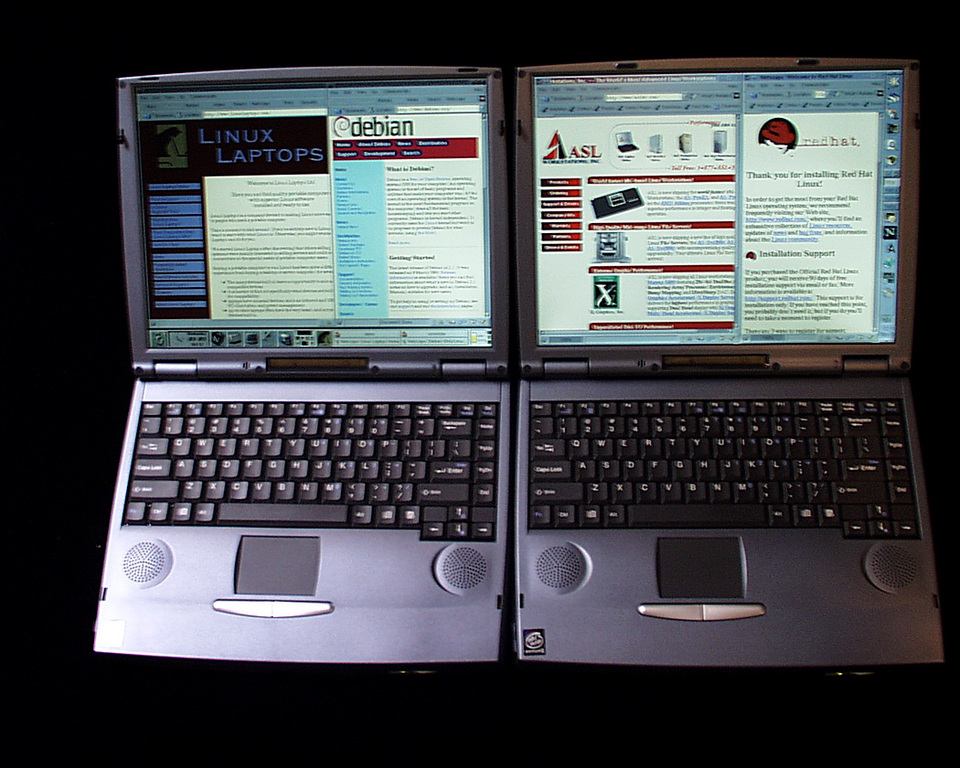
The Laptops
Since only enormous firms have their own laptop factories, laptop providers for Linux buy standard laptops and configure them for Linux. Incidentally, the AS-LT300 and Attache are both ChemBook 7400s. Internally, they have slightly different configurations, but the most significant difference is between their respective Linux setups. Table 1 shows the more relevant features of the laptops sent to LJ, but keep in mind that you have much flexibility in configuration if you order a laptop for yourself.
LinuxLaptops | ASL | |
Processor | Pentium II 333 MHz | Pentium II 366MHz |
L1/L2 Cache | 32K / 256K | 32K / 256K |
RAM | 128M SDRAM | 96M SDRAM |
BUS | 66MHz AGP/PCI | 66MHz AGP/PCI |
Hard Drive | 6.4GB Ultra DMA/33 | 6.4GB Ultra DMA/33 |
Linux | Debian GNU/Linux 2.1 | Red Hat 6.0 |
X Server | XFree86 3.3.2.3 | Accelerated X-Server 5.0 |
Desktop | GNOME/Enlightenment | KDE or GNOME |
Console | 128x48 | 80x25 |
Video | ATI 3D Rage Pro LT 4MB | ATI 3D Rage Pro LT 8MB |
Audio | awaiting driver | Open Sound System |
Kernel/Size | 2.2.11 / 715K | 2.2.12 / 636K |
Once upon a time, the important issue with a computer was how well it worked. Nowadays, people have these funny ideas; they'd like to be comfortable while using their machines and not get headaches, neck cramps, back pain, carpal tunnel syndrome, radiation sickness, etc. Laptops win on most counts, the only problem being that tall people may be made to suffer.
The LCD flat screens on these laptops are pristine and clear: images are sharp and detailed, without glare, fuzziness, or flicker. There are exactly 1024x768 pixels on the screens (unlike CRT monitors, which often haven't got enough phosphors for the high resolutions they “support”). While laptop monitors are not as lovely as the extraordinarily expensive LCD flat panels, they have remarkable clarity and accurate color. And, they consume very little power while emitting hardly any electromagnetic radiation. Ever since these laptops arrived, I haven't touched my desktop computers, preferring instead to use ssh to log in from the laptops.
Both monitors are identical, 14.1-inch Active Matrix TFT (thin film transistor) panels. The ASL looked a tiny bit better in X, while the Attache looks significantly better in console mode. The reason for this is the Attache has been configured with a frame-buffer device, so the console shows up in 1024x768 instead of the usual 640x400. This means the screen can fit 48 rows and 128 columns of crystal-clear text (literally), as opposed to the usual 25 rows by 80 columns in 640x400 mode (which will appear ghosted on a laptop). LCD screens look proper only in their ideal resolution, so a monitor made for 1024x768 will be clear only in this mode and should stay there all the time to take advantage of the excellent image quality. If you are a console enthusiast, LinuxLaptops' frame-buffer-enabled kernels which run the console in 1024x768 are the only way to go.
The main disadvantage of LCD screens, other than expense, is they have particular viewing angles; if you look from the wrong angle, the colors and brightness will be off. Also, the screens are very delicate, so you can't get mad and punch your monitor. One shouldn't press on the screen at all, so it takes a concerted effort to clean. If you buy a laptop off the shelf and try to install Linux, configuring X will be a challenge. Finally, if you are slightly taller than average, you might develop neck and back pain from hunching over, since the keyboard is fixed so close to the monitor.
The ChemBook 7400 keyboard is a compact arrangement of full-size keys which are perky and shallow. You don't have to push down very far, so typing should conceivably be faster. One problem with these keyboards is they sit far back in the laptop, leaving a big surface in the way, and this usually results in the user resting his or her wrists on the laptop. After about thirty minutes of typing away while resting my wrists on the laptop, I feel a horrible throbbing pain which follows me around all day; I suspect this is what carpal tunnel syndrome feels like. So during the time I have been using only laptops for their nice monitors, I have also been using an external keyboard. Still, the key action on the laptop keyboard is fast, and LinuxLaptops even took the effort to remap CAPS LOCK to serve as the CTRL key.
Truthfully, I think track balls and little red joysticks are neat, but these days the typical pointer is a pad which one runs a finger across, inspiring the pointer to move accordingly. The pad is easy to get accustomed to, and the movement is logical and straightforward. The mouse buttons are two wide buttons situated below the pad. Clicking both at once will emulate the third button, but these days we should just have three buttons. Also, tapping on the pad often acts as a mouse click, and this leads to some funny accidents, especially on the Web.
The fundamental difference between the AS-LT300 and the Attache is that the AS-LT300 is a Red Hat system, whereas the Attache is a Debian system. Although distributions are usually fairly similar, especially when one gets past installation, these two are essentially polar opposites. Red Hat, as we know, is the market leader, the epitome of commercial Linux, while Debian GNU/Linux is a vanguard of the free-source philosophy, and typically the hacker's favorite setup. Herein lies the difference in the feel of these laptops: ASL went the commercial route, while LinuxLaptops took the expressly non-commercial route.
ASL includes the Accelerated X-Server, while LinuxLaptops runs the standard XFree86. According to Xi Graphics, there is usually a 40% to 60% performance improvement gained from running the commercial servers, as well as support for many more cards. I have not noticed any visible advantage; GNOME/Enlightenment is slow on both laptops. Nevertheless, if you do graphics-intensive work, there may be a benefit here. Both laptops use the ATI 3D Pro LT card, so the graphics performance is similar. Neither in X nor in console mode did I notice the lagging, slow updates associated with LCD screens of the past. Graphics on both are superb.
Well stocked, fully loaded
KDE or GNOME
Faster X server
Complete, functional laptop for Linux
Clear, flicker-free 14.1" LCD monitor
Console mode is ghosty
Disk access a bit slow
Has some unnecessary software
Very expensive
The window manager situation is a bit different. The AS-LT300 offers a choice between KDE and GNOME, and the Attache uses GNOME/Enlightenment. While the Attache's devotion to GNOME/Enlightenment (which is well configured) keeps good faith with the open-software movement, the window manager and desktop environment are a tad too resource-intensive for a mid-range laptop, not to mention being unstable and slightly buggy.
As is typical of Linux, audio support is a mess. The Attache awaits the release of the free sound driver, so other than beeps (which you can mercifully turn off with a volume control), you don't have audio support. The AS-LT300 has OSS audio support, which means you can play CDs, but the audio devices are not set up properly so you'll miss out on mpegs and the like (I expect ASL has fixed by now). Still, the microphone appears to be working, because at full volume, the machine starts generating horrible feedback when I type. What to do about MIDI? Might as well get a hardware sequencer.
Network support on both laptops is fine and simple. All you have to do is plug an Ethernet/Modem card into the PCMCIA slot, edit the network files (five minutes tops), reboot, and your system will be completely on-line. Networking is transparent and I even swapped the network card in and out of the computers while running and without any disastrous effects. The network card gets very hot, though; I worry it will melt. It would be preferable to have Ethernet/modem built into the laptop instead of using a PCMCIA card, since it looks less graceful to have this gizmo sticking out of the laptop's side.
Benchmarks are good general indicators of system performance, but they're often misleading and not entirely relevant. It is true these laptops do not compare well performance-wise to desktop machines or servers, especially in terms of disk access, but then, these laptops are not servers and servers are not particularly portable. Laptops are generally one- or two-user machines and will not be called on to do anything resource-intensive. As for disk access, you don't need a super fast drive if you won't have several dozen users reading and writing all at once, and you don't need too many megahertz or that much RAM to run vi or Emacs. Multimedia would be the one area for which a single user would need supercomputing power, but then multimedia support on Linux is not outstanding. So, Table 2 shows the Bonnie and BYTEmark results. The AS-LT300 shipped with a faster processor (and higher price tag) so its processor results are slightly better, while LinuxLaptops has spent much effort tuning for hard-drive performance, hence the better results here. I set both laptops to “Suspend to RAM” and “Large Filesystem”, and ran the benchmarks several times for best results. Bonnie's results fell into a broad range, due partially to variance in access speed depending on the location of the data on the disk. Laptop drives tend to be single speed, so the farther in you go, the slower your access speed.
Attache | AS-LT300 | ||||||||||||
Memory Index | 1.361 | 1.566 | |||||||||||
Integer Index | 1.145 | 1.324 | |||||||||||
Floating-Point | 2.277 | 3.616 | |||||||||||
Sequential Output | Sequential Input | Random | |||||||||||
Machine | MB | K/sec | %CPU | K/sec | %CPU | K/sec | %CPU | K/sec | %CPU | K/sec | %CPU | /sec | %CPU |
Attache | 100 | 5608 | 98.7 | 14571 | 22.6 | 3173 | 9.3 | 4577 | 75.1 | 72967 | 39.2 | 2950.0 | 47.9 |
ASLT300 | 100 | 5659 | 98.9 | 13442 | 21.7 | 2947 | 8.7 | 4306 | 72.0 | 8646 | 7.8 | 230.5 | 2.9 |
Each laptop partitioned its drive differently, and the Attache even includes a tiny DOS partition for the emulator, but included neither the correct file-system module for the new kernel nor an entry in fstab or mtab. I think both laptops have a slightly odd partition setup, with too much swap (256MB on the Attache, 128MB on the AS-LT300). Table 3 is a short file-system table so you can see how they're set up for Linux, a bit systematic for what is presumably a single-user system.
File System | 1024-blocks | Used | Available | Capacity | Mounted on |
/dev/hda2 | 204945 | 50155 | 144206 | 26% | / |
/dev/hda6 | 1492311 | 436562 | 978639 | 31% | /usr |
/dev/hda8 | 2901830 | 5228 | 2746538 | 0% | /home |
/dev/hda9 | 965801 | 13 | 915894 | 0% | /other |
File System | 1024-blocks | Used | Available | Capacity | Mounted on |
/dev/hda2 | 161027 | 75501 | 77210 | 49% | / |
/dev/hda3 | 1565171 | 1228067 | 256212 | 83% | /usr |
/dev/hda5 | 4054179 | 64890 | 3779501 | 2% | /home |
/dev/hda6 | 117087 | 13 | 111028 | 0% | /tmp |
It is difficult to put together a top-quality laptop for Linux. There are too many peculiarities and quirks of the hardware, and drivers are hard to come by. The best anyone can hope for in the near future is that everything will work after a bit of fixing. I would expect LinuxLaptops to lead the way, with ASL and the others adopting those ideas which turn out well. We don't have Linux-specific laptop factories, and we don't have perfect support for all the hardware. Laptops for Linux are coming, and hopefully some day they will be as completely functional as desktop boxes. Right now, they lack audio and some video support (svgalib, for example). These laptops do have PCMCIA slots, infrared ports, disk and CD-ROM (optional DVD) drives, and some potential for expansion. Check the web sites for the full technical details.
Now that players have entered the Linux laptop market, we're going to see quality go up and price go down, though there are many options to buying a Linux laptop. If you need just a portable machine with little computing power, you could get an inexpensive or used laptop and install Linux. If you want the flat screen monitor, you could buy one (I think they are worth the reduced eye strain and radiation); Xi Graphics already has some drivers available. If you want a small computer, pair your flat panel display with a NetWinder and Happy Hacking Keyboard Lite. If you need a laptop but don't like either of these, you could try one of LinuxLaptops' other models (the Paquet looks exceedingly cute). Also, you could wait until we move on to 64-bit RISC technology (one x86 is enough, eh?). If you are buying only one computer, and you live in an apartment which you'd like to look nice (i.e., no ugly CRTs), or if you travel and need your computer, these laptops have much to offer. The choice between our review subjects should be easy. By now, you must know if you're a Red Hat (AS-LT300) person or a Debian (Attache) person, although realistically, LinuxLaptops has made a more highly tuned machine for the price. Either way, how can you go wrong putting Linux on a computer, especially one as cool as a laptop?