
The PPP Connection
Ah! Bonjour! Nice to see your friendly faces back in my restaurant, “Chez Marcel”. Please, sit down. Your table is ready and François will bring you your wine immédiatement.
François! Wine! Vite! Vite!
As you already know, the topic for this issue is networks and communications. Take it from Marcel; a little networking can get you an awful lot of communication. A memo here and a memo there and all of a sudden you are drowning in e-mail.
Quoi? No e-mail? You have not yet set up your Internet connection? But this is terrible. How can you be overwhelmed with messages promising you easy ways to make money or offering you questionable services, such as finding love in all the wrong places, if you are not yet connected to the Internet?
Let me show you the basics of a PPP connection, and then I will show you ways to make the whole process even simpler. Sounds good, non? The very first thing you need to do is make sure you have PPP installed. PPP stands for Point-to-Point Protocol, and it is the means by which the vast majority of Internet service providers (ISPs) make it possible for their clients to connect.
PPP can be installed as a package. In Red Hat, Caldera, or any of the fine Linuxes that use the Red Hat Package Manager (RPM), you can use this command:
rpm -ivh ppp-
If you are running Debian, the command is similar:
dpkg -i ppp-For brevity, I will not try to go into whether your kernel has PPP support compiled in and what to do if it does not. If you have a recent Linux distribution, I can guarantee it is there.
The next step is to get some information from your ISP. This is your user name (which will most likely be your e-mail address as well) and password, along with the DNS (domain name server) address. You should also have the mail server information for your e-mail package. The sort of information you need to get are POP (post-office protocol) and SMTP (simple mail transfer protocol) server addresses.
When your ISP gives you the DNS address, edit the file /etc/resolv.conf with your favorite editor (vi, anyone?) and add that information as below. The XXXs are, of course, replaced by the numbers your ISP provides.
nameserver
A PPP setup in its simplest form involves a chat script and a properly configured options file. These files are most likely in the /etc/ppp directory.
The first thing to do is edit the options file. Mine looks like this:
/dev/modem
     57600
     modem
     crtscts
     lock
     defaultroute
     noipdefault
     connect "/usr/sbin/chat -vf /etc/ppp/chat-script"
My modem lives on /dev/ttyS0, but I also have a symbolic link to /dev/modem for convenience (ln -s /dev/ttyS0 /dev/modem is the command to create that link, if it does not exist). What do the other items mean? 57600 is my baud rate, while crtscts means that my modem should use hardware flow control. The lock statement means that pppd (the PPP daemon) should create a lock file to ensure that some scoundrel does not try to use my modem while I am trying to connect to my ISP. The next parameter, defaultroute, means that a default route to my PPP interface should be established after the connection is up. That means all nonlocal traffic knows to go out through my point-to-point interface. The last parameter (before connect) is noipdefault, which means I did not specify a local address for the connection. The PPP daemon will try to figure this out on its own by getting the local address from the system.
The connect statement describes how we go about establishing this PPP connection and is our chat script. chat is a command whose purpose in life is to establish a connection with your ISP. This little program talks to your modem, watching for things like the CONNECT string or a login prompt. A sample chat script follows:
ABORT 'NO CARRIER'
     ABORT 'NO DIALTONE'
     ABORT 'ERROR'
     ABORT 'NO ANSWER'
     ABORT 'BUSY'
     "" ATZ
     OK ATDT5550000
     CONNECT ""
     ogin: myISPlogin
     ssword: myISPpassword
This is the classic “expect/send” script. Expect nothing, then send ATZ to reset the modem. When the modem responds with “OK” (you expected that, did you not?), send ATDTyourISPphonenumber, and so on.
My example above is frighteningly simple. I kill this connection by finding pppd's process ID (use ps) and terminating it with a kill command. For the down and dirty of PPP, check out the latest PPP HOWTO on the Linux Documentation Project web site (see Resources).
Would you like an even easier way to do this?
The truth is that PPP setup is fairly simple; however, little ripples like PAP authentication or CHAP or even the vagueries of your ISP's setup can make the whole process somewhat less friendly. Instead, you can try some of these wonderful precooked programs for easy Internet access. As is the nature of Linux cooks, after working hard on making things work, they will often create recipes designed to simplify the process for others. The following PPP dialer entrées should have your mouth watering in no time. The only catch is that being on-line already makes it easier to get your hands on these, but if you are still fighting with your connection to your ISP, ask a friend to get these packages for you.
First on the menu is Hwaci's eznet software. This great little piece of software needs only your login name, password, and ISP's phone number, and you are ready to roll. While you are visiting the web site (see Resources), pick up Mark Hall's Tk front end to eznet, xeznet. This client makes it almost too friendly. A note of caution: the “eznet” binary must live in the /usr/bin directory.
Starting the xeznet interface is easy—simply type xeznet. For a screenshot of xeznet in action, have a look at Figure 1.

Figure 1. xeznet Screenshot
The next item on tonight's menu comes from Worldvisions Computer Technology Inc. Like our previous chef, they have created a wonderfully intelligent tool for connecting to your ISP. In running WvDial, I recommend you also pick up Patrick Patterson's KDE front end, a little something he calls KWvDial. After getting and building the package, I simply clicked on Configure. Kwvdial/Wvdial sought out and found my modem without a problem, setting baud rate on the fly. Armed with only my login name and password, Wvdial/Kwvdial had me connected to my ISP in seconds.
The command to start the interface is simply kwvdial.
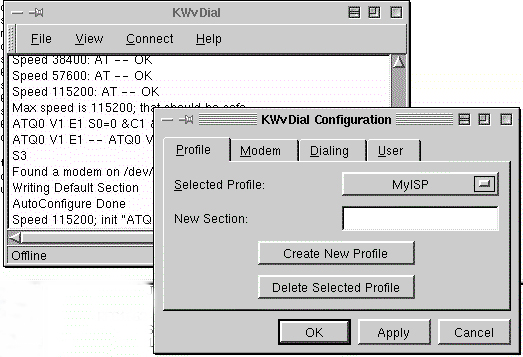
Figure 2. kwvdial Screenshot
Both of these products are available in source distribution as well as various binary distributions. Check the web sites to decide what is easiest for you.
Well, mes amis, it is once again closing time. I do hope you'll see your way clear to paying us another visit at Chez Marcel.
Bon Appétit!

