
MailStudio 2000

Manufacturer: 3R Soft, Inc.
E-mail: sales@3rsoft.com
Price: starts at $299 US for 30 users
Reviewer: Jason Kroll
E-mail changed the way we communicate, and now the Web has changed the way we e-mail. Web-based e-mail has numerous advantages over traditional e-mail: access from any web terminal, no need for e-mail client software (such as Pine, Elm or Mutt) and multi-platform support (users have the same interface on Linux as on any other platform). MailStudio 2000 is a web-based e-mail server from 3R Soft for Linux, Solaris, HP and DEC that provides web-based e-mail service for users. It is accessible through web browsers such as Netscape and also through POP3-based mail programs such as Eudora. It can even be implemented on top of existing POP3 servers to provide a local interface. Unlike many web-based e-mail servers, MailStudio 2000 apparently aims to be a quality, functionality-oriented e-mail utility, rather than a commercial excuse for running advertisements (though you can, if you must, put ads on MailStudio 2000). Three main elements of a web-based e-mail server are its interface to the users, its interface to the administrator and the technical features of the server.
The uniform user interface offers a number of traditional e-mail features, such as mailboxes and address books, as well as some things which are quite modern (or even trendy), such as the ability to send e-mail as HTML with italics and graphics and all of that bother. (This tends to annoy people, actually.) By default, MailStudio keeps Inbox, Sent and Trash folders, and you can apparently add as many as you like, which will be kept in the user's folder menu. The Options folder contains entries for changing your preferences, folders, external mail configuration (for POP3 servers), address book, signature, user information and password. There is also a Question & Answer board for the system and a User Search function for finding others. The last option is “Log off” which kills the encrypted cookies used for user authentication.
a bit pricy
somewhat insecure
flickers
In order to use MailStudio 2000, a user must have Java and cookies enabled. In addition, it seems to take a while to load, with a lot of flickering during initial contact. The software is constantly being developed, so maybe this flickering will go away soon. Everything else is simple, like any other mailer. People who don't like command lines, vi, or typing in general will like this entirely graphical user interface. MailStudio 2000 used to have multi-layer folders and address books, which I think is a neat idea, but they eliminated multi-layers because they weren't entirely cooperative with frames.
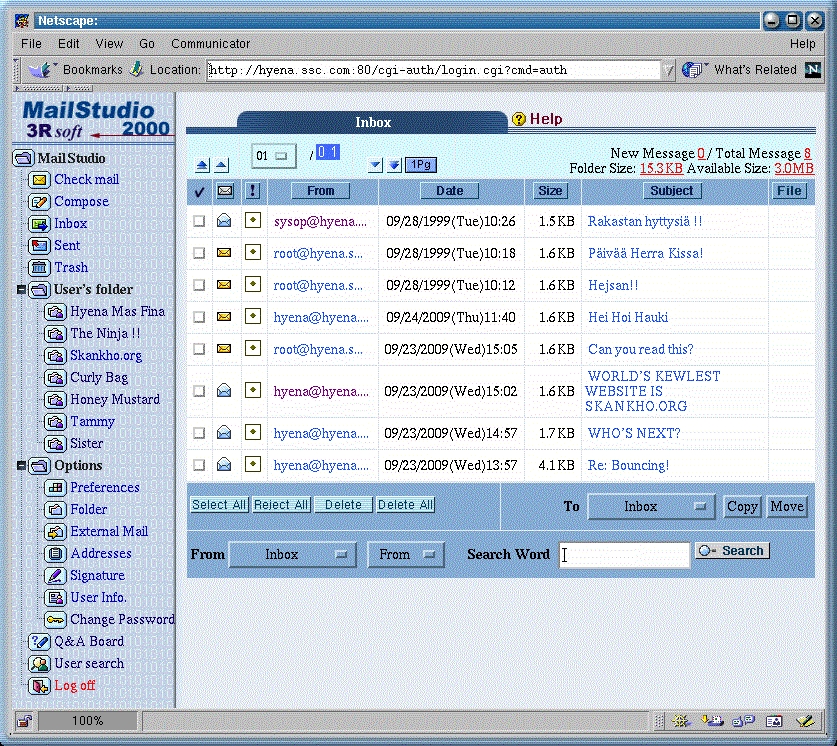
Figure 1. A Picture of the User Interface
From an administrator's viewpoint, MailStudio 2000 has a number of good qualities. Installation is easy, and should take no more than a few minutes. Likewise, starting and stopping the server is quite simple with start and stop. Administrators can change the user interface just by changing the HTML files, making all sorts of customization possible, as well as advertisements if you really want them. (Well, it wouldn't be the Web without ads.) The client/server model of MailStudio is based on open standards, so it integrates easily with other software. As an example, user database and mail files can be automatically backed up by cron; the manual gives the cron entries for doing this. For normal management of these user database and mail files, MailStudio's intended interface is a web based menu which is accessed by logging in as sysop. The interface provides menus for user management, application, admission and admin's (system) preferences. Of these, the administrator's preferences menu has the important, system-wide, technical parameters.
Figure 2. Administrative Interface
The server has a number of functions and features to help it deal with the complicated issues which arise in something seemingly as simple as web-mail. Not all mail is processed following the same protocol, so in addition to the standard Sendmail and SMTP, MailStudio is also able to support POP servers and retrieve mail from them.
Security, such as it is, is achieved by way of cookies, which are encrypted with MD5, and customers can order SSL services as well. The server supports numerous standards such as MIME (Multipurpose Internet Mail Extensions), multipurpose and dynamic HTML, ISO2022, Quoted Printable, BASE 64, uuencode, two-byte character sets and multiple-language environments. Embedded in the system is the CodeBase 6.3 database for dealing with all the data.
Overall, the server is flexible, adaptable and generally cooperative. For example, you can assign MailStudio to a specific port in order to avoid conflicts with a web site you are already running, and you can implement virtual mail hosts to achieve multi-domain support. In terms of resource consumption, MailStudio allegedly can support over one million users and can deliver fast service even during heavy loads. (I could not exactly verify this point, so we'll have to take their word for it.) The system is self-contained, with safeguards, simple methods and standard error procedures, and requires very little maintenance.
Holistically speaking, the problem with networks is security. Every packet of information usually travels through several machines, and all it takes is a packet sniffer at any point along the way and your data can be intercepted. This is a reason not to send unencrypted credit-card information over the Internet. (This is also why we want the U.S. government to allow stronger encryption.) However, when it comes to dealing with sending passwords over the Internet, it's a complicated problem to fix. For this reason, web-based e-mail has always been vulnerable to security breaches, whether through accessing a page directly to bypass login or through packet sniffers routing out people's passwords. Cookies have largely put an end to the former problem, but the latter is still with us. Fortunately, crackers (as Eric Raymond likes to call them) don't have too much interest in reading other people's web-based e-mail. Still, at login, your user name and password are sent unencrypted across the network to the MailStudio server, as are the e-mail messages you send and receive. Although this is the same situation as with TELNET or almost anything else, it's not safe and something must be done (hence secure shells). 3R says it can purchase and implement an SSL package from a third party and integrate it into MailStudio in order to have encrypted first-pass user name and password data. I think 3R should just write SSL into MailStudio since it is, after all, an open protocol. Maybe it'll show up in a later version; I certainly hope so. If systems were secure in the first place, fewer curious people would be in prison, and script kiddies wouldn't seem so annoying.
Even though it seems like a simple task, implementing a web-based e-mail server is complicated due to the numerous protocols, standards and platforms. Because of this, 3R concentrated on performing one task simply and doing it well. Much effort was put into making this software run easily, and I think it is a success. I'm not a web type (three cheers for Lynx), and I managed to have it up and running in less than ten minutes.
One strange quality of MailStudio 2000 is that the advertisement 3R sent with it didn't exactly correspond with the features on the server. The reason? MailStudio is still being improved. Now that the base product exists with everything working, 3R can concentrate on improving the features, such as search routines or user management. I have been told by 3R that their later releases will have all sorts of neat things. An on-line demo at http://www.mailstudio.com/ shows the system and demonstrates the current features.
I was definitely impressed with MailStudio 2000's ease of use. While I am concerned about the insecure first pass of user name and password, and the flickering during the first screen load, it seems to be quite resource-minimal. One strange thing I noticed is that all e-mail I receive from MailStudio comes with paragraphs formatted as single lines, which is a bit weird. Still, with web-based products so easy to use, it's not hard to understand how the Web has become so immensely popular and populated. MailStudio is more expensive than I'd like (which means it costs more than Apache), but I suppose if you have the resources to run a web site, perhaps you can afford the price—still, ouch.
MailStudio 2000 is targeted not only at free e-mail providers but at educational and commercial organizations, Internet service providers and government and public institutions. It received five Golden Penguins from TUCOWS and is listed as a Sun Microsystems software solution. You can download a trial version (which supports five users or so) from http://www.3rsoft.com/. It is Y2K compliant (well, wouldn't it be fun to have a product named MailStudio 2000 that wasn't Y2K compatible?) and it just so happens I'm running it successfully from a VArStation in which the BIOS clock thinks it's the year 2036 (though server problems will arise in 2038). If you're looking for a web-based e-mail server for your Linux box, definitely take a look at MailStudio. It's already very neat, and I'm told the next version will be a total web-based e-mail solution.

