
Porting Progress Applications to Linux
Progress Software recently announced that by the time you read this article, the Progress RDBMS will be available in a native Linux port. Why is this good news? Because it immediately makes thousands of new applications available on our favorite operating system.
Over 5,000 applications have been written in Progress by Independent Software Vendors (ISVs). All of these applications could potentially use Linux as a back-end server, and many, if not most, provide a character interface which would allow Linux to serve as a client as well.
If you are not familiar with it, Progress is an enterprise-level relational database and 4GL development environment which has been running on UNIX systems for 15 years. It supports a wide variety of operating systems, including servers for NT, AIX, HP/UX, Solaris, Compaq Tru64 UNIX and many other popular platforms. It also supports character clients on UNIX plus character or graphical MS-Windows clients.
Version 8.3 of the database engine, the first version to be ported, can store half a terabyte of data in a database. (Of course, if that's not enough, you can connect to a couple of hundred databases simultaneously.) Also, each database can handle up to 4,000 simultaneous user connections. Version 9, which will be ported shortly after 8.3, supports 1000 times the data and up to 10,000 users.
One of the nice things about Progress, in my opinion, is that it also scales down. If you want to run single-user on a low-end 486, you can. Database size can go down to less than a megabyte. Running a single-user session, or serving a handful of users on a small application remotely, can fit nicely in a 16MB Linux machine. Try running Oracle on NT and see what kind of power you need to get the same job done.
Where does Linux fit into a Progress deployment? In order to answer that, you need to know something about Progress' architecture.
Databases can be accessed in either single-user or multi-user mode. Single-user sessions give a single client process complete control of a database. Multi-user Progress sessions consist of three different types of processes: clients, servers and a broker process which manages database connections. Deployment architectures can be chosen to support a wide variety of business needs and available machinery.
A broker process runs on the machine containing the database. The broker manages client connection requests and allocates a shared memory area which is used by all the processes connecting to the database.
The client process is the one the user sees; it presents information to and accepts input from the terminal. A client may also run as a background process, in which case it is not associated with a terminal but is architecturally identical to a foreground client. Clients are of two types: self-service and remote. A self-service client runs on the same machine as the broker and the database, and handles its own database manipulation requests. A remote client uses the TCP/IP networking layer rather than connecting directly to the shared-memory area created by the broker. This allows the remote client to be on a different machine than the database. The broker spawns server processes to respond to remote client requests. Each server process can handle many simultaneous client connections. The remote client sends data retrieval and update requests to the server; the server executes the requests as though it were itself a self-service client, and sends the results back to the remote client.
This design easily allows separation of database and clients. Not only that, the communications between them are standard so you can mix and match operating systems. If you are currently running Windows clients against an NT server, you can move the database to Linux and the Windows clients will operate unchanged.
This flexibility allows Linux to fill several different roles in a Progress deployment. Granted, the ability to replace the back-end server machine with Linux is a real boon in several ways, which any Linux fan will be able to tell you: the smaller footprint, the difference in cost and the reliability of this operating system are already well-known. Also, remote maintenance comes free with Linux; you must otherwise buy not only the expensive OS license, but network-hogging third-party remote control software as well.
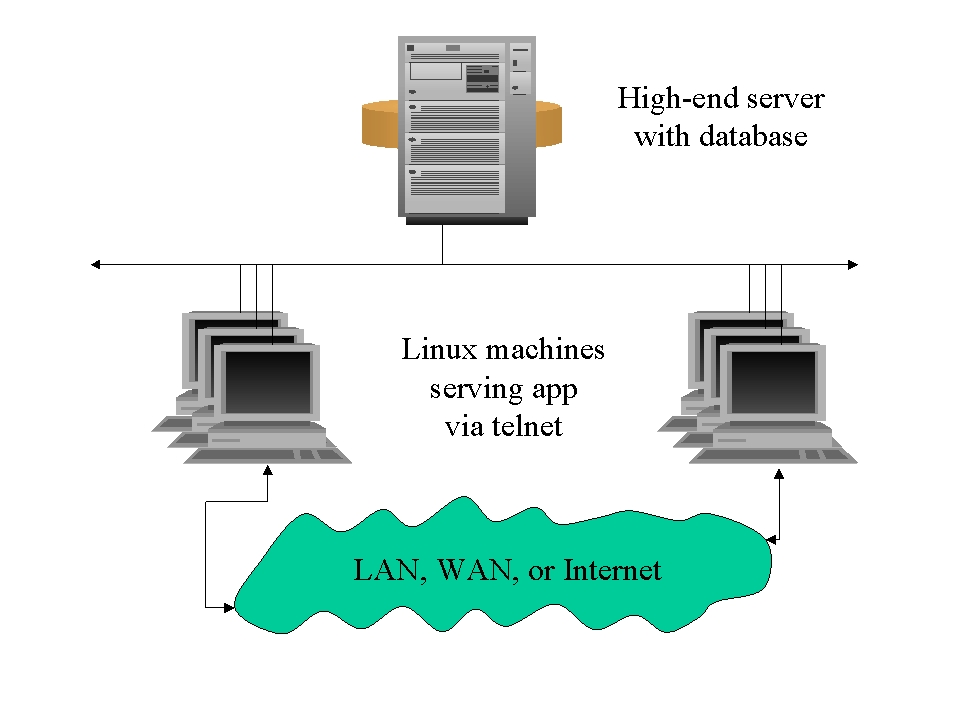
Figure 1. Linux can offload client work from an overburdened server.
Turn the situation around, and say you've already got a high-end UNIX server that 300 users telnet into in order to run their character-based application. If that single machine is struggling under the load of the database server plus running all the client processes, it is now easy to offload half the work, plus a fair proportion of the memory usage and disk I/O, by adding a few Linux servers to handle remote clients. Users no longer log in to your main UNIX machine; they log in to the Linux servers and use them as remote clients. Figure 1 is a diagram of this arrangement. Let's discuss four benefits of this arrangement.
One, the load on the database server is reduced. The memory consumed by running (say) ten clients on the machine is freed in exchange for one server process, which is about the same size as a single client. The number of clients a server process can support will vary based on the demands of the application. Server processes can typically serve the requests of anywhere from five to 20 remote clients simultaneously. Additional server processes are started automatically by the broker, based on the number of new connection requests from clients and on broker parameter settings. The CPU cycles which previously went to client calculations, screen manipulation and other front-end tasks are freed completely and moved to the new Linux machines. Any client-side disk I/O, used for temporary storage, record sorting and application printing or other output, is also removed from the server. Using Linux can therefore boost the available power of your expensive high-end server machine.
Two, security levels are increased because the users no longer need to have a login on your main server. Instead, they now use TELNET to log in to one of the Linux machines that contain no critical data.
Three, if all the Linux machines are configured more or less identically, which would make sense from an administrative standpoint as well, you increase the fault tolerance of your architecture. If one of the Linux machines needs to come out of service for some reason, those who were previously using that machine for their clients can immediately log in to one of the other Linux machines and continue their work.
Four, the machines running Linux need fewer configurations than you might think. Given a generous four or five megabytes of memory per client and very little disk space, a dozen or more well-behaved interactive clients should be able to run on a single mid-range processor. This small footprint, along with the price of PCs today, means that these client services can be purchased for well under a hundred dollars a seat. Compare that price with adding a second high-end server to perform the same function.
The networking bandwidth required between the Linux machines and the database server will vary based on your application. You might choose either to put the Linux machines close to the database server or to distribute them to your field offices, depending on the application demands and the available infrastructure.
Linux may have a place at several levels of your deployment and can in fact be phased in as needed, or used only where it is convenient.
Since the front end (application) and the back end (the database) are so independent, let's examine what needs to be done one step at a time.
To move an existing Progress character-based application, the good news is all it takes is a recompile. That's it! In fact, there are some instances in which you don't even have to recompile; if you are staying within the same machine class, the same r-code (compiled code) can just be copied from one machine to another and it will run. This is because Progress r-code is not truly compiled code, but rather an interpreted binary format. As long as you remain within the same machine class (defined as machines with the same byte alignment, endianness, and word size), your compiled code will not even need a recompile.
The only time any complications in this process will occur is when you have OS-specific code within your application. Progress code doesn't care what OS it runs on, but if you make a call to an external routine (such as ps with flags specific to your old OS), you will need to make those modifications. However, this situation is fairly rare. Common operating system functions (such as file copy and delete) can be handled generically within Progress by using statements like OS-COPY which work regardless of the underlying platform.
In some circumstances, porting an existing database is just as easy. Officially, Progress does not support copying a database between operating systems or machine architectures. In order to do this, you must do a dump and load. This is a process of extracting the structure and all the data from the database in an ASCII form, then copying the ASCII data to the new machine and loading it into the new database. However, there is an unsupported loophole which I take advantage of regularly. Currently, I dual-boot my laptop with NT and Linux, and I have a Progress database on an NT FAT drive which is visible when I boot Linux. This database is accessible from either OS. I have application code (uncompiled because that is more convenient for me, but I could also share a compiled version) which accesses this database no matter which choice I make at boot time. There can't be much better proof than that. The true technical limitations on copying databases are much the same as those for copying compiled code: if the machine architecture and the word size are the same, you should be okay.
If your situation does require a dump and load, and you want the time your application is unavailable to be as short as possible, there are some techniques which will dramatically reduce the down time of your database. I regularly travel to customer sites and have seen some extreme examples of this: one database, with a size measurable in tens of gigabytes, was unavailable for only 45 minutes and only in the final phase of their dump and load.
This sort of performance, however, requires some custom work in advance. Generally, it involves dumping and loading stable data ahead of the actual cutover point; the greatest time savings occurs when you can define stable data most broadly. For example, if you have modification dates on a table, the entire table can be dumped and loaded in advance; then, when you are ready to cut over to the new system, re-dump only those records modified since the first dump.
Porting an existing character application written in Progress is remarkably simple. With over 5000 applications already written, the arrival of Progress on the Linux scene should make a large dent in the “Linux has no application” argument. Progress is flexible enough in its deployment capabilities that it allows Linux to be integrated into existing deployments transparently to provide greater scalability and cost-effectiveness.

