UpFRONT
Open Source Software for Real-Time Solutions by Charles Curley compares Cygnus's eCOS to RTLinux, both designed for the embedded system market. Is there a place for both?
Web Client Programming Using Perl by Robb Hill describes how to monitor your own web site using Linux and Perl, in particular the LWP modules. He supplies scripts for creating an HTTP ping utility, paging using the Skytel web site and paging for SNPP servers. Use these scripts and keep cooking with Linux.
Java Servlets by Doug Welzel is an introduction to writing and running Java servlets on Linux. Servlets are Java programs which extend the functionality of the server and can be used to replace CGI scripts.
Bisel Bank by Pablo Trincavelli is a “Linux Means Business” article describing how a bank in Argentina uses Linux for testing database and web applications.
Perl in a Nutshell by Jan Rooijackers is a book review describing the contents, what is good and bad about it and why you might want to buy it. Perl is one of the most popular scripting languages in use today and the “nutshell” books are one of O'Reilly's most popular series. Don't miss this one.
Java 2 Software Development Kit by Harry J. Foxwell is all about the latest version of the Java SDK from Sun. Mr. Foxwell is a System Engineer for Sun and knows his subject well.
LIMP: Large Image Manipulation Project by Valient Gough tells us about designing a new library for processing large images using a minimal amount of memory. In this project, he uses C++, the Qt library and plug-in types for a number of interfaces. LIMP is being used for scientific image-processing needs, particularly aerial and satellite images.
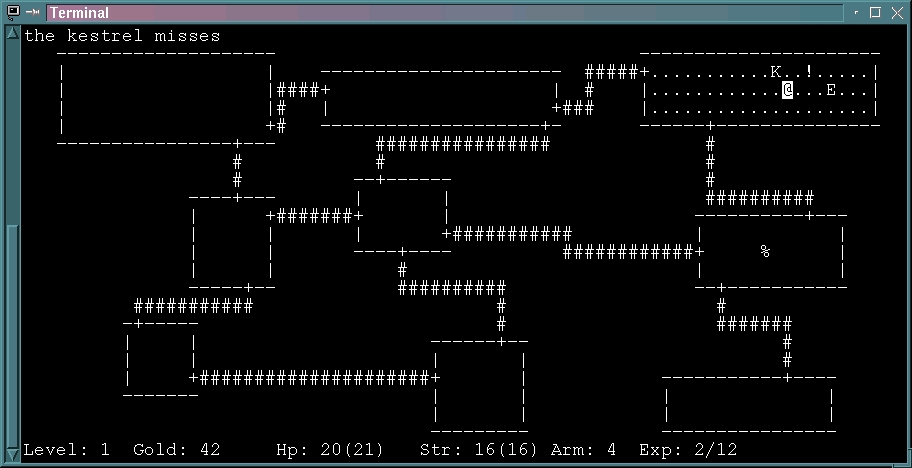
Some rogues are better off in dungeons. If you too are better off in a dungeon (or if your friends just think so), have a look at some of these classic console character-based role-playing games available for Linux. Have you ever wanted to be an @? Well, now you can, and as an @, you can guide yourself through hundreds of layers of algorithmically generated dungeons, encountering crazy creatures, mysterious treasures, problematic nymphs and even the notorious Kobolds, who burst when you strike them! What ever am I talking about?
Rogue was the creature that started it all. Written nearly 20 years ago, it was designed to run on “dumb terminals”, machines which were connected to mainframes but had no special powers of their own (such as graphics, for example). The intent was to produce a character-based adventure game, using the curses library, which would produce a new adventure every single time instead of reiterating the same plot over and over. This approach worked and produced a game which could surprise even its creators. Thus began a new genre of computer game, and generations of dungeon-crawlers were spawned.
Hack was one of the first Rogue-like games, and it introduced a new component—pets. You got to have a dog or cat wander about with you in the dungeon, and this animal was good company. Many items and new features were added, and the game became popularized in various formats across several platforms. As a child, I heard stories of a mysterious game called Hack which was supposedly a miraculous, ingenious game, vast and complex, like nothing I had seen before. In those days, stories soared into legends (like the rumor that Bard's Tale IV had been created but required a Cray supercomputer) and when I finally got around to Hack on the Amiga, it was already in another incarnation.
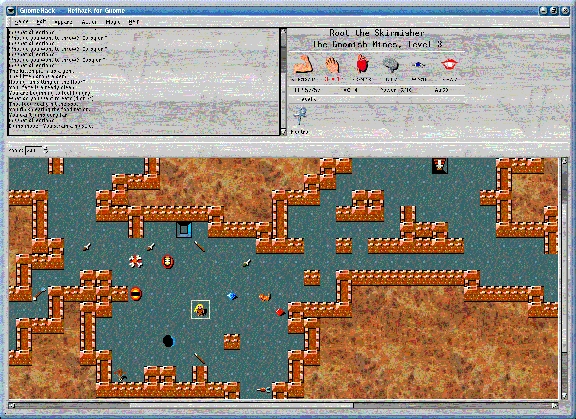
NetHack, the direct descendant of Hack, is the most famous of the Rogue-inspired games. It is extraordinarily complex, offering all sorts of classes, weapons, scrolls, magical rings, potions, creatures, locations and plots. The idea is that once you have outspent yourself (and your parents), you're better off seeking your fortunes underground by retrieving the Amulet of Yendor (well, so says http://www.gnu.org/; the game text has a different interpretation). Hence, you can become a Valkyrie (or a Wizard, Samurai, Rogue, Priest, Knight, Healer, Elf, Caveman, Barbarian, Archeologist or Tourist) and go out questing. There are dozens of levels which become immensely complicated, and the game draws on strategic thinking, cleverness and long-term strategy. NetHack is now available in two graphical versions, one based on Qt (QtNetHack) and one based on gtk (GnomeHack). These graphics are excellent and I recommend taking a look. This is a deep game (smile) which takes some time to get used to, but it's good fun and since it is a classic, it is a good way to expose yourself to hacker culture.
Moria is a Tolkien-inspired descendant of Rogue, written in 1983 for VAX machines and ported to UNIX in 1987. The point is to kill the Balrog. Dungeon levels are quite large, taking up several screens, as opposed to the single-screen dungeon levels found elsewhere. Hence, it is quite a bit larger than the original Rogue. Also, it features a town level, in case you want to come up for air. You can choose from numerous races and classes—if, for example, you've always wished to be a Hobbit (or believed you were one), now's your chance.
Angband is another Tolkien-inspired game (well, what isn't?) which was derived from Moria in 1990. The idea is to descend into a very deep dungeon and kill Morgoth, the Dark Enemy of Middle-Earth. The atmosphere is more serious than that of NetHack, so if the persistent humor and silliness of NetHack end up spoiling the fun for you, Angband is a good alternative. A developmental, multi-player version is also available.
ADOM, Ancient Domains of Mystery, is yet one more Rogue-like game which differs a bit from the others and offers much more in some areas. It has many different character classes, and the magical characters are especially interesting. A commercial version is planned, as well as a real paper-and-pen RPG (role playing game). ADOM is still version 0.9.9, but seems to have a large following especially among teenagers and players under age 10. It is being actively developed—the author doesn't seem to have run out of energy so far.
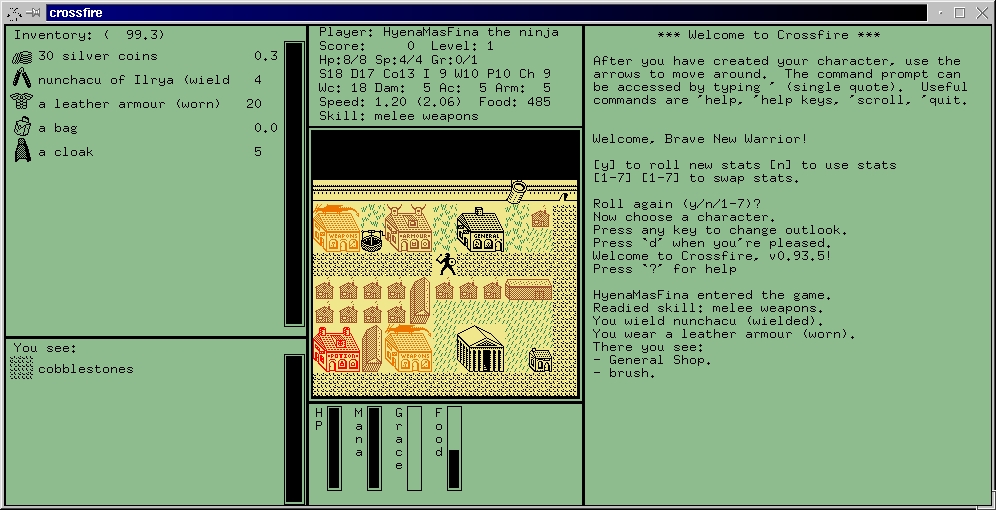
CrossFire is a different kind of game from the rest of these dungeon crawlers. The Linux Game Tome (http://happypenguin.org/) describes it as a cross between NetHack and Gauntlet, and that's actually fairly accurate. The game is graphical, multi-player (!) and immense. With over 150 different monsters, about 3000 maps, 19 character classes, about 65 different weapons, dozens of armours, helmets, shields and clothings, and 18 levels of magic available to wizards (with roughly 85 spells at last count), CrossFire is a whole different world in which you and your friends can live. Any number of people can have clients (even available for Java and Win32), but the server has to run on a UNIX-based system such as Linux. If you're tired of being an @ and want to be an animated graphic again, here's where you can do it!
—Jason Kroll
Year Alan Turing wrote Computing Machinery and Intelligence: 1950
Turing estimated the binary digit storage capacity of the human brain to be: 1010
Number of years Turing estimated would pass before computer storage would reach 109: 50
Wholesale price of a 109 (1GB) hard drive in August 1999: $150 US
Value of the Loebner Prize for the first computer to pass the Turing Test for machine intelligence (i.e., a computer in which the responses to the test are indistinguishable from a human's): $100,000 US
Year the Loebner Prize was created: 1990
Percent chance given by Turing in 1950 that a computer would pass his test by the year 2000: 70
Number of computers thus far to win the big prize: 0
Number of correct answers given by “Ask Jeeves” on July 27, 1999 to the question “Who is Linus Torvalds?” : 0
Year Ask Jeeves, Inc. was founded: 1996
Revenue of Ask Jeeves in 1998: $450,000 US
Market capitalization of Ask Jeeves at 4PM on July 2, 1999, at the end of its first day as a publicly traded company: $1.7 billion US
Total exports of the Congo in 1998: $1.2 billion US
National budget of Paraguay in 1998: $1.2 billion US
Millions of desktop systems at the end of 1998: 89
Millions of desktop systems at the end of 1997: 79
Windows 95 operating system market-share percentage: 57.4
Windows 98 operating system market-share percentage: 17.2
Windows NT operating system market-share percentage: 11
MacOS operating system market-share percentage: 5
Linux operating system market-share percentage: 2.1
Windows 3.11 operating system market-share percentage: 1.1
OS/2 operating system market-share percentage: .5
Percent increase in 1998 Linux shipments over 1997: 212
Estimated percentage compounded annual growth rate for Linux between 1999 and 2003: 25
Estimated millions of Linux customers worldwide: 10
Number of e-mails received in August at linux@ssc.com, asking the stock symbol for the company “Linux”: 14
Number of times Tux, or a reasonable facsimile thereof, appears in the August issue of Linux Journal: 48
Number of years required to build the Biltmore estate in Asheville, NC—the largest house in the U.S.: 6
Number of years required to build the Gates family home, referred to as “The House” in Medina, WA: 7
Number of square feet at Biltmore Estate: 175,000
Number of square feet at “The House”: 66,000
Number of square feet at The White House: 67,000
Computing Machines and Intelligence, Alan M. Turing, www.msu.edu/user/vattervi/turing/premium.html
The Loebner Prize, www.loebner.net/Prizef/loebner-prize.html
Red Herring on Ask Jeeves' debut, www.redherring.com/insider/1999/0702/inv-askjeeves.html
AskJeeves.com, http://www.askjeeves.com/
International Data Corporation (IDC), http://www.idc.com/
Jason Schumaker, LJ staff
The Biltmore, http://www.biltmore.com/
Remember the Turing Test? That was Alan Turing's famous test of computer intelligence, first published in 1950. Essentially, a computer will pass the Turing test for human-grade intelligence when it answers questions in a way that is fully human—that is, indistinguishable from answers given by a human being.
The search-engine business lives entirely outside Turing's shadow. Stupid answers are just not a problem—they're a standard. The more, the better. Case in point: the very popular and well-promoted site, Ask Jeeves (http://www.askjeeves.com/).
Jeeves is a bald and dapper cartoon that insists, like the game Jeopardy, that you frame your search in the form of a question. Here is a recent “dialog” I had with Jeeves:
Doc: Who is Linus Torvalds?
Jeeves: I think you may have misspelled something. Did you mean: Who is Linus Travelogs? Travelled? Traveled? Travailed? Travolta? Trivets? Trifocals? Travelogues? Gravitas? Traffics? Groveled? Grovelled? Gravelled? Graveled?
Doc: Huh?
Jeeves: Where can I read the chapter from Bulfinch's mythology about Orpheus and Euridice, Aristaeus, Amphion, Linus?
Doc: Uh. Let's click on Ask! again.
Jeeves: Linus was the instructor of Hercules in music, but having one day reproved his pupil rather harshly, he roused the anger of Hercules, who struck him with his lyre and killed him.
Doc: Thank you. —Doc Searls
It used to be flying toasters, tanks of fish and kittens cavorting on black backgrounds. But that was, well, very eighties. The most stylish new screen saver for Windows comes, of course, from Italy—pippo.com, to be exact. It defaults your idle screen to something much more Finnish or Antarctic or Linuxish, anyway. It's called “That Linux Feeling”, and it gives your Windows box that Linux look. To check out the latest, visit http://howto.linuxberg.com/saver/.
Apparently, the rumors are true. According to a report in ZDNet UK, Adobe's John Warnock recently caught wind of a planned company upgrade to Windows NT and overturned it in favor of Linux, which he describes as “a perfectly viable alternative to NT”. But he also said,
I want to pay for an operating system from a vendor with a contractual relationship that gives me recourse if things go wrong. Some people who have this utopian view that everything should be free don't understand the necessity for governments or corporations.
Of course, we wouldn't want to include Caldera, Red Hat or Linuxcare among those utopians. They're just corporations which deliver exactly what Mr. Warnock wants.
Who says Linux isn't for desktops? Ask the guys who get the service calls.
In the second quarter of this year, Linuxcare noticed a 27% increase in the number of desktop incidents, while service calls for file, print and web servers went down. Linuxcare co-founder David Sifry told us:
This industry is really quite interesting. The number of desktop incidents we get has surprised us. Many people are using Linux as desktop workstations for software development, VLSI design, and in financial services, among other things. And we have no idea where it will go next.
Here are the numbers:
Source: Linuxcare

Spending an evening enjoying Niagra Falls while attending COMDEX Canada in Toronto (July 15) are Evan Leibovitch of LPI, Matthew Rice of CLUE, Matthew Cunningham of Linux Journal, Dana Epp of CLUE, Mart Withers of Caldera and Allan Smart of Caldera.

Find a location that is well-known in your area and has plenty of parking. Be sure it has plenty of space and sufficient power sources. An added plus is having carts available to help people bring in their machines.
Host a DemoFest at a meeting about a month ahead of time to generate interest and recruit help.
Publicize in the education community (universities and secondary schools) and computer stores, libraries and major corporations (flyers and brochures in the cafeteria or break room). Ask about advertising on local cable access television and community calendars in newspapers.
Study the Linux Hardware Compatibility FAQ and the Linux Hardware Incompatibility FAQ and bring copies for your workers.
Practice installing Linux on a low-end PC to measure the amount of time it will take to complete. Do the same on a notebook computer and over a network (if you plan to offer this option).
Ask companies in the industry for CDs, literature and other items to use as giveaways.
Ask attendees to make a reservation in advance, stating the type of PC they will be bringing. Prepare for some to turn up without reservations.
Have an area at the front door for signing in and giving away promotional material.
Plan on giving all users a Linux CD, so they can distribute Linux to others.
Have random giveaways of books, T-shirts, etc.
Include Linux training seminars presented in a separate room.
Be kind to your workers. Have water and drinks handy. Order in lunch. Make sure they take breaks.
Bring a box of extra parts that people no longer need—you may need them to complete an installation.
Bring a camera.
—Michael Roberts, Cincinnati GNU/Linux Users Group
Melissa—Explore.zip—Back Orifice. If you think there has been a bad rash of viruses and crack attacks lately, you're right. And security experts say it's going to get worse, not better; the frequency of crack attacks is rising exponentially. So are the money losses from the problem. Computer Economics, a research firm in Carlsbad, NM, reports that American businesses lost $7.6 billion US due to software viruses during the first half of 1999—more than in all of 1998.
Curiously, the massive mainstream media coverage of these incidents completely fails to mention the one thing they all have in common: Microsoft Windows. Non-Microsoft operating systems such as Linux are invulnerable to macro attacks, immune to viruses, and can laugh at Back Orifice.
This simple fact explains why your Internet service provider never suffers from viruses; essentially all ISPs run their services off UNIX boxes, and about 40% of them run Linux. Evidently, businesses are finding this an increasingly attractive option; a recent Computer Associates survey reports that 49% of information technology managers describe Linux as “important or essential” in their enterprise plans.
One of the reasons for this trend is definitely security. Anyone running a Microsoft operating system on a machine visible from the Internet is just begging to be cracked. If you're concerned with computer security, you need to understand why—and why Microsoft will not and cannot fix the problem.
Linux and other operating systems like it were designed from the ground up to be used by several people on the same machine, and to protect those people from each other. The user interface of Linux is separated from the kernel, the privileged operating system core. And the kernel is carefully protected from being modified by ordinary programs. This is why Linux doesn't get viruses.
Microsoft Windows, on the other hand, has a one-person-per-machine assumption built deeply into it. There is no internal security, and the Windows kernel is not protected against being modified by user programs. In fact, the user interface of Windows is wired right into the kernel. This is why hostile programs coming in over an Internet connection (such as Back Orifice) can reach right through the user interface, deep into the operating system core, and infect it.
If you value your data and your privacy, you need to understand that Microsoft cannot fix this security hole. Too many applications (including Microsoft Office and the IIS web server) actually depend on the lack of security in the system. Furthermore, the fact that the source code for Windows is closed means it never gets properly audited for security problems.
How does Microsoft deal with this? Not well. Mainly, they tell lies and try to confuse the issue.
On August 3, 1999, Microsoft put a machine running a beta of its new Windows 2000 operating system on the 'net and challenged crackers the world over to break into it. A few hours after the announcement, the machine crashed. Microsoft spokespeople subsequently claimed that it had been brought down by electrical storms.
But the machine's own error logs showed there had been nine crashes due to errors in Microsoft's own software, not the weather. Furthermore, crackers did indeed get in and alter a guest book application during the short time the machine was actually up—a fact Microsoft tried to dismiss as irrelevant.
A few hours after Microsoft's challenge was announced, a Linux company in Wisconsin matched it. During the following three days, their Linux machine withstood 6,755 attacks without crashing once.
Which system would you rather trust your critical data to?
—Eric S. Raymond
Linux Mandrake 6.0 is out. I received it twice in the mail, so I know. I also put it on a partition of a VArStation to check it out. That's when the déjà vu came. I knew I had seen that screen before, “Welcome to Linux Mandrake”. Yes, dozens of times, only I seem to remember the phrase was “Welcome to Red Hat Linux”.
Linux Mandrake, you see, is based on Red Hat. It has a newer kernel, runs a well-configured KDE instead of GNOME, professes to be optimized for Pentium family processors, includes the usual Netscape, StarOffice 5.1 (the new version) and Corel Wordperfect, but at this stage it's still more a derivative of Red Hat than a totally independent distribution, at least so far.

One thing I discovered, though, is that Red Hat does successfully probe hardware. In fact, on the VArStation, Mandrake's installer (which is Red Hat's installer with the title changed) probed everything, which is a big improvement from E machines where Red Hat found nothing but the mouse. Even my home computer was never Red Hat probe-able, but then again, it's nearly a century old in computer years. The point is that when choosing between a VArStation, an E machine, and a “computer” from 1996, go with a VAr. Still, how do you decide between Mandrake and Red Hat?
Many people insist that Mandrake is better than Red Hat. Mandrake does come out later (by necessity), so it is more current. It also runs KDE, which seems to be winning the desktop's favor, and its configuration is pretty nice. It has more menu entries than I recall in Red Hat, and more useful links on the desktop (such as XKill). Mandrake also has some kind of automated online software upgrade function which seems to work—it would be so very Red Hat to have something like that. Mandrake also includes 5 CD-ROMs (though with less software than SuSE) and 100 days of e-mail support. (Well, phone support is a bit too social for us computer types anyway). And, it costs less.
Red Hat, even if it is older by an insurmountable couple of months, does have some points in its favor. For one, it has 700+ pages of documentation compared to Mandrake's concise 189. Also, Red Hat is apparently competing with Linuxcare in terms of support, whereas I don't know how Mandrake performs in this area, though they seem devoted to helping the new user. The Mandrake web site is full of enthusiasm about supporting new users, and maybe Mandrake, with its cute magician logo (Blue Hat?) will take an active role in bringing denizens of other OSes across the mountains to the western paradise that is Linux.
Mandrake is such a mysterious, exotic name, one might expect something a little more intimidating than a distribution for newbies (maybe Linux for sorcerers and witches or something). Still, it's a fine distribution, full of energy, with a following, and it's a bit funny (though maybe not intentionally), if you go for that. Linux Mandrake, based on Red Hat, copied Debian's login penguin, uses a blue hat for its logo, the BeOS color scheme in KDE, and named the distribution Venus (that's almost as good as naming a computer Amiga and then naming its chips after the developers' girlfriends). I hope Red Hat responds by naming their next distribution Aphrodite; when I make my distribution which has snakes growing out of the monitor, I'm going to name it... Well, in any event, Linux Mandrake does a good job of introducing Linux neophytes to elements of a few distributions. It may be among the better ones out there, especially for beginners.
Many people are bored with the console. “It's just text! Console games are stupid!”, they often announce. However, many games are available for Linux which take advantage of console graphics. They use the entire screen, don't require X and don't have silly borders and buttons all around them. Console graphics are fun, fast, and much easier than graphics in X.
The established Linux console graphics library is svgalib, with its sidekick vgagl. Svgalib is a low-level graphics library, and vgagl is a fast, frame-buffer-level graphics library for use with svgalib, containing many drawing, text, bitmap, screen buffering, palette handling and 3-D functions. Using these two libraries in conjuction makes programming graphics for Linux exceedingly easy, and both are included in practically all Linux distributions. Although svgalib doesn't work on some cards, needs root privileges to run, and may require an immediate reboot or even crash the machine if things go wrong, it usually works and it lets us do much more than X.
Here's a small example of how to get started. Next month, we'll move on to things which look impressive but are just as easy. The full details of svgalib and vgagl can be found with man svgalib and man vgagl. In case you're interested in a particular function, its man page should be available too; for example, man vga_waitretrace. If svgalib doesn't work, install the newest version which supports the new graphics cards. This example opens a graphics screen of 320x200 in 256 colors, draws some shapes, and waits for a key press before exiting. I recommend compiling with this command:gcc -Wall -O2 shapes.c -lvgagl -lvga -o shapes
#include <vga.h>
#include <vgagl.h>
#define VGAMODE G320x200x256
int main(void)
{
  GraphicsContext *screen;
  char key;
  vga_init();
  vga_setmode(VGAMODE);
  gl_setcontextvga(VGAMODE);
  screen = gl_allocatecontext();
  gl_getcontext(screen);
  gl_setfont(8, 8, gl_font8x8);
  gl_setwritemode(FONT_COMPRESSED);
  gl_clearscreen(0);
  gl_write(16, 68,
    "Console graphics are so cool!");
  gl_circle(160, 100, 60, 2);
  gl_fillbox(140, 80, 40, 40, 3);
  gl_line(0, 0, 319, 100, 4);
  gl_hline(0, 100, 319, 5);
  gl_setpixel(160, 86, 6);
  for (key=0; key==0; key=vga_getkey())
    vga_waitretrace();
  vga_setmode(TEXT);
  return 0;
}
—Jason Kroll
LinuxWorld was bigger then ever with all the vendors making major announcements. Here are a few of them:
Corel (http://www.corel.com/) presented a preview of its new Linux distribution, called Corel Linux, which will be available in beta in September. Installation is automatic, completing and then asking for special configuration options, such as networking and Ethernet. It includes a GUI for LILO and partitioning of the disk, two to eight virtual desktops, a file manager, new applications built on top of Debian and KDE and easy upgrade facilities.
KeyLabs (http://www.keylabs.com/) came to LinuxWorld to talk about their product testing and certification programs. Testing is focused on hardware compatibility with Linux and is vendor-independent. KeyLabs has been in business since 1996 providing independent, cost-effective testing for the network industry. It is a member of the Canopy Group.
Alpha Processor, Inc. (http://www.alpha-processor.com/) launched its strategic partner program to bring high-performance Alpha applications to enterprise customers worldwide. API provides chip sets and motherboards to manufacturers and is focused on mid-range servers and high-end office workstations. Companies already involved in this program to expand the number of Alpha applications include Cygnus, MySQL, Covalent, Atipa, the LinuxStore and several of the major distributions. Pricing is fast becoming comparable to Intel.
theLinuxStore (http://www.thelinuxstore.com/) launched its PIA (personal Internet appliance) and Element-L Linux-based product line. The PIA provides Internet access, e-mail and word processing, all for $200 US without a monitor. theLinuxStore also offers Alpha solutions from API. It is a subsidiary of EBIZ Enterprises.
Knox Software (http://www.arkeia.com/) showed off its Arkeia backup product on a huge flat screen—the gauges were awesome. Arkeia provides job management, e-mail and a new command-line interface. It is aimed at mid-range market (ISPs, government, et al.) and provides parallel network backup, multi-tape/multi-node restoration, on-line index, security and a distributed client/server architecture.
Magic Software (http://www.magic-sw.com/) came to the show with two South African penguins last seen in the second Batman movie. Magic announced it has ported its e-commerce solution eMerchant to Linux. Previous ports had been done of their development tools that provide a multi-platform database environment to speed development of business solutions. The development kit for Linux is freely available for the single user.
ParaSoft talked about the new versions of CodeWizard and Insure++ that will be coming out by the end of September. RuleWizard, an extension for CodeWizard 3.0, will give developers the option of creating their own rules and will also be out around that same time. A beta version of their new Java testing tool, jtest, will be available in October. ParaSoft products are multi-platform, working on Linux and other UNIX systems as well as Windows.
The Motorola Computer Group is announcing a unified Linux strategy that provides our OEM customers with a broad selection of Linux-based platforms, open-source software, service and support, training and integration services. In support of this broad initiative, we're collaborating with two leaders in the Linux community: Lineo and Caldera Systems. —Noel Lesniak, Business Manager of Linux Telecom Platforms for MCG
The Motorola Computer Group, of which we are a part, has a large emphasis not only in telecom but in other embedded devices. They are a large system-board vendor, both Poser PC-based and X86-based, both of which we'll be targeting with our embedded Linux solution, Embedix. —Brian Sparks, CEO of Lineo
(For complete statements by Mr. Lesniak and Mr. Sparks, as well as Ransom Love, CEO of Caldera Systems, see http://www.linuxjournal.com/articles/misc/005.html).

Pictured (from left to right) are Robbie Honerkamp, Steve Lewis, Jon “maddog” Hall, Greg Hankins, Antoni Dabed, and Reg Charney. Will World Domination be bearded instead of televised? These fellows seem to think so!
When we announced at Lotusphere that we'd be porting Domino to Linux, we got a standing ovation. From ten thousand people. —Don Harbison, Marketing Manager, Notes/Domino Product Marketing, Lotus Development Corporation
We did an internal survey of six hundred people to determine populations at levels of Linux knowledge. At the bottom level you had to know how to spell Linux. All 600 could do that. At the top level, you had to be able to hack kernel code. To our amazement, we had 120 in that group. —Felicity McGourty, Director, Problem Management, Tivoli Systems
Inprise (http://www.inprise.com/), still better known to most developers as Borland, is jumping into the Linux space with both feet. Their own Linux developer survey (which drew respondents from Slashdot and Linux Today) showed a high degree (72.3%) of interest in Rapid Application Development (RAD) and Integrated Development Environments (IDEs), which have long been a Borland/Inprise specialty. In fact, the top answer to “Which language are you primarily interested in developing in on Linux?” was Inprise's own Delphi (43.9%). The first Inprise product for Linux is VisiBroker for Linux, a new version of the company's popular Object Request Broker (ORB).
Cosource.com (http://www.cosource.com/), the new cooperative market for open-source development, launched a live beta just before LinuxWorld Expo. During the show, the number of proposals to develop open-source projects increased to 10, and financial commitments to the same projects jumped from $50 to $1,640. Driven by the rising interest in open-source development, Cosource.com expects these numbers to multiply over the next few weeks and months, leading up to the official launch of the service.
Due to numerous complaints about subscriptions and other unresolved problems with our subscription house, we have brought subscription fulfillment back in-house. We value our subscribers and want them to receive the best service possible.
All information from the outside fulfillment company is now in our own database, with a reworked computer database system specially designed for the task. Visit the LJ web page at www.linuxjournal.com/ and click on “subscribe”. Our secure form is at www.linuxjournal.com/xstatic/subs/customer_service.html. Using the 8-digit subscriber number on your mailing label, you can inquire about a current subscription, as well as order back issues, LJ archive CD-ROMs, renewals and new subscriptions, and pay an invoice. The information displayed will be current as of the time you made the inquiry. Your questions, problems and concerns will now be handled much more quickly, by a knowledgeable staff, using Linux, of course.
Another benefit to subscribers is free access to all back issues on-line at interactive.linuxjournal.com.
Thank you for your patience during this period of transition.
Now that Red Hat has gone public, other IPOs (initial public offerings) are on the horizon. We are sure to see one from VA Linux Systems and Andover.net. In addition, don't be surprised to see IPOs from other Linux players over the next year.
As most of us are computer gurus, not stock market gurus, I thought it appropriate to find out how an OpenIPO works. I asked Michael Ackrell of WR Hambrecht + Co to explain it. Here are his responses to my questions.
Q: What is OpenIPO?
A: WR Hambrecht + Co, the new investment bank founded by industry veteran Bill Hambrecht, uses a Dutch Auction method, dubbed OpenIPO, to price and allocate shares in an IPO. Under the auction, orders are received for shares at various price levels. At the end of the auction, orders are accepted starting with the highest bid price and continuing at the lower prices until the number of shares being offered has been sold. Each investor pays the lowest price accepted, or the clearing price. In addition, investors bidding above the clearing price will receive full allocation at that price. Investors bidding at the clearing price will receive pro-rata allocation. Investors who bid below the clearing price will not be allocated shares. For example, a company files a 2 million-share IPO with a filing range of $12-15. Orders are received as follows: 1 million shares at $18; 500,000 shares at $16; 750,000 shares at $15; 500,000 shares at $14; and 500,000 shares at $13. For this offering, the clearing price is $15. Investors who bid above $15 receive full allocation; investors who bid at $15 receive pro-rata allocation; and investors who bid below $15 receive no allocation.
Q: What are the advantages of an OpenIPO over the traditional approach?
A: OpenIPO, as the name implies, is open to any investor, including large institutions, the over 1,400 small- to medium-sized institutions, and the significant number of retail investors. Institutional investors like the system because they are able to receive the full amount of shares they want, if they bid appropriately. Retail investors like the system because it provides them access to IPO shares, and their orders count the same as those from institutions. Issuers benefit from the system because their stock is available to a much wider group of potential investors. Furthermore, the auction attempts to establish a more efficient pricing environment, one that captures the true demand for a stock in the IPO price rather than in the aftermarket.
Ultimately, through OpenIPO, the market, not the underwriter, prices the IPO. While the system will not alleviate all aftermarket price fluctuations, it should put more money into the hands of the issuer.
For the Open Source community, OpenIPO is a way for developers to actually receive shares in an IPO. Under the traditional approach, they would not be able to get any shares. OpenIPO provides better pricing for the issuer and better allocation of stock. Red Hat left a lot of money on the table, as the price rose significantly on its first day of trading and it was unable to get stock into the hands of its developers.
Cygnus Solutions announced plans to release the source code to Cygnus Insight, a graphical user interface (GUI) for the industry-standard GNU debugger, GDB. Known in programming circles as GDBtk, the Cygnus Insight GUI provides the technology for effective and efficient debug sessions by improving a software developer's ability to visualize, manage and examine the status of a program as it is running. The source code for Cygnus Insight debugger will be available from Cygnus at http://sourceware.cygnus.com/gdb/.
Kasten Chase, a provider of host access connectivity solutions announced that its VersaPath web-to-host product (http://www.versapath.com/) will support the Linux operating system and Java client technology, making this complete web-to-host solution more flexible. VersaPath fully integrates desktop and browser clients in a single solution.
Metrowerks Inc. (http://www.metrowerks.com/), a supplier of software development tools for telecom, desktop, embedded systems and consumer electronics, and SuSE GmbH (http://www.suse.com/), a provider of Linux software and consulting services, announced a partnership to provide CodeWarrior software development tools for the SuSE Linux operating system.
The Debian Project announced a hardware vendor commitment from Linux Laptops Ltd. Linux Laptops is the only hardware vendor devoted exclusively to delivering portable computers with Linux software installed and ready to use. Laptops with Debian GNU/Linux pre-installed can be ordered via the company's web site at http://linuxlaptops.com/.
Stormix Technologies in Canada announced the alpha version of a new Linux distribution called Storm Linux. Based on the Debian GNU/Linux distribution, Storm Linux is designed to be easy to use and simple to install. Its target market is both the server and the desktop market. All development for Storm Linux will be open source. The final release of Storm Linux is expected in the fourth quarter of 1999.
Red Hat, Inc. (http://www.redhat.com/), a developer and provider of Linux-based operating system solutions, announced that Global Knowledge, an independent IT training company, will provide hands-on, real-world training and certification nationwide for Red Hat Linux, including the Red Hat Certified Engineer program.
Hummingbird Communications Ltd. (http://www.hummingbird.com/), an enterprise software company, announced it has joined Red Hat's Independent Software Vendor Program and will participate in joint marketing activities. The new relationship will give Linux users access to all of Hummingbird's fat-client connectivity products including Exceed, HostExplorer, NFS Maestro Server, NFS Maestro Client, NFS Maestro Gateway and NFS Maestro Solo.
Stalker Software, Inc. (http://www.stalker.com/) announced the LinuxPPC version of their high-end CommuniGate Pro messaging system. CommuniGate Pro is a Unified Messaging Server which supports most major operating systems. On all platforms, CommuniGate Pro presents the same interface and uses the same file formats, allowing any organization to switch server platforms in less than an hour.
SourceGear Corporation (http://www.sourcegear.com/) announced today that it has acquired Cyclic Software and is looking forward to the opportunity to be involved in the support and development of CVS. SourceGear is a new identity for an existing company and is the founder and sponsor of the AbiWord project. They are active participants in the free software world and intend to serve the community as active maintainers of CVS and leaders in the ongoing development of this tool.
Oracle announced it was developing a computer (Intel-based) with no hard drive that will sell for $150 without a monitor, $250 with a monitor. It will come with the Linux operating system and Netscape Navigator installed. A CD-ROM drive will be used for booting the system and upgrading software. Dates for its manufacture and release have not been set.