
The Use of Linux in an Embedded System
I work for a company that's involved in the design and manufacturing of custom circuits. Historically, we have designed printed circuit boards and boxes that are further integrated by our customers into their systems. Until recently we were rarely involved in what is commonly called systems design and integration. However, times are changing and as we broaden our customer base, we have adapted to meet these needs. Most of the time, we have been able to meet the immediate requirements using DOS and in some cases Windows. This year, we began using Windows 98 to be able to use some of the newer video capabilities, and in one case, Linux stepped in to quickly solve a network connectivity problem. This paper is a brief description of one project that provided the opportunity to get more involved with Linux and the capabilities of this new operating system.
Recently, a customer, who is involved in retail sales and has customarily done their own systems integration, asked us to look at designing a Card Access System to replace their existing system. There were two primary reasons for this. One of these was cost. They felt that by designing a system to specifically meet their requirements, the production cost would be lower than by asking for customization of a product already on the market. The second reason was much more important to them. They wanted to be able to extend this new system and add interfaces into other parts of their overall store system. The store system includes their point-of-sale (POS) controller and a link to a security video system. These aspects of the system design will be discussed in more detail later.
The basic requirements to be met were:
Entry into an area was to be controlled through the use of a credit-card-style key.
If a user did not have their key it would be possible for them to enter the number manually.
Employees could be added or deleted either automatically through the POS system or manually by the store manager.
Access to an area was granted or denied based on the key and the type of area in question.
Configuration of the system could be changed easily on site.
If any area was accessed without a valid key, an alarm was to be sounded.
Alarms could be reset by a manager, or optionally, by any valid key.
Alarm conditions would be sent to the security video system.
Managers would be able to override the system and allow doors to be propped open for extended periods of time.
A must was the capability to query the system and examine activity based on area, time and/or employee.
Although these requirements are fairly basic, three things stood out. The first was they wanted the updates of the access database to occur from the POS system. However, this was something that remained “in the future”. Because of this, the second point was updates would need to be made locally which required an intuitive interface. Finally, the design of the security video system was being designed at the same time so the link to that would also be in the future. Other than having so many points that would remain for in the future, this was quite typical of many of the projects we've done. One other difference was we were to deliver a complete system rather than just the parts.
Because of the distributed nature of the store environment, the decision was made to use an EIA RS-422 type of interface to distribute the system throughout the store. The basic idea was to have several serial lines from the central PC going out to multiple door-access modules on each serial line. Each door-access module would control up to four readers (or doors), see Figure 1. The choice of four readers was based on a typical proximity of doors and the amount of wiring needed for the readers, the solenoids and alarms. Since we had designed card readers and other data entry type of equipment in the past, it was decided to implement the card reader as a wall-mounted panel with an 8051 type device controlling it. Any entry from either the keypad or from a card swipe would be buffered and sent to the door-access module when polled. The door-access module would later forward it on to the central PC when it was polled. The design of the system allows up to ten door-access modules per serial link or a maximum of 40 doors per serial link.
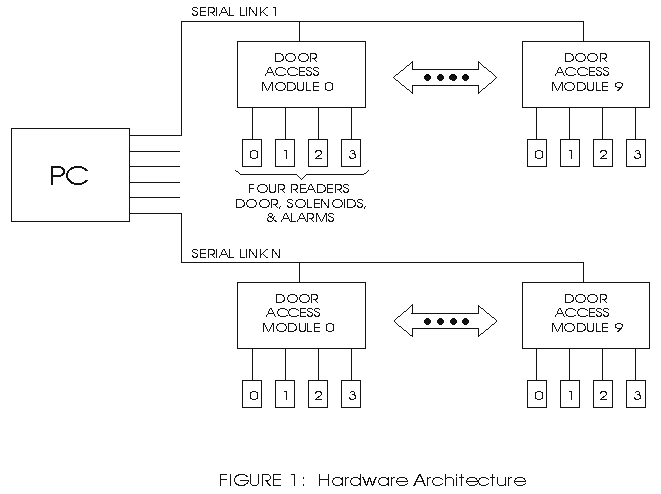
Figure 1.
When the project was started, the feeling was that we would use Windows 95/98 as the operating system. This was a natural considering that in addition to the necessary communication it could provide database services through the use of Microsoft Access and an intuitive user interface. However, as the hardware design progressed, it became apparent the programming resources would not be available within an acceptable time frame. When it came time to allocate resources for this job, I was winding down from another job and was asked about how I would approach the design of the user interface. Not being very familiar with Windows programming but having some exposure to the browser interface, I asked if it would be appropriate to switch to Linux and provide the user interface through the use of Apache and an appropriate browser. The design team immediately picked up on the idea and presented it to the customer. When it was pointed out that this implementation would not require the user to be present at the equipment, which is typically crammed into a closet, the customer responded, “Neat.” When asked if they would have objections to implementing it on Linux, their response was, “Cool.” With this, I was on my way.
Several aspects of using Linux needed to be considered before actually committing to this program. Many companies have been battling with these issues as Linux has struggled to move into the mainstream. The most important to us was whether or not the development resources would be available to us. Having worked with the GNU utilities, namely gcc and gdb, on a previous project, I felt developing the main program would present no problem. The next issue was the support required to allow the database interface to be provided through the user's browser. Again, a little research showed not only was the support there, but also there were many choices. One question that was asked of me was how we would handle the constant flux of kernel development. It didn't take long to realize it was not necessary to continually upgrade these systems just to stay up to date. All we needed was a workable version that could be propagated through the whole product. Since the source code is available, if the kernel were to develop in a direction incompatible with our system, we would not be abandoned with an albatross.
It seems that programming for a serial line in any system is a challenge and nothing comes easy. This was particularly true for this project as I had minimal experience with the UNIX environment and had to handle up to eight serial ports. Because of previous experience, the design team had already selected the Digi International eight-port 422 card. My first task was to set it up to run under Linux. I felt like I was groping around in the dark and looked for any kind of confirmation that I was doing things right. I tired to use minicom with a loop-back plug just to see if it worked. If it had, there'd be little mention of it here, but it didn't, and I spent considerable time reviewing what I had done. Finally, I called the Digi International support people. Of course, they had me try all the usual, and I was willing to entertain them on the off chance that I had overlooked something. To make a long story short, after several cycles of e-mail, one of their second-line support people picked up on my plight. While working with him, I certainly learned much about the inner workings of Linux, and it was worth the time for that alone. Finally, we discovered the problem was in the version of the driver I had; in fact, it had not been written to support the 422 card. A simple change and it started working. This experience proved to me that Linux is indeed a supported system.
Now that all the hardware was in place, it was my job to make it work. I was rather puzzled as to how I would handle up to eight serial interfaces and so I did some reading. This included the appropriate HOWTOs and any books I could get. Fortunately one of them was Beginning Linux Programming by Neil Matthew and Richard Stones, Wrox press, 1996. In it, they develop an excellent example of the use of FIFOs to communicate between tasks. I took their example and expanded it, so that each serial interface had its own task and all communicated through FIFOs to the central controlling task. To see how the various tasks relate, see Figure 2. This proved to be an excellent choice for two reasons. The first is that the central controlling task could spawn a task for each serial link. If only one was needed for an application, only one task was spawned, etc. The second is that the serial task could perform all polling, error checking and retransmission without involving the controlling task in any way. This made the controlling task much simpler in that it dealt only with valid messages that needed action.
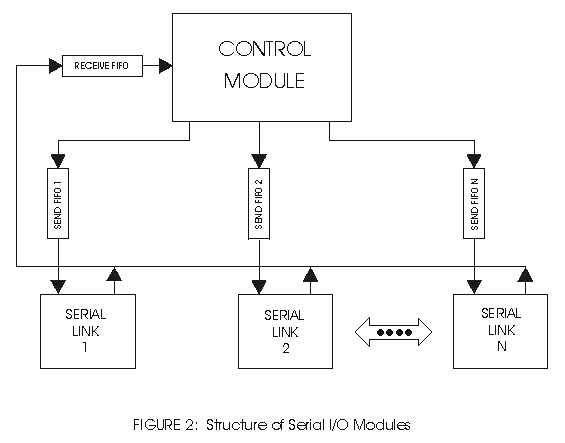
Figure 2.
One of the problems I've had in the past with programming serial links is that, unless you can master the interrupt mechanism, the system spends a large amount of time spinning its wheels waiting for something to happen. In the Linux system, I was able to use the select call to allow each task to go into the idle state until something needed to be done. This happens while the controlling task is waiting for a message to arrive from one of the readers. The timeout feature of the select call was also used to trigger a background task. If no messages arrived from any reader within ten seconds, a subtask would perform background housekeeping. It also happens in the serial task. In this case, the select is set to wake up on arrival of a message from either a reader or the controlling task. Again, the timeout feature was used, but this time it indicated that one of the door-access modules had failed to respond, which is indicative of a hardware problem.
With these basics in place, the development of the rest of the program progressed very rapidly. I want to point out that the multi-tasking power of Linux and the capabilities of gdb came through during this phase. Since the serial task was spawned by the controlling task, no screen was attached, and thus, there was no way to print the usual diagnostic messages during the development phase. One of the first things I did was to learn how to use syslogd to report error conditions within these tasks. Secondly, I used the capability of gdb to connect to an already running task and debug it.
This was one area where we had just enough experience to be dangerous. We knew it could be done and this was one potential hot spot. In evaluating various database packages, we looked at the licensing terms and the availability of support for embedded and web applications. It seemed as though many of the databases available for Linux took care of the last two requirements. The licensing aspect was more varied in that several of the better-known packages provided for a single user or non-commercial use at no fee. Since we would be installing this on many systems and for commercial purposes, licensing was an issue we didn't want to overlook. When we pursued it, we found some of the license fees were higher than the going rate for MS Access. That alone eliminated some of the choices. We eventually settled on using PostgreSQL. Besides the very liberal copyright, we were strongly influenced by the availability of high-quality documentation. Having the opportunity to review the manuals before even committing to downloading the code was enough to reassure us this was a good path to follow.
Once the database was chosen, we had to get down to the details of implementation. The first part was to define the schema. Having had some experience with SQL previously, I found that psql was easily adapted. Knowing that the schema was likely to change as the project evolved, I wrote a few scripts to define all the tables and fill in default values. This took care of setting up the database. The next step was to define the interface to the control program. On the same premise that the database schema would change, I set up the interface as a separate module with subroutines to read selected data into working buffers. With the exception of the log table, all of the tables were read only for this function. Thus, there is a subroutine to read a selected record from each of the tables. The only other exception to this approach is that when the system first came up, a way was needed to determine just how many doors were implemented. This merely took a set of subroutines that would open the table, return the next entry in the table on each call and then close the table. This allowed the program to scan all possible entries to set up the communications links and other structures. All the functionality I needed was provided by the lilbpq library included with the distribution. It turned out to be easier than I had first expected.
This aspect of the project is a bit more complicated because of the number of different packages involved. If you recall from the outset, the idea was to use the web browser as the user interface. This meant we needed to provide a web server on our end of the link. For anyone in Linux, the choice of Apache is a no-brainer. However, we needed to link it up to our database in some way. Because of the availability of Perl expertise, we chose to go that route. In order to provide a complete package, we also needed to include other modules. For the interface to the database, we added ApacheDBI, DBD for Postgres and the Perl DBI package. To support all we needed in Apache, we added Digest, HTML-Parser, MIME-Base64, URI, Apache-SSI, libnet, libwww-perl, and mod-perl. Quite a conglomeration of packages, but when installed correctly, it all worked very well.
The design of the user interface was broken into two primary sections. The first was a set of routines that formats the data for display on the user's screen. The second is a main routine that accepts input from the user and processes it. Generally, that processing consists of updating the database and passing control to an appropriate routine to display a new set of data for the user. On top of all this, Javascript was used at the browser level to perform validity checking before passing parameters back to the main routine. Because of the amount of data being passed back and forth between the browser and the system, we kept things fairly simple. The only graphic we used was an identifying logo.
In general, the user is allowed to select a specific table from a top-level menu. Once a table is selected, the user is allowed to list the current table, look up an existing entry, modify an entry, and of course, add or delete entries. Since the data in the various tables may be somewhat sensitive and the people defining a door have different needs from those defining job codes, we added one other table to the system. The security table has nothing to do with normal operation of the system, but instead determines who may see what tables. It worked out nicely and it also gave us a means of allowing only certain users to have access to the system.
One of the primary questions to ask yourself at the end of the project is: Should we have done it differently? Although there is a lot of pressure to follow the Microsoft flow because people are familiar with that environment, I'd have to answer “No.” The system as we installed it has met or exceeded all of the customer's expectations. The facilities provided with the linux operating system have allowed us to deliver a system that is reliable and is easily serviced and upgraded. For example, cron is used in conjunction with the logrotate utility to ensure that the log files don't fill up all disk space. Yet, at the same time, we can easily review the last four weeks of data. In a similar vein, PostgreSQL provides all of the database services that are required and, along with a quick script, delete stale data. These together keep the system from getting bogged down with bloated files. Other utilities come into play as well, the apcupsd daemon monitors the ups and ensures an orderly shutdown if necessary. As a side benefit, we also have a log of the power in the building. Using mgetty with pppd allows dial-in for any servicing that may be required. So far, all updates to the system have been handled through this path as the current network connection between us and the site is very slow.
The choice of using apache to provide the GUI couldn't have been better. When we started, the idea was to allow any browser on the network to gain access and allow updates to occur from remote locations. As noted above, the network connection is slow so this has not happened to any great extent. Also, by coincidence, the initial site did not have any other local machines. To take care of this situation, the X windows system was put into use and the Netscape browser is used at the machine. A special login was defined that placed the user into Netscape and on exiting X windows, the user is logged out. Security has been retained and the user is none the wiser.
Another thing to ask is: Where might we be headed in the future? The first step is provide a serial link to report activity to the external security system. A second is to have updates to the system database be done from another machine. Initial discussions centered around using a spare serial ports for these functions. No problem! In getting this far, we have all the experience with serial programming to know exactly what's needed for both tasks. Later discussions have moved towards using a TCP/IP link for the update function. Again, no problem with the networking environment provided by linux!
We have also been asked by the customer about setting up a central monitoring facility with the intent of being able report hardware failures. With the networking capabilities, both direct and dial-in, it was fairly simple to propose a system where a central unit could poll all of the units in the field. Alternatively, the field systems could call in and report their health. The system could even be a hybrid of these two approaches! The customer has not yet responded to this proposal, but it is not a big step to see that not only can all systems be monitored, but all program updates could be handled through this mechanism as well.
As you may see from my enthusiasm, I'm all for linux! The biggest barrier we've had is that of the familiar environment that people have come to expect. My expectations are that, given time, there will be a shift in the linux world and there will be 'education' of the masses and it will become more natural to use linux for projects of this type. In anticipation of this type of shift, the system was recently ported over to Red Hat version 6.0. With some minor tweaking for Apache and a recompilation of our code to use the new libraries, the transition was fairly uneventful.


