
Remind: The Ultimate Personal Calendar
Remind is a calendar and reminder program for Linux and most UNIX Systems. I started writing Remind in 1989 because I was fed up with the limitations of the UNIX calendar program. In the last ten years, it has accreted features and has become one of the most sophisticated calendar programs I've seen. I'd like to take you on a journey through the history of Remind, demonstrating some of the features which lead me to immodestly call it the “Ultimate Personal Calendar”.
First, let's start with the venerable UNIX calendar program. This program simply scans a text file for lines containing likely-looking dates. It prints any lines containing today's or tomorrow's date (where Monday is considered “tomorrow” relative to Friday). You can also arrange to have reminders mailed to you.
Well, this is fine for very simple things. However, there is no provision for repeating reminders, so you can't (for example) remind yourself of something on the first of every month.
The next step up in sophistication is cron. This lets you specify dates in a relatively sophisticated format, so you can remind yourself of daily, weekly or monthly events. Still, cron won't handle fairly simple things like events which happen on the first Wednesday of every month.
To remedy these shortcomings, I started work on Remind. In its simplest form, Remind is similar to calendar in that it reads a text file and sends reminders to standard output. However, Remind uses a sophisticated date-specification language which allows very complex reminders to be issued. Although the language is sophisticated, it is still quite intuitive for simple cases. Let's look at a few examples from a Remind script file:
REM 6 January MSG David's birthday.
That example is fairly straightforward. On January 6 each year, it reminds me of my birthday. But suppose I need advance warning of my wife's birthday, so I have time to buy her a present. Try this:
REM 20 December +7 MSG Norine's birthday is %b.A little more complex, but still understandable: The +7 means Remind starts warning me seven days ahead of time. The %b is a special substitution sequence, and it works like this:
On 13 December, %b is replaced with “in 7 days time”
On 19 December, %b is replaced with “tomorrow”
On 20 December, %b is replaced with “today”
How about some more tricky reminders? My local Linux users' group meets on the first Wednesday of the month. How do we express this in Remind?
REM Wed 1 MSG OCLUG Meeting.
How does it work? The Wed is recognized as a weekday token, and the 1 as a day-of-the-month token. If both of these tokens are present, the trigger date is the first weekday on or after the day-of-the-month. If you specify multiple weekdays, the first matching one is used. Here are a few more illustrations:
REM Wed MSG Issued every Wednesday.
REM Mon Tue Wed Thu Fri MSG Issued every working\
   day.
REM Mon Tue Wed Thu Fri 1 MSG Issued first\
  working day of the month.
REM Sat Sun 1 June MSG Issued first weekend day\
  in June.
Seemingly more difficult things like the first Tuesday after the first Monday in a month are, in fact, easy: a little thought shows that the first Tuesday after the first Monday in a month is simply the first Tuesday on or after the second of the month:
REM Tue 2 MSG Presto! First Tuesday-after-Monday.The last Monday in a month is handled like this:
REM Mon 1 --7 MSG Last Monday of a month.This one is rather tricky: the Mon 1 part is the first Monday of a month, but the --7 means “go back 7 days”. So that reminder is triggered seven days before the first Monday of every month—which happens to be the last Monday of the previous month. The --n sequence can solve some thorny problems related to the “last something in a month”.
So far, any commercial calendar package can keep up with Remind, but now we start pulling ahead of the pack.
One of the most annoying things about most calendar programs is how they handle holidays. Suppose you have a meeting every Thursday, but not if it's a holiday. The typical calendar program will go ahead and remind you anyway. Here in Canada, July 1 is a holiday and July 1, 1999, is a Thursday. Look at this script snippet:
OMIT 1 July MSG Canada Day.
REM Thursday SKIP MSG Meeting.
The OMIT line tells Remind that 1 July is a holiday, and it also prints a nice message on that date. The SKIP token in the REM line tells Remind to skip the reminder if it falls on a holiday. The reminder will thus be triggered on 24 June 1999 and 8 July 1999, but not 1 July 1999.
There are other flavours:
REM Thursday BEFORE MSG Meeting moved to preceding\
   Wednesday if Thursday is a holiday.
REM Thursday AFTER MSG Meeting moved to next\
   Friday if Thursday is a holiday.
Remind has fairly sophisticated mechanisms for adjusting reminders because of holidays and weekends; please read the manual for more information.
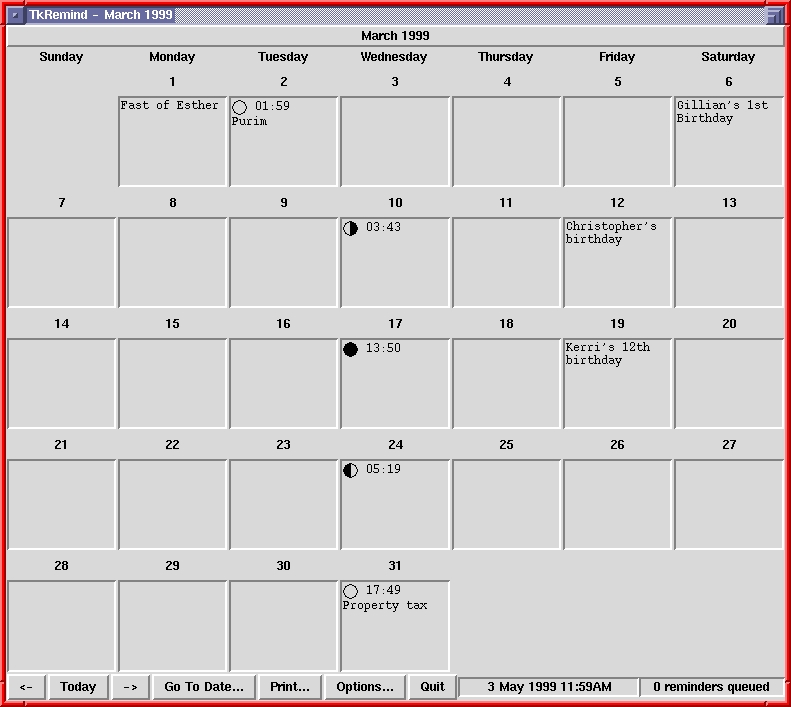
Figure 1. Main TK Remind Window
At this point, your head may be spinning. You don't want to learn yet another command language or obscure configuration-file format. You pine for the GUIs your Microsoft colleagues use. No problem; Remind comes with a graphical front end called TkRemind, written in Tcl/Tk. TkRemind presents a graphical calendar and lets you enter reminders with a simple graphical entry box. Figure 1 shows the main TkRemind window, and Figure 2 shows the reminder entry box.
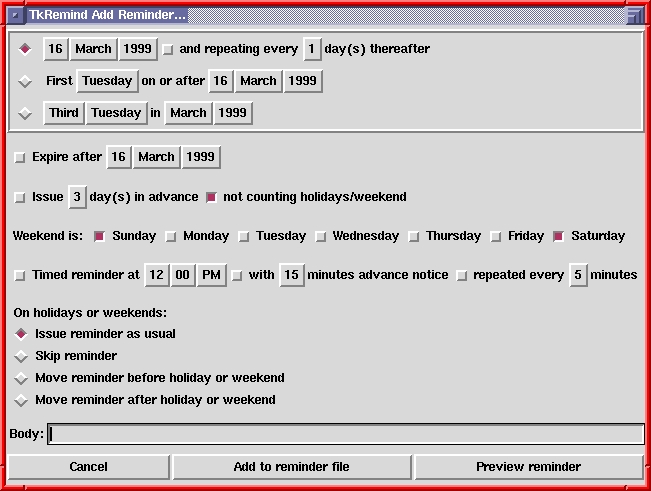
Figure 2. Reminder Entry Box
With TkRemind, you never have to learn Remind's scripting language, as long as you can express all the reminders you need with the GUI. However, you are encouraged to learn to script Remind; from the GUI, just click “Preview Reminder” to see the Remind code which will implement your reminder.
The GUI also hinted at the existence of something called a “timed reminder”. This is a reminder with a time of day specified. You can arrange to have Remind pop up reminders just before an important meeting, or more importantly, remind you to go home.
Here's an example of a timed reminder:
REM Mon Tue Wed Thu Fri AT 17:00 +15 *3 MSG Go home!
The AT keyword introduces an “AT clause”. The 17:00 means that the trigger time is 5:00 PM. The +15 means Remind starts carping at you fifteen minutes ahead of time, and the *3 means it annoys you every three minutes.
The TkRemind front end runs Remind in a special “daemon mode” so that timed reminders like the previous example are popped up in X windows.
While what we've seen so far is quite cool, there is still the stubborn oddball reminder which requires a much tougher piece of scripting to handle. Consider the 4th of July in the U.S. If this falls on a Saturday, the previous Friday is a holiday. If it falls on a Sunday, the next Monday is a holiday. Otherwise, the 4th itself is the holiday. I won't even attempt to explain this bit of scripting; get yourself the manual, and become a hard-core Remind programmer.
Listing 1 illustrates several features of Remind scripting: Remind has built-in functions (66 of them, to be precise) and allows user-defined functions (e.g., FSET). It also has conditional tests (e.g., IF/ENDIF). A bit of clever scripting can express reminders which prove too tough for most calendar programs.
Ultimately, all calendars are derived from astronomical observations. Remind includes routines to calculate sunrise and sunset times for where you live, as well as moon phases. The moon phases were illustrated in the GUI calendar. These astronomical calculations are available as built-in Remind functions.
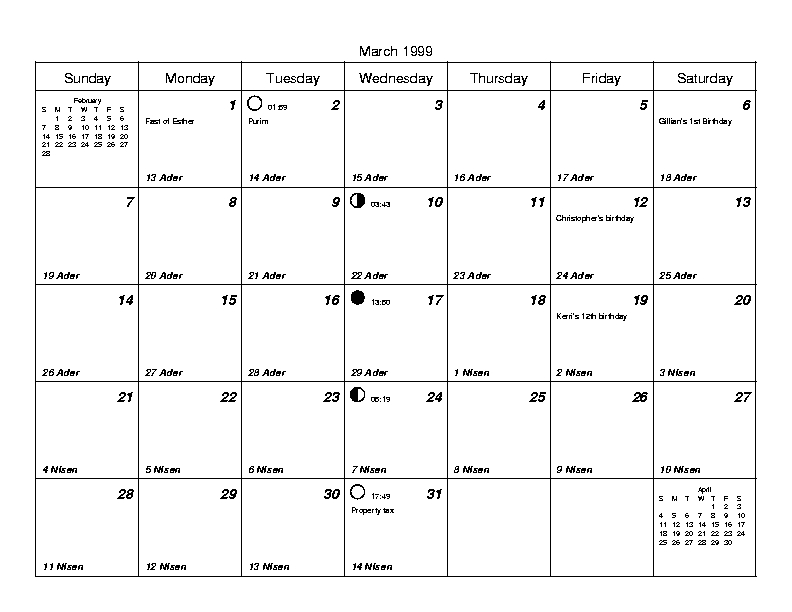
Figure 3. PostScript Output
In addition to issuing reminders on standard output or with pop-up windows, Remind can create high-quality PostScript and HTML calendars. The actual Remind “engine” knows nothing about PostScript or HTML. Rather, if invoked with a command-line option, it prints out reminders in a format convenient for back ends to process. The Rem2PS back end produces PostScript output (Figure 3) and rem2html produces HTML output. Remind itself can produce a passable text-only monthly calendar.
Remind uses classic UNIX pipes to communicate with back ends. In fact, TkRemind is a pure Tcl script which uses pipes to communicate with a background Remind process. In this way, all the hairy date-calculation code is contained in Remind, and the pretty GUI and formatting code in the appropriate back end. It should be fairly straightforward to write GNOME and KDE equivalents to TkRemind.
In addition to sending normal reminders to back ends, Remind can transmit “out-of-band” data which makes the back end do something magical. Currently, special mechanisms are defined for drawing moon phases and shading calendar blocks. The PostScript, Tk and HTML back ends all respect these mechanisms. Additional back ends can easily extend the mechanism for special purposes.
Not everyone speaks English. While you wouldn't know this from most software, things are changing and software authors are internationalizing their software. Remind is no exception; it has been translated into twelve different European languages. Unfortunately, this was done with a customized mechanism which does not recognize or respect the POSIX locale functions. You have to specify a language for Remind at compile time.
Different languages have different rules for forming plurals, expressing times and expressing time intervals. This makes simple message translation impossible; in some cases, the code for a language is specific to that language alone.
Remind has been designed so translators can port it to another language fairly easily; please see the source code for details. If anyone would like to make Remind recognize and respect the LC_* locale environment variables, that would be a great project.
Because I like to know when Jewish holidays fall, I included Remind functions for dealing with the Hebrew calendar. If anyone would like to contribute code for the Chinese and Muslim calendars, I'm open to input.
Two last bits of scripting. Suppose you want to be reminded of something every Friday the 13th. This does not work:
REM Fri 13 MSG Black Cat
because it would be issued on the first Friday on or after the 13th of every month. Try this instead:
REM 13 SATISFY [wkdaynum(trigdate()) == 5] MSG\
Black Cat.
The SATISFY keyword causes Remind to iterate through all possible “13ths of the month” until it hits one where the weekday is Friday. This powerful mechanism makes very complex reminders quite simple.
Finally, here's some Remind code to figure out when a blue moon occurs. A blue moon is the second full moon in a calendar month. (Blue moons are quite rare.)
FSET isFirstFull(date) \
           monnum(moondate(2, date)) == \
                monnum(moondate(2, moondate(2, date)+1))
REM 1 SATISFY isFirstFull(trigdate())
        set blue moondate(2, moondate(2,\
        trigdate())+1)\
MSG Next blue moon is [trigger(blue)]
Running this script through Remind shows that the next blue moon will take place on October 31, 2001. The one after that is July 31, 2004.
I defy you to get Microsoft Schedule to warn you of an upcoming blue moon.
I've barely scratched the surface of Remind. For more exciting esoteric things like system variables, priority, SCHED and WARN, TAG and DURATION, the substitution filter, safe movable OMITs, security features, the OMIT context, expressions, functions, debugging features, and so on, please download Remind. It's free—covered by the GPL—and can be found at ftp://ftp.doe.carleton.ca/pub/remind-3.0/. Although Remind is quite full of features, it's a rather slim 20K lines of code and should compile and install easily on Linux and any other UNIX-like system.
May you never forget another birthday.
David F. Skoll (dfs@doe.carleton.ca) is the founder of Roaring Penguin Software Inc., a Linux consultancy firm (www.roaringpenguin.com). He spends so much time tinkering with Remind that he often forgets his appointments.

