
Getting the NT Out—And the Linux In
You have probably been hearing many rumors lately about Linux in the corporate environment. I've been hearing “Linux is great, but it's not ready for production” and “I wouldn't trust my business to Linux.” Lately, with all the press Linux has been getting, it's time to set the record straight. Being a longtime UNIX user, I jumped on the Linux bandwagon several years ago. I have used Linux in a production environment and know plenty of people who are doing the same.
There are many web, mail and database servers currently used in production systems, with more being added all the time. Linux success stories range from Linux being used at NASA, to being used for creating movie effects. So, is Linux ready for a prime time production environment? You bet! Is Linux ready to replace Windows NT Servers for your corporate LANs? Yep! I'll walk you through building a Linux server that is going to be more stable, faster, easier to maintain and costs less.
In setting up a Linux file and print server, you will find more configuration and customization than I will be using in this simple scenario. To learn more about the different options and configurations, see the Resources section at the end of this article.
Windows machines use a protocol called Server Message Block (SMB) to perform file and print sharing as a network service. The SMB protocol defines how clients talk to servers to request printers, files, security validation and more. SMB has been around for a long time, and has some limitations that require a bit of thought. SMB requests and responses are based on local broadcasts for a NetBIOS name, which is usually the server name. This presents a problem to (routed) environments in which routers separate networks, like the Internet, because broadcasts do not pass through routers. This created a need for translation from NetBIOS names to IP addresses. Microsoft implemented this solution as the Windows Internet Name Service (WINS).
SMB is also used for directory services. Most users think of the directory services as the “Network Neighborhood” feature on their desktops. It's a bit more than that, but enough to start. It's important to keep track of which machines are on a network and the services they provide. Nodes do this by electing a “Browse Master” that keeps track of which computers are on the network. When SMB machines boot, they broadcast their name and service information for all to hear. The elected browse master keeps a database of these names and will respond to requests from local machines. This browse master can be updated from other browse masters on different networks and can share its own information.
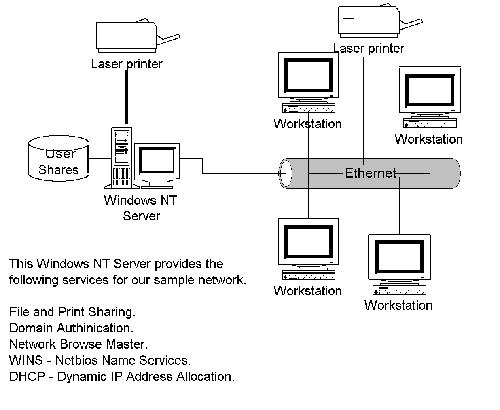
First, let's take a look at a sample Windows NT network and see what services are being provided (Figure 1). A Windows NT server has been configured as a file and print server. Users log in to the Windows NT server, using their Client for Microsoft Networks service with their network credentials. Once the user has been validated, a logon batch file is executed that assigns a user's home directory, various network drives and printers. The NT server also keeps track of which computers are on the network and the services they provide; clients can use this information in the Network Neighborhood.
The Linux Side of the House
Linux can use SMB to communicate with Windows and DOS-based clients using a package named Samba. The Samba suite was originally created by Andrew Tridgell, and is now developed by the Samba team. The Samba suite is currently running on somewhere around forty different platforms spanning the globe. Samba's main server dæmons are smbd and nmbd, which are pronounced “SMB-Dee” and “NMB-Dee”. smbd provides file, print and authentication services to Windows and DOS clients, and nmbd provides NetBIOS name resolution and browsing services (rfc1001/1002). Using these packages, Linux can easily provide the same services as our NT scenario.
Get the samba-latest.tar.gz file from the SAMBA site and unpack it to a temporary directory using
tar -xvzf samba-latest.tar.gz
Change to this directory, and review the README files for any special information. After familiarizing yourself with the documentation, begin the install with the following commands:
cd source
 /configure
make
make install
Once the make install is complete, smbd and nmbd should be ready for configuration.
In reading the Samba documentation, you will find many different ways to configure smbd and nmbd. The Samba suite has extensive features that allow Linux to integrate and complement NT servers and services, but we are going to configure our Linux server to replace the NT server shown in Figure 1. Specifically, we are going to configure Samba to validate users and run our login batch file, provide file and print shares, and provide network-browsing services.
Begin by editing the smbd initialization file, smb.conf. By default, it is located in /usr/local/samba/lib/smb.conf, but is sometimes found at /etc/smb.conf. I would like to stress that there are many features which can be configured in the smb.conf file, and I am starting with only the basics.
security = user is the default security setting for Samba 2.x. This configures Samba to require a user to provide authentication to access the server. To understand how Samba works with NT domains and servers, see “Security = Domain” in the Samba documentation.
iworkgroup = MyGroup controls which workgroup your server will appear to be in when queried by clients.
encrypt passwords = Yes controls whether encrypted passwords will be negotiated with the client. Windows NT 4SP3+ and Windows 98 will expect an encrypted password by default.
min passwd length = 6 sets the minimum length in characters of a plaintext password that smbd will accept when performing UNIX password changing.
smb passwd file = /etc/smbpasswd sets the path to the encrypted smbpasswd file. By default, the path to the smbpasswd file is compiled into Samba. I always add this to reduce confusion.
logon script = STARTUP.BAT specifies the batch file (.bat) or NT command file (.cmd) to be downloaded and run on a machine when a user successfully logs in. The file must contain the DOS-style cr/lf (carriage return/line feed) line endings.
If domain logons = Yes is set to true, the Samba server will serve Windows 95/98 domain logons for the workgroup it is in. For more details on setting up this feature, see the file DOMAINS.txt in the Samba documentation.
domain master = Yes enables WAN-wide (wide area network) browse list collation. Setting this option causes nmbd to claim a special domain-specific NetBIOS name that identifies it as a domain master browser for its given workgroup. Local master browsers in the same workgroup on broadcast-isolated subnets will give this nmbd their local browse lists, and will then ask smbd for a complete copy of the browse list for the entire WAN. Browser clients will then contact their local master browser and will receive the domain-wide browse list, instead of just the list for their broadcast-isolated subnet.
preferred master = Yes is a Boolean parameter which controls whether nmbd is a preferred master browser for its workgroup.
That's it for our global parameters. We can now move on to creating network shares. By setting up a [homes] section, our server can create home-directory mappings on the fly:
[homes]
comment = Home Directories
read only = No
create mask = 0750
browseable = No
Now let's create some shares for users to access. The share definition should include the path, who can access the share (valid or invalid) and whether the share is writeable. By default, if no valid user or group is defined, the share is open to any client, so keep this in mind when creating your shares. In the apps share, I chose to create the UNIX group all_users containing just my local users.
[apps]
comment = Apps Directory
path = /shares/apps
valid users = @all_users
read only = No
[project1]
comment = Project 1 Directory
path = /shares/proj1
valid users = dcsmith kholmes joe katie redpup
read only = No
Last, I set up my netlogon home. This will be set to the relative path for my netlogon scripts. In this example, my login script is located at /etc/netlogon/STARTUP.BAT.
[netlogon]
path = /etc/netlogon
The full Samba configuration script is shown in Listing 1.
The next step is to start the Samba dæmons. After checking everything out, you will probably want to add this to your system startup procedures.
/usr/local/samba/bin/smbd -D -s
/usr/local/samba/lib/smb.conf
/usr/local/samba/bin/nmbd -D
If everything went well, both smbd and nmbd were started successfully. If not, start troubleshooting by reading the log files at /var/adm/logs and review the FAQs from the Samba site.
Troubleshooting utilities, located in the Samba bin directory, are testparm, which will parse your smb.conf for errors, smbstatus, and nmblookup for NetBIOS name issues.
Now it's time to add your users and passwords to your smbpassword file. One item to note is that users must have a UNIX account password as well. There are many options regarding passwords, such as remote password sync and NT domain and pass-through authentication, to help you with larger administration issues. In our case, user accounts are on our local Linux box. This command will create a SMB account and then prompt you to change your password.
/usr/local/samba/bin/smbpasswd -a testuser
You should now be able to log in as testuser and get authenticated from your Windows machines and access network shares. Great fun, eh? Once you get up and running, you will want to use some of the tools and utilities that Samba provides. One of the more useful utilities available is SWAT, a web-based administration tool that helps monitor and configure almost all Samba configurations. If SWAT is not available on your system, you can find it and more on the Samba home page.
Hopefully, I provided you with enough information and inspiration to build Linux file and print servers. While I am not recommending that you dash out and replace your production NT servers, give Linux servers a chance. I'll bet you'll find them more stable and reliable, and they make remote administration much easier. The Samba team is constantly making Samba a better product with more and better features and utilities. As Linux solutions become more and more of a reality, I believe you will find that Linux file and print servers are an efficient, cost-saving tool—that will make both you and your department budget happy.

David Smith (dcsmith@duderman.com) lives in Springfield, VA. He works at TimeBridge Technologies, where he manages customer networks as the Engineering Manager. When not working, he is either at a baseball game or waiting for the baseball season to start.

