EMU—Event Management Utility
Event management is a backbone of every enterprise management system, since it is the flow of events that describes various activities in the enterprise. By coordinating or acting on those events, enterprise starts being managed.
One of us, Jarra, has been contracting to a large computer company that was deploying Unicenter TNG for monitoring outsourced systems. Most of the systems were UNIX-based. Unicenter TNG agents, as is well known, are SNMP-based. After a considerable amount of time was spent tweaking the agents to come close to what he had decided to monitor and how to go about it, he arrived at the following conclusions:
SNMP results in thick agents that are inflexible for dynamically changing environments.
SNMP OIDs (Object IDentifiers) are not suitable for quick deployment of new resource hierarchies.
Without access to the source code, which is typical of most commercial software, there is no way to extend the functionality of existing agents.
The provided event management language is too restrictive and just another new language to learn.
Linux is a superior management platform to Windows NT, especially in terms of available tools and utilities.
The event console design determines the efficiency of the whole system.
We began thinking about how to accomplish system monitoring with ultra-thin clients, while maintaining their status at the event manager. That was when we thought of using a principal parameter we coined “time-to-live”. At that very moment, EMU (Event Management Utility) was born. Each event message sent to EMU must have time-to-live set. It determines how long the message is kept in the database before it is deleted. If time-to-live is slightly more than the polling interval, the message will stay in the database until we stop resending it. In other words, the message will be in the database for the duration of an alarm only.
EMU is a comprehensive event management system with no limitations on what it can do for you. It harnesses the full power of Linux/UNIX utilities and scripting languages. Remember, software is here for us, and not the other way around.
Event management systems usually consist of four components: monitoring manager, monitoring agents, event manager and event console.
Monitoring agents typically poll a resource, such as a file system, at regular intervals in order to track its status changes. These changes are communicated to the manager. The manager processes incoming resource status changes and either forwards them to the event manager or updates the business rules it maintains. The monitoring manager can poll for resource status information as well.
Resources may be of any kind, such as file systems, processes, disk, swap, applications or logged-in users.
Some monitoring agents, such as Unicenter TNG, are built around SNMP. In those systems, agents use traps to notify monitoring managers of status changes. Traps are sent using the UDP protocol, hence their delivery is not guaranteed. This drawback has to be made up for by regular polling by the manager, thereby collecting resource status independent of traps.
SNMP agents maintain status information of each resource they monitor. This information is typically maintained by the monitoring manager as well. Both agents and the manager keep resource status stored in a database. This is a key design feature of SNMP-based monitoring. Let us consider a file system example. If a threshold is set at 90%, an alarm is raised on exceeding this threshold. The status of the resource is changed to critical. It must stay in the critical state until the file system is cleaned up. Then the status is changed back to normal.
A need to maintain resource status and resource hierarchy results in rather complex SNMP agent coding. As a result, it is not trivial to extend existing agents. Furthermore, C coding skills and access to the source code are necessary.
The monitoring agent forwards events to the event manager, which usually performs some kind of event processing, such as matching messages against predefined strings and triggering an action in case of a match. Unicenter TNG provides a language for matching messages and taking action on them. The language is extremely simple, and thus inadequate for performing more complex correlations and actions.
The event console is the front end for administration staff. It allows us to “view” events. Its design determines its usability and efficiency. Events representing one alarm should be displayed as one event, rather than getting a separate visible event at each poll. To keep track of events easily, one strives to keep their display representations to a minimum. Otherwise, they scroll out of view before IT staff can take note of them.
There are a few major players in the enterprise management arena, most notably Tivoli, BMC and Unicenter TNG. All of these strive to win support from other software and hardware vendors for their APIs. At the end of the day, they try hard to sell all the enterprise management components from their offerings. We find this disadvantageous to the end customer. Enterprise management is about using the best breed of products, from independent vendors, which can be easily integrated. This integration should be accomplished by either a single standard API or a command-line and script interface. Being UNIX types, weprefer a command-line interface and scripts. That way, we can intercept messages passed between enterprise management components. If a new product needs to be integrated, it can literally be plugged in.
EMU is a flexible and integration-ready event management tool developed under Linux. It consists of a manager and agents. In fact, it integrates monitoring and event manager into one program. Agents are very simple scripts invoked by cron. These scripts are run at regular intervals, perhaps every five minutes. Each run scans the resources it monitors, comparing their thresholds against a configuration file. If a threshold is exceeded, a message is sent to the manager.
EMU employs time-to-live, which proved to be a simple way of maintaining resource status across agent polls. Let us suppose an agent that runs every five minutes found a resource problem. At each poll, it will send an alarm message to the manager. In this case, time-to-live will be set to slightly more than five minutes at 330 seconds. The manager will maintain the first message sent and its updates. If no update is received within the 330 seconds time-to-live of a particular message, the message is deleted and the problem is assumed to have been fixed. This simple approach allows us to write simple agents, preferably scripts, that scan a monitored resource and send their findings on each poll. The manager takes care of the rest. In fact, thanks to EMU, agents consisting of a few lines of code can monitor a very complex resource.
ASCII and Tcl/Tk interfaces to EMU are available. They represent a console for viewing events. The console displays all the necessary information to keep IT staff up to date. Each event is uniquely represented by a resource ID, which consists of the monitored system host name and object ID. All updates from the same resource ID are treated as one displayable event, while all the individual updates are stored in an event log file. If no updates for a resource ID have been received within an agent-specific time-to-live, the event message is removed from the console.
Examples of resource IDs are dumbo.company.com.au:/usr/local, tcc2345:sendmail and brk23:tz45. The first field before the colon designates a host name; the second field is a unique resource name. Two resources on a single system must not have the same resource ID, because EMU would treat them as the same resource.
The input interface to the manager is emsg, a small utility that uses TCP sockets to send messages to the manager. While the manager is written in Perl, emsg is written in C to facilitate its easy deployment on any monitored platform. In fact, Jarra is currently contracting to a company to install emsg on Linux, Compaq Tru64 UNIX, Solaris, AIX, IRIX, Sinix, Ultrix and VMS.
The integration interface is taken to the extreme by invoking input, delete and output scripts. Depending on the type of message, these scripts are issued on receipt of the message, on its removal or on its processing. All the message attributes are passed to the script as environment variables. In this way, we have achieved integration with Unicenter TNG event management. The TNG console-held area is, in fact, an exact image of the EMU console, thus making it much more usable and efficient.
EMU was built with distributed processing in mind. Multiple managers can run on a single or several systems, thus forming a hierarchy reflecting a company's need. Through the truly open architecture of EMU, it is easy to synchronize multiple managers, build fail-over configurations or extend their functionality.
EMU consists of a manager (gemu), cleaner (gemucleaner), emsg agent (emsg1) and console/browser (eb, xeb). The manager and cleaner must run on the same node. The cleaner process manages message expirations. In order to provide flexibility, only one option is passed to gemu, gemucleaner and eb—the port number the particular server is running on. Both gemucleaner and eb use emsg to send delete messages to EMU.
A configuration file used by gemu, gemucleaner and eb is stored in /usr/local/emu/conf/port#.cfg. The configuration file describes the location of the EMU database (DBM-based), location of log files, scan interval for gemucleaner, etc. Each server will access its own configuration file based on the port number. If it suits your site, put the database under /usr/local/emu/port#/db. Each port/server will have log files and action scripts stored under /usr/local/emu/port# in sub-directories named logs and actions. The binaries/scripts are shared and stored in /usr/local/emu/bin.
One option in the configuration file is the location of emsg. If emsg, compiled for the individual platforms on your site, is stored in the /usr/local/emu/EMSG directory, you are ready to run eb (EMU browser/console) locally on your workstation. This is accomplished by exporting as read-only the /usr/local/emu directory. This directory will be mounted on the workstation as /usr/local/emu. By creating a symbolic link /usr/local/bin/emsg that points to /usr/local/emu/EMSG/emsg.platform and putting /usr/local/emu/bin in your search path, eb will run locally while displaying event messages from the server.
Depending on what actions EMU is configured to handle, the user ID it is running under can be either “emu” or “root”.
For the input, delete and output scripts, message attributes (e.g., host name, message text) are passed as environment variables. These can easily be used to trigger actions. It is a good idea to have one launcher script that, depending on message attributes, calls other, task-specific scripts. As a result, the workload imposed on the manager system will be reduced. The output script can be used to selectively forward messages to either a higher-level EMU or a third-party system. The input script may be used as a barrier to stop certain messages from processing based on a calendar. If this script returns a value greater than 0, the message is discarded. The delete message can be used for synchronization with a third-party system.
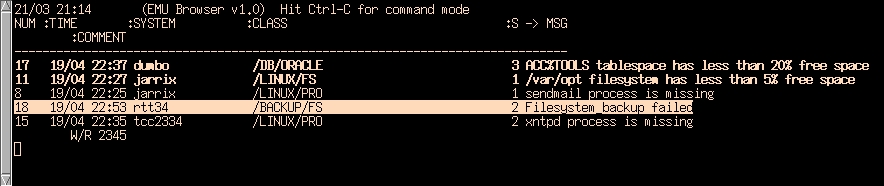
Time to live can be specified as seconds, minutes, hours or a fixed time in the form of HH:MM. A time-to-live of -1 stands for infinity, and the associated message will be displayed in reverse video (by eb) and the cleaner will not expire it. The only way to put the message away is with a delete command on the console. This allows a batch job or backup failures to wait until they are acknowledged. Time-to-live set to 0 is used with so-called pass-through messages. They are not stored in the EMU database (they are recorded in the log file), but are intended to trigger an action.
Figure 1. ASCII-Based EMU Message Browser
The eb console provides a basic display of messages. A new message is displayed in bold to draw our attention. A message can be deleted/acknowledged or annotated. Message annotations appear indented under each message. They serve the purpose of notifying others about details, such as a work request that has been logged. The message time shown on the console was the local time on the system that sent the first message. It helps identify when a problem occurred.
Figure 2. GUI-Based EMU Message Browser
EMU maintains a separate log file for each day. This log file stores all received messages, including their attributes, e.g. host name, message text and class. Message attributes are delimited with a vertical bar to allow for easy processing in scripts or uploading spreadsheets.
The class option of emsg can be used in many powerful ways. When monitoring systems, it is best used for identifying a class hierarchy to the monitored resource; for example, /LINUX/PRO to designate a process subsystem or /LINUX/FS to designate a file system subsystem. In a way, it is similar to the SNMP OIDs; however, emsg class is much more flexible and can be created immediately as a need arises. Companies should develop a standard document detailing the classes format to be used. It is likely to reflect their business, resource and escalation hierarchies.
In a pure SNMP environment, a message arrives with an OID number that many people find cryptic and impractical. With the use of classes, the information is not only easy to read, but also lends itself to message filtering, forwarding, actioning, etc. For example, database messages may have a class set to /IT/ORACLE. On receipt of such a message, the DBA may be paged to attend to the problem.
In this section, a simple example agent for file system monitoring is demonstrated. Considerations are made of important aspects of the system along with tradeoffs. To make the example simple, the configuration file used will ignore minimal disk space limits for each file system. The code for this agent is shown in Listing 1.
Once a resource is selected, we have to determine whether there is a periodicity in the way the resource can be monitored. For periodic monitoring, we need to know how frequently the resource should be monitored. The shorter the interval, the more resource-intensive the agent. However, by selecting too large an interval, we may miss an alarm in its early stage. For our file system agent, we will select a five-minute interval.
Next, time-to-live needs to be established. Given the poll interval of five minutes, we will select a time-to-live of six minutes. Remember, this must always be larger than the poll interval to keep display of events “continuous”. To achieve regular polling, the agent will be running from cron.
Once you have the agent, all that needs to be done is deciding which user it will run under and create a cron job for submissions in five-minute intervals. In fact, the simple code in Listing 1 is a full-blown agent for monitoring file systems with a 10% alarm limit.
Now, let us put together a simple output action script. We are going to use EMU for monitoring a flow of events. To accomplish this, a directory called events is created. This directory stores files with names reflecting event names. If a file exists, it means the event it describes is active. Once the file is removed, the event has finished. Consider a scenario where a backup of SAP_ORACLE must complete by 6 AM. If a backup event file is found after 6 AM, it indicates the backup is running overtime or the backup script crashed without an opportunity to remove the file.
The SAP_ORACLE backup script reads as follows:
#!/usr/bin/ksh
emsg -n emuserver -p 2345 -t 0 -s 3 -w
icecream\
-c ADD_EVENT -m SAP_ORACLE_BACKUP
# start backup
.
.
.
# backup finished
emsg -n emuserver -p 2345 -t 0 -s 3 -w
icecream\
-c DEL_EVENT -m SAP_ORACLE_BACKUP
The output action script that creates or removes the event file will look as follows:
if [ "$E_CLASS" = "ADD_EVENT" ];then
        touch /usr/local/emu/events/$E_MSG
fi
if [ "$E_CLASS" = "DEL_EVENT" ];then
        rm /usr/local/emu/events/$E_MSG
fi
Another example is an input action script that stops messages from
a node called dumbo, even though the EMU password is correct. It is
necessary to mention an environment variable called
E_RHOST. In order to facilitate forwarding of
messages from EMU to EMU, emsg has an -h option
for changing the name of the host from which the message arrived.
This message attribute is stored in E_HOST.
However, E_RHOST stores the true node name from
which the message arrived. The input action script is as follows:
if [ "$E_RHOST" = "dumbo" ];then
        exit 1
else
        exit 0
fi
Event management and resource monitoring is a complex subject, so we tried to touch on only the most important aspects of it. We believe by providing a free tool, enterprise event management will become a must on most sites. Linux is the best platform for EMU, since to take full advantage of its capabilities, an open and tools-rich environment is necessary. Check our web site at http://www.jarrix.com.au/ for the latest developments on the EMU front. Through collaboration around the globe, a valuable repository of EMU agents can be built. If you have an idea or have written an agent, let us know and we will post it on the EMU home page. If you have not done so yet, download EMU and delve into the vast and exciting horizons of enterprise management.
Jarra Voleynik has been involved with UNIX for the past 11 years. He is a graduate of the Technical University of Prague with an MS in Electronics. His first encounter with Linux two years ago got him hooked. He works as a UNIX consultant for Jarrix Systems. He can be reached at jarrix@yahoo.com.
Anna Voleynik (MS degree in Electronics) started being actively “aware” of Linux a year ago. She works as a UNIX Systems Administrator and keeps trying to minimize her and Jarra's “talking UNIX” at home. She mostly spends her spare time with their children, ages 8 and 2. She can be reached at anna_vol@yahoo.com.