ICP vortex GDT RAID Controllers
Manufacturer: ICP Vortex
E-mail: sales@icp-vortex.com
Price: $1595 US for GDT6518RD $2195 US for GDT6538RD (volume pricing available)
Reviewer: Eric Lee Green
ICP Vortex is a German company that has been a long-time supporter of Linux. The ICP driver was written by ICP and has been included in the Linux kernel since the Linux 1.3 days, and their RAID configuration utility (gdtmon) runs natively under Linux. While ICP is the largest supplier of RAID hardware in Europe, they appear to have a low profile here in the U.S. compared with Mylex, Adaptec and AMI.
What ICP provides is a number of RAID cards ranging from a low-cost one-channel RAID0,1 controller to a series of high-end fibre-channel controllers. All ICP cards work with Linux and are supported by current Linux distributions “out of the box”, with the exception of Red Hat 6.0, where the ICP driver was inexplicably left off the boot disk despite being on the install menu. A fixed boot disk is available from Red Hat's FTP site or directly from ICP.
First, a bit of background: RAID is a method for combining disk drives for either performance or reliability purposes. There are a number of approaches to doing RAID. Software RAID is built into the Linux kernel. “Pure” hardware RAID has the SCSI controller(s) actually built into the PCI card. There are also hybrid approaches that have the advantage of being cheap but requiring specially equipped motherboards (usually with what is called a “RaidPort”) or double the PCI bandwidth in order to run.
The biggest advantages of “pure” hardware RAID are low CPU usage, robustness, minimal bus bandwidth usage and avoiding the underlying limit in the number of SCSI devices that can be addressed by the Linux SCSI driver architecture. The Linux SCSI subsystem can access a maximum of sixteen hard drives (labeled sda through sdp). By presenting the multiple drives in a RAID array as a single drive to Linux, hardware RAID bypasses that limit.
The first problem was deciding which ICP RAID controller to test. It was easy to discard the low-end and high-end controllers. The 61xx series, which does only RAID0 and RAID1, is slower than the built-in Linux software RAID. The fibre-channel controllers work well under Linux using the EXT2 file system, but Linux support for file systems capable of using the fibre-channel drives as fibre-attached storage (shared between multiple machines) is in experimental stages at best.
To decide which to use, I turned to the two most common uses of RAID under Linux: web and news servers.
Web servers typically have three drives, a hot spare. With 4.5GB SCSI hard drives, this would give them 9GB of usable disk space. Note that 9GB SCSI drives are generally twice as fast as 4.5GB, so that would also be an option. A one-channel 6518RD works fine in this application.
News servers need massive amounts of disk space. A news server capable of backing up the entire USENET news hierarchy for a month will probably need at least twelve 36GB hard drives. My informal benchmarks show that an IBM 7200rpm 36GB hard drive transfers data at approximately 25MB/sec, while Ultra2 SCSI has a bandwidth limit of 80MB/sec. Thus, four drives per channel would be a good “seat of the pants” estimate here, requiring a 3-channel RAID controller. The 6538RD, one of their “mid-range” controllers, was chosen to be the second card evaluated.
The ICP controllers come in a fairly hefty box containing the controller, a CD with drivers and utilities, and a hefty wire-bound manual. The CD also contains a full PDF version of that manual as well as any addendums and errata created since the manual was published.
Examining the 6518RD uncovered an Intel 960 CPU, a Symbios 53c895 SCSI chip set, a Symbios 53c860 chip and various small support chips. There is also a socket for cache SIMM. This also serves as the Intel 960's scratch memory, so the controller will not operate without it.
The 6518RD and 6538RD both contained the 53c860 Ultra-SCSI chip to handle CD-ROM and tape drives on a separate narrow-SCSI bus. Thus, the 6518RD can actually be considered a two-channel device, though it has only a single Ultra2 RAID channel. Despite having two channels, the 6518RD has a single external SCSI connector on the back. Annoyingly, this connector goes to the Ultra2 controller. Note that attaching any non-LVD devices to an Ultra2 bus will slow it down to non-LVD speeds, i.e., 40MB/sec, so hooking that tape drive to this connector would be a serious mistake. An external tape drive will require a special cable bringing out the internal narrow SCSI to a socket on the back of the computer.
The 6538RD looked similar to the 6518RD, but was longer in order to hold the two additional 53c895 chips. It has three of the high-density SCSI connectors on the back. Similar to the 6518RD, only the Ultra2 channels are brought out to the external connectors. The workaround if you have an external tape device is the same: bring the internal narrow-SCSI connector out to an external connector using a special cable.
The first thing I had to do was add the cache SIMM to the controller card. ICP recommends you use 60ns FPM (Fast Page Mode) RAM or 50ns EDO RAM. I had only 60ns EDO RAM, so at first I tried setting the jumper to say I had 60ns FPM RAM. After talking with technicians, I decided to move the jumper to EDO mode. I discovered a significant performance difference between FPM and EDO mode settings. The jumper to EDO mode increased performance by approximately 20%. Using a cheap 60ns EDO SIMM definitely made the controller unreliable; in fact, it corrupted the hard drive when I tried copying multi-megabyte files to test disk write throughput. Switching to a good-quality OEM 60ns EDO SIMM solved that problem.
I tried benchmarking the GDT with both 64MB and 128MB of cache. I found no significant difference in performance, and thus recommend 64MB for cache. Given the low price of RAM today, it does not make sense to use less than 64MB for cache.
Both cards work identically when you put them into your computer. They use the same driver, the same BIOS and the same utilities. The only difference is that the BIOS utility you use to set up your RAID volumes shows more channels for the 6538RD.
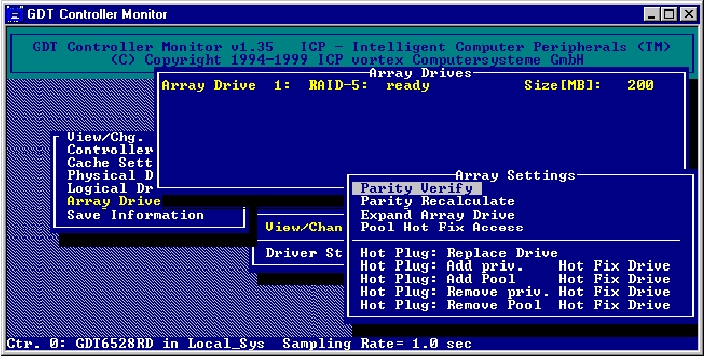
The BIOS setup utility allows you to select drives and then combine them into a single RAID volume. It does not allow dividing a drive between multiple RAID volumes as is possible with the software RAID driver. The setup utility writes the resulting data into a special boot sector at the start and end of the drives. Thus, you can remove the controller, put in a different (replacement) controller, and your RAID setup remains the same.
The GDT6538RD had no trouble combining drives from multiple channels and presenting them to Linux as a single SCSI hard drive. Curious, I tried putting multiple GDT controllers into a machine to see if I could combine drives which were on entirely different controllers. This did not work, though otherwise the Linux GDT driver had no trouble with handling multiple GDT cards in the same computer.
Once the array was configured, the GDT controller started building the array, i.e., building the checksum blocks. I interrupted this process to reboot into the Red Hat 5.2 installation routine. I discovered the ICP does not present a SCSI CD-ROM hooked to its Narrow SCSI port as a bootable device to the BIOS. Swapping to an IDE CD-ROM solved that problem.
The 5.2 installer detected on my system, an ICP RAID Array Controller and the RAID array as a single hard drive. I went ahead and installed Red Hat Linux. While I was doing this, the GDT controller was continuing to build the disk array, transparently, in the background.
It can take quite some time for the arrays to build and become redundant. Note that you can go about the task of installing the OS, configuring your software, etc. while the array is building in the background.
Unfortunately, I was not able to do extensive benchmarks on the system with the 3-channel controller and 36GB drives. The command hdparm -t reported 28MB/sec throughput on “virgin” drives (where the OS had just been rebooted and the GDT controller reset). Using dd to write 100,000,000 bytes from /dev/zero to the disk array reported a write throughput of around 18MB/sec. One thing I did discover was that turning on the write caching sped up throughput considerably. Apparently this allows the controller to do write re-ordering internally and combine writes when possible. The tested 2.0.36 and 2.2.10 kernels both properly flush the cache at shutdown time, so as long as you have a UPS that is properly configured to do a clean shutdown of the system, this is fairly safe. If you don't trust the UPS software and insist on turning off the write cache, expect the write performance to be significantly impacted.
The theoretical performance of the hardware involved was somewhat higher than the numbers seen. The EXT2 file system was eliminated as a possible factor by the expedient of using dd to read and write to raw partitions. Software RAID0 was faster by about 15%, but still did not approach the theoretical performance of the hardware involved. Speculations on the cause of this slowdown would be interesting (I suspect they happen due to various factors within the Linux kernel), but are irrelevant to this article. The GDT's RAID5 performance, in any event, performed similar to the software RAID5, without the excessive CPU usage seen while running the software RAID5.
If a drive fries, RAID1 or RAID4/5/10 keeps going. The GDT then starts beeping annoyingly. It also sends a message to both syslog and the console.
If a hot spare was defined, the GDT will automatically mark the bad drive as failed and switch to using the hot spare. It will transparently rebuild the array with the hot spare. No action is needed on your part, though you will eventually want to remove the bad drive, replace it with a new drive and initialize the new drive as a hot spare. Assuming you have hot swap trays, you don't need to shut down Linux to do this. The ICP gdtmon program runs natively under Linux and will handle this situation.
If you have no hot spare, the GDT will automatically mark the failed disk, but the array will no longer be redundant. Again (gdtmon to the rescue), you can use gdtmon to swap out the bad drive and swap in a replacement. No down time is necessary, since gdtmon runs natively under Linux; the new drive will be transparently rebuilt while your system continues to run.
Like Mercedes-Benz cars and most other German products, the GDT is somewhat over-engineered. This makes it very reliable and safe, but also more expensive than the competition. I tried two different resellers of ICP controllers. One tried to sell me the controller and RAM at the suggested retail price, the other quoted me a price for the 6518RD (with RAM) of approximately $50 less than the suggested retail price for the controller alone. This price with 64MB of cache was approximately $300 more than the equivalent Mylex ExtremeRaid with 32MB of cache. Prices fluctuate due to new product introductions, etc., but these relative prices will probably remain similar. Thus, for low-end RAID you may wish to look at competing devices, bearing in mind that most vendors do not have the Linux experience and range of support that ICP has.
The robustness, transparency and ability to present multiple drives as a single volume to the Linux SCSI layer makes hardware RAID a must for situations requiring high availability and large amounts of disk storage.
Within the hardware RAID market, the ICP GDT line stands out as the most complete set of RAID solutions available for Linux. Other vendors have single-channel RAID controllers for Linux, but multi-channel RAID controllers are still a rare bird in the Linux market. No other vendor at the time of this writing offers fibre-channel RAID solutions for Linux.
The ICP GDT line also stands out as one of the most robust RAID solutions in the Linux market. In part, this is because ICP ported their gdtmon utility to Linux, allowing handling of hot swap and failover situations without having to reboot to DOS like you must in order to reconfigure most competing devices. Much of it is because the ICP team has engineered their product to be as safe as possible.
Unfortunately, this does come with a cost. The ICP RAID controllers are not the cheapest. For a single-channel controller, you may wish to look into competing devices from Mylex, AMI or Adaptec, bearing in mind that their support for Linux is relatively recent and incomplete. For multi-channel controllers or fibre channel RAID, there is no argument at all. ICP Vortex is the RAID solution for Linux in those markets.
Eric Lee Green (eric@estinc.com) is the systems and networking guru for Enhanced Software Technologies Inc., “The Bru Guys”.