
Network Monitoring with Linux
NOCOL, Network Operation Center On-Line, enables a designated machine to host a collection of network monitoring agents. These agents can perform a variety of tasks, from checking that a machine is “up” using the ICMP ping method to ensuring that a remote web server is operating as it should by requesting a test page. This allows problems on a network to be diagnosed and reported in a variety of ways, be it by e-mail, web page or dedicated terminal.
The alerting system works via escalation. Normally, any data reported is classed as INFO. However, if a service starts misbehaving, it can be flagged as either WARNING, ERROR or CRITICAL. If a problem is not dealt with, it will escalate (WARNING will move up to ERROR, ERROR will move up to CRITICAL). For example, you may have a machine which has to reboot itself periodically. You would therefore expect NOCOL to complain that the machine stops responding now and then. In this situation, you would class such an event as a WARNING. You will then be kept aware when reboots occur: if the event escalates up to ERROR or beyond, you'll know something has gone seriously wrong.
Most routers and similar equipment today are SNMP (simple network monitoring protocol) compatible, and several of the NOCOL agents have the ability to interrogate such devices.
NOCOL does not need to run as root. The few binaries that do need to be privileged are set SUID root during the installation process. It is recommended that you create a user called “nocol” on your system for all NOCOL-related activities, including using it during installation.
NOCOL is available from ftp://ftp.navya.com/pub/. At the time of this writing, the latest stable version was nocol-4.2.tar.gz, which will be used for the purposes of this article.
NOCOL makes extensive use of Perl, so ensure that Perl is installed before continuing. In the unlikely event your Linux system does not already have Perl, obtain it from http://www.perl.com/CPAN/.
Once you have the NOCOL archive safely sitting on your proposed monitoring server (a 486/66DX machine with 32MB of memory sufficed for us), perform the magic:
gzip -dc nocol-4.2.tar.gz | tar xvf-
We installed NOCOL on a Red Hat 5.2 system, upgraded to allow use of the Linux 2.2.1 kernel. Enter the freshly generated nocol-4.2 directory, and then type:
./ConfigureYou will then be asked a few simple questions regarding your system:
Enter top-level directory: The NOCOL tree defaults to being located at /usr/local/nocol, but you may adjust it to suit. Make sure the “nocol” user has permission to write to any directory you specify.
Enter location of man pages: These reside under the main tree by default, but you may prefer them in the more “traditional” location on your system.
Enter extension for man pages: I stuck with the default of n for this option.
Enter FULLY QUALIFIED name of your log host: The server I set up for the main NOCOL monitors was also used for logging purposes, and this option does default to the host name of the installation machine. For simplicity, accept the default.
Where is your MAIL program located? For NOCOL's e-mail alerting system to function, it needs access to the mail binary. The default of /bin/mail should work with most Linux installations.
Where should the operational e-mail go? This e-mail address is for general NOCOL messages. Set it as appropriate.
Where should urgent/critical e-mail go? Similarly, this e-mail address is for the urgent stuff (e.g., “The web server has exploded!”).
Which compiler would you like to use? Parts of the NOCOL system have been coded in C. The default choice of cc should suffice.
Which compiler options do you want (-DDEBUG)? This is actually for developers, so accepting the default of -O will be fine.
Where is Perl located on your system? Enter the path to your Perl binary here, accepting the default of /usr/bin/perl if that is correct.
Predictably, the compilation process can be set in motion by typing:
make
On our systems, etherload (a tool to monitor Ethernet load) fails to compile. etherload is not covered here, we hope this problem will be rectified in a future release.
Now install the software:
make install
Use su to log in as root and type:
make rootExpect another failure due to etherload not compiling.
That completes the installation procedure. Now all that remains is getting NOCOL to do justice to your network.
Sample configuration files for the monitors are installed in /etc/samples under your proposed NOCOL tree. Take a look at these to become familiar with how it works.
One of the first things you may want to monitor is whether machines on your network are up and running. The traditional way to do this is to see whether they are responding to a ping request.
To deal with UNIX machines on your network (those running an RPC port mapper), create a file called rpcpingmon-confg in the /etc directory, typing something like this:
POLLINTERVAL    300
kenny           kenny.your-network.com
kyle            kyle.your-network.com
cartman         123.123.123.123
The POLLINTERVAL indicates how often NOCOL should “sweep” the network. In our example, it will sweep every 300 seconds (5 minutes). Following that is a list of the machines to monitor: the first column is the “friendly name” and the second column contains the TCP/IP host name or IP address.
For non-UNIX machines (routers, Windows boxes, etc.), you should create a separate file called ippingmon-confg. The format is the same.
NOCOL includes many other monitors (see The NOCOL Suite) which you should investigate and configure to suit your needs. The sample configuration files do a good job of explaining their actions and how to set them up.
A few minor scripts must be tweaked before NOCOL can start analyzing your network. Again, these are all located under the directory where you installed NOCOL.
The Perl script bin/keepalive_monitors handles the auto-starting of the monitors. Around line 32, you will find the following two lines (ignore wrapping):
PROGRAMS="noclogd etherload ippingmon rpcpingmon nsmon ntpmon
portmon"
PROGRAMS="$PROGRAMS radiusmon hostmon tpmon"
Alter these lines to include only the monitors you have actually configured. To match the two discussed here, you could condense them to one line:
PROGRAMS="ippingmon rpcpingmon"The script bin/notifier deals with sending warning e-mails to the addresses specified during configuration. By default, it will send a single e-mail when a site has been marked “critical” for more than two hours. If you are feeling confident with Perl, you can specify additional addresses to contact after even more time has elapsed. Specify these addresses in the AFTERx lines:
AFTER2="
AFTER3="
AFTER5="emergency-team@your-network.com"
NOCOL comes with a custom crontab file which will automatically carry out any housekeeping required, such as ensuring all the monitors are running and rotating logs. To install it, enter the /bin directory in your NOCOL tree and type:
su nocol
crontab crontab.nocol
To finally get NOCOL going, run the keepalive_monitors script located in the bin directory. Provided everything has gone well, the monitors will get to work.
If this fails, type ps aux | grep nocol (to see if the monitors are running), go back and check that you followed the instructions correctly.
Chances are, you will want to see what NOCOL is reporting. The simplest tool is netconsole which can be run either at the console or via a TELNET session. Run it and enter your terminal type when prompted (vt220, for example). The console screen will appear and will most likely be empty. The default is to show only CRITICAL events.
Pressing the l key lets you change the viewing mode. Set it to level 4 (INFO), and you will see all the information your configured monitors have gathered. See Listing 1 for an example. Play around with the levels until you find the one that most suits your needs. The h key will display a comprehensive help screen.
During the installation here, I found an old ICL DRS-10 serial terminal hiding in a cupboard. This terminal, or an equivalent, can be attached to a Linux box and used as a dedicated monitoring screen.
The exact settings required in /etc/gettydefs depend on the specifications of your terminal. For the DRS-10, we used the following entry for Red Hat:
# 9600 baud Dumb Terminal entry
DT9600# B9600 CS8 CLOCAL # B9600 SANE -ISTRIP \
CLOCAL #@S login: #DT9600
Now we need to edit the /etc/inittab file to present a login screen on the terminal. Be careful when playing with this file: it is possible to render your Linux system unbootable. Add the entry:
S1:3456:respawn:/sbin/getty ttyS0 DT9600 vt220for a terminal connected to the first serial port (ttyS0).
Finally, force init to re-examine its configuration file by typing:
/sbin/telinit q
If all is well, your terminal should bring up a login prompt. From there, you can bring up netconsole in the usual fashion.
Setting up such a serial terminal is described in more detail in the Text-Terminal HOWTO (www.linuxhq.com/HOWTO/Text-Terminal-HOWTO.html).
NOCOL has a web interface, included in the archive, and instructions for setting it up are found in the INSTALL file. In essence, this is a web version of netconsole which can be customized to look a bit more flashy (see Figure 1).
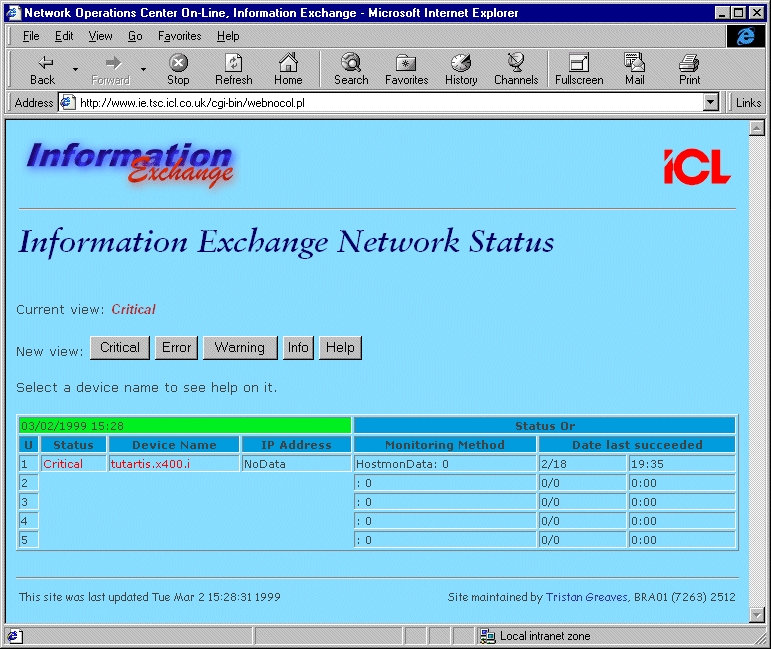
Figure 1. Web Version of Netconsole
The hostmon part of NOCOL is also very powerful. It allows you to install a Perl-based client on machines on your network in order to monitor aspects such as available disk space, mail queues, etc. The scripts can be extended to monitor any custom software you may be running. (We added an extension to monitor queues on our X.400/SMTP mail gateway software.)
An API to the system is provided that allows you to script your own monitors in Perl. Because of this, NOCOL has the power to monitor anything.
As an example of NOCOL's flexibility, I coded an extension to the notifier tool, which utilized our internal SMS messaging system. This allowed text messages describing CRITICAL problems to be sent to my mobile phone. This was done by coding an e-mail front-end to the SMS gateway, so all notifer had to do was fire off an e-mail in the correct format.
In essence, NOCOL has proven itself to be an extremely useful tool. It has alerted us to network problems as soon as they occurred, and the fact that it is freeware (it comes under a “not-quite-GPL” agreement) is just another example of great software under Linux being available for no cost.


