
Java 2 Software Development Kit
Since its introduction four years ago, Sun's Java technology has appeared on nearly every size and type of computer system, from IBM's MVS-powered mainframes to 3Com's Palm organizers.
New versions of the Java Development Kit and Java Virtual Machine are available first on Sun's systems and on Microsoft Windows, but many months may pass before they appear on other platforms. Sun's Java Software division produces reference implementations only for Solaris and for Windows, and licenses source code to other system vendors who want to port the JDK or JVM to their own hardware and operating systems.
Some vendors, like IBM, have their ports of new Java versions ready almost immediately. Unfortunately, users of platforms such as Apple's Macintosh have had long waits for the latest JDK. Linux users didn't see JDK 1.1 until mid-1997, although Sun introduced it in December 1996, and they have been eagerly awaiting Java 2 since November of last year.
Sun had no problem figuring out with whom to arrange Java licensing agreements at the major system vendors, but it did take them a while to identify a licensee for the widely dispersed Linux community. They eventually licensed the JDK source code to Steve Byrne and the Blackdown Java-Linux Porting Team, a group of Linux developers.
The Blackdown team recently released a preliminary version of the Java 2 SDK aft er testing it extensively with the Java Compatibility Kit, a suite of more than 16,000 tests which verify a port's conformance to the published Java language and runtime specifications.
You can download the Java 2 SDK for Linux from the Blackdown mirror web sites, found at http://www.blackdown.org/. Note that Sun recently changed the name of the software from JDK 1.2 to Java 2 SDK, although much of the on-line material still refers to the earlier name. The compressed SDK is nearly 24MB, so use a fast network connection if possible. Full documentation for Java 2 is packaged separately from the SDK. Download it directly from Sun's web site at java.sun.com/products/jdk/1.2/docs/index.html.
Installation consists of uncompressing and extracting the jdk1.2pre-v2.tar.bz2 file archive into your home directory or other location. Use the command:
bzip2 -d jdk1.2pre-v2.tar.bz2
tar xvf jdk1.2pre-v2.tar
In order to use the JDK, you must have a Linux distribution that includes the glibc2 version of the GNU C library. Most distributions, such as Red Hat 5.2, include this library, which is also called libc6.
After installation, simply set your PATH environment variable to include the JDK's bin directory, and you're ready to go:
export PATH={JDK-install-directory}/jdk1.2/bin:$PATH
To verify your installation, type:
java -versionThe JVM should run and report its version as “java version 1.2”, along with additional information about the implementation.
The Java 2 SDK includes several tools for development and testing, including the javac compiler, the jar Java archive manager that works similarly to the tar command, and the appletviewer program for testing applets. “Applets” are Java programs intended to run within a browser; Java “applications” are like any other program and don't need a browser to run. Current versions of Netscape and Internet Explorer do not directly support Java 2, so you will need to use appletviewer to test your applets.
The Java 2 SDK comes with a compiler, but does not include an interactive development environment. You can, of course, use vi or emacs to create your source files, then compile and run them from your command line. For example, create the file HelloLinux.java containing the lines:
public class HelloLinux
   { public static void main(String[] args)
      { System.out.println("Hello, Linux!"); } }
Compile your program with the command javac HelloLinux.java. The compiler will produce the file HelloLinux.class, which you run using the command java HelloLinux. If you encounter problems trying to compile and run Java programs, check your PATH and CLASSPATH environment variables. CLASSPATH lists the directories where the JVM looks for class files. If your own files or the class files required for a separately installed Java library are not referenced in CLASSPATH, the JVM cannot find and run them.
The Java 2 SDK includes the Java Foundation Classes, also known as the “Swing” class library. This library extends Java's original Abstract Window Toolkit, used for building graphical user interfaces. The Swing library provides a rich set of components for GUI development. The jdk1.2/demo/jfc directory contains more than 100 example source files that demonstrate the library's capabilities, including the SwingSetApplet demo, which shows all the components at work in one big applet. The SwingSetApplet includes full source code.
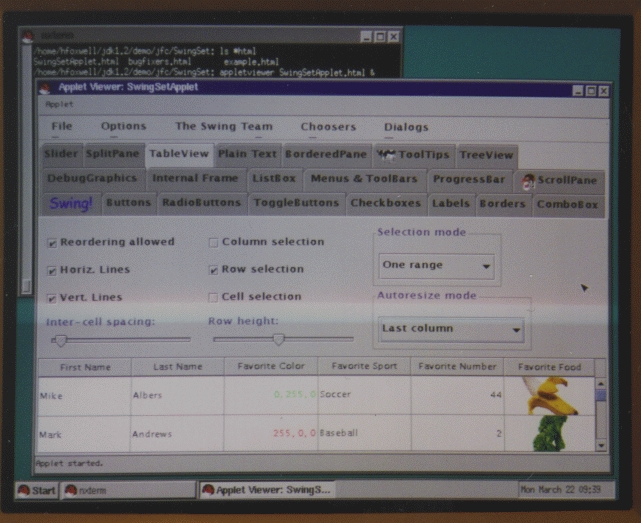
Figure 1. SwingSetApplet
Look in the jdk1.2/demo/jfc/Java2D directory, and you'll find the remarkable Java2DemoApplet, which shows off Java's 2-D imaging APIs, used to control image rendering, fonts, animation and printing.
One of the most significant changes to the Java platform concerns security. Earlier versions treated Java applets and applications differently, allowing applications unrestricted access to any system resource, while confining remotely loaded applets to an all-or-nothing “Sandbox” model. An applet in the old security model could not access client system resources and could not connect to any system other than its originating host. This provided a strong security model for remotely loaded executable code, but limited an applet's utility.
Java 2's new security model is based on a configurable policy file that can define security domains for each user, group and program component. This file, called the codeBase, tells the JVM where programs must be loaded in order to execute and determines who can run the program using digital signatures to authenticate the program's origin.
You can find a sample global policy file for all users in the jdk1.2/jre/lib/security directory. This file may be customized, and the JVM can be directed to use the policy file for all code execution permissions. An especially important point to note is that programs need not be modified in order to control their execution; the JVM and policy files determine what can run and who can run it. Take a look at http://java.sun.com/security/ for details and examples of Java 2 security.
If you are looking for professional Java 2 program development tools for Linux, you are again at the mercy of the tool developers, who generally release their products for Windows first and for other platforms later. However, if the development tool is written in 100% Pure Java, you are in luck. Blackdown's Java Tools for Linux link lists more than a dozen Java IDEs, including several that have been updated to work with Java 2. Check out NetBeans at http://www.netbeans.com/ and Together/J at http://www.togetherj.com/ for two excellent programming tools.
Sun has licensed source code for additional APIs to the Blackdown team, including code for Java 3-D, Java Media Framework, Java Advanced Imaging and Java Sound. Furthermore, Sun is now making sources available for much of the Java core technologies, including the new Jini software, under its Community Source Licensing Model. While not quite the same as the GNU General Public License, this model should make it easier for future ports of Java APIs to Linux and other platforms.
Linux developers are already at work adapting their solutions to Java 2. For example, Douglas Lau and Trent Jarvi have implemented the Java Communications API, used for access to serial and parallel ports. You can download the necessary libraries from http://jarvi.ezlink.com/rxtx/.
If you are new to Java programming, your background will determine how quickly you can learn it. Programmers already experienced with object concepts through C++ or Smalltalk can usually become proficient in Java after a few weeks of study and practice. If you are an “object challenged” C or FORTRAN programmer, you will need help learning to think and design using objects; taking a course in object-oriented programming will get you started. Beginners should study Sun's Java Tutorial or Bruce Eckel's Thinking in Java, while experienced object programmers can jump right in with Core Java by Horstmann and Cornell.
I can't think of a better platform and user community for Java than Linux. Now that Java 2 is available, with its advanced GUI features and flexible security model, I anticipate a major wave of new and interesting Java programs. The Blackdown team deserves applause for its efforts.

