
What Can you Expect? —A Data Collection Project Using Linux
I have been doing a fair amount of testing and monitoring on the system and hardware clocks of my Debian 2.0 machine that I use for file (Samba), communication (ISDN/masq/diald), printing and modem pool (mserver) service on my home office network. I wanted to see how well I could correct the system clock with adjtimex without running ntpd all the time and keeping the ISDN line to my ISP up. I had been recording daily data for the clocks and an ntp (network time protocol) reference server using the logging feature of adjtimex with cron and an Expect script. I was noticing some odd changes from day to day, and was beginning to wonder if temperature was affecting the server's system clock.
adjtimex allows you to fiddle with the kernel parameters which control the system clock. The file /etc/rc.boot/adjtimex contains settings for TICK and FREQ, the coarse and fine settings used to tune out variations in the frequency of the crystal oscillator on the motherboard which supplies the interrupts to the system clock timekeeping process. The command:
/usr/sbin/adjtimex --log --host ns.nts.umn.edu
logs data for the reference ntp server, in this case ns.nts.umn.edu, the system clock and the hardware clock to /var/log/clocks.log. By using
adjtimex --review=/var/log/clocks.logyou can get suggested changes for TICK and FREQ which will tune the kernel clock and hopefully get it to match the ntp reference server. This is all well and good, as long as the clock crystal is stable; but what if it varies with temperature?
What if I could measure and record the temperature near or actually inside the server? I could then correlate the temperature data with the system clock data to see if they were related. I have a Micronta (Radio Shack) digital multimeter with a serial interface. All I needed to collect the data was a circuit to convert temperature to voltage and interface the meter to a serial port on the server.
A little research on the Net turned up a couple of thermocouple to millivolt converters, but they cost much more than I wanted to pay. Being an electrical engineer and having worked at a measurement company for many years, I knew that a temperature to volts converter circuit is fairly simple. A couple of friends helped out by putting together a circuit that provides .01 volts out per degree Fahrenheit that fits on a piece of vector board about an inch square and runs from a 9-volt battery. See Figures 1 and 2 for the schematic diagram and a picture.
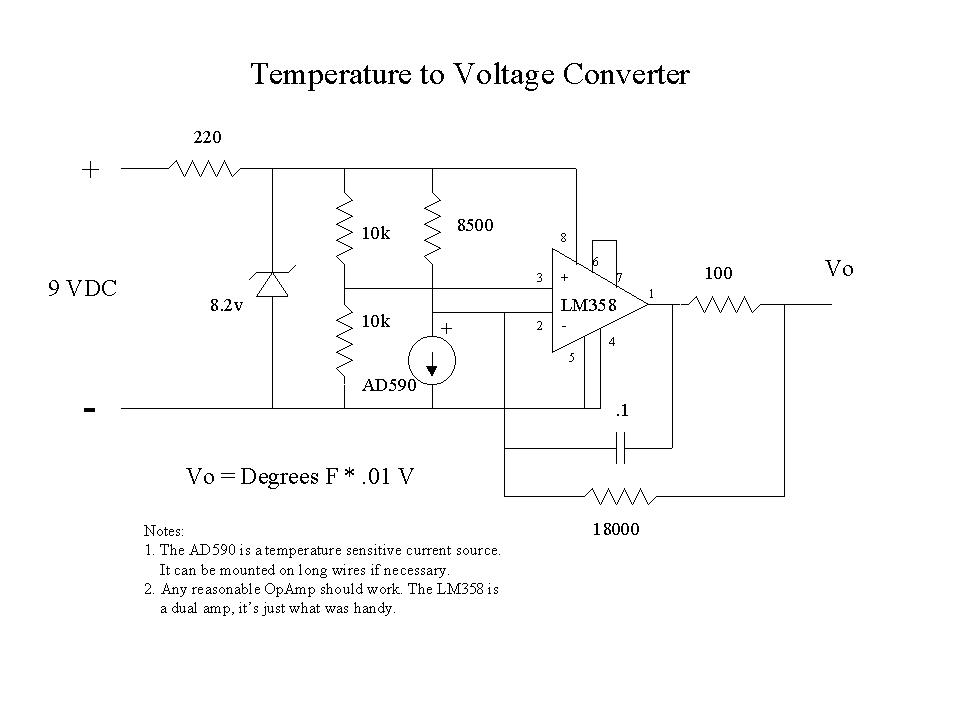
Figure 1. Schematic for Temperature-to-Volts Converter
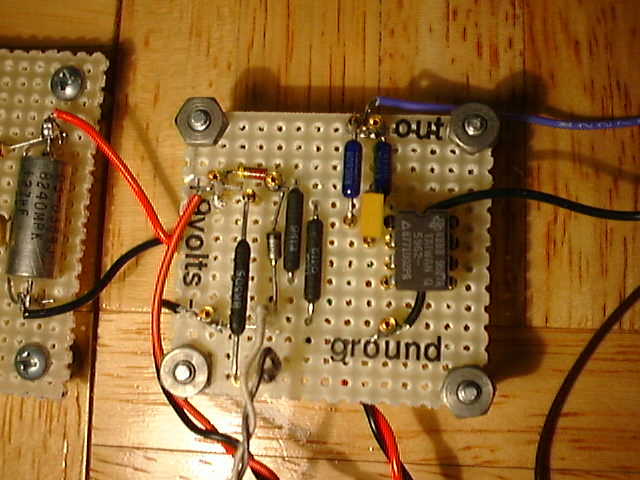
Figure 2. Converter
The Micronta No. 22-182 LCD Digital Multimeter comes with a five-conductor cable and a short section in the manual describing test programs for MS-DOS and MS-BASIC. A quick check showed that these worked fine. The serial interface communication parameters are 1200 baud, 7 data bits, no parity and 2 stop bits. Using the meter's continuity test function, I made a cable drawing as shown in Figure 3, a complete pinout and description of the serial port signals as found on a PC. These ports have male connectors with either 9 or 25 pins, and are wired as DTE (data terminal equipment). The RS-232 specification is designed so that a DTE port as on the PC can be connected to a piece of DCE (data communication equipment), typically a modem, with a straight-through cable. DCE usually has a female connector. You can use Table 1 to wire up a 9-pin to 25-pin conversion cable if you need one. Now I was ready to try reading the meter on Linux.
Before I hooked up the cable to /dev/ttyS0, I checked to see if there were any drivers like getty or gpm running on the port. Sure enough, there was a leftover gpm driver for a mouse, even though the mouse had long since been disconnected. I did an
/etc/init.d/gpm stop
and renamed the init script with
mv /etc/init.d/gpm /etc/init.d/nogpmto prevent gpm from restarting in the event of a reboot. If you have a getty process running on the port, you will have to disable it by commenting out the correct line in /etc/inetd.conf and restarting init with
kill -HUP 1Use something like
ps auxw|grep ttyto make sure the serial port you are trying to use is free.
I used stty to set the port to the meter's communication parameters with this command:
stty speed 1200 cs7 cstopb -echo clocal < \
   /dev/ttyS0
speed 1200 sets the baud rate, cs7 sets 7 data bits, cstopb sets 2 stop bits and parity is none by default. I added the -echo to make sure the device driver didn't echo back characters sent to the port and clocal to disable the modem control signals.
I decided to use Expect to collect the data, since the meter has a very simple “send a command” and “get a response” paradigm. Expect is a powerful tool and can be used to automate UNIX programs which interact with a user or processes needing a command or trigger and return some kind of response. Expect is built on top of Tcl, a widely used extensible language. I had recently discovered Expect and found it is one of those tools you just don't know how you ever got along without. You can easily automate things with Expect that are extremely difficult or next to impossible with shell scripts or other languages. Sol Libes' book, Exploring Expect, was a valuable resource. Mr. Libes is the author of Expect. I also found the Expect and Tcl web pages very helpful. I had previously used Expect to automate a couple of tasks such as the clock data logging mentioned above.
The meter protocol is very simple: send the meter a D\r (a capital D followed by a return), and it sends back a 14-character string ending in a \r (return). The message sent back by the meter is of the form:
Byte     1 2 3 4 5 6 7 8 9 A B C D E
Ex. 1    D C - 1 . 9 9 9 9   V     \r
Ex. 2          1 . 9 9 9 9 M o h m \r
In practice, since this is a 3-1/2 digit multimeter, a space character replaces the least significant digit in column 9.
Now that I had the port cleared and set to the right communication parameters and the cable hooked up, I was ready to talk to the meter.
However, when I hooked it up to the serial port on the Linux box, I got no outputs. Luckily, I have a serial breakoutbox, a piece of test equipment that has a two-color LED for each signal, switches to disconnect signals and sockets to jump them together. This is plugged in between the computer port and the piece of equipment you are trying to diagnose. My inexpensive box lights the LEDs red for negative voltages and green for positive voltages.
After much probing and watching the serial breakout box, I discovered that the meter depended on having the RTS (request to send) signal stay low to provide the negative voltage for the meter's output drive circuit. Without RTS low, the meter's TXD (transmitted data) line wouldn't work. Normally when you open a port, both the RTS and the DTR (data terminal ready) lines go high.
Now, how do you control the modem control lines on a serial port? This is where having access to the source code for the serial drivers, and other utilities truly helped. If this were just a DOS application (single user, single tasking), it would be simple to read the ACE's (asynchronous communication element) control register, set the right bit, and write the data back out to the port. Since user-space programs can't write directly to system devices, I had to figure out how to tell the device driver to manipulate the RTS line. After much searching, I found a UNIX serial support site, which led to a serial utility site, which had a utility that I could hack to do what I wanted. I'm not a super C programmer, but this was just what I needed to give me the clues on how to operate the ioctl function of the serial driver. I hacked up a couple of programs: clrrts.c to clear the RTS line, and modctl.c, which can either set or clear RTS or DTR on a serial port. The source of clrrts.c and modctl.c can be found in the archive file ftp.linuxjournal.com/pub/lj/listings/issue68/3357.tgz.
During my earlier sessions with Expect, I discovered a little hitch with Expect and cron. The Expect version 5.25 delivered with Debian 2.0 stable (libc6) will not spawn processes when run by cron. The Expect 5.19 on Debian 1.3 (libc5) works fine. I reported a bug to the Debian maintainers to learn that it might be a while until the libc6 issues were fixed. I worked around the problem by manually installing the Expect 5.19 executable and Tcl 7.4 support libraries, from my Debian 1.3 system to the 2.0 server, which already had the general libc5 support libraries, to support another libc5 package I was running.
The meter has an auto-shutoff feature, which can't be disabled. It shuts the meter down if more than ten minutes go by with no activity. Clearly, this wasn't very good for long-term data collection. To fix this, I added some code to the Expect script to define how many times per hour I wanted the data logged, and set cron to read the meter once per minute. This keeps the meter on, but avoids having a huge log. The crontab line that runs rddmm.exp is:
* * * * * /usr/bin/expect5.19 /root/rddmm.exp
A couple of things showed up after a reboot. I discovered the Expect script was timing out, since the meter was not responding. Two things came out of this. The first was some interesting things that happen when you attempt to change certain stty parameters, and the serial port cable does not have connections to the modem control input lines: CTS (clear to send), DSR (data set ready) and DCD (data carrier detect). Basically, the port gets stuck. Since the cable that came with the meter left CTS, DSR and DCD open, and I did not want to modify the cable, I figured out which stty parameters not to use: hupcl and crtscts. I had placed hupcl in the original stty settings for the port while sorting out the RTS low requirement. The port had accepted the hupcl setting, because at the time the command was issued, I had the serial breakout box on the port and used the jumpers to wrap around the modem control signals. But when the meter cable alone was connected to the port, the lack of the feedback signals CTS, DSR and DCD caused hupcl to hang the port. This didn't show up until reboot.
Second, I needed to set “raw” mode on the serial port, the default as booted parameters are set to “cooked” which translates returns to newlines. This prevented the Expect script from seeing the \r at the end of the response. These changes were also incorporated into the Expect script.
The Expect script, rddmm.exp, with the lines numbered for reference, is included in the archive file along with a line-by-line explanation of the code.
Both the temperature conversion circuit and the multimeter run from 9-volt batteries. Since I wanted to take data for weeks at a time without worrying about them going dead, I designed and built a couple of simple power supplies using adjustable voltage regulators and the cube transformers that plug in the wall, to act as battery eliminators. These also fit on a piece of vector board a little over one square inch. (See Figure 4.)
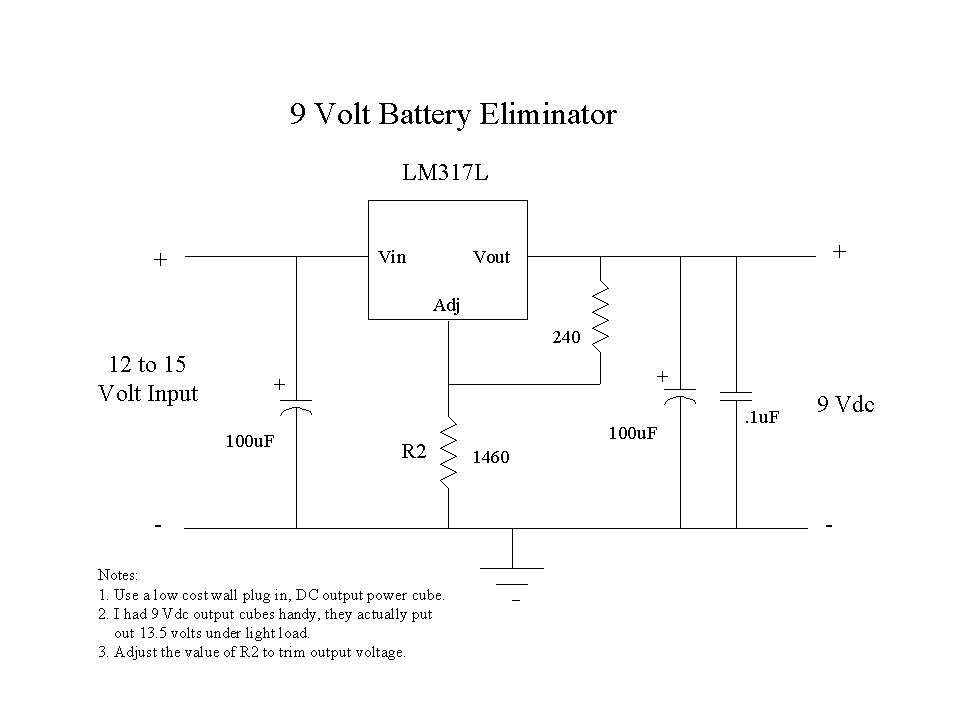
Figure 4. Battery Eliminator Schematic
The last part was visualizing the data. I used gnuplot to read the log file and plot temperature versus time. I hadn't used gnuplot before, but a couple of hours going through the man pages got me to a point where I could view the plot on the Linux console or print it to my HP LaserJetIII.
Lines in /var/log/temps.log look like this:
Dec 31 10:45:01 server1 rddmm: 68.9 Degrees F
The operative gnuplot directives are:
set xdata time
set format x "%b %d\n%H:%M"
set title "Internal Server Temperature at Timekeeping Crystal"
set timefmt "%b %d %H:%M:%S"
set xrange [ "Jan 03 14:00:00" : "Jan 04 07:59:00"]
set ylabel "Degrees F" -2
plot "/var/log/temps.log" using 1:6 with lines 1
The xdata and timefmt directives tell gnuplot the horizontal axis is measured in time and how the times in the log file look. The xrange directive determines which lines of the log file get plotted. The format x directive defines the labels on the x axis; the \n between the date and time forces a two-line label. The plot command tells gnuplot where to find the log file, which columns to plot and to use line plot style 1. The set title and set ylabel put a title and y-axis label on the plot.
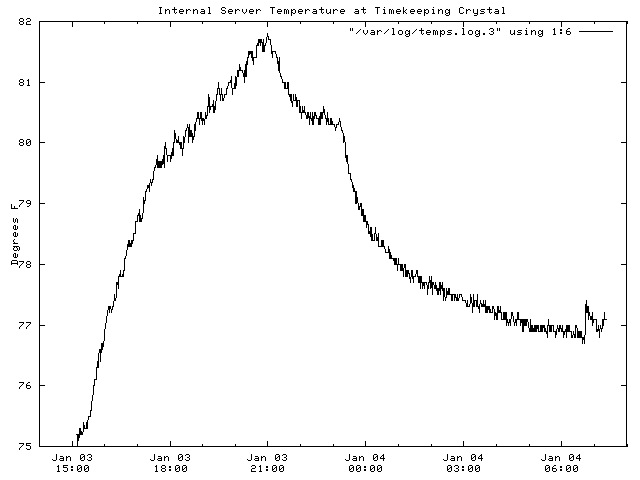
Figure 5. Temperature Versus Time
To print the plot to the laser jet, I used:
set terminal pcl5
set output '/root/plot.out'
replot
Then from the shell:
lpr /root/plot.outIn a similar fashion, I plotted the difference of system clock time measurements versus the reference NTP server on the Internet with the gnuplot directives shown here:
set xdata time
set timefmt "%Y-%m-%d %H:%M"
set xrange ["1999-01-03 15:00":"1999-01-04 07:00"]
set format x "%b %d\n%H:%M"
set title "Delta sysclock Minus Delta refclock"
set ylabel "Seconds" -2
plot "/root/clk_hr.prn" using 1:3 with lines 1
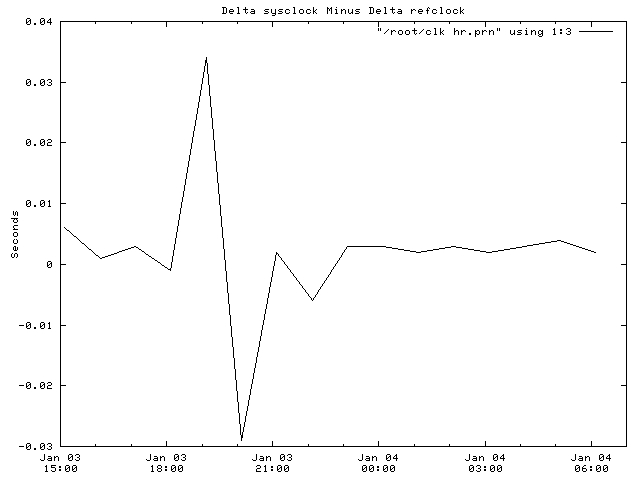
Figure 6. System Clock time Measurements Versus Reference Ntp Server
And now, after all of this, is the system clock being affected by temperature? By looking at Figures 4 and 5, you can see that the variations in the clock differences do not follow the temperature variations inside the server. As a matter of fact, there is a large time variation that corrected itself, which I must chalk up to variations in network latency. By taking time data once per hour instead of once per day as I was originally doing, it became easier to identify the random network variations, which had originally peaked my curiosity.
These techniques are also adaptable to measuring and recording other physical parameters using devices with a serial interface. This particular digital multimeter can measure DC and AC voltage and current, capacitance, frequency and transistor gain. All these are accessible through the serial interface.
Linux and a project like this have brought me back to the days when you could actually create something useful with hardware and software. Sadly, most things for computers today come out of a shrink-wrapped box. Linux provides me with the tools I can use to make things happen in the real world.

