LinuxPOS

Manufacturer: Linux Canada, Inc.
E-mail: sales@linuxcanada.com
URL: http://www.linuxcanada.com/
Price: $199 US per lane
Reviewer: Brian Walters
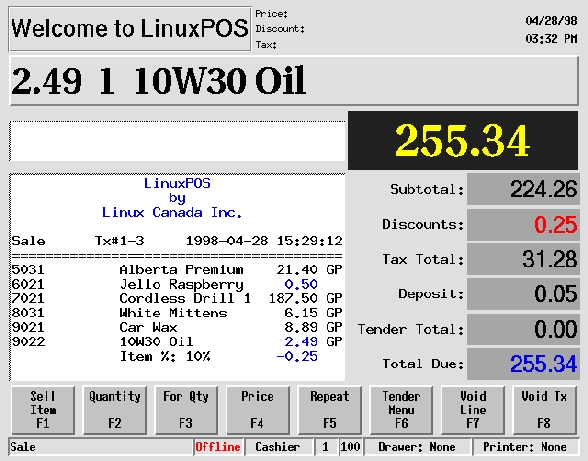
Being a Linux consultant by night and a Windows programmer by day, I am always looking for the best way to solve different problems. Recently, I was given the chance to apply a Linux solution in a new market for us. A longtime Linux client asked me what I'd recommend for a point-of-sale system. Of course, I knew if he was asking me, he probably wanted a reliable solution based on Linux. After a little searching on the Web, I found LinuxPOS from Linux Canada, Inc. Their web site said LinuxPOS was still in beta but a demo copy was available, so I downloaded it. The beta installed easily and in a few minutes I saw the POS login screen. I was impressed immediately.
One of the strongest features of this program is its client/server nature. Once the registers are up and running properly, the server can actually be taken off-line for backups, maintenance, hardware upgrades, etc. When the server is back on-line, the registers synchronize with the server and the cashiers never notice a thing. This type of configuration makes this application great for remote stores where phone lines may not be 100% reliable.
LinuxPOS is the front end to a powerful Unidata-based program called Retailer's Choice ($599 US), also from Linux Canada. (UniData Server, $885 for a 3-user license, can handle up to six lanes of POS.) RC can handle all the accounting and inventory needs for a single store as well as multiple locations. Written as a text-based application, RC is easy to navigate and simple to understand. You can access it through an xterm window, the Linux console or a terminal such as a PC with a modem. The report writer is a real plus for managers who want to query the system for specific reports not already available in RC.
The server I set up to run the Unidata database is a Pentium II 400 with 128MB of RAM and two 6.4GB Fujitsu hard drives, housed in a RAID1 full bay enclosure from MicroPal Corporation (http://www.MicropalCorp.com/). Backups are handled by a Seagate DAT drive connected to an Advansys SCSI card. Red Hat 5.2 with iBCS re-compiled handles the OS needs, since the database is not yet native to Linux. Network connectivity is handled through a 10/100 Intel Pro NIC.
The registers also run Linux, of course. AMD K6 266 processors with 32MB RAM and a 2GB hard drive make up the registers. Symbol scanners and Star printers were added to handle the specific POS needs. I believe it is very important that any Linux system sold includes some sort of reliable, fast backup and restore process. These registers are no exception. With a floppy disk in hand, a store manager can walk up to a crashed register and restore it in five minutes while typing only one command. This type of restore is possible due to the 100T network and etherboot.
Another great feature of this system is its technical support. Beside the on-site support provided by myself, the folks at Linux Canada were always there, ready to solve any problems we couldn't quickly fix on our own with the help of the manuals. Support can be a tough thing for small companies to provide, since so much effort is consumed in actually writing and enhancing a great program—these folks have found the perfect balance.

While it appears that LinuxPOS can do everything a storekeeper would want, there was one place where I had to find another solution—employee time cards. Sure, you can have them punch a card in and out every day, but with all this processing power, there is a better way. At first I thought I had found it through a great little application called TimeClock, but after contacting them, I discovered they are having internal difficulties and could not provide us with what we needed. So what's a good Linux consultant to do? Simple; I wrote a series of scripts called lxTimeClock (http://www.TexasComputers.com/) and released them under the GPL, free to all. Support is very limited, but once you get things installed, it really doesn't need much attention at all.
With a little ingenuity and a few years of Linux experience, I was able to deliver a strong, reliable solution without much custom programming. Many people get stuck on how free Linux is and toss a computer together from old or cheap parts. This is fine for testing it out at home or in your office, but when it comes to delivering solutions, quality parts make all the difference in the world. So the next time someone asks you “Can Linux do...?”, search the Web—the answer is most likely there. LinuxPOS was just sitting out there waiting for a great opportunity like this one.