
MultiFax
Faxing is one of the world's great business constants. This ubiquitous technology has changed the world and can be found in any office and a number of homes around the world. Even when we don't have dedicated fax machines, we use PC or network-based faxing. Putting a fax modem on every PC in your organization doesn't just sound ridiculous—it is. Might I then humbly recommend a great fax solution, free of charge, combined with the dependability of Linux? Wonderful!
While deciding on how to present this article, I thought about all the great free software available for Linux. Your Linux distribution CD contains thousands of such programs. The catch is that not all of them are pretty—extremely functional, but not pretty. Windows users still shudder at the thought of the dreaded command line. So how do we, Linux gurus all, protect them and impress them with the power of our Linux servers? I can hear some of you saying “We don't!”, but seriously, Windows is still out there and will be for some time. Convincing users from the Windows world that hidden behind the command-line interface is a product that will satisfy their needs is sometimes difficult, even when it's something as simple and useful as free network faxing for the office.
As developers and supporters of what will invariably become the next great operating system, both as server and on the desktop, we can ease the confusion of the terrifying command line by wrapping the solutions we offer in friendly, easy-to-use interfaces. My solution often involves hiding the magic of the command line behind a friendly web-style interface. After all, everybody loves their browser—http://www.allplaynowork.com/, anyone?
I will show you how to create an integrated fax solution for your Windows 9x users to make faxing as easy as printing. Using the web-based administration tools, you can then off-load some of the responsibility for watching all those faxes go through to your users.
At the end of the article is a URL link from which you can download the full distribution for MultiFax. Find yourself a nice comfy chair, and we'll begin.
Well, luckily, not much. You should take a moment and think about this one, though. Will you be using your fax modem as a permanent fax solution, or will you be sharing the fax modem with a dial-on-demand PPP connection? The answer will define whether you can use your current fax modem, or whether you should consider adding another to your system. In my case, I use the same connection for Internet access as for faxes. When I need to pick up a fax (or send one out), I simply take down my Internet connection (by killing my diald process), and start a single process for the fax. In a busy office, that may not be such a hot idea.
Gert Doering's mgetty+sendfax is a relatively easy-to-use fax solution for the office, that is, if you're a command-line-savvy Linux user. The great thing is that it comes with your Linux distribution. Red Hat's package includes it as one of the default choices during installation. I checked my SuSE distribution as well as a Caldera CD and they all had it, so finding it should not be a problem. The latest version of mgetty+sendfax is always available at metalab.unc.edu (formerly sunsite.unc.edu) under the pub/Linux/system/serial/getty directory.
Combined with Horst F.'s respond utility for Windows, it provides a rugged and easy-to-use fax mechanism from the Windows desktop. Horst's utility, which lives on your task bar as a tray icon, appears as a fill-in form whenever a user submits a fax to the queue. You enter the destination name and phone number, click OK, and off go your faxes. You can get the respond program at www.boerde.de/~horstfhttp://www.boerde.de/~horstf. While there, make sure you pick up the accompanying printfax.pl Perl script and the recommended smb.conf entry for Samba.
Create a directory on your Windows PCs (or in a shared drive on the network) and copy RESPOND.EXE there. On my office PCs, I put everything communications-related in a directory called C:\COMM. Then I have subdirectories for my applications. RESPOND.EXE lives in C:\COMM\FAX. It doesn't really matter where it lives, so long as you know where you've put it.
Once the mgetty+sendfax package is installed on your Linux system (whether with an RPM install or compiled from source), you will need to set up some basic configurations before moving on. On my Red Hat 5.2 system, most of these live in the /etc/mgetty+sendfax directory. Your distribution or install may put them in a different place.
You can get a lot of detail from the mgetty+sendfax FAQ on setting things up, but if you're in a hurry to get faxes moving, here are some of the basics. The config files I took the time to set up are named sendfax.config, mgetty.config, faxrunq.config and faxheader.
In the sendfax.config file, I set up the following parameters:
fax-devices ttyS1
fax-id 955-555-5555
ignore-carrier y
There are other settings, but I was also in a hurry. Since we have only one fax modem, I set up ttyS1 as my fax-devices entry. The fax-id is the phone number your fax modem announces to the other fax machine. The third line is to correct a nasty US Robotics problem I had with my fax—it tells the fax program not to hang up between pages of my fax transmission.
On to the faxrunq.config file, essentially, I set only one parameter here. That was:
success-send-mail Y
Since we have e-mail set up in our office, my Linux system sends us mail when a fax has been successfully sent out. You may or may not want to set this one. If you are setting up large broadcast fax lists, you may not want to get a hundred or more messages confirming each successful fax, or maybe you do. Whatever you decide, consider this carefully before you set up your system. Fear not, though—you can always go back and change it if you find that you made the wrong decision (after you've read your 300 confirmation e-mails).
In my mgetty.config file, I also make only one change:
fax-mode 0666
More on that change later when I discuss security.
Finally, we have the faxheader file. Mine looks something like this:
FAX FROM: **Marcel & Sally** 955-555-5555 TO: @T@
 PAGE: @P@ OF @M@
Okay, so my number is not 955-555-5555—you got me there. This defines the identification information that appears at the top of every fax we send out. Pages are numbered for easy reassembly when they are inadvertently dropped on the floor.
You should also make sure that you have a fax.allow and a fax.deny file in the directory. The fax.allow is a text file with a simple list of user IDs to be allowed fax access. The fax.deny file is a list of people who are not allowed fax access. Alternatively, if you just want everyone to be able to fax, simply omit the fax.allow file and create an empty fax.deny file. If neither file exists, only root can fax. For a network fax solution, this is not a good idea.
One last thing in our mgetty configuration, and we'll move on to the Windows side of the picture. The default umask for /usr/bin/faxspool is 022. Since faxspool is simply a text file, it's easy to modify the netmask so that network users can delete jobs. In the script, we comment out the umask 022 default and add the line umask 000:
# Change umask to 000 so that any user can delete
# an old fax
# umask 022
umask 000
Earlier, I mentioned security regarding spooled jobs. Security concerns will arise for some users, but in most offices, the fax machine is a fairly public tool. We look at the network fax queue in much the same way. Anyone can check on faxes, clean up their sent jobs, or print out incoming jobs. The odds of a co-worker deleting your job out of spite is generally fairly remote, at least in our office—I can't guarantee civil behavior in yours. As for outside users, I'll assume your firewall already takes care of them.
Speaking of outside users: would you like to receive faxes as well? That one is easy. The mgetty process can be added to your inittab to listen for incoming calls on your fax modem. Edit your /etc/inittab and add this line:
fax1:2345:respawn:/sbin/mgetty /dev/ttyS0
In the above entry, fax1 is an arbitrary name I've chosen. In your case, you may pick a different name just as you may need to specify a different device than my ttyS0. Finally, tell the system to reread the inittab with this command:
init q
mgetty is ready to receive incoming faxes and will restart the listener process each time it hangs up. In my office, we share the fax with our Internet connection, so I simply start a single instance of mgetty with this command:
/sbin/mgetty /dev/ttyS0 &
Now we want to give our Windows users access to the network fax. A detailed description of setting up Samba services is an article on its own, so I won't cover it here (see Resources). The following snippet from my own smb.conf file can be appended directly to your smb.conf file to create the network fax entry.
[netfax]
   comment = Network Fax
   path = /home/samba/faxdir
   read only = No
   guest ok = Yes
   print ok = Yes
   postscript = Yes
   printing = aix
   print command = (/usr/bin/printfax.pl %I %s\
    %U %m; rm %s) &
You can now set up a network printer on each of your Windows 95/98 workstations. For a printer type, I use an HP Laserjet 4 PostScript printer and refer to it as Network Fax. I chose the HP Laserjet 4 more or less at random, but any PostScript definition should work.
Next, add a shortcut to the PC's startup folder that points to your RESPOND.EXE program. Remember where you put it? When it runs, RESPOND.EXE will appear as a small rectangular tray icon in your Windows 95 taskbar.
When a user wishes to send a fax from a Windows program, they simply select the Network Fax printer from the list. When they click OK, respond will pop up with a dialogue box similar to the one in Figure 1. Fill in the blanks and click on “OK” to send your fax.
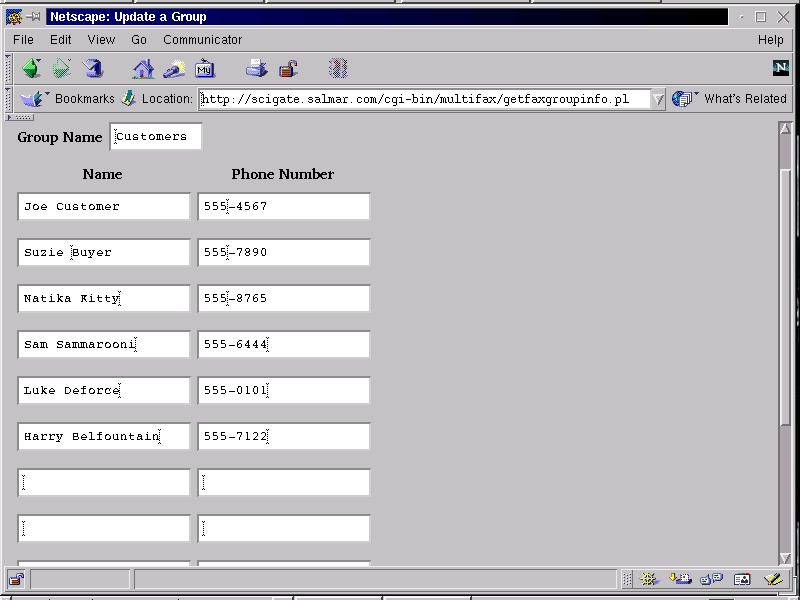
Figure 1. RESPOND Dialogue Image
Now, since part of MultiFax involves the setting up and maintenance of broadcast fax lists, you'll need to do things differently if you are sending to such a list. When prompted for a “Fax Number”, you must enter @ followed by the broadcast fax group name. For example, if the group name is Toronto, the user would enter @Toronto.
If you want your users to get immediate confirmation that their fax job has been spooled (and you probably do), add WINPOPUP.EXE to their startup folders as well. Winpopup comes standard in the Windows 95 distribution and lives in the C:\WINDOWS directory. Then, on the “Winpopup Shortcut” properties tab (accessed with a right-click), I set the Run: option to “Minimized”. Winpopup starts up out of the way in the Win95 taskbar, and pops up only when it gets a message. One more thing. Click on “Winpopup” on your taskbar to maximize it. Now click on “Messages”, then “Options”. Click on the checkbox for “Pop up dialog on message receipt”, so that Winpopup pops up each time a message is received.
Winpopup is also a great way for us to send each other little secret notes when you're supposed to be working, but I never said that.
Now we have mgetty+sendfax ready to go and our Windows PCs all set to fax away. What we want now is a way to report all that activity through a web-browser interface. This is where the MultiFax software comes into play.
The MultiFax administration tool consists of a handful of Perl scripts, web pages and support programs that tie in to mgetty+sendfax. To install MultiFax, follow these steps.
Unpack the bundle into a temporary directory using the tar command.
As root, run the install script by typing ./install. The install script will do the rest.
Administering the queue, monitoring the status of outgoing and incoming faxes, then cleaning up afterward is a little more difficult. You could just have your system delete everything as soon as it is processed, but my experience is that people want a bit more feedback. This leaves us with a cleanup job.
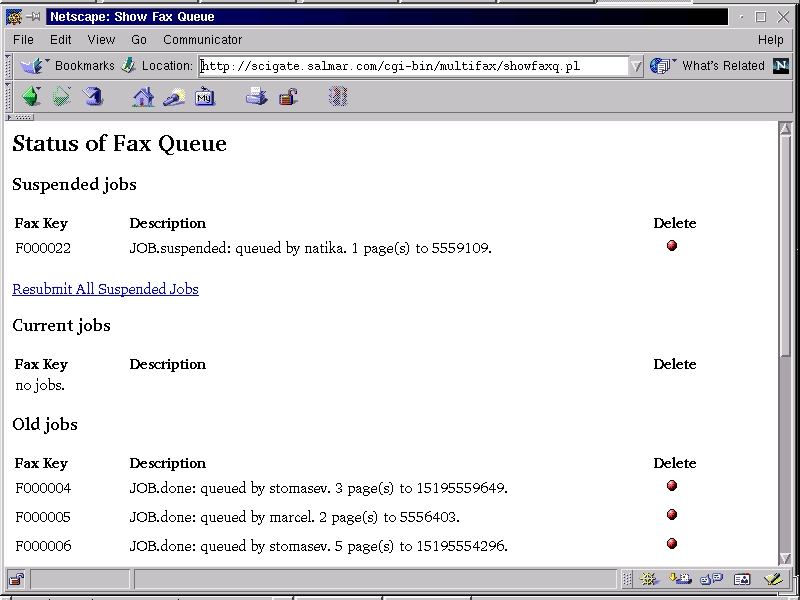
Figure 2. Multifax Main Menu
To access the web tools, point your browser to http://your_serbserver_address/multifax/. You should now be looking at the MultiFax menu (see Figure 2) which contains these four items:
Check Outgoing Fax Queue Status
Check Incoming Fax Queue (or print)
Update Broadcast Fax Groups
Documentation
The outgoing interface looks at the queue in three different ways: the current outgoing queue, any suspended jobs and successfully sent old jobs. All three views offer the opportunity to delete jobs from the queue. The suspended view has a resend option (when you know beyond a shadow of a doubt that you have the right phone number). See Figure 3 for an example screen.

Figure 3. Netscape Screenshot of Fax Queue
The Perl script, showfaxq.pl, builds an HTML page by querying the faxq for current, suspended, or old (successfully sent) jobs. You have the option at each level to delete a queued job. Strangely enough, the version of faxrm included with mgetty does not allow you to delete faxes that have already been sent, only those still waiting to go out. The MultiFax installation will install a modified version of faxrm that takes care of this strange behaviour.
Sending out queued faxes is the job of faxrunq, also part of mgetty+sendfax. Processing the queue in this way is probably not what we want to do. There are actually a couple of ways to automate this. The first is to create a cron entry that checks the queue and processes it on a regular basis. A good entry for root's crontab would look something like this:
0,15,30,45 7-19 * * * /usr/bin/faxrunq -s\
1>/dev/null 2>/dev/null
Another option is to run faxrunqd which runs as a daemon and regularly checks to see if faxes are waiting to go out. This is by far the easiest way. The cron approach lets you set your own timetable for dealing with the queue.
The next part of the screen shows suspended jobs. Along with the delete option, it is possible to resubmit those suspended jobs to the current job queue.
Finally, we have the old job listing. The only option there is to delete something when you are satisfied that the job has completed and the fax has gone.
When faxes arrive, you have the option of printing them immediately using the new_fax scripts or simply stacking them up in the queue and printing them manually. In order to have your faxes immediately go to a printer, mgetty+sendfax includes a few scripts to use depending on the eventual destination of your printout. On my system (Red Hat 6.0), the sample scripts are in the /etc/mgetty+sendfax directory. On my local server, we use the new_fax.lj script which formats the output for a Laserjet printer. To use the script, simply copy (or rename) the new_fax.whatever to new_fax.
The web-based menu lists faxes in the incoming queue and allows for printing or reprinting of any given page. Each entry is identified by date and time, sender and page number. Printing the page is simply a matter of clicking on the red button on the right.
Now comes the fun part and the real reason a simple web interface for outgoing faxes became so much more. We had many requests for a package that offered broadcast faxing at a decent price (or free). After checking the newsgroups and discovering that those solutions weren't easy to come by, it was obvious we needed to create one.
The mgetty+sendfax package does allow for broadcast faxing, it turns out. As mentioned above, you can specify a list name by sending to @listname instead of just a user name. This would require a user to maintain a text list on the Linux server. Not too difficult, but what about our Windows users who would rather not see the shell prompt or deal with vi? It is for those users, after all, that we are doing this.
Click on the “Update Broadcast Fax Groups” link from the MultiFax menu. You will be presented with a list of current fax groups. See Figure 4 for an example. You can add a new group, modify an existing group, or remove a group from the list. The basic installation has no groups yet, so you will have only one choice—to add a group.
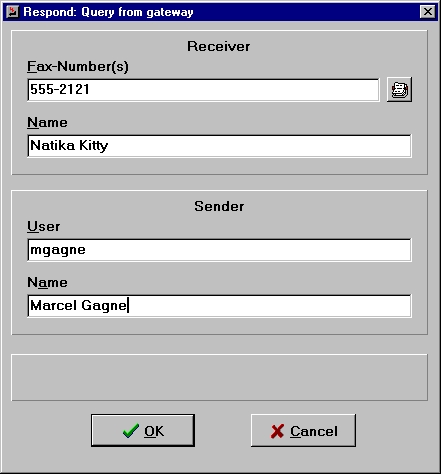
Figure 4. Broadcast Fax Administration Screen
Let's start by adding a group called “Customers”. Choose “Add a new fax group” from the list, or simply click on the radio button with the same name. Then click on “Submit Request”, and you will be presented with the group update screen. This is the same screen you would see if you chose an existing group and wanted to modify it. The only difference is your group name is blank at this time. Enter Customers and tab over to the next field.
Initially, the form has ten rows for names and phone numbers. When you have filled in all ten, you can continue adding more names by clicking the button labelled “Modify an Existing Group”. If you need more than ten, just go back to the broadcast fax menu, select your group (Customers), click on modify, and you will get another ten fields of names to add. In fact, you will always have ten free fields.
Finally, you have the option of removing groups which have become dated or no longer apply. Removing a group from the list starts with the same menu. When you click “Submit Request”, you will be prompted with the confirmation request, “Are you sure you want to do this?” after which the group will be permanently removed.
MultiFax has a fourth menu option with simple, guideline-only documentation. The MultiFax distribution comes with some READMEs and documentation that should answer any other questions that might crop up. Using what's there, you could customize the solution to your own ends.
Regardless of what you are prepared to spend for a commercial fax solution, there is no such thing as “plug it in and your whole network is up and faxing thirty seconds later”. You, the beleaguered system administrator, will have to do some of your magic to make it happen. Using these instructions, you can create a Linux/Windows network faxing solution that is dependable, inexpensive and fairly simple. Add the web-based fax administration software to that package, and you can unload some of the responsibility of administering network faxing to your users.
Besides, as system administrators, you've got other more important things to worry about—like printers, but we won't go there.


