
Workings of a Virtual Private Network, Part 1
Commercial Virtual Private Network (VPN) products are becoming widespread. They let confidential data safely take the “free ride” offered by the Internet, compensating for the Net's intrinsic lack of security. A Linux VPN can be constructed several ways. One is outlined in the clever but spare VPN mini-HOWTO by Arpad Magosanyi. I implemented it for a business and present some of the insights gained.
Part 1 of this article is theoretical and explanatory, Part 2 practical. I first define VPNs and describe technologies they employ. I discuss the combination of Linux building blocks used by the HOWTO for constructing one. In Part 2, I show log and screen output depicting the results of actually running the script that constructs the VPN.
A VPN uses a public transport—the Internet—for private communications. It applies encryption to preserve privacy. Traditionally, companies have used private transport to do that—dedicated phone lines. The two ways of keeping an electronic conversation private are to make the line private and the data private. Dedicated lines are private because the line is private, i.e., inaccessible to others. VPNs are private because the data is private, i.e., rendered unintelligible by encryption—different means, same result.
VPNs are most commonly used to connect two networks at different sites of the same company. The technique in effect plugs the remote computers into the local network, consolidating the two physical nets into a single logical one. Remote computers have access to the same local resources as local ones. At the same time, remote machines enjoy the same degree of privacy as local ones. All this is location-transparent in terms of operation (though not performance) as if they were attached to the local network. This combination of full participation plus full privacy between networks, while using a link that isn't private, is the hallmark of a VPN. The compelling appeal of the VPN is that it's cheap. Dedicated lines are expensive, so displacing them with a free transport is economic.
The VPN in the HOWTO is fashioned from two main ingredients: the secure shell (ssh/sshd) and the point-to-point protocol (pppd). One machine (the “local” one in my terminology, “master” in Mr. Magosanyi's) runs the HOWTO's script to call another (my “remote”, his “slave”). I'll call these VPN servers. The idea is that they belong to the two networks to be joined and serve as the contact points or data conduits between them, on behalf of any remotely situated pair of workstations that want to converse.
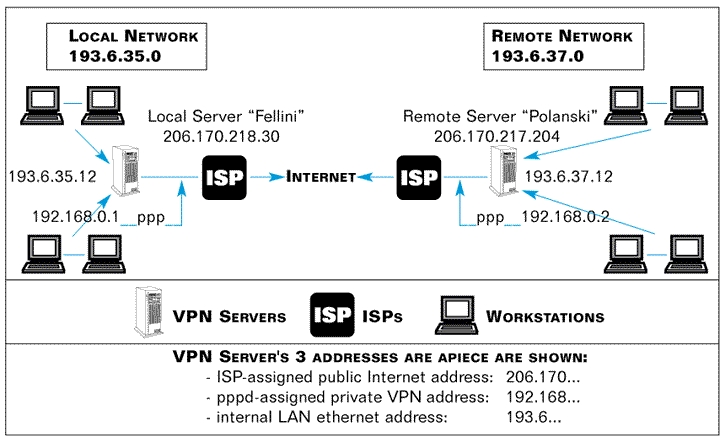
Table 1. VPN Layout
The diagram in Table 1 depicts the layout and addresses in section 4.1 of the VPN HOWTO. For the public Internet addresses (fellini-out, polanski-out), I have substituted those actually in force when I generated the screen captures and log snippets shown later in this article for agreement.
To construct the VPN, the script on the local VPN server must execute four main commands, two of them on the remote VPN server:
pppd remotely, triggered somehow on the other VPN server
pppd locally, on the VPN server where the script runs
route locally
route remotely
The pppd commands establish a working connection. It's strictly a bilateral umbilical cord between the VPN servers that extends no mutual connectivity to workstations on the networks. That is done by the route commands. Once these commands have been executed, the two networks have been transparently pooled into a single group of machines, all mutually visible via Internet addresses.
Privacy comes through the tool used by the first computer to trigger commands on the second, because that tool also does authentication and encryption. It's called the secure shell program, which is a remote command executor and an encryptor. Actually, it's a pair of programs, ssh and sshd, deliberately crafted to work together on the client-server model. Other familiar programs that use the model are ftp/ftpd, telnet/telnetd and any browser/httpd.
The “d” in sshd, ftpd and httpd stands for daemon, a synonym for server. Server programs are like genies that grant categories of wishes to their client/petitioners. So, ftpd grants file wishes to the ftp client and the httpd grants web-page wishes to a browser client. Likewise, sshd grants remote-command wishes to the ssh client. Additionally, ssh and sshd are written to encrypt and decrypt all traffic as it passes between them.
As a command executor, ssh can process a single command and exit. Alternatively, it can set up an open-ended login session where the user submits commands ad hoc. In both cases, ssh delivers back to the local machine the standard output from commands it tells sshd to run in the remote machine. The user sits physically at the local machine, logically logged in and functioning as one of the remote machine's users. All command or session output is delivered from the remote machine to his local monitor. This is much like telnet. Unlike telnet, everything gets encrypted and decrypted on the fly during the session.
The first sentence of the ssh man page highlights these roles:
ssh (Secure Shell) is a program for logging into a remote machine and for executing commands in a remote machine. It is intended to replace rlogin and rsh, and provide secure encrypted communications between two untrusted hosts over an insecure channel.
The syntax for setting up a remote login session is
ssh -lThe syntax for executing a single remote command is
ssh -l-l stands for “login” and specifies the user name for the remote computer login. The first command form gets you logged into the other machine as remote-user, with his login prompt on your screen. The second also logs you in and launches command on the remote machine all at one stroke. When the command terminates in the latter case, so does your connection. If command is ls /home, the listing of the other machine's /home subdirectory will be delivered to your screen. Here's an actual screen capture of it:
# ssh  -l slave  206.170.217.204  ls /home
david
ftp
httpd
panderson
samba
slave
The login prompt is that of the local machine, where the user is seated. The output comes from the remote machine, where ls was run (as a user on that machine called slave), but appears here on the local monitor. It shows the contents found in the remote directory /home.
Notice execution was unimpeded by password challenge. This is surprising for a program that's supposed to provide security. However, ssh did authenticate in an alternative, transparent way; its technique uses public-key cryptography and is called RSA authentication. I'll show you the evidence from the remote machine's log file, then explain how the keys work.
Concurrent with the above local activity, these entries appeared in the remote machine's log file (/var/log/messages):
Nov  7 20:15:54 localhost sshd[1400]: log: Connection from 206.170.218.30 port 1023
Nov  7 20:15:57 localhost sshd[1400]: log: RSA authentication for slave accepted.
Nov  7 20:15:57 localhost sshd[1402]: log: executing remote command as user slave
Nov  7 20:15:58 localhost sshd[1400]: log: Closing connection to 206.170.218.30
Nov  7 20:15:58 localhost PAM_pwdb[1400]: (ssh) session closed for user slave
Note that these entries were authored by sshd, the server half of the secure shell tandem of programs. That's reasonable, since the calling program on the local machine was the client half, ssh. By design, ssh calls and asks for the sshd process, hooking up to it by TCP port number where sshd runs, 22 by default but configurable. sshd then swings into action and they proceed to do their thing: authenticate and encrypt. We just saw secondary evidence of the authentication, although so far we've seen no evidence of the encryption. Both rely on the use of keys, in particular the matched pairs of keys that characterize public-key cryptography. Let me describe the essential theory and how you configure ssh with keys, before explaining how authentication results from their use.
First, here's a good nutshell summary from the README.SSH file:
When started, ssh connects sshd on the server machine, verifies that the server machine really is the machine it wanted to connect, exchanges encryption keys (in a manner which prevents an outside listener from getting the keys), performs authentication using...RSA authentication.... The server then (normally) allocates a pseudo-terminal and starts an interactive shell or user program.
Note that using ssh's -v option allows you to watch these activities.
Public-key cryptography is the historical successor to secret-key cryptography. I call them two-key and single-key cryptography. Early ciphers used the very same key to decrypt as to encrypt. When sending a recipient your scrambled message, you must somehow also supply him your key to enable unscrambling.
The Achilles heel is that you may not supply the key using the same communications channel you are trying to secure. By presupposition, it needs securing—information on it is available to others. Others' inability to penetrate the scrambled messages you plan to send relies on keeping your key secret from them. But if you send it over that channel to your intended recipient, you are in effect sending it to others too, defeating your purpose. The term “secret-key” for this type of cipher reflects its requirement for keeping the key secret so it can work.
With public-key cryptography, there are two keys: a scrambler and a mathematically corresponding unscrambler. A person never gives out the unscrambler. Instead, he distributes the scrambler. Unlike a secret key, it doesn't unscramble anything. It doesn't possess the ability or value of unscrambling power. Therefore—drum roll—it's okay if it gets publicly intercepted.
Also, the parties—sender/encryptor and recipient/decryptor—reverse roles. The recipient-to-be, not the sender, generates the keys. And he, not the sender, distributes the necessary (scrambler) key to the other person. Security comes from the fact that the “power” key—the unscrambler—reposes from the start with the recipient where it's needed and never needs to travel. Transmission risk is thereby eliminated. Achilles heel solved.
Now let's see how ssh uses public-key cryptography for RSA authentication, and how it handles encryption. It has a utility, ssh-keygen, that generates matched key pairs and writes them into disk files. Typically, each user who wishes to use ssh/sshd will generate his own key pair, whether actively by running commands on other computers or passively by having users from other computers log in with his user name to run commands. ssh-keygen writes the two key-files into the logged-in user's home directory. The file identity.pub contains the public key suitable for distribution to others and is pure ASCII. The file identity contains the private key to be kept secret. A user runs ssh-keygen only once. Table 2 is the layout of these and some other important ssh files (not all discussed here).
User authentication works as an interplay between users' key files. (ssh also offers host authentication, involving /etc/ssh/ssh_host_key, not discussed here.) I'm talking about the two users who are always party to an ssh connection. First, when you run ssh from the local machine, you are already logged into it as somebody. Second, with the -l option in your ssh command, you specify some target user on the remote machine as the operator there. I'll call these local-user and remote-user. Another key-related file in each ssh user's home directory is authorized_keys. To succeed, RSA authentication must find a copy of local-user's public key embedded in remote-user's authorized_keys file. This will never happen except deliberately. If I, as the local-user, want to be able to log into your machine as you, I send you my public key. I could send you a copy of my identity.pub as a file, or embed its contents in an e-mail message (since it's pure ASCII and security of key transmittal is unimportant). You, the remote-user, will then place my public key into your authorized_keys file with an editor. Authorization will now succeed when I use ssh to log into your machine as you. Conversely, if I want to let you log into my machine as me, you'll send me your public key and I'll drop it into my authorized_keys file.
Authentication by sshd on the remote machine uses the local-user's public key to encrypt something and ship it back to local machine. Local machine must then prove itself by decrypting and sending back to the remote machine data matching the original. At that point, authentication is complete. sshd writes “RSA authentication for remote-user accepted” into the remote log (as above), and lets the session or command proceed. For implementation purposes, you simply need to follow the key prepositioning rules when configuring the computers to interact through ssh.
As we noticed earlier, this method doesn't involve any password. It cares only whether the “petitioning” user can convincingly come up with the expected public key and then demonstrate his possession of the matching private one. While it's counterintuitive, I routinely log into remote machines without a password—as root!
ssh offers other authentication methods, password checking among them (ssh is extensive, with many more options in its configuration files). These methods can be used instead of or in combination with RSA authentication. For purposes of a VPN, given that RSA authentication satisfies the test of adequate security for most, using it alone is preferred because of its transparency.
Once authenticated, the local user can freely operate as the specified user on the remote machine. There, on his behalf, sshd runs the requested command or shell and sends any standard output back to the local machine, but not before first encrypting it. Direct conversation between the machines is all between ssh and sshd. So, ssh is there on the receiving end, knowing what to do with the incoming data stream (decrypt it) and how (using the agreed key). The same thing happens with reverse traffic, ssh encrypting and sshd decrypting.
You might think the encryption key used on each machine for outbound data would be the public key of the other machine's user. However, for performance reasons, ssh and sshd settle instead on a different, secret-key during their initial negotiation phase, and both use that same key for encrypting the session. While ssh-keygen's public/private keys play the central role in authentication, their role in encryption is solely to impenetrably encrypt the initial exchange of this secret key, overcoming the key exchange weakness in secret key cryptography. For ongoing message encryption, however, the public/private keys are not used. Secret-key algorithms are faster than public/private-key algorithms. The securely exchanged secret key, called the “session key”, is used to encrypt the rest of the session.
The important point is that once the session gets underway, ssh and sshd operate as transparent intermediary processes such that the entire session gets encrypted. Nothing moves between the machines unscrambled, so meaningful interception is impossible.
Now we can put together our VPN. The trick is to strategically submit a certain command for ssh to launch remotely. That command is pppd, the point-to-point protocol daemon.
We know that during a session, ssh and sshd encrypt the entire dataflow of whatever command(s) they launch as it passes between them. The duration of a session is as long as the command takes to execute. So, for commands that run straightaway to termination like ls /home, the session is transient because the command is transient. Not all commands are this expeditious, for example, an editor or pppd.
ssh -l
This command stays up all day—you have to kill it to stop it.
Critical for achieving VPN functionality, pppd is itself a traffic carrier for other programs. This implies that everything passing between two computers via a pppd interface launched under ssh control automatically goes through the encryption mill.
Combined with routing, this bilateral umbilical link broadens into a general-purpose bridge that can carry conversations between any pair of workstations on opposite sides. Routing lets each workstation on one LAN see those on the opposite LAN by IP address—one big happy family. At the same time, ssh denies that visibility to the outside world. This is precisely the effect of having all the workstations local. With this setup, you have the equivalent of a single LAN, but because that's not truly what you have, your consolidated network is “virtual”.
What can workstations on opposite LANs do here? Whatever a pair of workstations on the same LAN can—more generally, whatever any machines mutually addressable by IP addresses can. In my experience, examples of actual operations between remote machine pairs on a Linux VPN include:
Microsoft computers conducting MS peer-to-peer resource sharing.
A Linux machine serving resources to MS machines by running Samba.
An MS machine running a terminal emulator on an IBM AIX UNIX machine.
A Linux or MS machine using TELNET to log into another Linux or UNIX machine.
Interacting machines don't know their conversation is being encrypted for much of its journey. They just launch packets at one another by IP address and let their routing tables figure it out. Upon reaching their VPN server, the routing table there points these packets across the ppp interface operated by ssh. That's where the security comes in; otherwise, it's nothing more than routing as usual.
That's it for the theory. It's virtual. It's private. It's a network. So, I trust you'd agree, it's a virtual private network. Part 2 will cover practical operation of the VPN HOWTO script in detail.

