
Red Hat Motif 2.1 for Linux
Manufacturer: Red Hat Software
E-mail: info@redhat.com
URL: http://www.redhat.com/
Price: $149 US
Reviewer: John Kacur
Motif is a windowing system and environment developed by the Open Software Foundation (OSF). The Motif Xm library is a software layer used with Intrinsics' Xt library and the Xlib library of the X Window System. According to the Motif user-interface specification, Motif is independent of how it is implemented, so it is theoretically possible to implement the Motif GUI on a different windowing system. PC users will immediately recognize the similarity of the Motif GUI to the Microsoft Windows 3.x and OS/2 GUI.
Motif has become a standard in the UNIX world and is the basis for the common desktop environment (CDE). The Motif 2.1 release placed great emphasis on compatibility with CDE. Since CDE is based on Motif 1.2, some features and components available in Motif 2.0 are no longer supported under Motif 2.1. This provides the programmer with a minimum of portability problems in designing Motif-based programs for a variety of UNIX systems.
Motif is an unusual choice in the Linux and free software world, as it is commercially licensed software. The license cost about $149 US at the time of this writing (early 1999), and you must purchase a license for each copy of Motif you run. You may not redistribute the Motif library with your software, but you may freely distribute statically linked binaries created for people who don't have a copy of Motif on their system. The Netscape browser is an example of a statically linked Motif application. People who have Motif libraries can compile their software dynamically, creating faster and smaller binaries.
The most compelling reason for Linux users to use Motif is the ability to create programs for commercial UNIX systems on their home computer. However, many free software programmers prefer to work with totally free toolkits such as gtk+. Another alternative is Lesstif, which is a free Motif work-alike. Lesstif is still considered alpha-release software, but is a good place to start if you want to teach yourself some of the fundamentals of Motif programming.
I tested Motif 2.1 from Red Hat Software. Red Hat gets its Motif license from Metro Link, which in turn licenses it from the OSF. Although I have been very happy with my Red Hat product, I've noticed a new Motif 2.1.10 release is available. This is not a major upgrade but mostly bug fixes. I sent an e-mail message to support, asking about the possibility of an upgrade. They promptly and kindly told me I could get an upgrade from Metro Link for a reduced price. Because this was only a minor upgrade, I didn't feel that even the reduced price was warranted. Red Hat did tell me they would understand if I wanted to return the product, but they didn't have any arrangement for an upgrade because of the licensing agreement.
The Red Hat Motif includes 30 days of installation support, shared and static libraries, man pages, the UIL compiler, the MWM window manager, Motif demo programs with source code, a printed user manual and a lot of other documentation in PostScript form on CD. As a bonus, you get the KL Group's XRT Professional Developer's suite of widgets. This version is fully licensed, but if you require support, you purchase it separately from the KL Group. These widgets include 2-D and 3-D graph and chart widgets and XRT gear which includes tabs, tree widgets and various icons.
If you purchase Motif directly from Metro Link, you can get a product called Motif Complete. Motif Complete provides you with Motif 1.2, 2.0 and 2.1 on one CD, so that you can create a custom installation.
The installation process is quite straightforward and adequately documented. Just be sure to mount your CD with the exec option turned on, as explained in the README. This allows the programs to be executed directly from the CD. The process is slightly different for different systems, depending on whether your system is a.out or ELF, and also whether your system can use RPM. If you have Slackware, for example, you need to run the instelf.sh program. With Red Hat, you can use glint or any other RPM-based tool.
Next, you must edit (or create) an .Xclients or .xsession file to use MWM as your window manager. I chose the .Xclients method, which allows you to leave your .xinitrc file in place. Here is a sample .Xclients file:
nxterm -geometry 80x44+0+2 +ut &
nxterm -geometry 80x50+509+2 &
# Color for the display or root window
# doesn't need to be put in the background
xsetroot -solid CadetBlue
xscreensaver &
exec mwm
This starts two nxterm windows, sets the background color to CadetBlue, starts the xscreensaver program and the Motif Window Manager. Notice that you use the normal X Window System programs to do things such as set the background color. You can get a list of color names for xsetroot in the /usr/lib/X11/rgb.txt file. If you are creating the .Xclients file from scratch, don't forget to make it executable with chmod +x.
Next, the two places to customize resources are the .Xdefaults file and the .mwmrc file in your home directory. The .Xdefaults file most likely already exists, and only needs some lines appended to it. The .mwmrc file should be copied to your home directory as follows:
cp /etc/X11/system.mwmrc ~/.mwmrc
Note the User Guide is in error and says the system.mwmrc file is found in /usr/lib/X11/system.mwmrc.
Now you can have some fun customizing your environment and creating menus. For example, I have these lines appended to my .Xdefaults file:
Mwm*activeBackground: CadetBlue
Mwm*UseIconBox: true
Mwm*keyboardFocusPolicy: pointer
The general format for these lines is Mwm*resource: value. In my file, I've defined the activeBackground, i.e., the window which has the focus, as CadetBlue, which is the same as the background color I set in my .xinitrc file. Setting the keyboardFocusPolicy to pointer means moving the mouse pointer to another window gives that window the focus automatically. Setting the keyboardFocusPolicy to explicit would require you to explicitly click your mouse button in the window to give it focus.
The UseIconBox default is false which means when you minimize a window, its icon appears in the root window. Setting the UseIconBox to true creates an MWM window which holds the icons. See Figure 1 for an example of an icon box. The dark black line around the xterm icon indicates that the xterm window has the focus. The frame around the Netscape icon indicates that it is iconized, and the lack of frames around the nxterms, Mail and nedit icons indicates that the windows are not iconized.

Figure 1. Icon Box
Let's take a look at the .mwmrc file. Listing 1 is a portion of my modified .mwmrc file copied from system.mwmrc. The complete file can be found in the archive file ftp://ftp.linuxjournal.com/pub/lj/listings/issue61/3218.tgz. Make sure to enclose your items in exclamation points if they contain spaces. Mnemonics and accelerators are optional. Mnemonics are one of the letters in the item which should appear underlined. Once the menu is chosen, typing the mnemonic is the same as clicking on the item. An accelerator is a series of keystrokes for accomplishing the function without using the menu at all. Functions include titles, exec, separator and menu. Titles are the titles in the menu (see Figure 2), and separators draw a line in the menu. The program you want to start is lauched by exec. You can specify the full path name of the program or just its name, if your path variable is set correctly. Menus are the sublevel menus. For example, I've created a menu item “games” and the name of the menu is Games Menu. Then, later in the listing, you have the definition for the Games Menu. Customizing your environment in Motif is easy and fun.

Figure 2. My Root Menu
Last but not least, you can use your Motif libraries to compile programs which are dynamically linked, which should make the binaries smaller and quicker.
An example I suggest trying is NEdit. This is a nice WYSIWYG (what you see is what you get) editor available from ftp://ftp.fnal.gov/. If you don't have Motif, you can still use the statically linked version of this editor, or try to compile it with Lesstif. Compiling this program on my system gave me errors of this type:
/usr/X11R6/lib/libXm.so: undefined reference to 'XpEndJob'
/usr/X11R6/lib/libXm.so: undefined reference to
XpSelectInput
/usr/X11R6/lib/libXm.so: undefined reference to
XpGetPdmStartParams
The libXp library comes in XFree86-devel, so the Makefiles which come with NEdit must be modified to include -lXp. You can examine the Makefiles which come with the demo programs (see Figure 3) to give you clues to other libraries which are not properly linked.
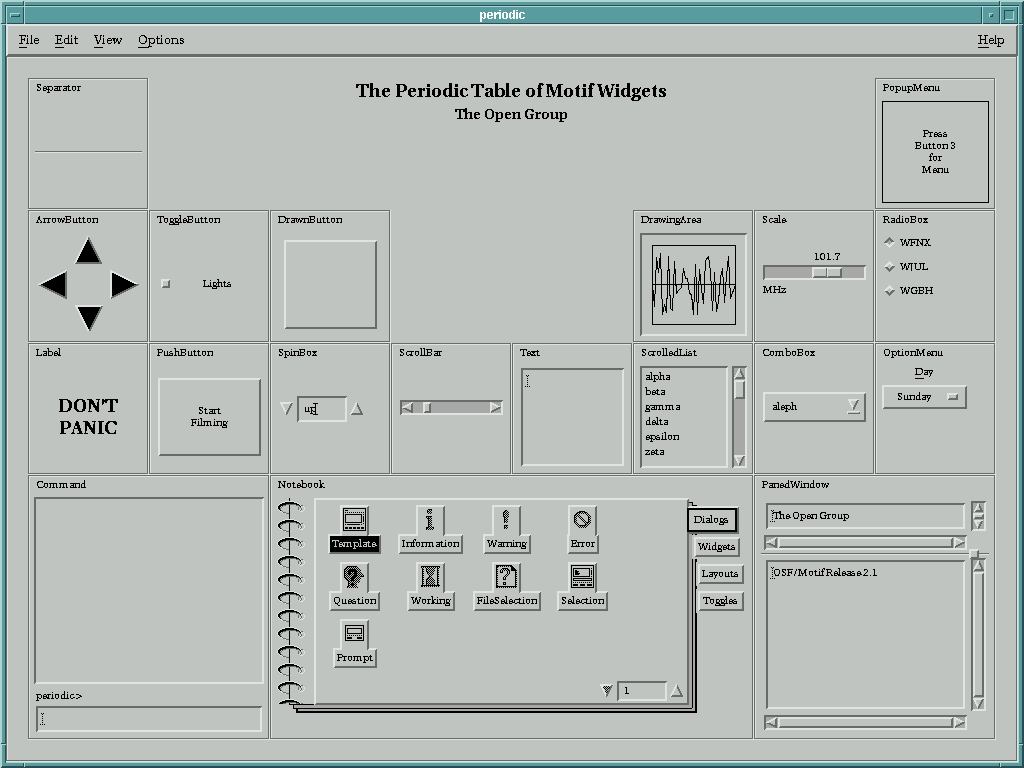
Figure 3. Motif Widgets Provided in the Demo Programs
Motif isn't a necessity for the average Linux user, but it does provide you with a clean interface and a standard GUI model for the UNIX environment. It is especially nice for programmers who want to use their Linux boxes to write software that will easily port to proprietary UNIX systems.


