Caching the Web, Part 2
Last month we discussed the basic concepts of proxy servers and caching. Now, let's see how to implement this technology in your organization. A few proxy-server programs are on the market, such as MS-PROXY, aka Catapult, available only for Windows NT, and Netscape Proxy Server, available for different UNIX platforms and Windows NT. Both have two main drawbacks: they are commercial software and they don't support ICP. The excellent Apache web server has included a proxy-cache module since its 1.2 version. This module is a very interesting option: it's free, and works with the most popular web server on the Net. However, it doesn't use ICP, and its robustness is not comparable to the best choice for a proxy-cache server—Squid.
Squid is a high-performance proxy-cache server derived from the cache module of the Harvest Research Project, maintained by Duane Wessels. It supports FTP, gopher, WAIS and HTTP objects. It stores hot objects in RAM and maintains a robust database of objects in disk directories. Squid also supports the SSL protocol for proxying secure connections and has a complex access control mechanism. Another interesting feature of Squid is negative caching, which saves “connection refused” and “404 Not Found” replies for a short period of time (usually five minutes).
Squid consists of four programs:
squid: the main proxy server
dnsserver: a DNS lookup program that performs single, blocking DNS operations
unlinkd: a program to delete files in the background from the cache directory
It also provides a CGI program, designed to be run through a web interface, that outputs statistics about its configuration and performance and allows some management capabilities.
Installing Squid is easy. Just download the source archive from http://squid.nlanr.net/ and, in a temporal directory, type:
gzip -dc squid-x.y.z-src.tar.gz | tar xvf -
Next, compile and install the software by typing:
cd squid-x.y.z
./configure
make all
make install
These commands install all needed programs and configuration files to /usr/local/squid. The binary programs are installed in the /bin directory, the configuration files in /conf. Log files are located in the /logs directory, and the object database in the cache directory and its subdirectories. A shell script called RunCache is in the bin directory used to run the squid binary, and assures that if the process dies for any reason, it is restarted automatically. So, put the following line in your rc.local file:
/usr/local/squid/bin/RunCache &
This will generate an error log in /usr/local/squid/squid.out, if Squid could not start because of some configuration problem.
Of course you can choose to install an RPM version of Squid if you use RedHat Linux or another distribution that supports RPM packages.
Squid installs a sample configuration file called squid.conf with many comments for each option. Here you can change the ICP and HTTP ports (3128 by default) and define how much memory and disk space to reserve for caching objects and other parameters such as refresh patterns and access control restrictions. Of course, you need an ICP port only if your cache is going to be the sibling or parent of other caches. The directives for changing these values are http_port, icp_port, cache_dir and cache_swap. Additionally, you can set the maximum object size to be stored in the database; the default is 4MB. Also, you should uncomment the following lines in this file:
cache_effective_user nobody
cache_effective_group nobody
This avoids running Squid as root, a dangerous habit for anyone who runs servers like httpd or gopherd. If you are using a recent version of Squid (at the time of this writing, the current version is 1.1.16), it will not start running as root, but will write an error message to the squid.out file.
To let Squid use 100 MB of your HD, the directive cache_dir should be something like this:
cache_dir /usr/local/squid/cache 100 16 256
Before starting Squid for the first time, create the cache and logs directories. To build the cache and hashed subdirectories, you should execute the commands:
cd /usr/local/squid
mkdir cache
chown -R nobody cache
cd /usr/local/squid/bin
./squid -z
Finally, to create and change the owner of the logs directory:
cd /usr/local/squid
mkdir logs
chown nobody logs
Now Squid can be run safely for the first time, with the above RunCache invocation. It will spawn several dnsserver processes and write its PID in the file logs/squid.pid. Important warning or error messages can be found in the squid.out and logs/cache.log files. Remember, if you want to shut down the cache, you must first kill the RunCache process to avoid an immediate restart and then type:
/usr/local/squid/bin/squid -k shutdown
Never use kill -9 to shut down the cache, because it doesn't close the object database in such a way that it can be recovered—you'll probably lose part of it.
In order to enable only those users who are in your organization to access your cache, you must set up some access control lists (ACLs). Defining access lists in Squid is quite easy; all access lists are defined with a name and are used to define a subset of elements. You can make a subset of IP addresses, protocols, destination URLs and even browser brands. The directive to define an ACL or subset is:
acl
You can learn more about ACL types in the example squid.conf. In the case of restricting access to only our users, the type needed is src. For example, suppose you want to allow access to the cache to all browsers in the 172.16.236.0 class C, the first 32 addresses of the next class C and your PC, 172.16.237.180. You can define an ACL like this:
acl my_users src 172.16.236.0/255.255.255.0
acl my_users src\
172.16.237.1-172.16.237.32/255.255.255.255
acl my_users src\
172.16.237.180/255.255.255.255
Next, define an ACL for the rest of the addresses. This line is included in the squid.conf example file:
acl all src 0.0.0.0/0.0.0.0
Apply these ACLs in an ordered way with the http_access directive. The syntax is:
http_access
For example:
http_access allow my_users
http_access deny all
More than one ACL can be combined in the same http_access directive and can be used in its negative form (i.e., preceded by !). The example shown is the most simple use of ACLs, but more complex forms will allow connections only in designated hours and days, allow only defined URLs or domains to be fetched and restrict some protocols such as FTP. This powerful feature of Squid can help you enforce and implement your security policy, whether you use Squid in your firewall or the Squid machine is the only one allowed to cross your firewall. Just look for examples in squid.conf.
There is also an ACL to permit setting the desired web ports you allow your users to use. This is the Safe_ports ACL. You should uncomment this line and add the 443 port to this ACL in order to allow the use of secure web servers through your Squid server.
Squid can generate huge logs of your proxy-cache usage. With this information and the help of some scripts, we can generate complete access statistics, like the ones generated from web servers. Squid maintains three main log files:
cache_log includes warnings and information about the status and operational issues of the cache.
store_log includes information about database operations, such as inserts of new items and releases of expired objects.
access_log contains an entry for each object fetched from the cache and information on how it was served. It also includes information about each ICP query received by the cache from other servers using this server as a neighbor.
Many utilities are available for generating statistics from the access_log file (see Resources). Remember, it is not considered ethical to surf your access_log to see which places your users visit. Some sites have chosen not to publish processed statistics in any form to guard their users' privacy, which is an important concern for all of us involved in the Internet community.
The logs grow very quickly and in a few days can eat up your remaining disk space. To safely clean your log files, you should rotate them with the SIGUSR1 signal. A single line can be added to your crontab to begin new log files each night:
/usr/local/squid/bin/squid -k rotate
This command will create the files access_log.0, store_log.0 and cache_log.0 and begin logging to new empty files. Now you can safely remove these files or process them for statistical purposes. The next time you rotate logs, files.0 will be moved to files.1 and so on. You can configure how many extensions Squid will use for these rotations to save disk space with the logfile_rotate n directive in the squid.conf file.
To begin using your new proxy-cache server, you must first instruct your user's browsers to fetch objects from your server instead of retrieving them directly. In most modern web browsers, one of the configuration options is the specification of the proxy setup. Another option is to specify a list of domains or URL patterns which must be fetched through the proxy.
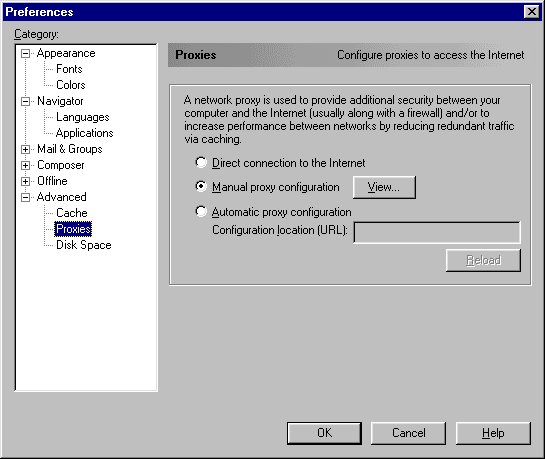
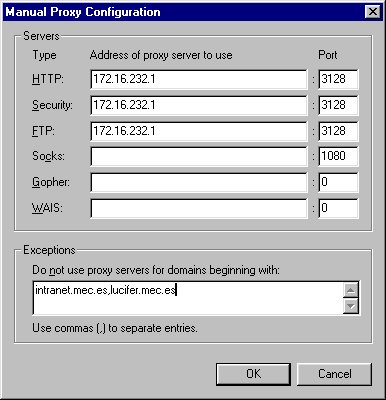
In Netscape Navigator or Communicator, you can include a proxy server and its port for each service to be proxied. With Squid, you can use these settings for the HTTP, Security (SSL), FTP and WAIS services, all with the same port (3128, by default). First, select the “Manual proxy configuration” radio button and then the “View” button to type in your settings. Figures 1 and 2 show examples of these screens.
Figure 1. Proxy Preferences Screen
Figure 2. Manual Proxy Configuration Screen
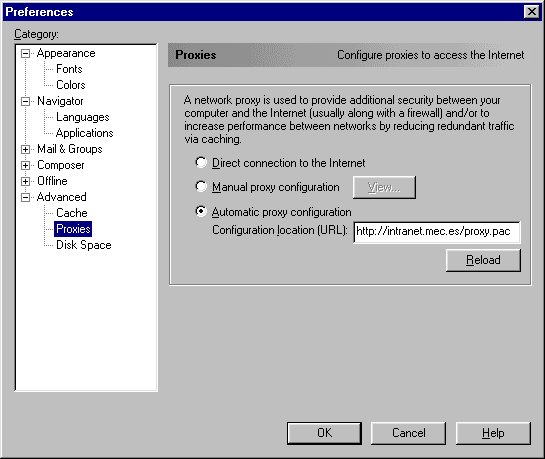
Another solution is the Automatic Proxy Configuration, introduced in Netscape Navigator 3.0, that allows multiple proxy servers, backup servers and different servers by domains. This configuration sits in a Javascript-like file that must be retrieved from a server. Using it, you can change the topology of your cache mesh or introduce new servers that must be treated as “No proxy for” servers. Without telling your users to change their configurations, the new configuration script is reloaded each time the browser is launched. MS Internet Explorer has also supported the automatic proxy configuration feature since version 3.02.
Figure 3. Automatic Proxy Configuration Screen
An example of this kind of configuration for Netscape Navigator and Communicator is shown in Figure 3. In this example, each time the browser is started, it loads the file proxy.pac from the server intranet.mec.es. This file must be returned with MIME-Type application/x-ns-proxy-autoconfig which can be accomplished in two ways:
Or add the following line to your mime.types file:
application/x-ns-proxy-autoconfig pac
Add the following line to your Apache srm.conf file:
AddType application/x-ns-proxy-autoconfig pac
For the changes to take effect, you must name your proxy auto-configuration file with the .pac extension and restart your web server. The Netscape documentation will tell you about the syntax of the .pac file (see Resources). Nevertheless, we'll look at a couple basic examples of how to write them.
No HTML tags should be embedded in the Javascript file, just the function FindProxyForURL with arguments URL and host. This function should return a single string containing DIRECT (get the object directly from the source), or PROXY host:port (get the object through this server and port). The string can contain more than one of these directives, separated by semicolons. For example:
function FindProxyForURL(
{
return "PROXY proxy1.mec.es:3128;
PROXY proxy2.mec.es:80; DIRECT ";
}
will instruct the browser to use the first proxy to fetch the object. If it can't contact the first (proxy1), then it will try the second (proxy2); in the case that both are down, it will fetch the object from the source. This gives a fault tolerance level to our cache system.
One interesting feature is using different proxies for different domains and including support for internal servers where we don't want to use the cache. For example:
function FindProxyForURL(
{
 if ( isPlainHostName(host) || dnsDomainIs(host,
        "intranet.mec.es"))
 return "DIRECT";
 else if (shExpMatch(host, "*.com"))
 return "PROXY proxy1.mec.es:3128";
 else
 return "PROXY proxy2.mec.es:80";
}
This function will directly fetch all objects whose URL is only a word with no dots or the Intranet server, all .COM objects from proxy1 and the rest from proxy2.
As a tip, the .pac file can be generated “on the fly” by a CGI script, giving different proxy configurations for different browsers, e.g., depending on the REMOTE_HOST environment variable provided by the CGI interface. In this way, load balancing between different networks can be achieved. Always remember that the MIME-type returned by the CGI must be application/x-ns-proxy-autoconfig.
If your cache is to be part of a cache mesh or your proxy server is to be connected to another proxy that will be its parent, you must use the cache_host directive. You must include one line for each of your neighbors. The syntax for this line is:
cache_peer
where:
hostname is the name of your neighbor.
type is one of parent or sibling.
http_port is the neighbor's port from which to fetch objects.
icp_port is the port to which ICP queries are sent. Use a value of 0 if your neighbor does not run ICP, or 7 if your neighbor runs the UDP echo service. This can help Squid to detect if the host is alive.
If you have a stand-alone cache, you should not include any of these directives. If you have one parent that runs its HTTP port on 3128 and its ICP port on 3130, the line to include in the squid.conf file is:
cache_peer
With the cache_peer_domain directive, you can limit which neighbors are queried for specific domains. For example:
cache_peer_domain
cache_peer_domain
will query the first cache only for the .COM and .EDU domains, and the second for some of the European domains.
If you have only one parent cache, the overhead of the ICP protocol is unnecessary. Since you are going to fetch all objects (HITs and MISSes) from the parent, you can use the no_query option in the cache_peer directive to send HTTP queries to only that cache.
Also, there are some domains you will always want to fetch directly rather than from your neighbors. Your own domain is a good example. Fetching objects belonging to your local web servers from a faraway cache is not efficient. In this case, use the always_direct acl command. For example, in our organization we use:
acl intranet dstdomain mec.es
always_direct allow intranet
to avoid getting our own objects from the national cache server.
Squid includes a simple, web-based interface called cachemgr.cgi to monitor the cache performance and provide useful statistics, such as:
The amount of memory being used and how it is distributed
The number of file descriptors
The contents of the distinct caches it maintains (objects, DNS lookups, etc.)
Traffic statistics with each client and neighbors
The “Utilization” page, where you can check the percentage of HIT your cache is registering (and thus bandwidth you are saving).
Be sure to copy the cachemgr.cgi program installed in your /usr/local/squid/bin (or wherever you chose) to your standard CGI directory, and point your browser to http://your.cache.host/cgi-bin/cachemgr.cgi. There, you should type your cache host name, usually “localhost” or the name of your system, and the port your cache is running, usually 3128, and check all the options.
A proxy-cache server is a necessary service for almost any organization connected to the Internet. In this article, we have tried to show the whys and hows to implement this technology, and a brief tutorial on Squid, the most advanced and powerful tool for this purpose. Don't forget to read all the comments in the example configuration file. They are complete and useful and show a lot of features not mentioned in this article.
Perhaps in a few years, with the growth of PUSH technology and the use of dynamic content on the Web, caching won't be a solution to the bandwidth crisis. Today, it's the best we have.
One problem proxy caches don't solve is making certain your users configure their browsers to use the caches. Users can always choose to bypass your proxy server by not configuring their browsers. Some organizations have chosen to block port 80 in their routers except for the system running the proxy-cache server. It's a radical solution, but very effective.
Another thing you can do to improve the speed of your users' browsers is pre-fetching the most accessed web sites from your cache. Recursive web-fetching tools which support proxy connections can help do this task in non-peak hours, e.g., url_get, webcopy. Launching one of these retrieval tools with the standard output redirected to /dev/null updates the cache with fresh objects.