
Introduction to Sybase, Part 2
Last month, we installed a Sybase database server. This month, we will install a client to access our server. First, we need to understand how the Sybase network interface works.
A Sybase client must create a network connection to a database server when it needs to access resources in the database (see Figure 1). Sybase has created a protocol to communicate over the network. This protocol is called the Tabular Data Stream (TDS) protocol. It operates on top of other networking protocols such as TCP/IP on UNIX systems or IPX/SPX on Novell networks. TDS is a proprietary protocol and not documented by Sybase. Fortunately, Sybase has created client libraries which can be used to communicate with the server. A group of people have tried to reverse-engineer the TDS protocol. Look at http://sunsite.unc.edu/freetds/ for more information.
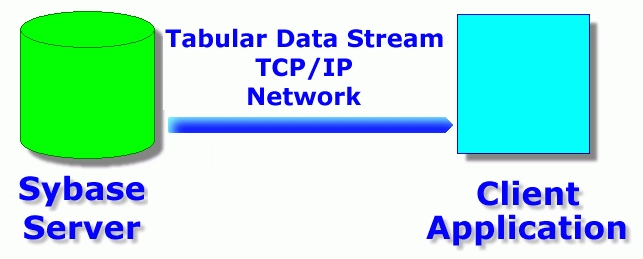
Figure 1. TDS Protocol
Sybase supports two interfaces to the database. DB-Library is an API that has been used for quite awhile in Sybase products. I believe it is supported for backwards compatibility, and may not be supported in a future version of the product. CT-Library is the API Sybase created for version 10 and higher products. It supports advanced features such as cursors and asynchronous query processing. You don't need to understand these features to do basic processing with your database server. We will use CT-Library to communicate with our server.
We could write our client using C or C++. The libraries required to do this are included with the server. Look for examples in the sample directory under the server directory. There is a subdirectory for DB-Library and one for CT-Library. We don't have to use C or C++, however. An extension to the Perl language called sybperl enables the use of Perl to write clients to access the database.
Most Linux distributions come with the Perl language. On my system, I have installed Red Hat 5.1 which includes Perl version 5 by default. Fortunately, it is possible to install sybperl without recompiling Perl. Using this method precludes the use of the DB-Library, which is why we have chosen to use CT-Library.
If Perl is not installed on your system, install it now. If your distribution does not provide perl, you can download the source from CPAN (http://www.cpan.org/).
First, we must download sybperl from http://www.perl.com/CPAN-local/authors/Michael_Peppler/
The newest version available at the time of this writing is version 2.09_05 in the file sybperl-2.09_05.tar.gz (148KB). Change directories to the location of the sybperl tar file, and issue the command:
perl Makefile.PL
Change to the sybperl directory just created, and edit the CONFIG file. In the line DBLIBVS=1000, change the 1000 to 0. Make sure the line SYBASE=/opt/sybase contains the correct directory for the Sybase server. The line EXTRA_LIBS=-ltli must be changed to EXTRA_LIBS=-linsck.
We will build sybperl to work with CT-library. Most Linux distributions come with the Berkeley DB library. If Perl is configured to use this library, a conflict arises when using DB-library at the same time, since both use the call open_database. If you recompile Perl to leave out the Berkeley DB library, you can leave the line DBLIBVS=1000 in the CONFIG file and use DB-library.
Save the changes to the CONFIG file, then issue this command:
perl Makefile.PL
This will create a file that will build the software. It looks for the Perl installation in your path. If Perl isn't in your path, you'll need to change your path to include it. Now issue the make command to build the software; it will take a few minutes to run. sybperl has tests that can be run to ensure it is built properly. To run these tests, edit the PWD file to put your sa password and the name of your Sybase server on the proper lines. If you installed the server following the directions in the last issue, the name of the server is linux_dev. Save the file, then type the command
make testThis command will run a series of tests. If everything is working properly, the message “All tests successful” will be printed.
Now, let's install sybperl. If your Perl installation is in a directory that requires root access to modify, change to root using su. Run the command
make install
Perl and sybperl are now installed, so it is time to write some programs.
All of the programs here are available for download. If you type in these programs, be sure to use chmod to make them executable.
Writing a sybperl program is quite simple. Listing 1 is our first example program. This will list the names of all the databases in the server. Here is a line-by-line explanation of the program.
Line 1 tells Linux which program to use to run this script. This must be the new version of Perl you just installed. Make sure you change this line to point to the correct version of Perl on your system.
Line 3 tells Perl to use the CT-library interface to Sybase. It should be at the beginning of all Perl scripts you write that access a Sybase server.
Line 5 attaches to the correct Sybase server. The first parameter is the user name, the second is the password and the third is the name of the server.
Line 7 is the SQL to run.
Lines 9-10 are commands that run the query on the server and return a reference to an array of rows, @rows. Note this command loads the entire result set into memory. This is fine for small result sets, but if you are expecting a large result set, you shouldn't use ct_sql. Later, I will give you an alternative method for executing commands and receiving large result sets.
Lines 12-14 will print all rows that were returned.
Listing 2 is an example of a sybperl program that updates data. In Line 7, we use the same ct_sql command to send the SQL to the database, except this time a set of rows is not returned. The insert, delete and update SQL commands also do not return rows. The SQL command use pubs2 tells Sybase to make the pubs2 database the default database for the rest of this session. In Line 10, we again use the ct_sql command to run the SQL. This time, we add a row to the discounts table. You can use the isql program to run an SQL SELECT command to verify that the row was added.
Linux is mostly used as a web server, and Perl is primarily used to write web applications. So, we will create a Perl program to access the Sybase database.
Writing a CGI program to access Sybase is quite simple. Listing 3 is the complete code of a CGI program to let you know who's logged in to your Sybase server. Place this program in your web server's cgi-bin directory. On a default Red Hat system, the directory is /home/httpd/cgi-bin/. For this example, name the program listing3.pl.
In lines 5 and 6, we set two environment variables. The Sybase DB-Library and CT-Library must find these environment variables, or an error will occur. When you run a CGI program, very few environment variables are passed to your program. These two environment variables must be set in each CGI program that needs to access Sybase. If you have many CGI programs, place these commands in a file included in all your CGI programs.
The SYBASE environment variable contains the directory of the Sybase software. The DSQUERY variable contains the name of the default server.
The only other difference between this example and the others is it outputs HTML to a browser.
These example programs show the basics of accessing a Sybase database server. In production programs, a few more things must be taken care of in your programs.
Errors from the server must be handled properly. If you ignore them, your program will stop when it encounters a server error.
In all our example programs, ct_sql was used to run queries. It works fine for SQL commands and stored procedures which don't return result sets, but would have severe problems for queries returning large result sets.
Listing 4 shows how to handle errors and demonstrate a replacement for the ct_sql command. In lines 3 and 4, we establish both a client and a server message call-back routine. These routines will be called when the server or client generates an informational or error message.
In lines 7-20, we handle a single SQL statement. Sybase allows a single statement to return multiple result sets. Lines 8-10 will process each result set. Lines 17-19 will handle each row in a result set. Lines 11-16 will look at the result set and print the names and types of each column. A Sybase result set contains more than just data—it also includes column definition information.
Lines 23-50 are the two call-back routines. These routines are called each time there is a message from the server or client. An example of a client message is the one returned if you can't log in to the server. An example of a server message is the one returned if you have an error in your SQL.
All this information can be found within the sybperl and the Sybase documentation.
The Sybase database server is a powerful piece of software. Unfortunately, all that power comes with a price. Setting up and supporting a Sybase server isn't as easy as using Postgres or MySQL, but if you need a heavy-duty, high-performance database, Sybase is your best bet.
Next month, we'll discuss application development using Sybase on Linux. This article will appear in the “Strictly On-line” section.
Jay Sissom is responsible for the web-based front end to the financial decision support data at Indiana University. He has installed and supported Sybase databases on many operating systems and has written database clients for the Web using C, C++ and sybperl and for Windows using tools like Visual Basic and PowerBuilder. When he isn't programming, he enjoys amateur radio and playing his bass guitar and keyboards. If you have questions, you can contact him via e-mail at jsissom@indiana.edu.

