Creating a Client-Server Database System with Windows 95 and Linux
About half a year ago, we began a project called NORA to develop an information system for a private dental clinic in Hong Kong. The basic requirement was that the clinical information, including patient folders, appointment books, laboratory work, etc., could be retrieved and edited by any client PC in the clinic. In addition, the users hoped they could access the data from another clinic using the same system. The system is now in beta testing. We gained some valuable experience during this project, which may be useful for someone wishing to develop a similar system, especially for small- to medium-sized businesses.
We established the following requirements:
a client-server database system
multi-site (de-centralized)
connectivity between LANs on demand
dial-up service
Windows 95 client
Big5 Character set support
low transaction rate
portability
Since the system would be needed by several users (a dentist and nurses) at the same time, a client-server system is expected. The users do not know much about computers, but they do know Microsoft. They insist on using Windows 95 as the operating system of the client PC, so that they can use their favorite office suite with the same machine. For the server part, they have no preference, so we could decide. We considered both Windows NT and Linux. After considering the stability, ease of installation, cost, flexibility and the requirements listed above, we chose Linux. We think we made the right choice; otherwise, the other system requirements could not be easily fulfilled.
The system is used by a group of several clinics. Users wished to retrieve and update all data easily from any clinic. We considered implementing the system on a single big server, with all clinics connected to it by telephone line or ISDN. However, we found that not only are the communication costs and efficiency worse than the decentralized system (i.e., each clinic has its own server), but also much work would be necessary if another clinic joined the centralized system, since the data in both databases would need to be merged.
As we chose to have one server in each clinic, the connections between clinics should be made on demand, i.e., the connection should be established only when needed. We could install a modem for each client, so that one could dial the server of another clinic to access the data independently. However, this is not an effective method, since every client machine would need a modem and telephone line, and most of the time they are idle. We proposed that the connection be established by the servers, and the clients access the data at another clinic through the servers on demand.
We tried to use diald (dial daemon) on Linux to provide this function. However, most of the documentation on diald assumes the user is using it on a stand-alone workstation or to dial an ISP to access the Internet. The consequence is that the connection is not two-way, i.e., the machine on the Internet cannot access the local workstations. Moreover, the configuration in the document did not consider having dial-in service on the same machine, and the two kinds of service may or may not be compatible.
We found a way to configure diald and dial-in service on Linux harmoniously. Thus, all machines in one clinic can access the database server in another clinic based on dial-on-demand, while the machines in the other clinic can access the database in the first clinic at the same time.
Dial-in service is needed for the dial-in request from the server in another clinic to connect the two LANs. Moreover, the users want to access the data, even when they are at home, by a stand-alone Windows 95 workstation with a modem.
As mentioned above, the users insist on using Windows 95 as their front end. Finding proper method for connecting the client software in Windows 95 to display the data in the Linux server was a problem. This is because some of the database servers for Linux do not provide this feature.
Another constraint for the server is that it must support Big5 characters, since most of the patients use their Chinese name and address for registration. This almost forces us to the final choice of database server, the MySQL server.
We estimated the transaction rate of the system server and found it should be relatively low, about ten SQL executions per minute in the peak period. We think this property is common for small- to medium-sized business applications, so the loading performance of the database server is not crucial.
Finally, we always kept portability in mind. Even though the client software is implemented on Windows 95, we hope to port it to another platform in the future.
When this article was being written, Informix-SE for Linux was just becoming available, and Oracle had started to port their database server to Linux. We did not consider these two popular databases. We considered only database servers with these basic properties:
It follows the relational model and supports SQL (or a subset of SQL). The relational model has become a standard for modern database servers. Our client software can communicate with the database in the standard way using SQL. Therefore, even if we change the database server software in the future, most of our client code will not need to be changed.
It is free or low cost. We believe one can find good software for free or low cost in the Linux world so we considered the free database servers first. If none had satisfied our requirements, we could then have considered a commercial one.
It is open source, if possible. We wanted the source code of our whole system including operating system, client-server software and database server, so that our system would not be affected by any standard or format changes by third parties. Of course, we cannot have the code to Windows 95, which is why we want to port the client software to another platform.
The database servers were compared in four aspects: available C API, available ODBC driver, Big5 code support and concurrency control method. C API is important for the client software running on Linux. The ODBC driver is for client software running on Windows 95. Big5 code support, as mentioned above, is one of the basic requirements of our system. Since it is a multi-client system, the method for preventing concurrent client data access from interfering with each other is also important. We carried out a survey of four popular database systems: PostgreSQL, Beagle SQL, mSQL and MySQL. All source code to these systems is available. Both PostgreSQL and Beagle SQL are free of charge. mSQL is free if you use it in academic and registered charity organizations, otherwise it costs $250 US for a single license. MySQL is free if you don't sell it; otherwise, it costs $200 US per copy. The results are shown in Table1.
MySQL was chosen as our database server. The most important reasons were that it has an ODBC driver for Windows 95, and it supports Big5 characters. MySQL is a multi-threaded process, with one thread for each connection. Moreover, many support utilities such as table repairing tools are provided. We recompiled it for Big5 support. During beta testing, we found the system to be stable, efficient and reliable on Red Hat 4.2. However, we found it could not successfully compile and run on Red Hat 5.0, even when we strictly followed the manual. We think the main reason is library incompatibility.
We considered different C++ (or C) compilers for Windows 95, and finally chose Borland (Inprise) C++Builder as our client-side software development environment. Some visual objects are in C++Builder (similar to Delphi and Visual Basic) to access the content of a table in the database directly. They are supposed to be simple and easy to use. However, when the program becomes large, maintenance of the code with these kinds of objects is not easy, because the behavior of each database widget is almost independent. We decided to develop a layer of database objects to act as a bridge between the visual objects and the database content. The SQL statements are embedded in the database objects. In this way, the clinical objects can be defined as database objects naturally and consistently. Moreover, security checks can be implemented in this layer of objects to protect the data being displayed on the visual objects. We expect the portability of the software will be improved as well.
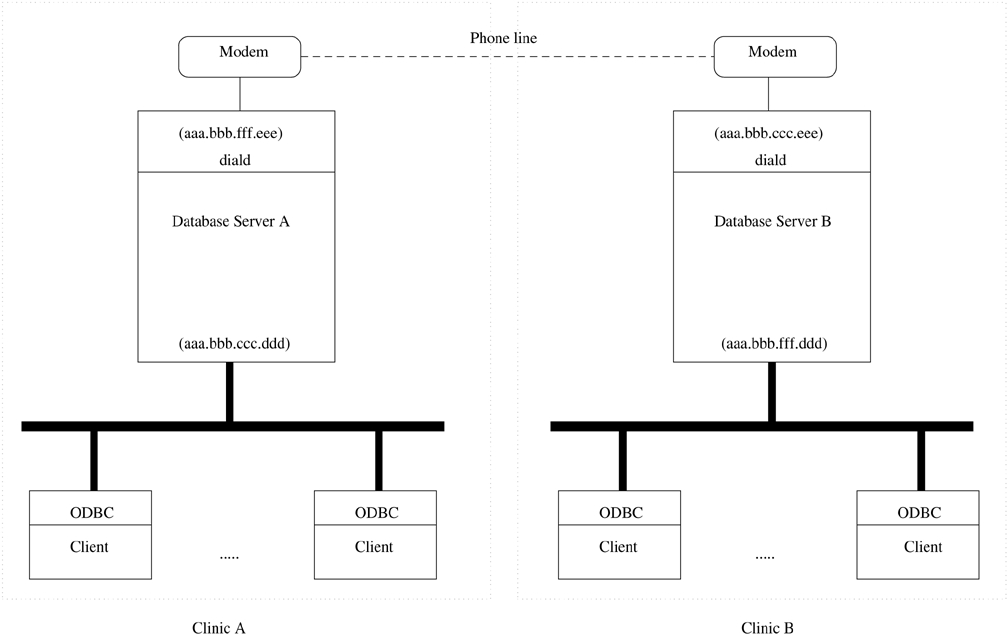
The proposed system architecture of NORA is shown in Figure 1. In order to simplify the discussion, we assume the connection is between two servers. The configuration can be generalized to connections among several servers. For each clinic, there is a Linux server for the database and diald. The Windows 95 clients are connected to the local or remote database server through ODBC drivers. diald starts the connection to another server, if needed.
Now we come to connection and configuration. Basically, we will follow the FAQs and man pages on these topics. Since an agent is needed to receive the dial-up call from another computer, we installed mgetty to answer the call from the modem. If the call is normal data communication, login will be executed to prompt the user on the other side. One of the nice features of mgetty is that it can also act as a fax receiver if the call is a fax, forwarding it to e-mail or printing it. mgetty should be started by init and specified in inittab.
The user on the other side can start pppd after logging in to the Linux server. The options file of pppd should be kept in the simplest form, i.e., IP address, netmask, etc., should not be specified. This is necessary because this configuration is used by any execution instance of pppd, even one started by diald. For example, if an IP address is specified in the options file, the dial-out connection (by diald) IP address will be fixed to the same address. It is incorrect, since this address should be assigned by the target server when the server dials out. A suggested PPP option file, called options, is shown here:
proxyarp
lock
crtscts
modem
We leave the other configuration options to the connection script. An example of a script for the dial-in PPP startup, called startppp, is shown in Listing 1. It should be noted that defaultroute may not be necessary for dial-up from a stand-alone PC, but it is necessary for a LAN connection. Otherwise, there is no way for the dial-up connection to route to all machines in the LAN. Moreover, we skip the connect script for pppd since it can be found in the FAQs and man pages.
You may check the completion of this phase by dialing in to the server with a Windows 95 or another Linux PC using PPP. Start PPP by executing startppp after login. The appearance should be similar to dialing in to an ISP.
As mentioned above, we are supposed to configure the dial-on-demand servers in a symmetric manner, i.e., the connection can be started by any server, and once the connection is established, any machine on either side can access the server on the other side, no matter where the connection started. In this case, IPtranslation, which is always mentioned in the diald documentation for connection to the Internet, is not needed. This will simplify the configuration of diald.
We install diald on the server and make it automatically start up after the system boot-up. A sample of the configuration file, diald.conf, is shown in Listing 2.
The addroute script is executed when diald starts. All the accesses to the remote site are routed to the IP address that activates diald (aaa.bbb.fff.eee in diald.conf). For example:
#!/bin/sh
/sbin/route add -net aaa.bbb.fff.0 \ # remote LAN
                                              # IP address
netmask 255.255.255.0 gw $4 \
window 2048 metric $5 dev $1
We skip the connect script for diald, since it should be similar to the connect script for pppd. It should be noted that the default gateway of all clients in a local LAN should be changed to the IP address of the local server. You may check the completion of this phase by accessing (e.g., using ping, FTP or TELNET) the remote server from any PC in the local LAN. The modem will dial out, and the server will successfully log in to the remote server. However, you will receive no response from the remote server if it has already configured diald in the same way.
The reason for the blocked connection between two servers with diald can be explained in the following way. Since both servers are ready to connect to the other side, the route tables of both servers have a route to the IP address for activating diald if the destination of any packet is to the other side. Therefore, for example, serverA starts the connection to serverB and sends packets to serverB after the connection is established. However, the return packets cannot come back to serverA, since the default route in serverB to serverA is to start diald in serverB. ServerA cannot receive the return packets from serverB through the established connection.
We solve this problem by using the ip-up.local and ip-down scripts of pppd. ip-up.local is executed whenever pppd establishes a connection successfully. So, we delete the route table entry to serverA in serverB when pppd starts a connection. Here is a sample of ip-up.local.
/sbin/route del aaa.bbb.fff.0 # remove remote IP
                                  # route
It should be noted that the script has no negative effect on the dial-up service from a stand-alone PC. When the connection is finished, the route table should be recovered. So the ip-down script file, which is executed when pppd stops the connection, is used like this:
#!/bin/bash
/usr/lib/diald/addroute sl0 \
255.255.255.0 \
aaa.bbb.ccc.ddd \       # server IP address
aaa.bbb.fff.eee \       # IP address will be activated
                        # by diald
1
Basically, it is the same as the addroute script with the same
parameters as when diald starts. After this phase, you should be
able to access the remote server from any machine in the local LAN.
The remote server can access the local server at the same time.
Moreover, a stand-alone PC can dial up and access the server from
anywhere.
NORA has been installed and tested on several sites over a three-month period. There has not been a single crash or failure on the server machines. We also set up other services such as file and print servers (Samba), a web server (Apache), etc. Linux is truly a stable, flexible and extensible OS.
We are planning to use ISDN to replace the traditional phone lines to improve the transmission time for large objects like X-ray photos. We are also porting the client software to Linux, so the stability of the whole system can be improved.
All listings referred to in this article are available by anonymous download in the file ftp.linuxjournal.com/pub/lj/listings/issue67/3191.tgz.