
Happy Hacking Keyboard
Manufacturer: PFU America Inc.
E-mail: hhkb-support@pfuca.com
URL: http://www.pfuca.com/
Price: $229 US for keyboard including 3 cables, $189 with one cable option
Reviewer: Jeremy Dinsel
The Happy Hacking Keyboard is a cute and fuzzy streamlined keyboard designed specifically with programmers in mind. While not a single bit of fuzz is actually on the keyboard, its size makes it cute, if not disorienting, to people used to the standard IBM PC keyboard.
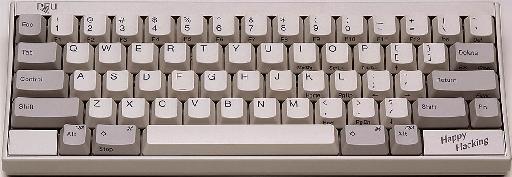
According to PFU America, the keyboard's design makes it easier for programmers to reach the keys they want quickly and efficiently. They claim having fewer keys on the keyboard increases efficiency by preventing users from overextending their fingers on certain keystrokes.
The Happy Hacking Keyboard arrived in a tiny box shortly after I agreed to do a review of the product. Inside were the keyboard and three cables (for a PS/2, Macintosh and Sun computer) along with the usual manual and warranty information.
PFU America recently changed the package, and lowered the price. The Happy Hacking Keyboard now comes with only one cable (of the customer's choice), but additional cables are available for $35.00 each. The cables are expensive because they are handmade by the people at PFU America.
The manual was fairly straightforward—after all, almost everyone knows how to hook up a keyboard. However, with the many cables that accompanied the keyboard, it was comforting to know that documentation was available should it be needed.
After the computer was powered down, I said goodbye to my 101 Enhanced keyboard and hello to blissful days of Happy Hacking. Or so I thought—I had to grab a PS/2 to AT keyboard adapter first.
The keyboard is streamlined, containing only 60 keys. A function key is included that can be used in combination with other keys; as a result, awkward finger positioning is sometimes required. My first days using the keyboard reminded me of playing Twister and trying to reach the red dot by squeezing my arm past two opponents while keeping my feet on the orange and blue dots on opposite sides of the mat. In fact, two weeks later, I was still finding myself reverting to my old PC keyboarding habits. Some complex key sequences were hard to complete correctly, as old habits die hard.
Also, in the beginning, the backspace key didn't work; however, this turned out to be primarily my fault. Being lazy and excited to test out the new keyboard, I refrained from reading all the way through the manual to the final (third) page where a table and accompanying figure would have taught me how to program the keyboard using a slider switch. Eventually, I toggled the switch and had the backspace key working to my satisfaction.
Since I started using Linux before Windows 95 was introduced (I stopped using MS products long before that), I did not miss the extra “Windows” keys found on most PC keyboards. I did, however, have to get used to console cruising with the new keyboard. Switching from X to the console requires a four finger/key combination (ctrl-alt-fn-f*, where fn is the function key), while cruising through consoles requires a three finger/key combination (alt-fn-arrow-key).
Even in a non-vi-type editor without command mode movement keys, the Happy Hacking Keyboard makes the user adjust to finding the location of the arrow pad and remembering to hit the function key. In all fairness, it took me less than a week to become oriented with the key locations. (It does remain comical to watch others try to wander through the key selections for the first time.)
Unlike a laptop, the size and shape of the keys are the same as on a PC keyboard, making it easier to adjust. I never overreach the true location of the keys and don't have a difficult time typing something on other people's computers (who don't have a Happy Hacking Keyboard). However, I am now known to complain about how “weird” other keyboards are.
While the keyboard did not cure me of my sarcastic nature, I did find the escape key much easier to reach since it's located to the immediate left of the “1” key. In vi, I can quickly switch out of insert mode since I never have to look down to relocate the escape key or reposition my fingers afterwards; thus, cruising through vi has become even easier.
For XEmacs programming, the control key is located in the “right” place, directly left of the “A” key. This makes it easy to use without any odd movements or taking your fingers away from the home row. (Yes, I learned to type before I learned to program.)
Both of these key locations, escape and control, have allowed me to quickly negotiate commands without having to reposition my fingers. This has the benefit of reducing the frustration of trying to return to the home keys after each command—my fingers never wind up in odd locations as they did on a typical PC keyboard.
As a part-time game player (Linux Quake), I'm accustomed to using the keyboard for all player movements, such as turns and running. With this keyboard, I'd have to hold the function key down constantly (to select the arrow keys) or figure out how to use the mouse. Otherwise, keeping the function key depressed (two keys away from the arrow keys) and trying to fumble around with the arrows might increase the probability of developing carpal tunnel syndrome.
After a few games of Quake, I think I'll be comfortable with the bizarre fingering required. Also, using the keyboard to program in XEmacs helped in the adjustment needed to get into the gaming world.
Documentation is also available on-line. While I haven't had to use their tech support e-mail, it is readily available—my contact at PFU America was quick to reply to any e-mail I sent. Furthermore, all of the information needed to install and hook up the keyboard can be found on-line. All of the information in the manual is included in their on-line documentation.
Overall, I would be hard-pressed to sum up this review with anything but a positive remark. With the price tag recently dropping by $40, the keyboard is more affordable. I'm sure other hackers will be quite happy to own it.
For someone who hasn't experienced the keyboard, it's hard to believe everything reported about the Happy Hacking Keyboard by PFU America. In fact, I was skeptical about the remarks I had heard before I became a Happy Hacking Keyboard user. Now, one month after laying my fingers on it, I can't imagine using any other keyboard. I wonder if PFU America makes a Happy Hacking tote bag.

