Linux Security for Beginners
Security is one of the biggest issues on the Internet today. It affects everyone in one way or another. If you use Linux, it should be a big concern to you. You may think security is for system administrators managing 20 or more machines and not for the average user with a simple PPP link to the Internet. This may in fact be true, for the chances of anything happening are rare. Are you willing to take a chance and trust the security of your system right out of the box?
Ignorance on your part may turn into a powerful tool in the hands of a cracker willing to compromise your system. Is knowing every in and out truly necessary to keep your system secure enough for safe usage? Not really, but one of the best things you can do is become aware of what is available. Many people are intimidated by the subject, since it covers a wide area, but you don't have to be a security guru to be safe. On the other hand, you do need to be willing to get your hands a little dirty.
Before talking about security, the basic underlying principles of the TCP/IP protocol suite must be understood. There are two parts to TCP/IP: tcp and udp. I won't go into great detail about the difference between them—mainly, tcp is connection-oriented and udp is connectionless. Both have their advantages and disadvantages, and both are used differently.
These two protocols are the underlying base for applications run over TCP/IP networks. Each machine connected to a TCP/IP network has its own IP address to uniquely identify it. Each application has its own port number on that IP address. A normal connection to the Internet is no different, since it could be considered a giant TCP/IP network. The two files which govern an application's port and protocol are /etc/services and /etc/protocol. The first, /etc/services, identifies the machine's services and the port number and protocol for each particular service. The second file, /etc/protocol, simply identifies the protocols used in /etc/services.
These two files identify only each service, its port number and its protocol. Where is the application? Instead of having an application running in the background listening for its respective port and protocol and perhaps generating hundreds of daemons, we have only one: inetd. inetd listens for each service, and when it notices a remote host making a call, it spawns the application bound to that port number. How does inetd know which application goes with which service? It uses its configuration file, /etc/inetd.conf. This file matches the service found in /etc/services with an application found on the system.
For example, let's take a look at a small chunk of that file:
ftp stream tcp nowait root /usr/sbin/ftpd in.ftpd\
        -l
telnet stream tcp nowait root /usr/sbin/telnetd\
        in.telnetd
finger stream tcp nowait bin /usr/sbin/fingerd\
        in.fingerd
You may be familiar with some of these common Internet applications. But what does all this mean? Beginning with the first column, the variables correspond to the service, the socket type (depends on tcp or udp), the protocol to be used, wait or nowait (depends on tcp or udp), user field, the application or server to be called, and the arguments passed to the application.
Where is the security problem in all this? All of these services offer some kind of access to your system and are the principal means by which a cracker can compromise your system. How do we police it? Let us look again at the fields of the code chunk shown above. The first field, representing the service, can be understood with common sense. If you won't be using that service, there is no reason to offer it. If no one besides yourself will be using your box, comment the line out of your /etc/inetd.conf file. The same thing applies to those services that run independently of inetd, such as web servers (httpd) and mail servers (sendmail). Each has its own daemon running in the background which must be killed to eliminate them as potential security risks.
The next field of concern is the user field. Run applications under the least privileged user possible. If an application doesn't require root to run properly, don't run it with root privileges.
The last field of concern is the most important for those services you do require to be available. My example above works fine when offering those services, but inetd doesn't give you much control. A far better alternative comes with most Linux distributions: tcpd. This daemon wrapper is executed instead of your usual server application, and offers far more protection. It will log requests for services to syslog, and it can allow and deny hosts based on rules specified in the /etc/hosts.allow and /etc/hosts.deny files. The rules can do very complex things you wouldn't normally be able to do, such as allowing or denying certain services for certain hosts. It can also trigger applications based on access of services or requests by remote hosts. The list of possibilities is endless. Details on this subject can be found in the August 1997 Linux Journal (issue 40) in the excellent article entitled “Wrap a Security Blanket Around Your Computer” by Lee Brotzman. Many security and administration books covering this subject are also available.
Now that you have commented out those services that aren't needed, what do you do about those that are? As we discussed above, you could use tcp wrappers, but that only cuts it for services offered by inetd, and tcpd doesn't necessarily mean your system is secure—those applications can still be exploited. Also, those services independent of inetd and those people who do have access to your system must be considered.
The best thing to do is be aware. If you run a news server right out of the box, you could be taking a severe security risk. On the other hand, if you learn everything including known security holes, then you have the opportunity to search for a patch or solution. There are also alternatives such as using different programs. Instead of using an insecure application like TELNET, use one that is more secure and designed with security flaws in mind. A secure replacement for TELNET would be ssh; for sendmail, which is notorious for its security flaws, a secure alternative is qmail.
What about users who have authorized access, or those who don't but manage to gain access? There are all kinds of known security holes, back doors and other nasty things which can be used for no good. Since you can't beat them, join them. By this, I mean learn all about those exploits; new ones are discovered every day and patches are made to remedy the situation. Several web sites thoroughly document these problems and solutions (see Resources).
The system can also be exploited through setuid programs. These are programs which run with the privilege of the program's owner when executed. These programs could even be setuid root and, as a result, when executed they have the permissions of root. Crackers can use this to gain root privileges. The best way to deal with this situation is to learn about possible problems with programs that run with the root setuid bit set on and disable those programs which are not needed.
With all of the above in mind, let's look at some nifty tools and methods for internal security. Obviously, someone can compromise your system if they have access. To limit user access on a machine, you use two files: /etc/securetty and /etc/login.access. The first file defines which ttys terminals can be logged into by root. The second limits user access, but is far more flexible. Lines in this file follow the format:
permission : users : origins
where permission is either access granted (+) or access denied (-), users is a list of login names, group names or ALL, and origins specifies “where” a user can log in. An example would be the following line:
- : ALL EXCEPT bob : ALLThis instruction means bob is the only one allowed to log in from anywhere—everyone else is denied access to log in from all ttys, hosts, domains, etc.
- : ALL : .anytown.state.us consoleThis statement denies access to everyone except those in the domain .anytown.st.us and those from the console. With a bit of imagination, one could come up with some pretty complex rules for logins.
As I mentioned above, setuid programs can be hazardous. One way to deal with these programs is to find them first. This can be done with a simple script, using the find command as shown in Listing 1.
Be aware that this script will generate a file containing sensitive information. After viewing it, you should delete it. Once you've looked at the list and found any scripts or programs that aren't necessary, you could disable them as root using chmod like this:
chmod 644 filename
Once setuid is disabled, the script or program is no longer a security risk.
So far, we have discussed a couple of techniques to tighten system security. What about testing the security on your system? Is it vulnerable to attack? Are there back doors? Several tools are available to answer these questions. Satan can scan a system for any back doors or holes that might become potential security risks. Other programs like netwatch and tcpdump can monitor network traffic on your system. A packet sniffer program, SniffIt, can also help you in many ways. Packet sniffers have a bad reputation, because they can be a security risk to your system, but they can also help you find problems. A lot of network clients/hosts send information using plaintext, which presents a severe security risk.
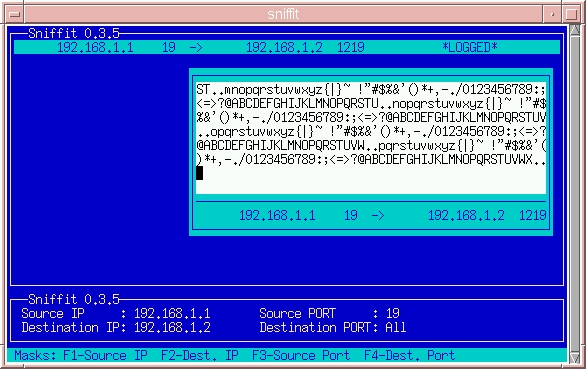
Using sniffit you can test various combinations to see if there is any potential risk. The program can be downloaded from the URL shown in Resources. I won't discuss compiling and installing sniffit, for that's another topic. Once you have the program up and running, you can give it a test drive. To use the interactive mode, which has a nice curses-based interface, type the following command:
sniffit -i
In Figure 1, you can see two IP addresses: a destination and a source. The source IP is sending packets from port 19 to the destination IP, 192.168.1.2. Notice that port 19 is “chargen” and does nothing but send characters. (Packet sniffing works only in situations with high bandwidth.) If the source and destination port are changed to 21, any TELNET sessions from 192.168.1.1 to 192.168.1.2 can be picked up, thus allowing the viewer to see what the TELNET user is typing in his session. If the user is using ssh instead of TELNET, the viewer would see only useless garbage.
I have presented only some of the basics of security; however, there is far more to it than this. The best way to make your system more secure is to learn more about Linux security and to grab some of the tools I have mentioned (see Resources). Security is like philosophy—there is no definitive answer, just a lot of questions and books.
Alex Withers lives in Anchorage, Alaska during the summer where he tries to convince the hordes of tourists that they need a Linux box at home. The rest of the year, you'll find him studying computer science at Gonzaga University. Alex can be reached at awithers@gonzaga.edu.