Active Badges—The Next Generation
An increased interest in location-aware computer systems has occurred recently. This class of computer systems is able to react to location changes of people, equipment or resources. These systems could create a base for applications such as a “follow me” computer environment that supports user mobility around a building. The main part of such a system forms a location system.
This article describes our experiences during the implementation of a selected component of a new ABng (Active Badges Next Generation) software component for the location system called Active Badge. The ABng software has been implemented as a CORBA application using the distributed object paradigm.
The component of the ABng software that we implemented is called the poller: it acts as a communication engine between Active Badge Systems' sensors and the rest of the location system. Its efficiency and reliability have a substantial influence on system performance. Despite this strategic role, the poller is a self-contained, plug-and-play hardware component, easy to install and inexpensive.
The main purpose of this paper is to show that the usual trade-off problems between robustness, efficiency and low price can be solved by implementation of the poller as a Linux-embedded application. All consequences of this design decision have been analyzed in detail to evaluate its advantages and disadvantages.
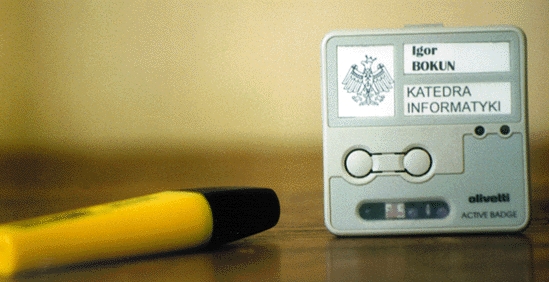
The Active Badges system was originally invented and developed at the Olivetti Research Laboratory in Cambridge, UK, in 1990-92. It uses hardware infrastructure with the key components of infrared (IR) sensors installed in fixed positions within a building, and infrared emitters (active badges) worn by people or attached to equipment. The sensors are connected by a wired network that provides a communication path to the controlling device, called a poller. A poller can be implemented on a PC or a workstation using a software communication protocol to talk to the active sensors.
An active badge periodically transmits an infrared message containing a globally unique code (a badge identifier) using a data-link layer protocol running over an RS-232/422 network. The messages sent by the badges are received and queued by sensors. A poller periodically polls sensors and retrieves badge messages from the sensor queues. Each message and the identifier of the sensor that received the message is forwarded to the software part of the Active Badges system. The software layer maintains a database that maps sensors to places where sensors are installed, and badges to the users wearing them or the pieces of equipment to which they are attached.
The relation defined between a set of sensors and badge identifiers is called sighting. Using collected data, the system can infer where users or pieces of equipment are currently located. Information about the current locations of users and equipment is provided to various applications, such as presentation tools that display location data or applications that use location data to control the users' environment. The software part of the original Active Badge system developed at ORL uses the ANSAWare distributed environment.
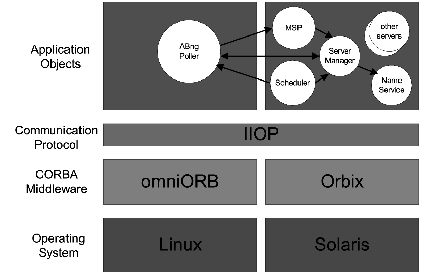
The ABng project goal is the development of a new software layer of the Active Badge system that will be flexible and reconfigurable. To satisfy this requirement, ABng uses modern components and object-oriented technology. The system was developed in CORBA-compliant environments: Orbix, omniORB and OrbixWeb. It is based on the object model in which all logical and physical elements of the Active Badge system (users, locations, sensors, badges, etc.) are represented as CORBA objects.
In the context of the ABng project requirements, ABng poller must be implemented as a CORBA object. The poller provides two-way communication between sensors and the rest of the system. It is, in fact, a gateway between the ABS data-link layer protocol running over an RS-232/422 network and the IIOP implemented over a TCP/IP protocol stack.
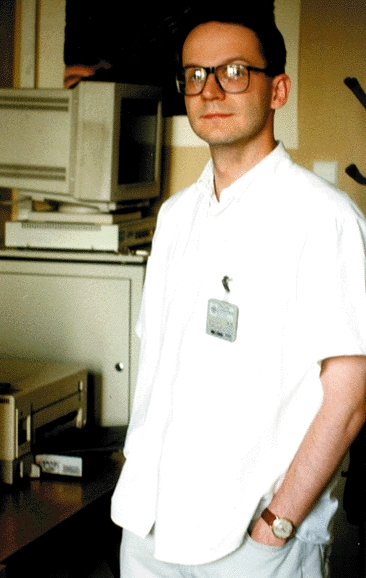
The poller acts as a CORBA client when it forwards information from the sensors, and as a CORBA server during information flow in the opposite direction. Acting as a client, the poller provides information (mainly the badge identifiers seen by a given sensor) to all Main Sighting Processors (MSP) registered with the poller, so that the MSP can update the sighting relation. The observed/observer design pattern is exploited to organize this communication. As an example, let's see what happens when a person wearing a badge (see Figure 2) enters a room containing an IR sensor. The message containing the identifier, generated by the badge, is observed by the IR sensor and cached in its local buffer. When the poller sends the next periodic polling request to the sensor, the information cached by the sensor is sent back to the poller. The poller in turn sends this message, with the sensor and serial network numbers, to all its observers; the MSPs interested in receiving the information needed for the sighting relation modification.
Figure 2. Alex Laurentowski wearing Active Badge
Taking the role of a server, the poller provides operations that forward commands to sensors and badges. In the ABng system, these commands are issued by a dedicated server called Scheduler. The badge can play sounds, and turn one of its two LEDs on or off. This simple feature can be used to notify a person wearing an Active Badge about events—for instance, a phone call or an e-mail arrival. This notification could also include an action based on information about the person's location, e.g., a call could be redirected to the nearest telephone.
The poller server's software interface consists of two parts, each with its own functionality. The first part of the interface provides system operations that register MSPs interested in receiving information for the sighting relation update from the poller. It will also de-register them when they are no longer interested. The second part represents the operations corresponding to the set of commands performed by sensors and badges.
The ABng system is integrated using two services: a standard name server implemented according to COS OMG specification and a server manager. The server manager is a dedicated server providing a notification mechanism for all servers in the system interested in server activity. When a new ABng poller is started, it registers with the name server via the server manager; the server manager notifies all registered MSPs that a new poller has begun activity. The server manager also monitors the poller process using a simple keep-alive protocol. The poller's IOR (Inter-Orb Reference) is de-registered from the name server when the poller is removed from the system or when its process dies. This integration mechanism provides plug-and-play functionality for the ABng poller CORBA server, supporting self-configuration and automatic binding, which is crucial in systems with many dependencies between the objects.
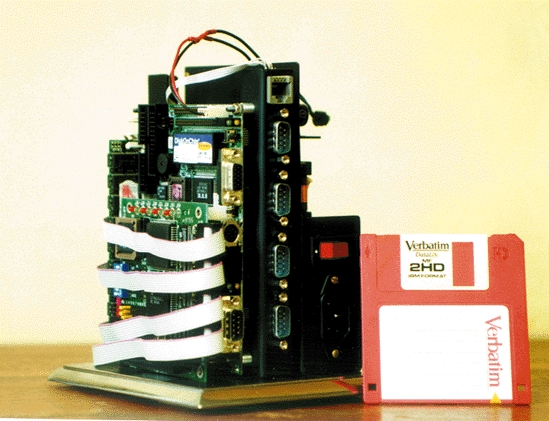
ABng poller is a multi-threaded Linux application, with the main purpose of collecting sightings from the serial lines and distributing the received data to registered observers. This application can be configured to interface with sensors designed by the ORL as well as with the modified sensors commercially available from Olivetti. The six serial lines available in the prototype ABng poller can serve up to about 80 sensors with reasonable response time. When more sensors are needed, additional pollers must be deployed. The design of the ABng system places no limitation on the number of pollers; thus, system scalability is ensured.
ABng poller is able to cooperate with other parts of the system via the standard socket services or through the CORBA interface. This feature enables a smooth transition from the old ANSAWare-based location system to the CORBA-based ABng. Object Request Broker functionality is ensured by the omniORB which, although free, has performance levels hard to beat by the commercially available CORBA-compliant products including the industry leader—Orbix. An important feature of omniORB is its portability; it runs on most modern operating systems, including Linux.
ABng Poller runs on the PC/104 hardware platform, which was developed in 1992 in response to a growing need for a more compact implementation of the PC bus, satisfying the reduced space and power constraints of embedded control applications. Yet these goals had to be realized without sacrificing full hardware and software compatibility with the popular PC bus standard.
The key differences between PC/104 and the regular PC bus are:
Compact Form-Factor: card size is reduced to 3.6 by 3.8 inches. It has a unique self-stacking bus that eliminates the cost and bulk of backplanes and card cages.
Pin-and-Socket connectors: rugged and reliable 64- and 40-contact male/female headers replace the standard PC's edge-card connectors.
Lower bus drive current (4 mA): lowers power consumption to 1-2 watts per module.
In the ABng project, we use PC/104 modules manufactured by Advantech. Products manufactured by Advantech fall into several groups, from which we use two: Biscuit PCs and PC/104 modules. Biscuit PCs are a family of small, highly integrated single board computers designed for all sorts of embedded applications, and are equipped with the 80x86 processors—from 386 to 586. Since the ABng poller runs in a distributed environment, it was crucial to have an Ethernet controller on-board. Other components, such as a VGA adapter, printer port or floppy interface, are not necessary but are quite helpful in early development stages.
One of the first versions of ABng poller worked on a PCM-4822 Biscuit PC equipped with an AMD 486 processor, NE2000 compatible network adapter, enhanced IDE interface, two RS-232 ports, keyboard connector and 4-bit digital I/O interface. All these components, including 8MB of RAM, fit into a compact 145mm x 102mm board.
During the testing period, we found two main drawbacks to the PCM-4822 board. The board is equipped with a 120MHz 486 processor that requires an electric fan. As the only mechanical part of the ABng poller, the fan is the weakest part of the whole design. A second problem is the lack of a PC/104 interface on the PCM-4822 board. Adding any PC/104 modules requires an additional adapter. One of our main design goals was to create a robust device of minimal size, so we couldn't accept moving parts or unnecessary adapter boards. The solution came from Advantech, with the release of PCM-4823 boards, equipped with the PC/104 interface and an AMD 586 processor. The CPU has a heat sink attached, so an external fan isn't necessary.
To increase the number of sensors supported by the poller, we had to use a multi-port RS-232 module. The PCM-3640 manufactured by Advantech, with a price of about $30/port, seems to be a good choice. The only problem is that IRQ sharing is not implemented, so four unused interrupt lines have to be allocated for the module to work.
The operating system platform for the ABng poller is Linux Piccolo, which has its roots in Red Hat 4.2. To fulfill the requirements of an embedded system, the size of Linux Piccolo has been reduced by keeping only the most important components such as system libraries, system commands, basic daemons such as telnetd, httpd, perld and necessary configuration files. The size of the first version of our system was about 25MB of hard-disk space. During the evolution of the system, its size was reduced to 4MB of compressed file-system image.
As Linux Piccolo runs on a diskless PC, two problems had to be solved: remote booting and root file system mounting. By remote booting, we mean downloading the Linux image from the boot server and performing a standard bootstrap procedure. After the kernel is loaded into memory, it mounts the root file system, which is crucial for the operation of the system. Without a local hard disk, the NFS root file system should be used.
The PCM-4822 board used in the first prototype of the ABng poller comes with the Remote Program Load (RPL) protocol burned into its boot PROM. The RPL protocol is supported by the following operating systems: Windows NT, Novell Netware, Microsoft LAN Manager and IBM LAN Server. Unfortunately, a Linux implementation of the RPL protocol does not exist. After an unsuccessful attempt to find an RPL specification, in order to implement it under Linux, we've decided to use Windows NT as a boot server. In our environment it wasn't a difficult decision, because we already had a Windows NT workstation. In other cases where an NT server isn't available, the alternative is to change the boot PROM image to support BOOTP/TFTP. A good place to find network booting solutions is the German company Imcon (http://www.imcon.de/). Their Boot PROM supports over sixty Ethernet cards, covering all major brands of current PCI and ISA cards, as well as many older 8-bit models.
After selecting boot protocol and configuring both client and server sides, two more elements are required: the Linux kernel and the root file system.
The kernel for the Piccolo workstation needs the following as a minimum set compiled in:
NFS file system support
“Root on NFS” enabled
The Ethernet driver for the network card (For Advantech's Biscuit PCs, the NE2000 driver works fine.)
RARP or BOOTP support for NFS-Root depending on your needs.
Additional parameters, such as the station IP address and the IP address of the NFS server, should be passed to the kernel at boot time. When loadlin is used to boot the kernel, the following command-line options should be used:
loadlin zimage nfsroot=/biscuits/piccolo1 \
nfsaddrs=149.156.97.54:149.156.97.58:: \
255.255.255.0:piccolo1:eth0:none
In this example, /biscuits/piccolo1 is the path of the root file system on the server, 149.156.97.54 is the station address and 149.156.97.58 is the boot server address. The rest of the parameters are the network mask, the station name and the network interface name.
As the next step, the root file system of the diskless station has to be prepared, installed on the NFS server and exported to the diskless station. The Linux Piccolo file system can be downloaded from our web site (see Resources).
Another feature of the NFS root approach is the lack of a swap partition. With no swapping capability and only 8MB of memory installed, RAM is a very scarce resource; therefore, the number of processes running should be minimized. Apart from removing unnecessary applications, the number of getty processes has been reduced by editing the /etc/inittab file. After this thinning treatment, about 3MB of RAM was left to the ABng poller process.
The biggest disadvantage of the NFS root approach is that it requires both a boot server and an NFS server (which can be co-located on one physical machine) during both the boot process and the system operation. This approach is very convenient in the early stages of the development process, when home directories can be shared between a development system acting as an NFS server and the Linux Piccolo host. When the development cycle is over, a “snapshot” of the system, along with the required applications, should be taken and stored in the poller's non-volatile memory. The poller can then run independently of the NFS server.
The M-Systems' DiskOnChip2000 is a new generation of high-performance single-chip flash disks. The DiskOnChip MD2000 provides a flash disk in a standard 32-pin DIP package. Since the PCM-4823 board we use is equipped with a DiskOnChip socket, M-Systems' solution seems to be a natural choice. We soon discovered that there is one serious problem with DoC. DiskOnChip2000 has built-in TrueFFS (true flash file system) technology, which provides hard disk compatibility at both the sector and file level. It works in a variety of operating system environments such as DOS, Windows 95, Windows CE, Windows NT, pSOS+ and QNX. Unfortunately, Linux is not yet on the list of supported operating systems. The good news is M-Systems is planning to support Linux; by the time this article is printed, Linux should be supported.
As the deadline for our project neared, we couldn't wait for the support. The fact that DoC is not supported by Linux does not mean that Linux cannot be started from it. The solution was to create a DOS partition on the flash disk containing the Linux Piccolo kernel and the compressed file system image, and to use loadlin with the initrd capability. initrd, which stands for initial RAM disk, enables loading the RAM disk image by the boot loader. This RAM disk can be mounted as a root file system, from which applications can be executed. Using the following command:
loadlin zimage initrd=linpico.gz root=/dev/ram
the compressed kernel (zimage) and the compressed root file system image (linpico.gz) are loaded into memory. After those two elements are loaded, the kernel is uncompressed and executed. Code contained in the kernel is then used to uncompress and mount the root file system. When the file system is mounted, standard system initialization is performed.
Having experience with the NFS-root approach, we decided to buy a 10MB DiskOnChip. Relying only on the flash disk requires much more RAM than using an external NFS server. A 32MB RAM module has been installed on ABng poller. Also, the size of the whole Linux Piccolo file system should be reduced as much as possible to fit on the 10MB flash disk. All required files can be copied into the flash disk using an external floppy or hard drive, or they can be downloaded through the network.
To create a file system image, a block device is required. We use a loopback device for this purpose. The first step is to zero out the block device in order to achieve a better compression ratio. Then, the file system is created using the mkfs utility. The file system is then mounted at the temporary mount point and all required files are copied onto it. The last steps are to unmount the file system and compress it.
After each development cycle of the ABng poller application, the script in Listing 1 is invoked on the external Linux server to prepare the Linux Piccolo file system.
The biggest drawback of this solution is that no changes can be written from within Linux. In the case of ABng poller, this is not a big problem, but for other kinds of applications it might be unacceptable. In such a situation, flash disks with an IDE interface may be used. An example of such a flash disk that performs well under Linux is the SanDisk FlashDrive.
Linux wasn't chosen just because it is free and very popular in the academic community. Linux was the best choice for several reasons. First, we needed a multi-threaded operating system that could be tailored to our own requirements. With Linux source code available, this customization could easily be performed. The other important features of Linux are its mature networking subsystem and the availability of the CORBA environment. The performance of ABng poller turned out to be better than expected even with a limited amount of RAM. The customization and integration of different components of the system were performed effectively without any major technical problems. This proves Linux to be an advanced and open operating system.