Color Reactiveness on the Desktop
For the seven-month period spanning July 1997 to late January 1998, I was involved in an OS development project called InSight. Part of my role within the InSight development group was to study interface designs in an attempt to further understand which aspects would still be viable and useful for users for the next five to seven years. In addition to the interface, I had the opportunity to collaborate on the design of the underlying OS, since much of what we were doing on the visible aspects of the system was tied very heavily to the underlying workings of the OS. Bringing together the design of the desktop and the underlying mechanics of the OS, we hit on what we believed to be a good idea—the concept of color-reactive destop elements.
Lamps
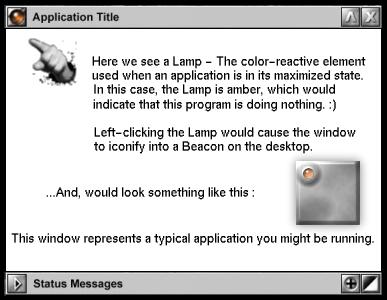
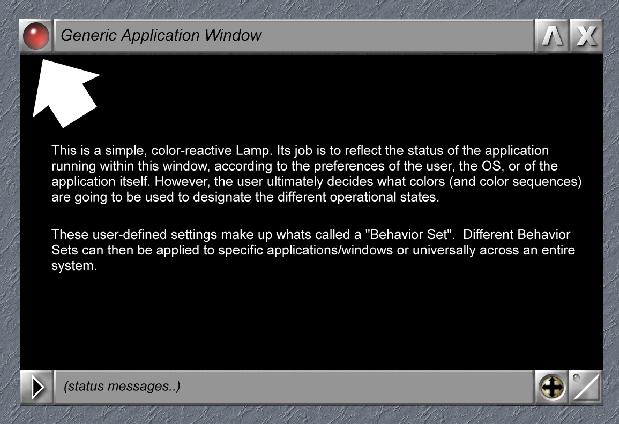
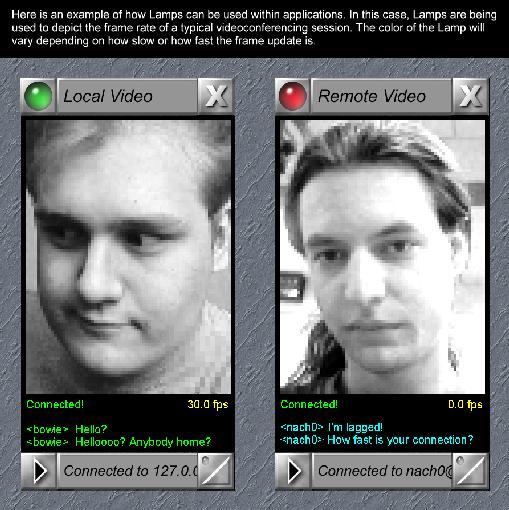
A lamp is a window element in which the color is tied directly to the operational status of the application using that window. Simply put, it is like a status LED for that particular application. As you use the program, its lamp changes color depending upon what is happening and what you'd like it to reflect—CPU usage, program status, etc.
Let's assume you have an e-mail checker which checks your mailbox every two minutes for new mail. Most of the time the lamp in the window remains blue, meaning it is just sitting around waiting for something to do. Every two minutes it turns yellow to indicate it is busy checking your mailbox for new mail. If no mail is found, it goes back to blue. If new mail is found, it turns yellow or begins flashing.
Beacons are like miniature lamps, meant to be used only when applications are in an iconified state. If you have a window open on your desktop, it has a lamp in one corner of the window. Now, when you click the iconify button, the entire application is collapsed into an icon on your desktop. If you still want to monitor that application, collapse it to a beacon instead of an icon. In that way, you will be able to see what is going on with the application without having to constantly open and close it.
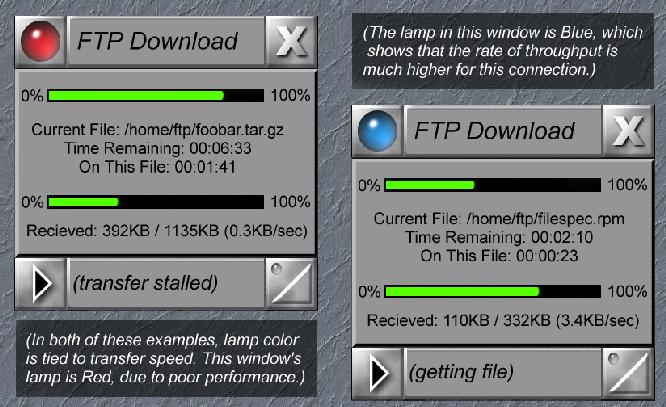
For example, suppose you are downloading five different RPMs via FTP. You can collapse each one down to a beacon with a color that reflects whether or not the download is proceeding without problems. At this point, you have five little beacon icons at the bottom of your screen and you can monitor their progress by checking if they are all still glowing a nice shade of green. You could even set it up so that the color was a function of transfer speed. Bright green could indicate a fast transfer; red could indicate a slow or dead transfer.
In order to fully understand how lamps and beacons behave, keep in mind the fact that the color of the lamp (or of the beacon) can be tied to a variety of “behavior sets” such as CPU usage, process status, or specific events which may occur within specific applications. A “behavior set” dictates what actions will produce what colors. Here are a few practical examples.
Suppose one of the above-mentioned FTP transfers begins to stall. One of the beacons begins to glow red and stays red for several minutes. Simply pop the window back open, kill or restart the transfer. The instant you kill that process, the other four beacons begin to glow more brightly, since you have just improved the speed of the other four by freeing up some bandwidth.
Beacons make the task of babysitting multiple applications a breeze. An entire 3-D rendering package could be collapsed down to a single beacon—one that will turn green when the rendering of a scene was complete, for example. There is no longer any need to continually pop the application back open to see what is going on.
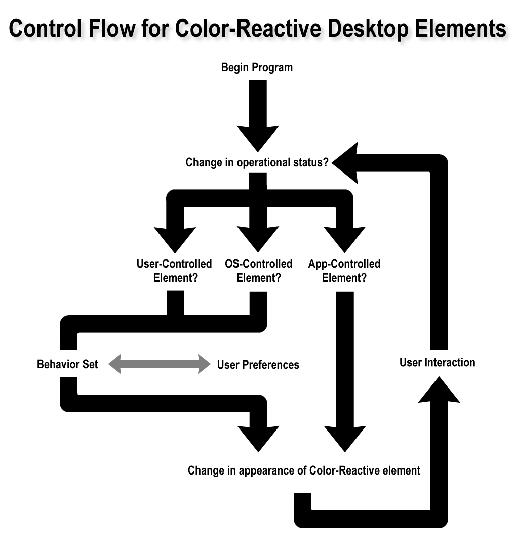
Since the behavior of color-reactive elements should be consistent throughout the desktop, a centralized point of control is needed (in the form of a control panel, for example) to allow the user top-level control. From there, it would also be wise to allow the applications, if permitted by the user, to dictate their own behavior sets. Ultimately, the user must have total and complete freedom to dictate the appearance and behavior of color-reactive elements on his or her desktop.
There are two ways to go about changing the appearance of a lamp or beacon on the desktop. With InSight, the plan was simply to change the icon on the fly by loading the appropriately-colored icon in its place. The second way, which takes considerably more CPU time to accomplish, involves hue-shifting the image data within the icon +/- 180 degrees to achieve the desired color.
The first method requires a small cache of colored icons to be present and ready to be loaded. About eight different colored lamp icons (and eight beacon icons) are usually enough to handle most situations. On the FTP site (ftp://ftp.linuxjournal.com/pub/lj/listings/issue58/) is a file called 3039.zip, containing a small archive of example lamps and beacons in different colors for you to look at and experiment with. The eight colors are clear, blue, aqua, green, yellow, amber, red and purple. That's right—the raw image data has already been provided for you. These icons are, in all respects, ready-to-use.
Here's how to go about constructing a control panel to handle behavior sets for color-reactive desktop elements.
The user should be presented with a list of potential “states” (like Busy, Idle, Sleeping, Error, etc.) and then be given the ability to map the color of their choice to each state.
The Color Transition Table allows the user to specify the physical behavior of the Lamp or Beacon. A whole row of “C” means simply “for this behavior, the color always remains clear”. A repeating sequence of BRBRBRBRBRBR would make the lamp flash rapidly between blue and red, over and over again. To slow down the rate of blinking, use a sequence like BBBBRRRRBBBBRRRR.
The Color Transition Table also allows the user to specify the sequence of colors it will show to indicate each specific state. If you wanted to get the user's attention, you would probably want to make the lamp or beacon flash rapidly. This can be done by alternating the sequence of colors, like drum beats in a song. To use an analogy, the lights on a police car can be thought of as color-reactive elements. When the police car is in a state called “pursuit”, its behavior is red, blue, red, blue, red, blue.
To make a lamp or a beacon flash like it is on fire, a sequence like ROYOROYOR will make it strobe from red to orange to yellow to orange, repeatedly.
The Color Transition Table allows for a tremendous amount of flexibility when dictating the precise behavior of color-reactive desktop elements. By simply changing the entries in the table, you can do everything from solid colors to wild rainbow effects just by playing with the order of colors for each state.
An example behavior set is shown in Listing 1. This is what the behavior set would look like if you wanted:
Clear color for idle
Blue for sleeping
Violet for low CPU usage
Red for moderate CPU usage
Orange for heavy CPU usage
Yellow for severe CPU usage
Slow blinking green/clear for attention
Fast blinking red/clear for error
Normal blinking aqua/clear for busy
Using color as a function of CPU usage, a behavior set might look like this:
Dead: clear
Light: purple
Moderate: blue
Heavy: green
Severe: yellow
Extremely CPU-intensive: red
As a function of process state, it might be defined this way:
Zombie: clear
Sleeping: purple
Idle: blue
Running: green
Waiting: yellow
Segfault/dead stop: red
Waiting for user input: blue
Busy: yellow
Rendering: green
Error: red
Finished: clear
A pager program or e-mail checker could be collapsed into a beacon that would turn green whenever you had a new message waiting. A packet sniffer could be made to flash red whenever suspect ICMP packets are received. An FTP client could use its lamp to indicate the various stages of connection to a host or the progress of a file transfer.
I propose that the GNOME desktop should not only feature this design innovation, but use it prominently in the general layout of each window as per the recommendations given here. Let's go for it! It is a simple concept to understand, simple to implement, and its function ultimately justifies its inclusion.
Since I first wrote this article, GNOME Developer Eckehart Burns has developed a color-reactive Lamp/Beacon widget to the GNOME UI library which is currently part of the GNOME CVS tree. GNOME application coders now have the ability to incorporate CR into their applications at their discretion.
All listings referred to in this article are available by anonymous download in the file ftp.linuxjournal.com/pub/lj/listings/issue58/3039.tgz.