Linux for the International Space Station Program
The first element of the International Space Station (ISS) has already been launched from Baikonur, Russia. ISS is the biggest civilian endeavor ever entrusted to human science and technology. Thousands of software code lines are being, and will be, written for the station, on-ground and on-board. ISS represents a synergy among many space agencies and companies around the globe, including European Space Agency (ESA). ESA has been developing several prototype systems which will pave the technology road for the European contributions to the ISS program. Among others, ESA has chosen Linux as the operating system for two software products which will control the rendezvous and docking operations for a servicing spacecraft called ATV. This article presents an overview of these products, explaining why they run on Linux, the advantages and disadvantages of doing so and the future of Linux in the space industry.
The ESA Automatic Transfer Vehicle (ATV) is an unmanned spacecraft planned to perform regular re-boosting and re-fueling of the International Space Station. Other ATV missions will comprise payload supply and payload removal from the ISS. The ATV is an ongoing project approved in October 1995 by the Council of the European Space Agency. ATV is scheduled to be launched for the first time by an Ariane 5 rocket from Kourou, French Guyana in February 2003.
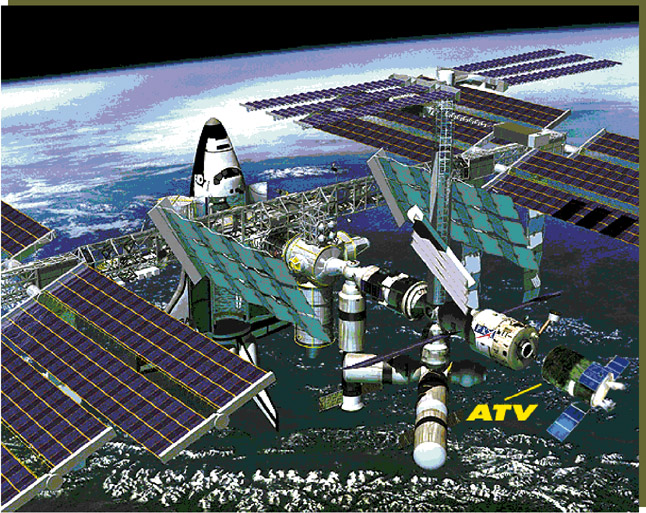
In its early configuration, ATV was designed as a cylindrical shaped spacecraft containing a cargo module (pressurized or unpressurized), a docking port and a propulsion module. Lately, ATV was modified with four solar panels added (see Figure 1).
The ATV mission profile establishes docking with the ISS in the Russian segment of the station. Rendezvous operations start at about 20km behind the station. This means that ATV will fly behind and faster than ISS, in order to catch up to the docking port of the station. The problem of the space rendezvous is the mating of two spacecraft in orbit—a small active chaser spacecraft (ATV) and a big target (ISS).
Although spacecraft rendezvous and docking may look simple, they are not. The mathematical equations governing the relative movement between chaser and target are rather complex. The onboard control of the rendezvous operations is to a large extent automatic, but not fully autonomous. Some control tasks are done from the ground control center and others onboard the station. Although the ATV onboard computer is fault tolerant, the complexity of the mission does not allow the prevention of and recovery all possible types of mission failures. Special features of the onboard system would allow detecting and forecasting failures, isolating them and proposing and executing recovery actions, but only for those types of contingencies anticipated during system design. The failure detection and recovery features are linked to both mission safety and mission success.
To overcome these and other issues, ESA built two products: GOAS and RACSI. GOAS is the Ground Operator Assistant System for the rendezvous operations of ATV. Used on ground, GOAS is a software tool to monitor the ATV mission and intervene in case of a problem. GOAS provides complex command and control capabilities to replan the entire mission if necessary. RACSI is the remote ATV control at ISS. RACSI is a laptop computer running a software package operated by an astronaut onboard the station. RACSI double monitors and checks the ATV mission and provides two simple command capabilities: temporarily interrupt the mission or command a collision-avoidance maneuver.
Currently, both the GOAS and RACSI developments run under Linux. Although GOAS was developed on Solaris (using versions 1 and 2), the software was ported to Linux without difficulties. RACSI was originally programmed entirely under Linux. For both systems, Linux was chosen as the underlying operating system because it provides four basic features required by up-to-date space applications: reliability, performance, portability and affordability. Reliability is crucial to space applications. The feature of reliability is guaranteed by the robustness of Linux: both applications run dozens of processes concurrently, using extensively shared memories and semaphores. The software never crashes or misbehaves, despite the fact that both systems were designed to run nonstop for weeks or even months.
Performance is the definitive factor in measuring real-time critical software. Although Linux is not used in real-time mode (the RT-Linux module is not loaded), the applications run in real time. That is, they receive data from the spacecraft, display it and send it back to the satellite, all in real time. Everything runs within the specified communications rate between craft.
Software portability is of vital importance for upgrades and applications enhancement. Portability among UNIX flavors can be done quickly, preserving expandability and keeping manpower costs down. This is not true for other non-UNIX operating systems. In addition, Linux is available for an enormous range of hardware platforms, making the change between platforms as simple as recompiling (in most cases).
Nowadays, space applications often lack the funds needed to buy costly licenses. Linux is a zero-cost operating system, which provides true affordability. It can be copied as many times as desired, keeping license costs and royalties low. This is true not only for the operating system but also for the tools (compilers, debuggers, editors, development environments, etc.) which come with it.
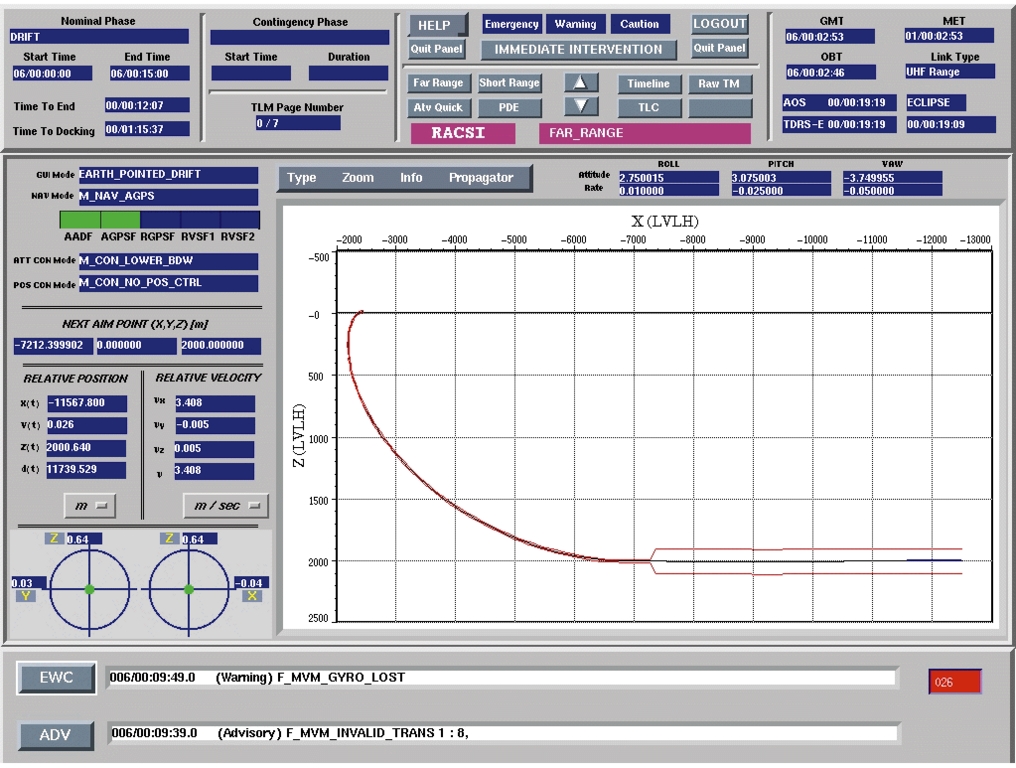
RACSI runs on an IBM ThinkPad laptop. The software requires 64MB of RAM and occupies around 40MB of disk space. (See Figure 2.) This type of laptop was chosen due to the hard radiation resistance requirements on the space station. It also provides an XGA graphical screen with a resolution of 1024x756 and 64K colors, mandatory for displaying trajectories and spacecraft equipment status. RACSI uses the X Window System (X11R6) with FVWM as its window manager. The Linux distribution currently installed on the laptop is Slackware version 3.0 with kernel 2.0.30.
A desktop configuration system has been installed on a Pentium Pro, running S.u.S.E. 5.2 with kernel 2.0.33. The pointing device of the system is the laptop track ball, although a conventional mouse can also be used.
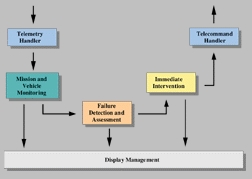
RACSI was programmed entirely in ANSI C. It uses the Moo-Tiff libraries from InfoMagic version 2.0, so all widgets are Motif type. (FVWM fulfills the complete look appeal of the application.) The system uses shared memories and the Linux file system as database storage for telemetry data coming from the spacecraft. RACSI process interfaces make use of application program interfaces (APIs). The APIs constitute an additional layer of software, which allows hiding the differences between local and remote software calls between applications. The software of RACSI is subdivided into several modules (see Figure 3) according to a modular architecture compliant with ESA software standards.
Telemetry Handler: this function is a data-handling module. It receives all incoming types of data from the spacecraft and preprocesses them to generate an additional set of data valid for storage and archiving. Next, this module distributes the data to a predefined set of client applications (e.g., Mission and Vehicle Monitoring and Control).
Mission and Vehicle Monitoring: this module allows the astronaut to have an overview of the status of both the mission and the vehicle. The Mission and Vehicle Monitoring module extracts data from the Telemetry Handler function and sends it to the Information Presentation function. This function provides a set of displays showing, with different levels of detail, information related to the mission and the vehicle extracted from the telemetry or resulting from any other data processing.
Failure Detection and Assessment: this function performs the detection and identification of a failure. When a failure is detected, the astronaut is free to manually interrupt the mission (stop the spacecraft) or abort the current mission plan (give control to ground).
Display Management: the purpose of this function is to provide an on-screen data presentation to the astronaut. RACSI screens are organized in three areas (see Figure 2): mission display (with information related to mission phase, mission transitions, etc.), main display area (trajectory plotting, equipment surveillance, etc.) and messages display area (local messages and warnings).
Telecommand Handler: this module provides centralized services to send two possible orders to the spacecraft: mission interrupt or a collision-avoidance maneuver.
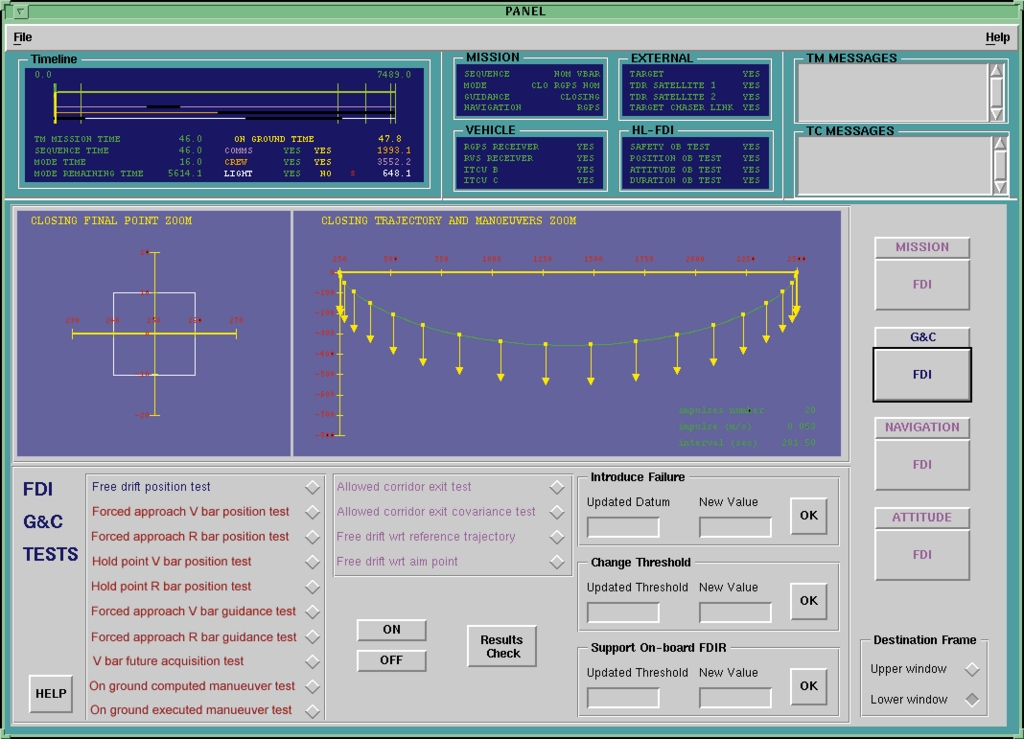
The native GOAS system runs on a Sun workstation, Ultra-SPARC 5, with 64MB of RAM and 300MB of hard disk space. A color monitor is mandatory. (See Figure 4.) This configuration runs under Solaris (version 2.5). It uses the X (X11R6) graphical user interface, with Sun OpenLook as the window manager.
The Linux version was developed from this initial system; the Linux GOAS runs on a 233MHz Pentium with 48MB of RAM. This system also uses X11R6, with Linux OpenLook as the window manager. The pointing device is a mouse, although using keystrokes is allowed.
GOAS was programmed in the C and C++ languages. C is used for programming the applications, C++ for programming the graphical interface. GOAS uses a collection of commercial off-the-shelf software routines (ILOG views) to build certain parts of the man-machine interface.
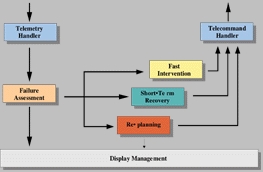
GOAS can run with two or three monitors at the same time, allowing the viewing of many spacecraft parameters. It is possible to configure a different monitor to display the man-machine interface of the monitoring, failure detection, replanning modules, etc. Like RACSI, the software of GOAS is subdivided into several modules (see Figure 5), according to a modular architecture compliant with ESA software standards. However, GOAS is much more complex in terms of mission planning capabilities, trajectory prediction and failure detection and recovery.
The Telemetry Handler receives the data from the spacecraft, archives it in several databases and broadcasts it to the necessary clients in the system.
The Failure Assessment subsystem performs the detection and identification of a failure by running a set of automatic tests under the control of the ground operator, are implemented at the mission, guidance, navigation and control levels, and compare both the actual and predicted state with reference corridors for position, attitude, rates, etc. This module archives data in a database.
In case of problems, the Failure Assessment module decides which recovery procedure should be applied to recover the mission: the Fast Intervention module when the recovery must be immediate, the Short-Term Recovery actions or a complete Mission Replanning.
Fast Intervention: the emergency actions managed by this function allow interrupting the mission. The ground operator is confronted with a predefined set of emergency actions: stop the spacecraft, initiate a drift out of the station inhibiting the thrusters, or initiate a collision-avoidance maneuver directly controlling the spacecraft thrusters. This strategy will prevent collision with the station.
Short Term Recovery: this function is used in situations where recovery allows a period of time between 5 and 15 minutes. The goal is to stabilize the mission, and afterwards to start the Replanning function once that situation is reached. If safety is not compromised, different Short Term Recovery actions can be launched: force switching of some equipment to the redundant ones, quick study of the impact of the coming maneuvers, activation of a short sequence of maneuvers, etc.
Mission Replanning: the purpose of this function is to support the operator intervention when the mission needs to be changed. It is a feature not present in RACSI—an astronaut cannot replan a mission; only the ground control center can. The Replanning function is launched on request. It supports the ground operator in the definition of a new mission plan according to three items: replanning scenario, mission constraints and status of the chaser equipment. This function can be run in automatic mode (the computer replans a whole new mission without operator intervention), semi-automatic (the operator is asked for some parameters) or manual (the operator constructs the maneuver sequence step-by-step). Visual information is constantly displayed to the operator.
The success of Linux is grounded in the fact that the work created by one group of people is not owned by any other group of people. Reliability, performance, portability and affordability are the four characteristics which convinced ESA to use it for real-time spacecraft control software. Important work still needs to be done; hopefully, the coming kernels will be POSIX compliant, plug-and-play will be truly available and multimedia capabilities will be extended beyond user expectations. I am almost certain that Linux will run onboard the International Space Station or in any of the ISS components' ground control centers around the globe. Linux has earned its excellent reputation and can successfully compete with all other available operating systems.
Guillermo Ortega works in the guidance and navigation area of the European Space Research and Technology Centre in the Netherlands. He has been working with Linux in space projects since 1994. He can be reached via e-mail at gortega@estec.esa.nl.