Driving One's Own Audio Device
I'm a strange guy, and I want my computers to keep silent—that's why I wrote the “Visible-bell mini-howto”, where I suggest speakerectomy surgery be performed. On the other hand, I enjoy playing with the soldering iron to build irrelevant stuff. One of the most irrelevant things I ever conceived is recycling the computer's loudspeaker in a very-low-volume audio device. As you might imagine, the device plugs in the parallel port.
This article describes the driver for such a beast, shows interesting details of the kernel workings and is still short enough to be an easy text for almost any reader. A quick description of the hardware is mandatory, but you can safely skip over the first section and jump directly to the section called “Writing Data”.
The software described here, as well as the electrical drawing, is released according to the GPL and is available as sad-1.0.tar.gz (Standalone Audio Device) from ftp://ftp.systemy.it/pub/develop/, my own ftp site.
Part of this work has been sponsored by “SAD Trasporto Locale” (http://www.sad.it/), the bus company of Bolzano (Bozen), Italy. They plan to bring my hardware on their buses and renamed the company to match my package (smile). (See “Travelling Linux” by Maurizio Cachia, LJ, June 1997.)
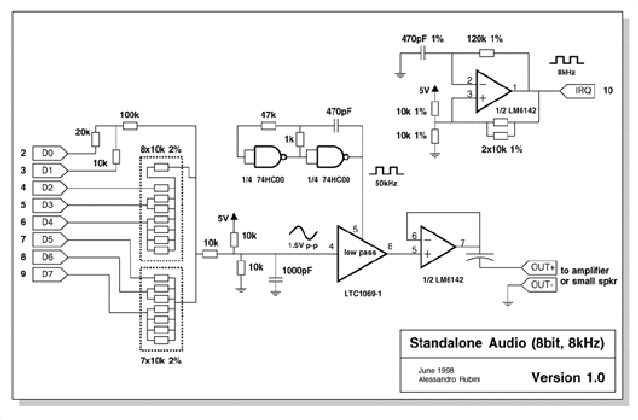
My device plugs in the parallel port, and its schematics are depicted in Figure 1; The photograph under the tiele is the only model ever built (Italian buses will run a different flavour of such stuff, the “bus for bus”--ftp://ftp.systemy.it/pub/develop/b4b-X.YY.tar.gz).
I owe the basic idea to Michael Beck, author of the pcsndrv package; the idea sounds like “use the parallel data bits to output audio samples.” My own addition is “use the interrupt signal to strobe samples at the right pace.” Audio samples must flow at 8KHz and any not-so-ancient computer can sustain such an interrupt rate: my almost-ancient development box runs a 33 BogoMips processor and is perfectly happy playing parallel audio. The interrupt-based approach trades higher quality for increased hardware complexity than that needed by Michael's package.
As shown in the schematics, the device is made up of a simple D/A converter built with a few resistors; the signal is then reduced to 1.5V peak-to-peak amplitude and fed through a low-pass filter. The filter I chose is a switched-capacitor device driven by a square wave at ten times the cutoff frequency. The 6142 chip is a dual op-amp with rail-to-rail output, one of several possible choices for low-power single-supply equipment.
The output signal can be brought to a small loudspeaker, but can be listened to only in complete silence; other environments ask for some form of amplification. My preferred alternative to the amplifier is the oscilloscope, the typical hear-by-seeing approach.
The main role of an audio driver is pushing data through the audio device. Several kinds of audio devices exist, and the sad driver only implements the /dev/audio flavour: 8-bit samples flowing at a rate of 8KHz. Each data byte that gets written to /dev/audio should be fed to an 8-bit A/D converter; every 125 microseconds, a new data sample must replace the current one.
Timing issues should be managed by the driver, without intervention from the program writing out the audio data. The output buffer is the software tool that isolates timing issues from user programs.
In sad, the output buffer is allocated at load time using get_free_pages. This function allocates consecutive pages, a power of two of them; the order argument of the function specifies how many pages are requested and is used as a power of two. An order of 1, therefore, represents two pages and an order of 3 represents eight pages. The allocation order of the output buffer is stored in the macro OBUFFER_ORDER, which is 0 in the distributed source file. This accounts for one page, which on the x86 processor corresponds to 4KB, or half a second worth of data.
The output buffer of sad is a circular buffer; the pointers ohead and otail represent its starting and ending points. The kernel uses unsigned long values to represent physical addresses, and the same convention is used in sad:
static unsigned long obuffer = 0;
static unsigned long volatile ohead, otail;
Note that the ohead and otail variables are declared as volatile to prevent the compiler from caching their value in processor registers. This is an important caution, as the variables will be modified at interrupt time, asynchronously with respect to the rest of the code.
We'll see later that sad has an input buffer as well; the overall buffer allocation consists of these lines, executed from within init_module:
obuffer = __get_free_pages(GFP_KERNEL,
   OBUFFER_ORDER, 0 /* no dma */);
ohead = otail = obuffer;
ibuffer = __get_free_pages(GFP_KERNEL,
   IBUFFER_ORDER, 0 /* no dma */);
ihead = itail = ibuffer;
if (!ibuffer || !obuffer) { /* allocation failed
                             */
cleanup_module(); /* use your own function */
return -ENOMEM;
}
Any data that a process writes to the device is put in the circular buffer, as long as it fits. When the buffer is full, the writing process is put to sleep, waiting for some space to be freed.
Since the data samples flow out smoothly, the process will eventually be awakened to complete its write system call. Anyway, a good driver is prepared to deal with users hitting the ctrl-C and must deal with SIGINT and other signals.
The following lines are needed to put to sleep and awaken the current process, all the magic is hidden in interruptible_sleep_on:
while (OBUFFER_FREE < OBUFFER_THRESHOLD) {
   interruptible_sleep_on(&outq);
   if (current->signal & ~current->blocked)
       /* tell the fs layer to handle it */
      /* a signal arrived */
      return -ERESTARTSYS;
/* else, loop */
}
/* the following code writes to
 * the circular buffer */
What are OBUFFER_FREE and OBUFFER_THRESHOLD? They are two macros: the former accesses ohead and otail to find out how much free space is in the buffer; the latter is a simple constant, predefined to 1024, a pseudo-random number. The role of such a threshold is to preserve system resources by avoiding too frequent asleep->awake transitions.
If the threshold was 1, the process would need to be awakened as soon as one byte of the buffer was freed, but it would soon be put to sleep again. As a result, the process will always be running, consuming processing power and raising the machine load. A threshold of 1KB assures that when the process goes to sleep it will sleep for at least one tenth of a second, because it won't be awakened before 1KB of data flows through the audio device. You can recompile sad.c with a different threshold value to see how a small value keeps the processor busy. Too big a value can result in jumpy audio, i.e. the sound cuts in and out. The audio stream becomes jumpy because data continues to flow while the kernel schedules execution of the process writing audio data. The more heavily the computer is loaded, the more jumpy the audio is likely to be; if several processes are contending for the processor, the one playing audio might be awakened too late, after all pending data has been transferred to the audio device. In addition to lowering the wakeup threshold, you can also cure the problem by increasing the buffer size.
Naturally, the write device method is only half of the story; the other half is performed by the interrupt handler.
In sad, audio samples are strobed out by a hardware interrupt, which is reported to the processor every 125 microseconds. Each interrupt gets services by an ISR (interrupt service routine, also called “interrupt handler”), written in C. I won't go into the details of registering interrupt handlers here, as they have already been described in other “Kernel Korner” columns.
Managing several thousand interrupts per second is a non-negligible load for the processor (at least for slow processors like mine), so the driver only enables interrupt reporting when the device is opened and disables it on the last close.
What I'd like to show here is how data flows to the A/D converter. The code is quite easy, and the OBUFFER_THRESHOLD constant appears again, as expected:
if (!OBUFFER_EMPTY) { /* send a sample */
   OUTBYTE(*((u8 *)otail++));
   if (otail == obuffer + OBUFFER_SIZE)
      otail = obuffer; /* wrap */
   if (OBUFFER_FREE > OBUFFER_THRESHOLD)
      wake_up_interruptible(&outq);
   return;
}
wake_up_interruptible(&closeq);
As usual, every code snippet introduces new questions; this time you might wonder about OUTBYTE and closeq. The latter item is the main topic of the next section, while OUTBYTE hides the line of code that pushes a data sample to the D/A converter.
The macro is defined earlier in sad.c as follows:
#define OUTBYTE(b) outb(convert(b), sad_base)
Here, sad_base is the processor port used to send data to the parallel interface (usually 0x378), and convert is a simple mathematical conversion that turns the data byte as stored in the audio-file format to a linear 0-255 value, more suited to the D/A converter.
The close system call, like read and write, is one of those calls that can block. For example, when you are done with the floppy drive, close blocks waiting for any data to be flushed to the physical device. This behaviour can be verified by running:
strace cp /boot/vmlinux /dev/fd0
Audio devices are somewhat similar to the floppy drive: a program writing audio data closes the file after the last write system call. However, this means only that data has been transferred to the output buffer, not that everything has necessarily already flown to the loudspeaker. An implementation that blocks on close can be helpful, when you want to do this:
cat file.au > /dev/sad && echo doneOn the other hand, sometimes you'll prefer to stop playing sounds when the process closes the device. For example, if you play the piano on your keyboard, the sound should stop as soon as you raise the key, even if the program has already pushed extra data to the output buffer.
For this reason, the sad module implements two device entry points, one that blocks on close and one that doesn't block. Minor number 0 is the blocking device and minor number 1 is the non-blocking one. The entry points in /dev are created by the script that loads the module, included in the sad distribution: /dev/sad is the one that blocks on close and /dev/sadnb is the non-blocking one.
While real device drivers often offer configuration options (such as choosing whether or not to block on close) through the ioctl system call, I chose to offer different entry points in /dev, because this way I can use normal shell redirection to perform my tasks, without the need to write C code to perform the relevant ioctl call. The close method in sad.c, therefore, looks like the following:
if (MINOR(inode->i_rdev)==0) /* wait */
   interruptible_sleep_on(&closeq);
else {
   unsigned long flags; /* drop data */
   save_flags(flags);
   cli(); ohead=otail;
   restore_flags(flags);
}
MOD_DEC_USE_COUNT;
if (!MOD_IN_USE)
   SAD_IRQOFF(); /* disable irq */
return;
Actually, there is a third possibility as far as close is concerned: go on playing in the background as long as some data is there, even after the program has closed the audio device. This approach is left as an exercise to the reader, because I prefer having a chance to actively stop any device making noise.
Usually, a device can be read from as well as written to. Reading /dev/audio usually returns digitized data from a microphone, but I haven't been asked to provide this feature, and I have no real interest in hearing my voice.
When I built my first alpha release of the physical device, I found the need to time the interrupt rate, in order to be sure it was close enough to the expected 8KHz. (In the alpha version, I used a variable resistor to fine-tune the frequency, and I needed a way to check how it went.) The easiest solution that came to mind was to use the clock of the host computer to measure the time lapses.
To this end, I modified the interrupt handler so that it would write timestamps to an input buffer whenever the device was being read. The input buffer is a circular buffer just like the output buffer described above.
The previous excerpt from sad_interrupt showed that after writing an audio sample, the function returns to the caller. Any additional lines, therefore, are only executed if no audio data is there, so the rest of the ISR has thus been devoted to collecting timing information. This shows how I implemented “if there is no pending output, deal with input” rather than the more correct “if something is reading, give it some data.” This is acceptable as long as the device is not meant to be read from and written to at the same time in a production environment.
static struct timeval tv, tv_last;
unsigned long diff;
do_gettimeofday(&tv);
diff = (tv.tv_sec - tv_last.tv_sec) * 1000000 +
   (tv.tv_usec - tv_last.tv_usec);
tv_last = tv;
/* Write 16 bytes, assume bufsize
 * is a multiple of 16 */
ihead += sprintf((char *)ihead,"%15u\n",
            (int)diff);
if (ihead == ibuffer + IBUFFER_SIZE)
   ihead = ibuffer; /* wrap */
wake_up_interruptible(&inq); /*
        anyone reading? */
Printing the time difference between two samples has two advantages over printing the absolute time: data is directly meaningful to humans without resorting to external filters, and any overflow of the input buffer will have no effect on the perceived results, other than the loss of a few samples.
Real tests show the reported interrupt rate is not as steady as one would hope. Some system activities require you to disable interrupt reporting, and this introduces some delay in the execution of the ISR routine. Nonetheless, an oscillation of a few microseconds is perfectly acceptable and it is not perceived in the resulting audio, which is not high-fidelity anyway.
It's interesting to note that disk activity can introduce some real distortion in the audio stream, since servicing an IDE interrupt can take as long as two milliseconds (on my system). The IDE driver disables interrupt reporting while its own ISR is active, and the huge delay results in eight lost interrupts from the parallel port, which in turn causes a noticeable distortion of the audio data stream.
If you read from sad during disk activity, you'll see the long time intervals; writing to the device produces very bad audio. The easy solution to this problem is invoking
/sbin/hdparm -u 1 /dev/hda
before playing any audio. The command tells the disk drive not to disable reporting interrupts while it is servicing its own. Refer to the hdparm documentation to probe further.
The device driver interface offers other device methods in addition to the open/close and read/write pairs. While none of them is critical to device operation, I usually add a few lines of code to implement select and lseek. The former is needed by those programs which multiplex several input/output channels or use non-blocking operations to read and write data. Its role is quite needed if you run real programs, and the implementation is straightforward enough that I won't show it here. The implementation of lseek, on the other hand, consists of the one line return -ESPIPE; and is meant to tell any program that tries to lseek the device that this “is a pipe” (reported to user space as “Illegal seek”).
My aversion to computer sound makes me a novice in the field, and I really don't know anything about programs that play audio, or sites where audio files can be retrieved. Although Linus Torvalds offered an interesting “I pronounce Linux as Linux”, the file was not enough to test my device, and I needed to generate some audio data. The result is the sad distribution includes a program that plays sinusoidal waves, one that plays square waves and a not-so-good piano implementation. These tools work with any /dev/audio you happen to run and can be fun to play with, especially if you have a scope near your Linux box.
All code for the sad program is available by anonymous download in the file ftp.linuxjournal.com/pub/lj/listings/issue53/2997.tgz.