X-ISP and Maintaining Multiple Account Records
Connecting your Linux box to a PPP server can be a frustrating task, especially if you are not familiar with the scripting requirements, authentication modes or network settings your ISP expects you to use. X-ISP, a program written by Dimitrios P. Bouras (dbouras@hol.gr), takes what could be a complex task and simplifies it with a clean, effective GUI front end.
What makes X-ISP such a great piece of software? First, it is a user-friendly X-based front end to PPP/CHAT. Second, X-ISP provides a dialer, xispdial, and a stripped-down terminal, xispterm, which help work out some of the difficulty in establishing a connection. By using PPP/CHAT, X-ISP leaves most of the work to the operating system, while also giving experienced users the freedom to hack familiar connection scripts for any special needs.
X-ISP can be found at http://users.hol.gr/~dbouras/. To run X-ISP, you need to have X11R6, Xforms-0.88 and ppp-2.2.0f, and your modem must be set to verbose mode so that X-ISP can pick up connection status correctly. The home page provides comprehensive information and screen shots of the configuration and main screens. Once downloaded, the installation README gives clear instructions on how to compile X-ISP on a variety of systems.
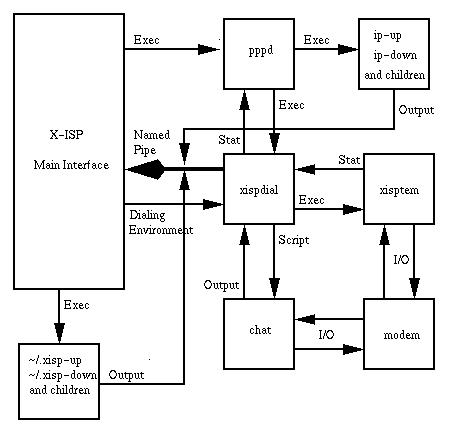
X-ISP adds two helper modules called by pppd (see Figure 1). The first, xispdial, takes care of the dialing. xispdial sits between pppd and chat and is used by X-ISP to start the connection. xispdial reads an environment file residing in the user's directory. After getting the information for the ISP selected, it calls chat to make the connection. Once connected, control of the modem is turned over to the second module, xispterm. This terminal program allows the user to log in to the system manually, or in the case that ip-up/ip-down scripts exist, xispterm runs those scripts. X-ISP also runs user-specific scripts, .xisp-up/.xisp-down, which reside in the user's directory and provide increased versatility.
Figure 1. X-ISP Functional Layout
A named pipe sends information from pppd, chat, xispdial and xispterm to the terminal window in X-ISP. The pipe gives immediate feedback as to system and connection status. The terminal window provides a clean view into the connection sequence and invaluable information for tracking down any connection errors.
The user interface provides all actions through five buttons, three pull-down menus and a drop list for selecting which account to activate. The first step is setting up an account through the Options menu.
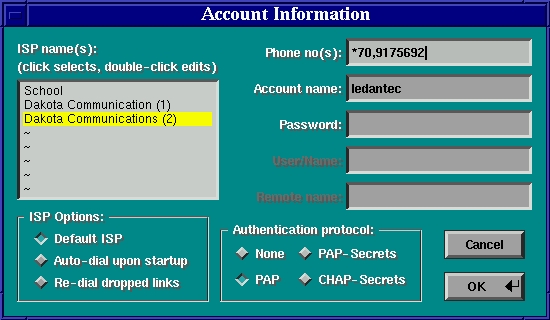
First, open the “Account Information” item. Enter the name of the account to add, then enter the phone number, user name and password. You will also need to know which authentication protocol your ISP uses. (See Figure 2.)
Figure 2. Account Information Setup
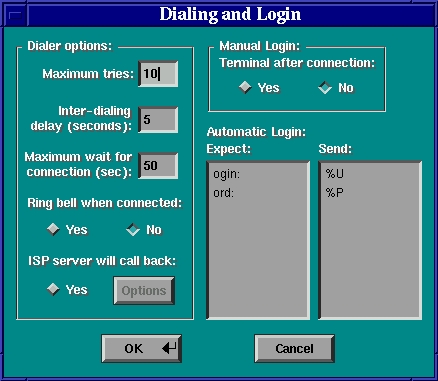
The next item, “Dialing and Login”, has you set the login and connect environment. Set the number of retries, connect notification, ISP callback and login setting. For manual login, X-ISP will start xispterm, or if you know the sequence, you can put together an automated login script and send user name, password and any initialization commands to the remote host. (See Figure 3.) X-ISP will use the connection script for automatic login or ISP call-back. For PAP or PAP/CHAP-Secrets authentication, the script will be ignored.
Figure 3. Dialing and Login Preferences
“Communication Options” allows you to control settings for the modem, baud rate, flow control, initialization and reset strings.
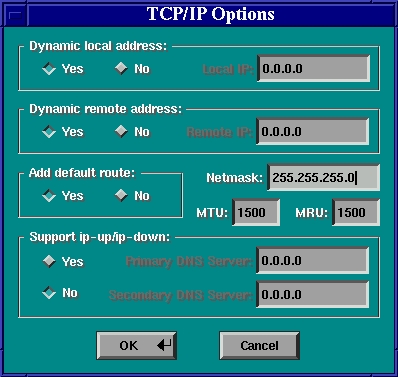
The final item, “TCP/IP Options”, sets up Network Addressing. The most notable point here is the “Support for ip-up/ip-down” scripts. If set to “yes”, the DNS addressing can be set for each account, providing great flexibility when maintaining multiple accounts by dynamically updating the /etc/resolv.conf file. (See Figure 4.) When using ip-up/ip-down, X-ISP sends the ipparam option to pppd, which passes a string to ip-up/ip-down containing the pipe name for X-ISP, the description set in Account Information, and if set, the DNS addresses specified. X-ISP will also display any information from ip-up/ip-down on the terminal window via the named pipe.
The next menu choice is Logging. If you are located in Europe, you will get the most advantage of this feature as the telephone companies (TelCo) listed are applicable only there. By selecting the appropriate TelCo and zone, X-ISP will keep track of on-line cost.
The Statistics item displays usage data in a window with a text summary and a bar graph.
The last item is the Help menu. Any issues you come across will probably be addressed in this very thorough help file. The “about” screen displays the version number and how to get in touch with the author.
Once your account is set up, you are ready to connect. First, check the following to be sure the rest of the system is in order:
Set pppd for all users (i.e., other than just root):
chmod u+s /usr/sbin/pppdCheck the permissions on all X-ISP modules (xispdial, xispterm ...) so that group root can execute them (this should be done by the install script):
chmod g+xAdd any users who will use X-ISP to the dialout or root group for Debian or Red Hat releases, respectively.
Now, to connect, click on the “Connect” button in the main window of X-ISP. You should see the connection feedback in the small terminal window to the right. (See Figure 5.) Once the connection is established, the status windows will report the assigned IP address, modem connect status, connection speed and time since connected. The status is updated every 15 seconds, so if your connection is dropped, a maximum latency of 15 seconds will pass before X-ISP recognizes the dead connection and allows you to reconnect.
Figure 5. Main Window, Establishing a Connection
Hopefully, everything now works correctly. If there is a problem, the terminal window in X-ISP should give you an indication of where to look.
As with any program that allows users to connect or disconnect the system to or from a network, security concerns must be addressed. The areas of most concern to me are the entering of account passwords at setup time (not dial-up time) and the transmission of authentication data.
X-ISP saves all account information in the .xisprc file in the user's home directory, including user name and passwords for the accounts. The rc file is readable only by the owner, so as long as there has not been a breach of the user's security, there should be no problem. As a secondary line of defense, X-ISP encrypts the password in the rc file using encrypt(3). The key used to encrypt the rc file is scrambled to remove any visibility in the binary. Since the encryption key resides in the source code, the possibility exists that someone could come up with the key and decode a user's rc files. Therefore, it would be best to change the encryption key in the source code before compiling X-ISP. The documentation outlines the procedure for changing the encryption key.
For PAP authentication, X-ISP calls pppd with the +ua option. PPPD version 2.3 no longer supports the +ua option, so if you are using that version of pppd, the PAP authentication mode will not be available. X-ISP creates a temporary file with login details in the user's home directory before calling pppd during a connect request, then removes the file as soon as the connection is established. This prevents any plaintext files with login details from sticking around. For PAP/CHAP-Secrets login, the appropriate files must be edited aside from X-ISP.
A potential liability may occur since X-ISP requires the user to be a member of the root group. Two remedies exist: either create a new group for X-ISP and add appropriate permissions to the program and data files, or use sudo. Creating a new group and adding users and files to it is probably the most straightforward way to tighten security on X-ISP. However, by allowing users access through sudo, the system administrator can allow the use of X-ISP without creating a new group or adding users to the root group and still maintain security integrity.
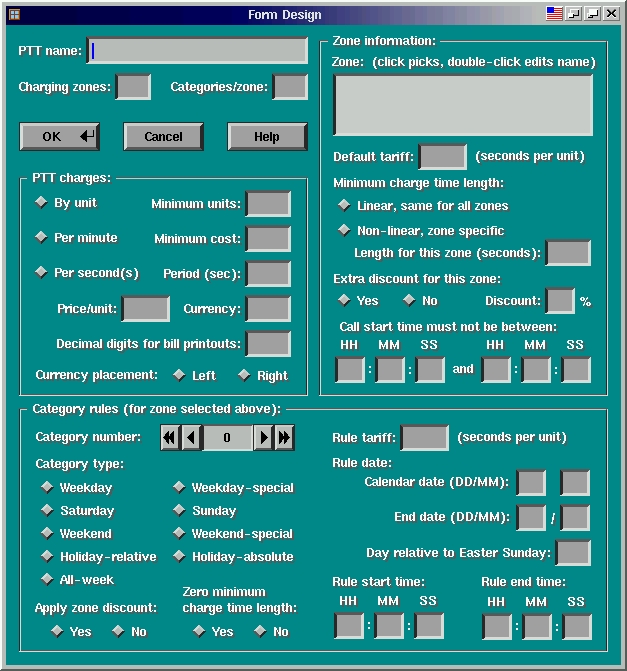
This should give you a good start with X-ISP, as well as a little insight into how it works. In the next release of X-ISP, a PTT editor will enable users to add entries to the TelCo database. The PTT information editor envisioned for X-ISP version 2.4 enables editing of all tariff rules for PTTs known to X-ISP, and also adding your own PTT information through a versatile GUI interface. The fields of the editor pop-up window shown in Figure 6 are the result of analyzing the PTTs currently known to X-ISP (version 2.3p7) plus a handful more which haven't yet made it into the distribution.
Figure 6. Information Form (under development, courtesy of Dimitrios P. Bouras).