An Introduction to JDBC
In 1996, Sun released a version of the Java Database Connectivity (JDBC) kit. This package allowed programmers to use Java to connect, query and update a database using the Structured Query Language (SQL). The use of Java with JDBC has advantages over other database programming environments. Programs developed with Java and JDBC are platform and vendor independent, i.e., the same Java program can run on a PC, a workstation, or a network computer. Also, the database can be transferred from one database server to another and the same Java programs can be used without alteration. This article discusses how JDBC can be used with the MySQL database. (See “At the Forge” by Reuven Lerner in the September, October and November 1997 issues of LJ.)
A number of technologies have been developed for databases, such as transaction processing, triggers and indexes, which are supported by JDBC. However, these topics are beyond the scope of this article. Since the JDBC package is relatively new, the tools that database developers expect, such as report generators, query builders and form designers are available. In the near future, more tools should be available. Despite the lack of tools, it is possible to develop highly interactive web pages using the JDBC API without much complexity.
The idea behind JDBC is similar to Microsoft's Open Database Connectivity (ODBC). Both ODBC and JDBC are based on the X/Open standard for database connectivity. Programs written using the JDBC API communicate with a JDBC driver manager, which uses the current driver loaded.
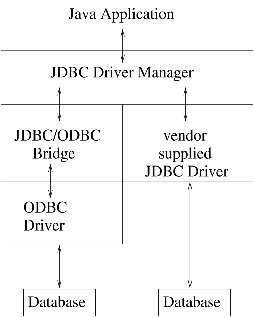
Two architectures can be used to communicate with the database (see Figure 1). In the first one, the JDBC driver communicates directly with the database. The driver connects to the database and SQL statements on behalf of the Java program. Results are sent back from the driver to the driver manager and finally to the application.
In the other, the JDBC driver communicates with an ODBC driver via a “bridge”. A single JDBC driver can communicate with multiple ODBC drivers. Each of the ODBC drivers execute SQL statements for specific databases. The results are sent back up the chain as before.
Figure 1. Database Communication Architecture
The JDBC/ODBC bridge was developed to take advantage of the large number of ODBC-enabled data sources. The bridge converts JDBC calls to ODBC calls and passes them to the appropriate driver for the backend database. The advantage of this scheme is that applications can access data from multiple vendors. However, the performance of a JDBC/ODBC bridge is slower than a JDBC driver alone would be, due to the added overhead. A database call must be translated from JDBC to ODBC to a native API.
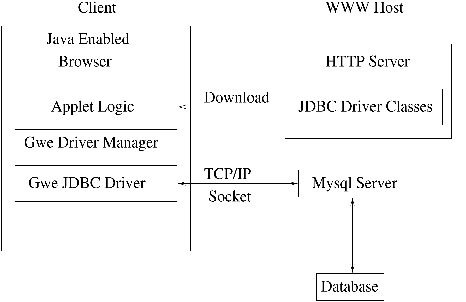
Figure 2. Accessing a Database from an Applet
Fewer operations are required to use a JDBC driver without a bridge. In Figure 2, the steps to access a database using a JDBC driver from an applet are shown. The Gwe JDBC driver is used with the MySQL database. The JDBC driver classes are first downloaded from the Gwe host site. Next, the applet logic passes a JDBC call to a driver manager which in turns passes the call to a JDBC driver. The JDBC driver opens a TCP/IP connection with the MySQL database server. Data is transferred back and forth via the connection. When database processing is complete, the connection is closed.
The JDBC API can be used in applets and stand-alone applications. In addition to the usual restrictions for applets, only connections from the same server from which the applet was downloaded are accepted. If the web server and database server are not on the same machine, the web server must run a proxy service to route the database traffic. Stand-alone applications can give access to local information and remote servers.
Installation of the JDBC driver for the MySQL database is simple. The software can be downloaded from Gwe Technologies at http://www.gwe.co.uk/. The copyright statement allows the redistribution of source and binary, but is not identical to the GNU license. Download the file, exgweMysqlJDBC.0.9.2-src.tar.gz. It contains the source and class files for the Gwe MySQL JDBC driver.
The use of JDBC requires access to java.sql classes which were not available in the pre-1.1 Java Development Kit. These classes have been renamed and included in the /exjava directory. Another directory, /exgwe, contains the source and classes for the Gwe MySQL JDBC driver. These classes make use of the classes in the exjava directory. Add the directory in which the tar file was unpacked to the CLASSPATH environment variable, and installation of the JDBC driver is complete.
This example, shown in Listing 1, assumes you have some familiarity with Java. The Java code loads the JDBC driver class, establishes a connection with a database, builds an SQL statement, submits the statement and retrieves the results. A database and a table populated with some data must exist.
In the first executable line, the class object for the JDBC driver is loaded by passing its fully qualified name to the Class.forName method. This method loads the class, if it is not already loaded, and returns a Class object for it. In the next line, the database URL string is constructed in the form jdbc:subprotocol_name: hostname:port/database_name/other parameters. The subprotocol name is mysql, since we are using the MySQL database. The host name is localhost in this example, but can also be an Internet host name or IP address. The port number for the MySQL server is 3306 and the name of the database is test. Other parameters can be passed in the database URL, such as user ID and password.
A connection object is obtained via a call to the getConnection method of the driver manager, allowing use of the JDBC driver to manage queries. The user ID and password are in clear text in the file. The password is encrypted by the JDBC driver before passing the information to the MySQL server. A statement object is required to issue a query. The statement object is obtained by calling the createStatement method of the connection object.
The SQL query is stored in a string and passed to the executeQuery method of the statement object, which returns a ResultSet object containing the results of the query. The next method of the resultSet object moves the current row forward by one. It returns false after the last row. This method must be called to advance to the first row, and can be called in a loop to retrieve data from all matching rows. The resultSet object contains a number of methods to extract data from a row. For example, to retrieve a string, the getString method is used. Similarly, to retrieve an integer, the getInt method is used. Other methods to retrieve a byte, short, long, float, double boolean, date, time and a blob are included. The getBytes method can be used to retrieve a binary large object (blob). The parameter to these methods is either an integer or a string. The integer is the column number of the row retrieved. Not all columns of a table need to be retrieved. The string is the name of the column label.
Once data has been extracted from the resultSet object, it is closed. Another SQL query can be issued and the resultSet object can be reused. The statement object can also be reused. The statement and connection objects are closed when database retrieval is complete. This simple example illustrates the process of retrieving data from a database table. It is also possible to update tables and obtain information about tables. When updating tables, the executeUpdate method of the statement object is used. For example:
String query = "update test_table set phone =
        999-9999 ";
query += "where name = \"John Smith\"";
stmt.executeUpdate( query );
JDBC can be used to obtain information about the structure of a database and its tables. For example, you can get a list of tables in a particular database and the column names for any table. This information is useful when programming for any database. The structure of a database may not be known to the programmer, but it can be obtained by using metadata statements—SQL statements used to describe the database and its parts.
Two types of metadata can be retrieved with JDBC. The first type describes the database and the second type describes a result set. The DatabaseMetaData class contains over a hundred methods to inquire about the database, some of which are quite exotic. A common method is the getTables method.
DatabaseMetaData dmd = con.getMetaData();
ResultSet rs = dmd.getTables( null, null, null,
        new String[] {"TABLE"} );
The parameters passed to getTables are, in order, a catalog (group of related schemas), a schema (group of related tables) pattern, a table name pattern and a type array. Some of the types include table, view and system table. If null is passed, no pattern is used to limit the metadata information retrieved. Some of the other methods include getDataProductVersion, getTablePrivileges and getDriverName. The result set rs contains information about all the tables in the database. Each row contains information about a table. For example, the third column of any row of the result set is the table name string.
Useful metadata can be obtained about a result set after the execution of a query. When a result set is obtained after the execution of a query, the metadata statements can be used to extract information such as the number of columns, column types and width.
ResultSet rs = stmt.executeQuery("Select * from test_table");
ResultSetMetaData rsmd = rs.getMetaData();
The rsmd.getColumnCount() method returns the number of columns in the test_table and the rsmd.getColumnLabel(i) method returns the name of the ith column. Similarly, the rsmd.getColumnDisplaySize(i) method returns the width of the ith column. A number of other methods described in the JDBC API can be used to extract all types of information about a table.
At Mitre, we collect information from the Internet using commercial search engines such as Altavista and Lycos for a variety of topics. This information is stored as a collection of text documents for any topic and can be searched via keywords. We use the public-domain search engine Glimpse from the University of Arizona to index and search the document collection.
Some of the document collections can be fairly large (over 1500 documents). If a common keyword is entered, the list of matching documents will be large. We display the results from the search engine using Java and JDBC to avoid scanning long lists of matching documents. Java was used to build a 3-D space and plot circles at locations representing the frequency of the occurrences of keywords in a document. JDBC was used to retrieve the titles of the documents stored in a table. Passing all the titles of all documents in the collection as parameters to the Java applet would significantly increase the time to load the applet.
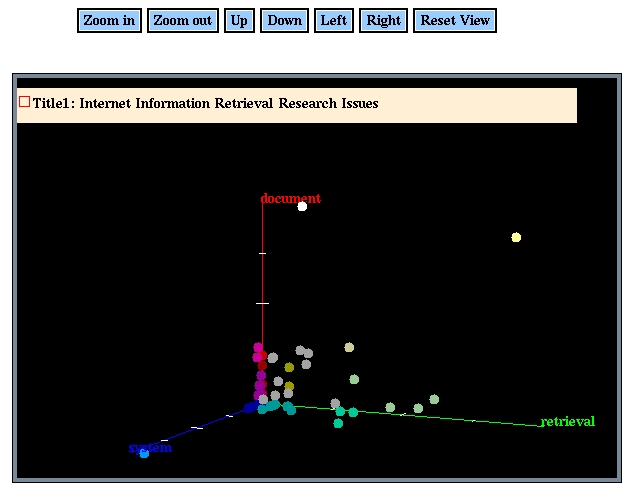
Figure 3. Documents Represented as Circles in 3-D Space
Glimpse returns the frequency of occurrence of a keyword in a document. We use that number to locate a circle representing the document in 3-D space (see Figure 3). Each axis represents a keyword. If fewer than three keywords are entered, documents will be displayed in a plane or on a line. If more than three keywords are entered, three or fewer keywords must be chosen in order to display matching documents.
The frequency of occurrence of keywords is normalized for each axis, and the frequencies of keywords in documents are passed as parameters to the applet. The color of the circle was computed based on the position of the circle in the three axes. Red is used for documents on the z-axis, green for documents on the y-axis and blue for documents on the x-axis. Brighter shades of the three primary colors are used for documents with higher keyword frequencies. A mix of the primary colors is used for circles which contain more than one keyword.
JDBC is used to retrieve the titles for documents containing non-zero occurrences of the keywords. This number is usually fewer than the total number of documents when a fairly unique keyword is used. When the mouse is located over the document, a window is displayed with the document's title. Sometimes, more than one document can have the same frequency of occurrence of a keyword. In such cases, the window displays multiple titles of documents. The color of the circle changes to white to indicate the document where the mouse is located. An option to click on a box in the window is provided and will retrieve the text corresponding to the document in a separate window.
This article has described the basics of working with JDBC under Linux: the design of JDBC, the installation of JDBC for MySQL and example code to retrieve/store data. Metadata statements can be used to interrogate the structure of a database and its tables. Finally, we looked at an example using a search engine with JDBC and Java. Viewing the results from a Java applet made the user's task more interesting than it would have been through a CGI program.
The listing referred to in this article is available by anonymous download in the file ftp.linuxjournal.com/pub/lj/listings/issue55/2846.tgz.
Manu Konchady (manuk@mitre.org) works at Mitre Corporation developing software for information retrieval. As the lone user of Linux in a group of 50, he is striving to promote its many benefits.