
Making the Most of Andrew
In previous articles I focused a great deal on the ez editor and on the multi-media user mail agent, messages, but these are only two of a rich set of applications. Here are a few other applications that you'll find useful:
bush (see Figure 1) provides a graphical interface to the file system. It shows the directory hierarchy, filenames and their attributes. It also provides a window where the ez editor will run as well as a means to invoke an arbitrary command on a file. With bush you can sort the list, rename, and delete files, too.
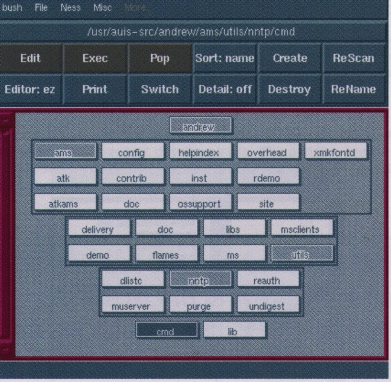
Figure 1. Bush Showing a Tree of Directories
chart allows you to create simple graphs from numeric data. The data can be presented as a histogram, pie chart, or line graph.
ezdiff is not actually an application, but rather a procedure you can call from all ez windows. This is used to run the diff command on the data in two windows and then interactively see the difference between the files.
To try ezdiff, edit two files (e.g., ez/etc/hosts .deny/etc/hosts.equiv). In each window, select the Start item on the Ezdiff menu card. As you select the Next item on the Ezdiff menu card, the differences in each file are shown as highlighted data. This makes it very easy to copy lines selected in one window and paste them in the other. And yes, ez correctly remembers the locations of all the other differences when you make changes to either document. This is a life saver when looking at various versions of a file.
figure (see Figure 2) is a fairly conventional drawing editor. The files usually have an extension of .fi. Figure can create a document with lines, circles, boxes, and other insets (e.g., rasters or text), and then move them around, reshape, etc. Since figure creates an ATK data-stream, you can easily insert figures in other AUIS documents.

Figure 2. Sample AUIS Figure
pipescript (see Figure 3) reads data from stdin and displays it in a window. This is very convenient with pipes, because the output data does not disturb your xterm window and yet is not in a file you need to remove. The data can be conveniently scrolled, searched or saved. I use it all the time for commands like tar tzvf auis63L1-wp.tgz | pipescript.
raster provides a simple means to edit digitized pictures (called rasters). The data must be in AUIS data-stream format. The pbmplus package (available on sunsite) provides a wide set of filters to convert between various forms of digitized data. For example, to convert from a TIFF to an AUIS-raster, I'd use this command:
tifftopnm test.tif | ppmquant 256 | ppmtopgm\
| pgmtopbm | pbmtocmuwm > test.ras
typescript (see Figure 4) provides an alternative to xterm. You enter commands to your shell in the input window and the results are shown in the same window where they can be scrolled, searched or saved. Typescript does not support curses like xterm does, so you cannot run vi or bash in a typescript, for example. However, you can use the tcsh or pdksh (ksh) shells.

Figure 3. grep InitializeClass *.c | pipescript
Typescript has several other features that I find very useful. The README for the word processing package describes how you can cause the current working directory to be kept in the title of the typescript window. Typescript is “smart” about these paths, too. Notice in Figure 4 that the path shown in the title of the window is “~”, my home directory, and not a fully qualified path.
Typescript supports the use of several PC keys to make it easier to enter commands. The Cursor-Left and Cursor-Right keys can be used to edit the current command (regardless of whether my shell supports this). The Home and End keys will move the cursor to the beginning or end of the line (or selected area). The cursor keys are also mapped to allow me to move up and down through the command history. Cursor-Up gets the previous command entered, Cursor-Down the next.
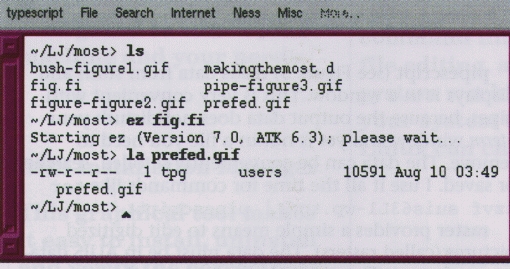
Figure 4. Sample Typescript Window
In my opinion an even more useful feature is command completion. If I type ls and then press Cursor-Up, I get the previous command that began with “ls”. File completion is supported with the tab key. If I enter ls src/tp and then press the tab key, typescript will complete the path “src/tp” to “src/tpg-config” (in my case). It makes entering paths to files ten times easier. I love it!
If I enter a command like ls /etc, the window will likely fill and scroll automatically. If I want to see the beginning of the scrolled data, I must use the mouse (or Page-Up/Down keys) to scroll. However, if I enter ls /etc control-J (where I enter the command with a control-J keystroke, rather than the normal Enter), the command is executed, but the output is pushed to the top of the current window so I do not need to scroll.
Typescript also allows me to create my own menus in the file ~/.shmenu. In Figure 4, you can see I have a menu card Internet on the menubar. This is from my own .shmenu file which looks like this:
#  User's .shmenu file
#       Do help .shmenu for more information.
#       Establish the pop up menus for the
# typescript window.
Internet~20,FTP<->Sunsite export~15:ftp
sunsite.unc.edu
Internet~20,FTP<->CMU~16:ftp.andrew.cmu.edu
Internet~20,FTP_Anonymous~20:anonymous
Internet~20,FTP_Ident~21:tpg@mr.net
Internet~20,FTP_bin~22:bin
Internet~20,FTP_submissions~23:cd pub/next/submissions
Internet~20,Telnet->CMU~31:telnet ftp.andrew.cmu.edu
Internet~20,Bring Slip Up~40:/usr/local/bin/slipup
Internet~20,Take Slip Down~41:/usr/local/bin/slipdown

Figure 5. Modifying preferences with prefed
All AUIS applications provide a means to use a filter to modify a selected area. The Misc menu card provides items to fold data to lower case, upper case or to “flow” the data together. To use filters, simply select an area (so it is highlighted) and select the correct item. There is also an item (Filter Prompt) which allows you to specify your own filter. For instance, specifying the filter sort would cause the selected text to be sorted—just like you would in a conventional Unix pipe.
You can tailor the behavior and appearance of your AUIS applications with your own ~/preferences file. Each time an application begins, it checks a set of resources you have specified in your preferences file. The resources in the preferences file are similar to other X-resources. A sample preferences file is provided in /usr/andrew/sample.preference. If you edit this file you will find lines like these:
Messages.Geometry: 750x600
Figure.BackgroundColor: White
*.BackgroundColor: LightSkyBlue4
The first field (e.g., Messages, Figure or “*”) is the application name. The asterisk means it applies to all AUIS applications. AUIS resource names are case insensitive, so “Messages” is the same as “messages”. The second field is specific to the application. Most of these, like “Geometry” or “BackgroundColor”, will be pretty obvious. Others, like “XStyleSelections”, will be a mystery unless you read the preferences help file (auishelp preferences). Some of these resources are specific to a single application and others apply to all AUIS applications.
The third field (after the colon) is the value of the resource and is tied directly to the second field. These resources can be rather confusing. To make it easier to understand what resources can be set for which applications, a specialized preferences editor was written, prefed. As you can see in Figure 5, the prefed window is divided into four areas. You select the application name in the upper left hand window (“EZ” in this case). The upper right hand window has the list of resource names (“OverwriteFiles”). The middle window shows you what the current setting is and allows you to change it. Finally, the bottom window provides a description of what the resource controls. When you select the item Save, your preferences file will be modified, just as you would expect with any editor. The addition of prefed has made it much easier to figure out this bewildering array of resource names. When an application initializes, it searches for all resources that apply to that application. The resources are applied in the order that they are read. The search order is first in ~/preferences and then in the machine-wide “preferences” file in /usr/andrew/lib/global.prf. Thus, if you specify any resources that apply against all applications (e.g., *.BackgroundColor), these should be at the bottom of your preferences file. This is sightly different than resources for conventional X-applications.
One thing to keep in mind is that preferences are only read when an application initializes. If you change the ez BackgroundColor, for example, this will not take effect until you start a new ez from the command line (from an xterm or typescript).
Messages, the multi-media mail user agent, is unique with respect to its treatment of preferences. Since there are a great many preferences resources for messages, a long time ago the author of messages added his own specialized way to set preferences for messages by selecting the Set Options item on the Other menu card.
Printing is an area where it seems everyone needs to “have their own way”. AUIS printing involves two steps. Applications generate groff data and the first step is to format this to generate the printer-specific datastream. The second step is to simply deliver the stream to the printer. These two steps can be overridden with your preferences. The default preferences settings are:
*.FormatCommand: /usr/andrew/etc/atkprint /tmp/%s.n |
*.PrintCommand:  lpr -P$PRINTER
These two commands are joined in a pipeline (hence the pipe character, “|”, at the end of FormatCommand). When this command is built, the %s will be changed to the name of the groff input file.
Many AUIS applications actually generate PostScript data with just a simple groff “wrapper” around the PostScript. In the next major release, AUIS will generate PostScript directly and the need for a FormatCommand will be eliminated. But for now, if you are having difficulty you might want to copy /usr/andrew/etc/atkprint and make your own version which you can modify to meet your needs. You can then specify your own FormatCommand resource to invoke your own version of atkprint.
Sometimes I want to capture the groff input, so I simply make a quick preferences change
*.FormatCommand: cat /tmp/%s.n > /tmp/test.n
to copy in the input file to /tmp/test.n. I can then execute the print sequence manually with:
/tmp/atkprint /tmp/test.n | pipescript
so I can see exactly what's happening in the shell script. On the other end, if I want to simply capture the PostScript, I can change preferences to:
*.PrintCommand: cat > /tmp/test.ps
There are obviously many ways to accomplish either of these steps. The point to remember is that AUIS printing is entirely externalized. You can control it to any degree you need.
At startup AUIS applications look for several initialization files. There are two classes of these, global or machine-wide files found in /usr/andrew/lib and personal files, found in your home directory. Each application can have its own initialization file. For example, ez would check for files in this order:
~/.ezinit
/usr/andrew/lib/global.ezinit
~/.atkinit
/usr/andrew/lib/global.atkinit
If the .ezinit file is found, the global.ezinit is not read. Similarly, if .atkinit is found, the global.atkinit file is not read. This ordering means that when you create an initialization file, you should make it refer to the files that it masks by using an “include” statement. So, if you are going to make a .ezinit file, you would want to include the global.ezinit by:
include /usr/andrew/lib/global.ezinit
include $HOME/.atkinit
and your ~/.atkinit should probably include /usr/andrew/lib/global.atkinit.
If you don't include the global file, you will not get important default settings. Note, though, that not all programs have global initialization files. When something is defined more than once, the last definition stays in effect.
While I used ez in this example, this works exactly the same for typescript or any other AUIS application. Typescript would read ~/.typescriptinit, or if that file did not exist, it would read /usr/andrew/lib/global.typescriptinit instead. All applications look for ~/.atkinit and /usr/andrew/lib/global.atkinit. These files are described in more detail with the command auishelp initfiles.
In AUIS applications menus are simply a means to call a procedure (method) for an object. AUIS has hundreds of these defined and they provide enormous functionality. To define a menu, edit one of the initialization files described previously (a personal initialization file is probably best) and add lines like these:
addmenu filter-filter-region-thru-command
"Misc,Flow~20"  textview \
        filter inherit "flowtogether"
addmenu textview-lowercase-word         "Misc,Lower~21"
textview
addmenu textview-uppercase-word         "Misc,Upper~22"
textview
addmenu filter-filter-region            "Misc,Filter
Prompt~25" textview
The entries shown add items like Flow and Lower to the Misc menu card. The order of these items is determined by the numbers (20, 21, etc.). When you select a item like Lower, the procedure textview-lowercase-word will be called and the selected area will be folded to lower case.
Knowing the procedure names is important to create menu cards. There is no fixed list of all the procedures that are in AUIS because the AUIS objects are dynamically loaded. To help you find out what is available, select Describe Proc Table on the Misc menu card. This will open a window which displays a list of all the procedures and a short description of purpose for each.
A more complex example is shown when the procedure filter-filter-region-thru-command is called when the Flow item is selected. In this case the procedure calls the filter flowtogether. Flowtogether is a simple filter which combines lines together to remove excess whitespace and create data in paragraphs. I use this filter in messages when I want to quote part of some mail and make it nicer looking.
Most of the menus you see in the Linux distribution were added using addmenu in the various initialization files. You can add your own menu cards by adding addmenu commands in your private initialization files. More details on adding menu cards can be found with the command auishelp initfiles.
If I issue the command ez test.d, the data in this file will be an AUIS text document, but if I edit the file test.document, it will be just simply ASCII data. The difference obviously has something to do with the extension of the file. Linux, like all conventional Unix systems, really has no innate “knowledge” of what is in a file, but we all have expectations for what's in the file test.c. It's just a matter of convention. AUIS has its own conventions and these are controlled in the file /usr/andrew/lib/global.filetypes which has entries like these:
addfiletype .Xdefaults     rawtext   "template=rawtext"
addfiletype .c          ctext     "template=c"
addfiletype .h          ctext     "template=h"
addfiletype .d          text      "template=default"
addfiletype .doc        text      "template=default"
addfiletype .help       text      "template=help"
Addfiletype commands allow you to map extensions to inset types so that new documents you create with a certain extension will get the proper inset type specified by the “template=” keyword.
Editing .Xdefaults will have the template rawtext (which will insure that copying an AUIS datastream results in a simple ASCII string and not some bold text) and editing .Xdefaults.old results in the default template (which allows you to copy and retain bold text) which is probably not what you want. The current AUIS distribution does not allow you to use wildcards in addfiletype commands, so you must explicitly map .Xdefaults and .Xdefaults.old individually. More details on filetypes can be found with the command auishelp initfiles.
In AUIS applications, keystroke combinations are another means to get a procedure called for an object. The same procedures are available for keybinding as for menu items. To define a set of keybindings, edit one of the initialization files described previously and add lines like these:
addkey compile-build          ^X^E srctextview compile
addkey compile-next-error     ^X^N srctextview compile
addkey compile-previous-error ^X^P srctextview compile
addkey fcomp-complete-command-forward \eB typescript fcomp inherit
addkey fcomp-complete-filename ^I typescript
addkey fcomp-possible-completions \e^I typescript
The first line of the example says that when you are in a srctextview inset (e.g., editing C-source), the procedure name compile-build will be called when you press the keystrokes <control>X followed by <control>E. (The \eB in the fourth line means you should press the escape key and then <shift>b.) You can see a dynamically created list of all the keys that are bound to a procedure by selecting the Describe Bound Keys item on the Misc menu card. You can also query what procedure will be called for any keystroke by selecting the Describe Key item on the Misc menu card.
AUIS is far more than just ez or messages--and yet in many ways it is no more. AUIS is built on a toolkit of objects which combine to provide a set of tools which are consistent in their look and feel and which can be extended or combined with new applications with remarkable ease. In these four articles on AUIS I have not attempted to show any of the underlying toolkit. The Andrew Consortium is dedicated to extending and disseminating this technology. If you think your organization could benefit, I'd encourage you to contact the consortium and talk with us about what else has been done and what's new.
Terry Gliedt (tpg@mr.net) left Big Blue last year after spending over twenty years with IBM. Although he has worked with Un*x and AUIS for over six years, he is a relative newcomer to Linux. Terry does contract programming, teaches classes in C/C++ and Unix and writes the occasional technical document.

