
Crisp Text Editor
First, a history lesson. Crisp was originally a shareware product, written by Paul Fox, of London, UK. It is a clone of Brief, an MS-DOS product marketed by Borland, and was originally released in 1988. The last shareware release, 2.2e, was in 1991. Fox, who is also known to the Linux community as the initiator of the NOTIF project, was disappointed with the low shareware income. He was also aware that he had an excellent product on his hands. So, version 3 of Crisp was released in 1992 as a commercial product; the initial Linux version is 4.1.9. It is available on a number of platforms, including Sun, AIX, SCO, HP, Univel, Windows 3.1, and Windows NT. Both character and X-Windows versions are available for Linux.
The original designer of Brief paid a great deal of attention to ergonomics. Crisp is easy to learn: the only thing you really need to know to get started is that <alt>x saves files and exits. Once you've got that down, <alt>l is used to block lines, and <alt>c is used to block columns. The + key on the numeric keypad is used to copy a block, and the - key on the numeric keypad is used to cut a block. If no block is defined, the current line is copied or cut. Blocks are then inserted using the <insert> key. The <home> key takes the cursor to the beginning of the current line, and the <end> key takes the cursor to the end of the current line. <PageUp>, <PageDown>, and the “arrow” keys perform their obvious functions. <alt>h gives you help.
To list all of the features of Crisp would make this a very long article. It has just about all of the capabilities of Emacs, but it is, in my opinion, much more user-friendly than Emacs. It's easier to customize, and the documentation and on-line help are much easier to deal with. It is much easier to install. Both Crisp and Emacs have macro languages, but Crisp's is C-like, as opposed to the lisp language for Emacs. From my personal point of view, Crisp has one key feature that Emacs lacks: when you exit Crisp, it remembers all of the files that you were editing, the position of the cursor in each file, and, for the X-Windows version, the size of the window. Not only that, but it keeps a separate “record” for each working directory that you edit files in. You can edit one set of files in directory /a, save and exit, cd to directory /b, edit another set of files, save and exit, and cd back to /a, and edit the first set of files without losing your place. Even search strings are carried over.
Version 2.2e (the final shareware version) has been ported to Linux. It can be found on sunsite.unc.edu, in /pub/Linux/apps/editors.
At first glance, the look and feel of the current version of Crisp is not very different from the old shareware version. The first thing you'll notice that's different is that if you're editing a C program, the comments will be in a different color from the rest of the text. The big difference comes when you press <F5> to do a search: you can recall previous search strings by pressing the <up-arrow> key. Also, searches can “wrap” as they do in vi. The “context memory” works better: the shareware version remembered only the last file edited, but the commercial version remembers all files. The commercial version has optional pull-down menus.
There are other improvements that are less obvious, but very important. The on-line help has a professional look, rather than a shareware look, and the product is generally tighter.
The shareware version of Crisp includes an X-Windows version, but Paul Fox describes it as “How I Learned to do X-Windows Programming”. It works OK, but it's very rudimentary: no menus or icons, and the mouse support is incomplete.
The Linux commercial version uses XView. Crisp has been implemented with Motif on some other platforms. This was not done for Linux for practical business reasons: the number of Linux users that have purchased Motif libraries is small, and of these, the number who would shell out money to purchase Crisp would be even smaller.
I regard this as a minor drawback. I have an SCO system at work, and use the Motif version of Crisp on it eight or nine hours a day. I prefer the Motif look-and-feel over XView, although people with Sun backgrounds may feel differently.
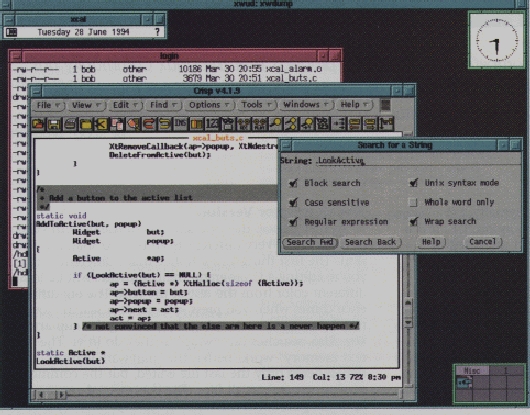
Anyway, I said “minor” drawback. The XView version certainly works, and Crisp has been designed to take maximum advantage of this environment. The mouse can be used to move the cursor, and cut and paste text. Above the text window is a row of color icons that can be clicked to activate the most commonly used functions: search/replace, switching files, recording and playing macros, etc. At the top of the Crisp window is a set of pull-down menus that can be used to do anything (as far as I know) that Crisp is capable of doing, including make, grep, and reading e-mail. There are vertical and horizontal scroll-bars for text editing and on-line help windows. There's an option for a separate “toolkit” window with a more extensive set of mouse-activated commands. It is possible to peel off additional editing windows.
There are also dialog boxes for functions like opening files and search/replace. The dialog boxes, fortunately, are configurable. I suspect that most users will want the dialog boxes turned on when they are learning their way around Crisp, and they will gradually turn them off. One reason is that you can get more work done without the dialog boxes. Another reason is that if you have a window manager that always makes the window under the cursor the active window (I use fvwm), you may type something like a file name into a dialog box, and discover that you have accidentally edited your text instead, because the mouse was pointing in the wrong place.
The major “ooh, ahh” feature for the X-Windows version of Crisp is colorization. As with the character version, comments are shaded. Language keywords, such as if, case, and int, appear in blue. Strings appear in red. These color choices are customizable, and there are, of course, templates for languages other than C, including Ada, COBOL, and SQL.
Crisp has vi emulation. With the X-Windows version, the vi commands and the GUI features are interchangeable.
Some Additional Features
As I said, discussing all of the features of Crisp would make this a very long article. I will mention a few that I don't have any personal experience with, but the developers are very proud of.
PostScript program listings: If you have a PostScript printer, or ghostscript, Crisp will attempt to simulate the language colorization by using shading, boldface, etc. If you have a color PostScript printer, you'll get a really fancy listing.
Filter mechanism: Clicking an icon will execute a predefined command, such as a compiler, and the contents of the current file become the input to that command. Crisp opens another window, and the output of the command appears in that window.
Asynchronous mechanism: External programs can write commands that Crisp can understand, such as “edit__file” or “goto_line” to a file named cr.async. The external program can then send signal -16 or -17 to the Crisp process, and Crisp will execute the commands. (If your external program cannot send signals, it's possible to configure Crisp to look for the cr.async file every few seconds.)
Crisp is sold with a variety of license arrangements. The one that will be of interest to most Linux users will be the single-user, single-execution license. The price for this will probably be $99US for either the character or
X-Windows version, and the manual (useful, but not essential) will be another $40. The international agent
for Crisp is Vital, and they can be reached by e-mail at owner-crisp-list@uunet.uu.net.
Robert Broughton (a1040@mindlink.bc.ca) has been developing software for 22 years, and has been using Linux since February, 1993. He is employed by Zadall Systems Group, in Burnaby, BC, Canada.
