ez—for the Programmer
AUIS had its roots in 1982 when Carnegie Mellon University and the IBM Corporation decided to jointly develop a campus computing facility based on personal computers to replace the time-sharing system then on campus. IBM provided not only generous funding, but also some talented individuals and access to IBM development programs.
The result was a graphical user interface we know as the Andrew User Interface System and a file system, the Andrew File System. The file system formed the basis of Transarc Corporation's Distributed Computing Environment (DCE) and is offered as part of the Open System Foundation software.
The Andrew Consortium, composed of a number of corporations and universities, funds the current development of AUIS. AUIS is available on a wide variety of platforms including Linux, AIX, Solaris, Ultrix, HP UX as well as others.
In early June, version 6.3 of the Andrew User Interface System (AUIS) was released by the Andrew Consortium. This led to the release of auis63L0-wp.tgz which contains just a small portion of AUIS that is suitable as a word processor.
Now another package has been released, auis63L0-src.tgz, to sunsite.unc.edu in /pub/Linux/X11/andrew. This is a set of additions to the word processing package to support the programmer. This article will describe the support ez provides to ease the coding and analysis of our programs. Future articles in Linux Journal will describe other pieces of AUIS.
As a programmer, we use the same simple tool, ez, as we did for word processing. Our source program is loaded (or created) and displayed in a window. But unlike ez the word processor, the data in the program source (document) does not directly control what happens. Rather the editor, ez, actually is “aware” of the syntax of the source language that is being edited and provides a specialized view of the source.
In the same way that a graph is really just a different representation of an array of numbers, ez has the ability to provide unique views of program source. This allows the editor to help you when entering the program source. ez also provides assistance in compiling your program. Finally, ez can help you analyze your program, to assist in understanding where data is referenced or where routines are defined.
ez provides support for a number of languages including assembler, Pascal, Modula, Lisp, C, and C++. It provides a unique view for each language source file. The view is triggered by the extension of the file you edit. For instance, ez will treat the file test.c as a C program and will treat the file test.C as a C++ program.
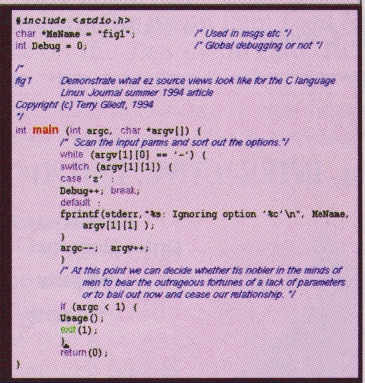
Figure 1. -fg black -bg lavenderblush
When you first edit a C program, you will see something like Figure 1. You see immediately there are many things to make the program easier to read:
the include statements are in a fixed font
comments are in a blue italized font
special words in the language like char, int, while, etc. are in magenta. (These are words already recognized by the ez view.)
function names, like main, are in red, using a different font
other special words, like, exit, are in green. (These are words the user defines as special.)
strings are shown in a fixed font
Figure 3. C-clause in progress
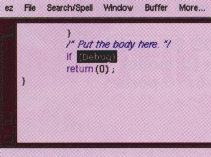
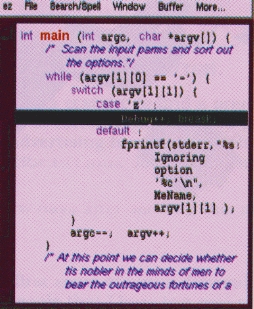
As you enter your code, ez will react as soon as it figures out what you are coding. In Figure 2 you can see a comment being formed. Notice the color and font have already been applied, even though the comment is not closed. In Figure 3 you can see how ez handles pair delimiters like (), {}, and []. When you enter the trailing delimiters (e.g.,“}”) then ez will reverse-video the entire region to the matching delimiter. As you continue typing, the reverse-video is removed.
ez will attempt to keep its view correct at all times, but you can confuse it. For instance you might code a string without the comment delimiters and then later add the /* */ operators. When this happens, you only need select the menu item Redo styles on the Source Text menu card. This will cause the entire screen to be redrawn applying the view.
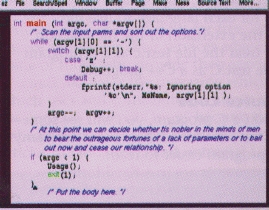
Figure 4. Reformatting your C source
ez will also attempt to help as you enter text by automatically indenting your source lines as you enter them. You do not need to enter a tab to indent, since ez will do this for you automatically. Unlike other aspects of the view, this does modify the source since it inserts tabs to align the text. You can also ask ez to reformat your source at any time. Simply select the area you want to reformat (i.e., so it is shown in reverse-video) and select the menu item Format line/region on the Source Text menu card. You can see the result of this action on our original source program in Figure 4. One convenient feature is that when you enter a trailing delimiter (like a “}”), ez will reverse-video the region to the matching delimiter (“{”). If you press tab at this point, ez will reformat the selected region, saving you the need to later re-select the area with the mouse.
There is a great deal of tailoring that can be done to control the behavior of your source view. If you do not like the way ez indents your source code, simply avoid the use of the Format line/region menu item and your source will not be modified. Regardless how your source looks, the lines of your original source are not modified unless you select this menu item.
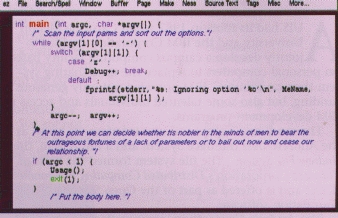
Figure 5. Source from Fig. 4 in wider window
Just as with a text document, ez will automatically wrap lines based on the width of the window. For instance, Figure 5 shows the same source as in Figure 4. Notice the comments and source lines are re-aligned to make it more readable.
In the past I would spend a great deal of energy making my source look “pretty”. It's important to me that my source look consistent since it makes the code much easier to read. Since I have been using ez, I no longer make any effort to format code, but rather concentrate on entering it. When I'm done, I reformat it with ez and I'm done. I especially like the reflowing of comments. This has caused me to change my commenting style. I seldom put comments on the same line as code any more. Rather I rely on paragraphs at the beginning of a block of code to explain what will follow. I much prefer this approach in coding. Others may not like this style. I use the parts of ez that I find useful, and ignore the others. I encourage you to do the same.
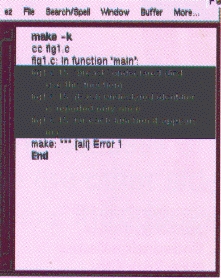
ez has support to assist you in finding compile errors. This is done by invoking make, capturing the output and then asking ez to show you the source lines in error. This is done by creating a second window of the source (select New Window on the Window menu card). In either of the source windows, select Start Compile on the Make menu card. You can see the results in Figure 6. When the compile completes and there are errors, select Next Error on the Make menu card. ez will then switch files to the offending file (if necessary) and show the line identified in error by the compiler. Correct the errors and start the process over again.
Sometimes just having the editor format the source helps to understand the code. The first time I used ez on my C source, I immediately noticed that some code was shown as comments. “Ha! A bug in ez”, I thought. Well, there was a bug, but not in ez. I discovered I had missed an ending comment delimiter in a program that I thought was working. I actually had 10 lines of code commented out. That was enough to convince me of the value of views in ez.
Figure 7. Compressing lines in source program
ez is not a complete source browser in the sense of some commercial applications, but rather it provides a set of functions to help you to navigate through your source. Sometimes you don't want to see some parts of your program. Highlight that part of your program with the mouse and select Compress region on the Source Text menu card and you will see something like that shown in Figure 7. If you click in the “compressed lines” box, the code will be shown again. Selecting Decompress all on the Source Text menu card will expand all compressed source areas.
The program ctags is a program found on most Unix systems. It will generate a file called tags which contains cross-reference information on the functions within a set of source files. You can also get cross-reference information on variables by issuing the command “ctags -v *.h *.c”. ez can use this file to show you where functions or variables are defined. Load the tags file by selecting the menu item Load New Tag File or Rebuild Tag File on the Tags menu card. To find where a variable or function is defined, select the variable with your mouse and select Find Tag on the Tags menu card. ez will switch to the file where this is defined and show you the line where it is defined.
So far we have been talking about editing existing source files. ez provides additional support when you edit a new, non-existent source file, by providing a means for you to control a “template” or default file. Each language has its own template file which can be found in /usr/andrew/lib/tpls. You can tailor your own by creating your own template directory and telling AUIS applications where your templates are by defining the
TEMPLATEPATH environment variable. To set this up, issue the following commands:
mkdir $HOME/tpls
cp /usr/andrew/lib/tpls/c.tpl $HOME/tpls
export TEMPLATEPATH=${HOME}/tpls:/usr/andrew/lib/tpls   # For bash/ksh
setenv TEMPLATEPATH ${HOME}/tpls:/usr/andrew/lib/tpls   # For
csh/tcsh
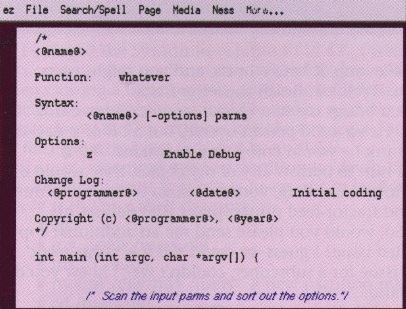
Figure 8. Template for C language source file
Now you can edit your own $HOME/tpls/c.tpl template and tailor this to your needs. Figure 8 shows you one such template. What you will see is much like a conventional program source, and indeed, it is. This is where you put your own “boiler-plate”; code you'd want in most any program. More interesting, however, is the existence of dogtags (what's in a name?). These are fields, delimited with “<@” and “@>”, which are automatically substituted when the template is loaded. For instance in Figure 8, you see <@name@>, which is replaced with the name of the file being edited (fig1.c). Most of these are pretty obvious. For a complete list of all dogtags, see the help text shown by the command auishelp dogtags.
This template file also controls the colors and fonts you first saw in Figure 1. While editing the template file, select Edit Styles on the File menu card. This opens a second window used to define the attributes of data within this template. Start by selecting the <No Menu> field in the upper left-hand corner. To the right you will see keywords which correspond to aspects of the language (comment, function, etc.). Select one of these and other attributes like the font and size, color, spacing, etc., will be shown. Using these you can change any attribute you'd like. This change will not become effective until you save the template and then edit a new source file. It does not take effect for files which you are already editing.
Just as with the text documents, ez will print the source program as you see it on the screen, including the fonts. Regardless of the colors you display your source with, printing uses a black foreground on a white background (as you'd expect). The preview process uses ghost-view to display the PostScript document that is generated.
A mailing list is available at info-andrew@andrew.cmu.edu (mail to info-andrew-request@andrew.cmu.edu for subscriptions). The newsgroup comp.soft-sys.andrew is dedicated to the discussion of AUIS. A World Wide Web home page can be found at http://www.cs.cmu.edu:8001:/afs/cs.cmu.edu/project/ atk-ftp/web/andrew-home.html. A book, Multimedia Application Development with the Andrew Toolkit, has been published by Prentice-Hall (ISBN 0-13-036633-1). An excellent tutorial is available from the Consortium by sending mail to info-andrew-request@andrew.cmu.edu and asking about the manual, A User's Guide to AUIS.
Terry Gliedt (tpg@mr.net) left Big Blue last year after spending over twenty years with IBM. Although he has worked with Un*x and AUIS for over six years, he is a relative newcomer to Linux. Terry does contract programming, teaches classes in C/C++ and Unix and writes the occasional technical document.