EZ as a Word Processor
AUIS had its roots in 1982 when Carnegie Mellon University and the IBM Corporation decided to jointly develop a campus computing facility based on personal computers to replace the time-sharing system then on campus. IBM provided not only generous funding, but also some talented individuals and access to IBM development programs.
The result was a graphical user interface we know as the Andrew User Interface System and a file system, the Andrew File System. The file system formed the basis of Transarc Corporation's Distributed File System (DFS) and is offered as part of the Open System Foundation software.
The Andrew Consortium, composed of a number of corporations and universities, funds the current development of AUIS. AUIS is available on a wide variety of platforms including Linux, AIX, Solaris, Ultrix and HP UX, as well as others.
In June, version 6.3 of the Andrew User Interface System (AUIS) was released by the Andrew Consortium. This release provided support for Linux and shortly thereafter, the package auis63L0-wp.tgz was made available at sunsite.unc.edu in /pub/Linux/X11/andrew. This particular package contains just a small portion of AUIS that is suitable as a word processor. This article will describe some of the word processing aspects of AUIS. Future articles in Linux Journal will describe other pieces of AUIS.
ez is the simplest, most general AUIS application possible. It loads a document (or creates a new one) and displays it in a window. That's all. Everything else that happens is controlled by the document itself. For example, if you are editing a text document, you get all the text-editing commands. If you're editing a picture, you get picture-editing commands. If you're editing a text document with pictures, you get both, depending on which piece you are working on at the time. The application, ez, doesn't care (as if any software really cares).
At an initial glance, the document you see displayed by ez appears to be What You See Is What You Get (WYSIWYG). Upon further investigation, however, you'll see that it really is not. While the document appears with various fonts and pictures as you might see on paper, the application does not enforce any concept of a “page”. If you make the screen extra wide or narrow, the text will re-flow to fit the window, not some notation of a page. Documents are printed in PostScript™ (well, not precisely, but that is what comes out in the end), and of course the X fonts do not quite match those used when printing. So ez might better be said to be a WYSIWYG-almost editor. One pundit calls this “WYSLRN” (What You See Looks Really Neat).
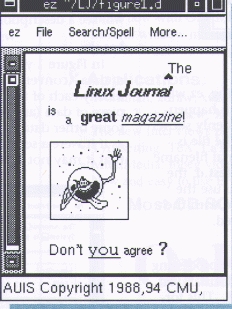
In Figure 1 you can see a sample of a tiny document. The application and name of the file appear in the title bar. A small message area appears at the bottom of the document. Notice there is a menubar for pull-down menus at the top of the document. You can select these menus as you'd normally expect. As a shortcut AUIS applications will pop-up the menus when you press the middle mouse button (or both buttons simultaneously for a two-button mouse).
The scroll bar looks rather Motif-like, but behaves differently. You can scroll forward by pressing the left mouse button, as usual, but unlike some scrollbars, you can scroll back by pressing the right mouse button. In larger documents you can “grab” the “box” in the scroll bar to quickly scroll through the document.
Most commonly used functions have been assigned to a sequence of keys. Many of the common Emacs keybindings apply to ez (e.g. ^x^c). Several function keys have been assigned useful bindings. F1-3 will invoke the Copy, Cut and Paste functions. AUIS applications will remember the past few Copy/Cut buffers and F4 will allow you to Paste them in your document and then cycle through them. This allows you to Paste two or three objects by simply pressing 4 a few times without needing to repeat the select-copy-paste sequences. I use this feature all the time and feel crippled when I work with other systems that do not have this capability.
F5 will italicize the selected text and F6 will make it bold. F7 (Plainer) will remove the last style applied against an area. For instance, if you press F5, F6 and then F7, your text will be left in italics because the Plainer function removed the bold style. F8 (Plainest) will remove all nested styles applied to the area.
AUIS applications are highly tailorable. Almost everything described thus far can be made to behave differently. The look and feel I describe here reflects the auis63L0-wp distribution. A future article will describe the various configuration files and settings and how you can control these.
This distribution of AUIS has over 800KB of help text (and this is about one-third of the total). There is extensive help information on how to use all the aspects of the system, including its configuration and personalization files. After installing AUIS, probably the first command a novice would enter is auishelp.
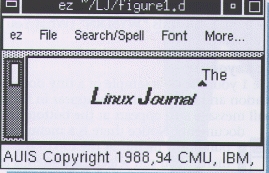
Figure 2 shows a second window of the same file. You can, of course, edit more than one file at a time. You can also have two windows on the same data. If you enter data or make changes in either window, the other is immediately updated (if the changes are in a part of the document that is visible).
If you work for a few minutes without saving, ez will automatically save for you. You can tell this is happening when the message line at the bottom suddenly shows “Checkpointing...” and then “Checkpointed”. The file is written to a separate file named like the original filename except “.CKP” is appended. Thus if you edit test.d, the checkpoint file will be test.d.CKP. When you use the “Save” command, your original file is replaced with the new version and the checkpoint file is removed.
It is important to understand that the word processing files created by ez have their own distinctive format, just like your favorite commercial word processors. This format was conveniently designed from the start to allow ez documents to be sent via conventional electronic mail systems.
This format is the “magic” that allows ez to be so simple. The data quite literally defines what can be done to it. As the data is read, programs that match the data are automatically loaded for you. ez is not a single program, but a group of programs that can cooperate with each other, each of which knows how to manipulate a certain type of object. If ez reads a document with text in it, the text-editing program edits the text object. If ez reads a document with a bitmap (picture), the bitmap-editing program edits the bitmap object. If your document has several different objects, all the different programs cooperate to edit the objects.
However, you need to do more than edit your documents. You need to print them and send them to other people, both electronically and on paper. Therefore, filters have been written to convert AUIS documents to several different formats. To print your documents, you can convert them to PostScript. To exchange documents with people running other word processing systems, you can convert them to RTF format, the most common document interchange format. You can even convert your documents to straight ASCII, though of course all your fonts and pictures will be lost.
One of the simplest things you can do with ez is to add styles to a document. Styles appear as menu items. If you look at the menus, you will find quite a few styles can be chosen. In Figure 1 you can see some of the more common styles—italics, bold, centered, or left/right justified, and various font sizes to name a few.
Most styles can co-exist peacefully—italics and bold make bold-italics. Others cancel each other out—like center and right-justify text. Some styles you can apply more than once—changing font sizes can be done by successive applications of bigger. To remove a style, select and area and chose the Plainer (F7) menu item. To remove all styles, choose the Plainest (F8) menu item. You can see what styles have been applied by placing the cursor at some point in your document and then entering “Esc-s” (press the escape key and then press the “s” key). In the message area at the bottom of the screen you will see a description of the styles that apply at that point.
In Figure 1 you can see our document has two types of data—conventional text and a small picture. Tech-nically each of these are insets to ez. An inset is just a piece of data (an object) that has been inserted within some other data (other object). An inset behaves exactly as if it were a separate document. The only difference is that it may not have scrollbars.
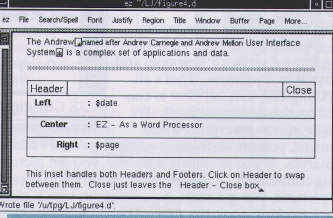
Figure 3. Sample Footnote and Header Insets
ez can be configured so that when a file is to be created, a certain inset will be the default. For instance, if you invoke ez on a file called test.d or test.doc, the menus will contain the text inset with menu items you need for writing a paper like this one. Of course, once the file has been created, ez will automatically use the insets indicated by the data itself. Similarly, editing a file called test.ras results in the raster inset being created. Editing test.html results in an html inset being created.
To create a new inset in a text document, move the cursor to where you want the inset to exist and select an item from the “Media” menu (or press Esc-Tab). In Figure 1, I selected the “raster” inset. The causes a raster object to be created, initially appearing as an empty box. Many insets (but not all) allow other insets to be embedded in them. After adding a raster inset, you are editing two documents—each with different attributes. Which “editor” (object) has control is based on where the cursor is positioned. In this example if you click in the raster box, the menu cards will change to those of the raster program. Click in the text area outside the box and the text menus return.
Some insets have special meaning for the formatting of the text document. They generally have their own menus. If you select the “Insert Pagebreak” menu item, a thin horizontal line appears on the screen. This causes a new page to begin when the document is printed or previewed.
Footnotes can be added to your document with the “Insert Footnote” menu item. The footnote will appear as a small square with a star in it. Footnotes can be open or closed by simply clicking in the box. They are displayed in-line as shown in Figure 3, but print at the bottom of the page, as you would normally expect.
A page header or footer can be specified for your document by inserting the Header/Footer inset on the Media menu card. As shown in Figure 3, you can specify various fields. There are special $-keywords you can use for variable data. Select the AUIS Help menu and then select Show Help On... When prompted, enter headers to get more detail on headers. Alternatively, you may enter auishelp headers in an xterm window.
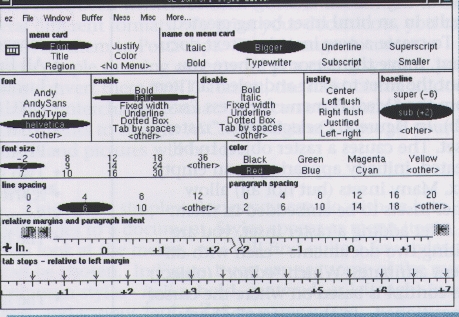
The list of styles that come with ez is usually sufficient for simple documents. However, you may need better control of tab stops, paragraph indenting or outdenting, or double spaced lines. Perhaps you want your own combination style that sets the margins, font, point size all from a single menu item. All this and more can be done by selecting the “Edit Styles” menu option. This brings up a second window which is divided into several panels, as shown in Figure 4.
The style editor window has its own menus. The top part of the window, above the double line, is used to select a style to edit. The left-hand panel is a list of all the menu cards that have style options. If you select a menu card name, it is highlighted and its list of styles appears in the right-hand panel. Once you select a menu card and style name, the rest of the panel becomes active. It displays the attributes that apply to the selected style.
To change the attributes of a style, highlight the different options in the attribute panels. The document will not change until the document is redrawn. You can select “Update Document” to force the redraw.
Choose the menu item “Add Style” to create your own style. When you do this you are prompted in the message area at the bottom of the screen for a menu name. You should enter a pair of names like “Region,MyWay”. This will add a menu item “MyWay” to the “Region” menu. You should then select the attributes you want for this new MyWay style.
When you edit or add styles with the style editor, the changes only affect the document you are currently editing. They are saved in the data and will exist when you edit the document later. If you copy text containing the new style and paste it in a new document, the style will be transferred to the new document, but the attributes of that style will not be transferred. This is because the attributes of the style are saved at the top of the file in an area you cannot see. So when you copy the selected area, you only get the name of the style, but not the definition of the style (which you cannot see). You will need to either add a new MyWay style to the second document or learn about templates.
A template is a set of ready-made formatting information or instructions that you can apply to a text document. Templates describe two types of information:
Style specifications, which determine what formatting styles (such as boldface and centering) can be applied to a document, and exactly how they change the appearance of the text to which you apply them. Thus templates lend a standard appearance to documents by making a style always look the same.
Set text, which is text that you want to include over and over in many documents. A template saves you time in this case because you only have to type that text once. ez gives you an extensive set of templates. Most of these include style specifications only, but some also include set text (e.g., the template used for creating memos). Creating a template is described in detail in the on-line help (enter the command auishelp templates in an xterm window).
The entire AUIS system is designed to print using PostScript. This was a decision made many years ago and is still in transition. In this version AUIS objects all generate troff output—along with copious amounts of embedded PostScript. The troff is then processed to generate the necessary PostScript. In the auis63L0-wp distribution the default print command will invoke a shell, /usr/andrew/etc/atkprint. The default preview command calls the shell /usr/andrew/etc/ atkpreview. Each of these shells will invoke the groff formatter to generate the PostScript output. In atkpreview the groff output is piped into ghostview.
If you do not have a PostScript printer, you can modify atkprint to pipe the PostScript output through ghostscript to generate the correct stream for your printer. Andreas Klemm andreas@knobel.knirsch.de has written a filter, apsfilter (available from ftp. germany.eu.net in /pub/comp/i386/Linux/Local. EUnet/People/akl/apsfilter*), which works with your /etc/printcap entry and will automatically convert PostScript into the correct DeskJet stream. I have a DeskJet 500 printer which works very well in this mode.
There are other ways to control printing/previewing by AUIS. These will be discussed in a future article about tailoring your AUIS applications.
A mailing list is available at info-andrew@andrew.cmu.edu (e-mail to info-andrew-request@andrew.cmu.edu for subscriptions). The newsgroup comp.soft-sys.andrew is dedicated to the discussion of AUIS. A World Wide Web home page can be found at www.cs.cmu. edu:8001:/afs/cs.cmu.edu/project/atk-ftp/ web/andrew-home.html. A book, Multimedia Application Development with the Andrew Toolkit, has been published by Prentice-Hall (ISBN 0-13-036633-1). An excellent tutorial is available from the Consortium by send- ing e-mail to info-andrew-request@andrew.cmu.edu about the manual, A User's Guide to AUIS.
After spending over twenty years with IBM, Terry left Big Blue last year. Although he has worked with Un*x and AUIS for over six years, he is a relative newcomer to Linux. Terry does contract programming, teaches classes in C/C++ and Unix and writes the occasional technical document. You can reach him at Software Toolsmiths, (507) 356-4710 or by e-mail at tpg@mr.net.