
The DF Command
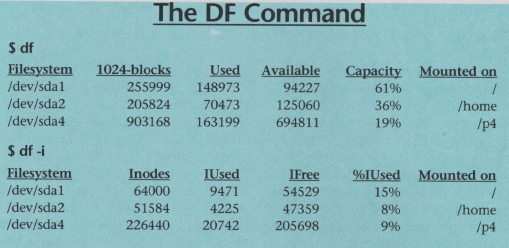
The df command is used to show the amount of disk space that is free on file systems. In the examples, df is first called with no arguments. This default action is to display used and free file space in blocks. In this particular case, th block size is 1024 bytes as is indicated in the output.
The first column show the name of the disk partition as it appears in the /dev directory. Subsequent columns show total space, blocks allocated and blocks available. The capacity column indicates the amount used as a percentage of total file system capacity.
The final column show the mount point of the file system. This is the directory where the file system is mounted within the file system tree. Note that the root partition will always show a mount point of /. Other file systems can be mounted in any directory of a previously mounted file system. In the example, there are two other file systems, the first in mounted as /home and the second is mounted as /p4.
In the second example, df is invoked with the -i option. This option instructs df to display information about inodes rather that file blocks. Even though you think of directory entries as pointers to files, they are just a convenience for humans. An inode is what the Linux file system uses to identify each file. When a file system is created (using the mkfs command), the file system is created with a fixed number of inodes. If all these inodes become used, a file system cannot store any more files even though there may be free disk space. The df -i command can be used to check for such a problem.
The df command allows you to select which file systems to display. See the man page for details on this capability.
email: phil@ssc.com
Phil Hughes
Realizing the promise of Apache® Hadoop® requires the effective deployment of compute, memory, storage and networking to achieve optimal results. With its flexibility and multitude of options, it is easy to over or under provision the server infrastructure, resulting in poor performance and high TCO. Join us for an in depth, technical discussion with industry experts from leading Hadoop and server companies who will provide insights into the key considerations for designing and deploying an optimal Hadoop cluster.
Sponsored by AMD
Built-in forensics, incident response, and security with Red Hat Enterprise Linux 6
Every security policy provides guidance and requirements for ensuring adequate protection of information and data, as well as high-level technical and administrative security requirements for a system in a given environment. Traditionally, providing security for a system focuses on the confidentiality of the information on it. However, protecting the data integrity and system and data availability is just as important. For example, when processing United States intelligence information, there are three attributes that require protection: confidentiality, integrity, and availability.
Learn more about catching the bad guy in this free white paper.
Sponsored by DLT Solutions
| Designing Electronics with Linux | May 22, 2013 |
| Dynamic DNS—an Object Lesson in Problem Solving | May 21, 2013 |
| Using Salt Stack and Vagrant for Drupal Development | May 20, 2013 |
| Making Linux and Android Get Along (It's Not as Hard as It Sounds) | May 16, 2013 |
| Drupal Is a Framework: Why Everyone Needs to Understand This | May 15, 2013 |
| Home, My Backup Data Center | May 13, 2013 |
- Designing Electronics with Linux
- Making Linux and Android Get Along (It's Not as Hard as It Sounds)
- Dynamic DNS—an Object Lesson in Problem Solving
- Using Salt Stack and Vagrant for Drupal Development
- New Products
- Build a Skype Server for Your Home Phone System
- Validate an E-Mail Address with PHP, the Right Way
- A Topic for Discussion - Open Source Feature-Richness?
- Why Python?
- Tech Tip: Really Simple HTTP Server with Python
- Great
1 hour 58 min ago - Reply to comment | Linux Journal
2 hours 6 min ago - Understanding the Linux Kernel
4 hours 21 min ago - General
6 hours 51 min ago - Kernel Problem
16 hours 53 min ago - BASH script to log IPs on public web server
21 hours 20 min ago - DynDNS
1 day 56 min ago - Reply to comment | Linux Journal
1 day 1 hour ago - All the articles you talked
1 day 3 hours ago - All the articles you talked
1 day 3 hours ago
Enter to Win an Adafruit Pi Cobbler Breakout Kit for Raspberry Pi

It's Raspberry Pi month at Linux Journal. Each week in May, Adafruit will be giving away a Pi-related prize to a lucky, randomly drawn LJ reader. Winners will be announced weekly.
Fill out the fields below to enter to win this week's prize-- a Pi Cobbler Breakout Kit for Raspberry Pi.
Congratulations to our winners so far:
- 5-8-13, Pi Starter Pack: Jack Davis
- 5-15-13, Pi Model B 512MB RAM: Patrick Dunn
- 5-21-13, Prototyping Pi Plate Kit: Philip Kirby
- Next winner announced on 5-27-13!
Free Webinar: Hadoop
How to Build an Optimal Hadoop Cluster to Store and Maintain Unlimited Amounts of Data Using Microservers
Realizing the promise of Apache® Hadoop® requires the effective deployment of compute, memory, storage and networking to achieve optimal results. With its flexibility and multitude of options, it is easy to over or under provision the server infrastructure, resulting in poor performance and high TCO. Join us for an in depth, technical discussion with industry experts from leading Hadoop and server companies who will provide insights into the key considerations for designing and deploying an optimal Hadoop cluster.
Some of key questions to be discussed are:
- What is the “typical” Hadoop cluster and what should be installed on the different machine types?
- Why should you consider the typical workload patterns when making your hardware decisions?
- Are all microservers created equal for Hadoop deployments?
- How do I plan for expansion if I require more compute, memory, storage or networking?


Comments
about free disk space (linux)
I am trying to find out how much free disk I have. I tried df and it gave me following output. can some explain what it means and how can I infer about the free disk space available to me.
$ df
Filesystem 1K-blocks Used Available Use% Mounted on
/dev/sda3 497861 224899 247258 48% /
/dev/sda1 147764 77278 62857 56% /boot
/dev/mapper/rootvg-data
37446324 81844 35462300 1% /data
none 2029744 0 2029744 0% /dev/shm
/dev/mapper/rootvg-home
507748 11902 469632 3% /home
/dev/mapper/rootvg-opt
3031760 1421864 1455888 50% /opt
/dev/mapper/rootvg-tmp
6063688 105684 5649988 2% /tmp
/dev/mapper/rootvg-usr
8579268 4494640 3648816 56% /usr
/dev/mapper/rootvg-cache
4031680 3190276 636604 84% /usr/vice/cache
/dev/mapper/rootvg-var
1515856 237556 1201296 17% /var
AFS 9000000 0 9000000 0% /afs
btvgsa.ibm.com:/gsa/btvgsa-p2
12570759168 11059573696 1511185472 88% /gsa/btvgsa-p2
Hi, I need to retrive
Hi,
I need to retrive the %used from df. can u plz help me in this regard? how to get the field where the fields are not seperated by a common space?
Thanks...
So what does this
So what does this mean?
Filesystem 1K-blocks Used Available Use% Mounted on
/dev/hda2 23152692 3650356 18326228 17% /usr
/dev/hda6 253775 246507 0 100% /var
Filesystem Inodes IUsed IFree IUse% Mounted on
/dev/hda2 2943360 138427 2804933 5% /usr
/dev/hda6 65536 3889 61647 6% /var
Does this mean my /var directory is all used up - yet why does the df -i command say only 6% used?
df command
Hmm,
I hope you've found the answer to this already (since February), but yes, your /var partition is nearly full. The 6% number refers to the used inodes, which in turn refers to the maximum number of files you could potentially have, given enough space. In your case, you are limited by the available space, not number of files.