Linux vs. Windows NT and OS/2
Picking an operating system is a dangerous business. You're committing yourself to a couple hours, certainly, or maybe a couple days of manual-reading, file-editing, and hassles. If your real goal was just to get some work done, maybe it would have been simpler to stay with Windows 3.1 and never embark on an adventure in computing.
But, then again, there seems to be a substantial body of computer users who are dissatisfied with DOS and Windows. Some are moving to OS/2, Windows NT, or some other Comdex wonder. Some are even daring enough to wipe out DOS in favor of an anti-establishment system like Linux.
Before you take the plunge, you should know up front what you stand to gain. More importantly, too, what you stand to lose. Here's what lies ahead for you if you want OS/2, Windows NT, or Linux to be part of your future.
Don't even think about switching systems until you know what your hardware supports. The wonderful features of a new system won't be compelling if your system doesn't work.
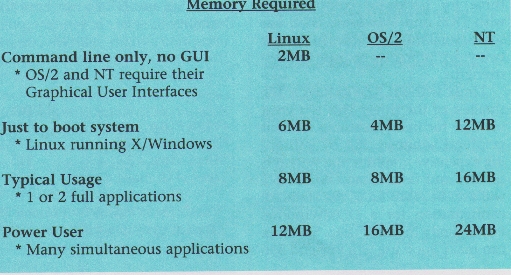
You must have a Intel 386 or better to have any 32-bit choices. Then you need memory. Linux needs 2MB RAM to try out, OS/2 needs 4MB, and NT needs 12 MB. And you need disk space. You need to set aside at least 15MB for Linux, 32MB for OS/2, and 70MB for NT for a good trial run. A full working system will require even more resources.
If these requirements are satisfied, you still have to determine if all the pieces of your machine are compatible. If your machine uses the Microchannel bus (all IBM PS/2s), Linux doesn't support you. If you have a Compaq QVision video board, OS/2 won't use it. If you have a network card with a 3Com 3c501 chip, NT can't talk to it. And these are just samples of some possible compatibility problems. The full list changes often. Incompatibilities constantly recede as better hardware support is added. But a constant stream of new, incompatible hardware is always hitting the market.
Why are computer users put through this ringer? Well, The PC hardware market has few solid standards. IBM-compatible hasn't really meant anything since IBM stopped leading the industry. These nightmares can be avoided by getting your 32-bit operating system the same way you got DOS and Windows—buy a complete computer system with Linux, OS/2 or NT pre-installed. Companies which do this are rare, but you'll save trouble by seeking one out. Let them find the best hardware to fit the operating system you want.
If buying a whole new system isn't an option, you'll have to take the path most Linux, OS/2, and NT users have taken. Just start installing. If you have trouble, be prepared to find out more than you ever wanted to know about the pieces of your system.
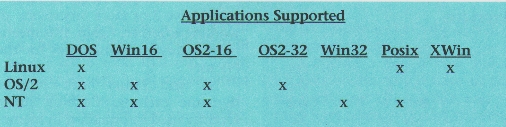
Operating systems determine which applications will work, what those applications will look like, and how they will work together.
For example, if you want to run Microsoft's application suite (Word, Excel, Access, and PowerPoint), you're out of luck with Linux. They won't work. With OS/2, they work for now, but the burden is on IBM to keep up since Microsoft abandoned OS/2 in 1991. In the end, Windows 3.1 and Windows NT are the only safe choices for using Microsoft applications.
How applications look and how they work together are determined by the operating system, too.
Windows NT uses the same program manager—file manager—print manager interface as Windows 3.1. This interface is not elegant, but it has one very significant advantage—it is simple. And because it's not very configurable, users can't do much damage by moving icons around and changing settings.
OS/2 takes the more radical route of a completely object oriented interface. Data and programs are objects which can be arranged in any manner. Clicking on a data object starts the associated application. Dragging data to the printer object prints it. Although OS/2 has a notoriously bland color scheme and layout when first installed, every detail can be re-configured.
With OS/2's flexibility comes a daunting depth of detail for first-time users. It is too easy to get lost. With dozens of windows open, it's a pain to locate and manipulate things. However, these disadvantages fade when the system is used for a while. The detail, power, and regularity of the interface become persuasive.
Linux uses the X/Windows system. X/Windows is a graphical chameleon, able to look and act many ways. The advantage is flexibility and choice. The disadvantage is complexity. Applications may not look and act alike. Many different interfaces are available. This makes user instruction and support more difficult.
Linux is primarily a command-line system where programs are typed in by name, although program managers and file managers are available to ease the transition of a novice user. The same tasks done with Windows and OS/2 are possible under Linux, but they generally require more knowledge and skills. If one knowledgeable user configures the Linux system, most novice users will be comfortable starting and running applications.
All three systems have a wide variety of books and tutorials available which can help novice users. Although Linux is a free system, it still has a library of books written about it—any book about Unix will apply to Linux. So finding assistance on the use of these systems should not be difficult.
If the issues of interface are surmountable, Linux has many positive characteristics that are not shared by OS/2 and NT. Linux enjoys the advantage of having no guarded secrets, no technology owned by a single company. The source code is freely available, which means it can be inspected and improved upon by any corporate or individual user. And, surprisingly, this common knowledge was used to build a system which is more miserly with memory and disk space than either OS/2 or NT. IBM and Microsoft would actually have much to learn from Linux if they cared to look.
When it comes down to it, an operating system is just a foundation. Choose the foundation that supports the features you need and will need in the future. But be aware of the high price in memory, storage, and performance that these features exact.
Linux, like OS/2, is designed and optimized to run on Intel 386 and compatible CPUs. By contrast, Windows NT is designed to be ported to many different CPUs. NT is currently available for MIPS, DEC Alpha, and Intel 386. This independence from Intel is an important advantage for NT, because users have more hardware choices.
All three systems support multitasking, which is the ability to have many programs running simultaneously. For example, it is possible to format a disk, download a file from a BBS, and edit in a word processor, all simultaneously. You can't do this using a system like MS DOS, which doesn't support multitasking.
NT supports multiprocessing, which means using more than one CPU in a single machine. An NT PC could have 2 or more processors, all working together. Again, this means more hardware possibilities for the NT user.
NT and Linux both support dynamic caching. Caching stores recently used information in memory, so it is readily available if needed again. OS/2 sets aside a pre-determined chunk of memory to do this (typically 512K to 2MB), whereas Linux and NT will dynamically use as much spare memory as possible. The result is much faster disk access for Linux and NT, because the information is often already in the cache. OS/2's inflexibility causes memory to be wasted when not used, and memory to be used poorly when it is scarce.
Linux, unlike OS/2 and NT, has full multiuser support. Local users, modem users, and network users can all simultaneously run text and graphics programs. This is a powerful feature for business environments that is unmatched by OS/2 or NT.
Linux has security systems to prevent normal users from misconfiguring the system. Although Windows NT isn't multiuser, it has security checks for the individual using the machine. It is safe to have a Linux or NT machine available for use by many people, whereas an OS/2 user could (mis)configure the system software.
Linux's security and multiuser features are so well developed because they are traditional features for Unix. Since Linux is “Unix-compatible,” it supports these same powerful features.
Every feature supported will tend to make an operating system larger, consuming more memory and storage. Larger systems are also slower than smaller systems when memory is scarce. So the size of a system is an important issue.
NT is the largest of the three systems. NT's support for portability, multiprocessing, and many other features is the cause of its large size. Given a powerful enough machine, NT offers a set of features that is very compelling.
Linux with X/Windows is the next smaller system. Linux itself is very miserly, but X/Windows puts a burden on the system. For most the graphical interface will be worth the cost in resources.
OS/2 is smallest of the three when using a graphical interface. This is the attraction of OS/2. A user need only upgrade to 8MB of RAM to use an object-oriented interface and have a good platform for multitasking DOS, Windows, and OS/2 programs. OS/2 is the strongest of the three for backward compatability with DOS and Windows. OS/2 has sold several million copies in the last two years, primarily because of these strengths.
Linux without X/Windows is the smallest of the three. This is a great sacrifice for many, running without graphical windows. But by jettisoning expensive graphics, the system is smaller and faster than OS/2 or NT will ever be. 4MB RAM, the standard configuration for a DOS/Windows PC, is plenty for most tasks. So Linux can make good use of a low-end 386 PC with little memory, where OS/2 or NT either would not run, or not run well. Systems with lots of memory will be able to use Linux's dynamic caching to achieve unusually high performance. With 16MB RAM, almost 12MB remains to be used for caching and running applications.
In general, the issue of size is a great strength for Linux. Linux was designed to be as small and efficient as possible. NT's most important criterion was portability, and OS/2's was backward compatibility. The result is Linux is the most efficient of the three. And because a company or individual has access to the Linux code, it can be optimized and scaled to suit the hardware and needs of the user. OS/2 and NT do not have this flexibility.
Windows NT is compelling because it is a solid system that offers freedom from the single CPU Intel world.
OS/2 is compelling because it offers the best system for running 16-bit DOS and Windows applications while moving into the more flexible and powerful 32-bit world.
But both systems still end up locking users into proprietary technology—applications that will only work on either OS/2 or NT. Linux does not pose this danger. Applications written for Linux can be ported to any of the dozens of other Unix systems available. Betting on an “open” technology from IBM or Microsoft is still a risky game. Linux offers freedom from this kind of entrapment.
The greatest difficulty in realizing this freedom is finding high quality applications. To keep from getting locked into a proprietary system, you have to choose applications with support for multiple platforms. If your spreadsheet supports Windows, OS/2, Unix, and Mac, you can be confident that support for additional platforms would also be possible. The trade-off is fewer features and higher prices.
Linux has an interface to run commercial applications designed for other Intel Unix systems like SCO Unix. But the quality of applications is still a problem. For example, there is no commercial word processor for Linux which matches the quality of ones for Windows and OS/2. This kind of glaring inadequacy alone can preclude the use of Linux.
For the corporate user, Linux will fit in well with a TCP/IP based client-server strategy. Linux can turn low-end hardware into a solid fileserver or PostScript print server. Linux works better than many commercial Unix systems on common Intel hardware. Linux is small and fast. Linux can be completely inspected and customized by anyone. Linux has built-in mail and internet tools. Phone support and documentation for Linux are available.
But there are three disadvantages. One, there are few commercial applications. Two, if something goes wrong, there is no one organization to blame as with OS/2 or NT. Three, Linux's foundations are strong, but Microsoft and IBM are constantly developing new technologies that may leave Linux behind. In general, Linux has the features to make it a better choice than NT or OS/2 in some situations. As Linux gains exposure, more businesses are likely to take advantage of this potential.
For the technical user, Linux offers the exciting chance to tinker with an operating system. All of the system's source code is available. It is a great learning tool and motivator. And since most current Linux users are technical hobbyists, a wealth of applications are available to suit these tastes. Ray tracers, morphing programs, graphics viewers, compilers, games, and more are all available. Linux does lack full-motion video, speech recognition, and some other cutting-edge technologies. These features, along with OS/2 and NT application development, may be compelling enough to draw the technical user towards OS/2 or NT.
For the novice user, OS/2 or NT is the best 32-bit option. OS/2's object-oriented interface and free technical support are compelling factors. NT's power to sway commercial developers is reassuring. But the safest and most likely choice for the novice user is to stick with the operating system that came with their computer, typically DOS and Windows 3.1. Tackling installation, configuration, and new applications is still not trivial for these three 32-bit systems.
Overall, Linux stacks up surprisingly well for a free system developed by a horde of volunteer programmers. It's foundations are solid. The quantity and quality of many free applications are stunning. If Windows-class applications and an OS/2-class interface are developed for Linux, it will have the compelling features to tackle commercial systems. While many computer users now know only OS/2 and NT, thousands of others have discovered Linux. As all three of these systems quickly improve and evolve, Linux is likely to gain an expanding base of users. Free software has a powerful new platform to build on.