Global Position Reporting
The Global Positioning System (GPS) has given rise to many unique applications and is destined to make its mark among the technological wonders of the world. The Automatic Position Reporting System (APRS) is an application that uses the GPS to allow amateur radio operators to broadcast latitude, longitude, heading, velocity and weather to remote receivers. Linux plays an important role in this application by providing the gateway between wireless APRS LANs and the Internet. This article provides an introduction to the GPS and APRS, and describes how Linux is being used to develop a nationwide APRS backbone. Also included is a list of hosts and web sites to which Linux users can connect to obtain real-time position reports. I will also discuss the Linux applications aprsmon, aprsd and PerlAPRS which take advantage of the power of Linux and the Internet to extend the usefulness of the GPS.
When historians look back upon the engineering accomplishments of the twentieth century, the Global Positioning System (GPS) is certain to be among the top engineering wonders. It represents major accomplishments in computer hardware and software, reliability, satellite technology, physics, communication and electronic engineering. By any standard, it is a marvel and a testament to the belief that mankind can accomplish anything the imagination can think of.
As Arthur C. Clarke, science fiction author and “father” of the geosynchronous satellite, once said, “Any sufficiently advanced technology is indistinguishable from magic.” In many ways, that phrase describes the GPS perfectly—it is magic. Although virtually everyone has heard of the GPS today, it wasn't always this widely known. I remember being handed a small GPS receiver a few years ago and being told that this little device would tell me where I was located anywhere on earth. I could not believe it and was not prepared to be sucked into this canard. How could this device, barely the size of a cellular phone, tell me where I was located within a few hundred feet? It just couldn't be; this had to be a hoax. Upon further discussion and a demonstration, I was hooked; I knew I had to have one, but wasn't sure why. When the Automatic Position Reporting System (APRS) was being developed, I knew I had found my excuse.
The Automatic Position Reporting System is one of the peacetime applications; it unites the GPS with amateur radio. APRS is one of the most popular facets of amateur radio today, and Linux supports APRS with several unique applications. For example, if you wish to know the location of a float in the Rose Bowl parade or the location of the Olympic Torch, APRS can provide that information.
The Automatic Position Reporting System allows amateur radio operators to send and receive position reports obtained from either a GPS receiver or a known fixed position. (See APRS Formats.) In fixed-position applications, radio frequency packet transmissions are broadcast from a stationary location such as a building or home. Since the station is fixed, there is no need for a GPS receiver to continually update its position. More interesting are mobile applications in which vehicles are tracked.
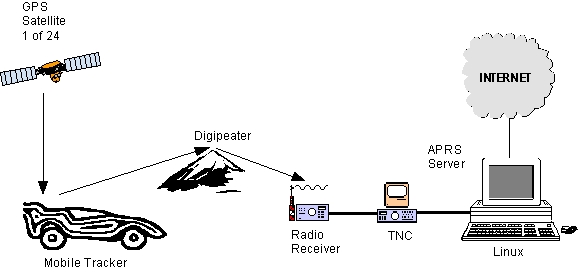
Most GPS receivers have a graphic liquid crystal display (LCD) which is normally attached to the dash of the car for easy viewing. A cable connects the internal GPS receiver to an external antenna. The external antenna is important since it provides better reception. Although a GPS receiver provides visual information to the occupants of the vehicle, virtually all GPS units provide an RS-232/4800 baud connection to allow the receiver to connect to an external device such as a laptop computer. However, for APRS applications, we are interested in broadcasting our position to the wireless APRS network. Therefore, the serial output of the GPS receiver is connected to a terminal node controller (TNC), which acts like a modem and changes the digital data stream to analog tones. The tones are then fed into a transmitter which broadcasts packets containing GPS position information. This configuration is shown in Figure 1.
Figure 2. GPS Satellite Antenna and Mr. Parry
Figure 2 shows an example of a tracker. Here, an ordinary automobile is shown with some not-so-ordinary equipment attached to the trunk. The object of interest, located in the center of the trunk, is a GPS satellite antenna. Also shown is a vertical whip antenna, used to broadcast APRS packets from a transmitter located within the vehicle. A second vertical whip antenna is used for voice communication. Pay no attention to the man behind the curtain (i.e., leaning on the car).
There is currently a nationwide effort to provide the information received by local APRS LANs to the Internet. This is done using APRS servers which provide live APRS traffic to the Internet. By using a simple TELNET client, one can connect to a server and see the information that is being collected throughout the United States. Several APRS servers are available for different operating systems. For Linux users, there are presently two APRS servers available: aprsmon and aprsd.
The aprsmon server can be found at http://www.cloud9.net/~alan/ham/aprs/; aprsd can be found at http://www.wa4dsy.radio.org/Files/aprsd.beta101.tar.gz. APRS servers allow users to connect and examine remote APRS networks located in several metropolitan areas. The nationwide network of servers is expanding with the ultimate goal of allowing one to locate mobile trackers anywhere in the U.S. To better understand the information provided by these servers, try a TELNET session to any of the addresses listed below. The numeric value after the host name is the port number and is required.
kb2ear.aprs.net 14579 (Northern NJ)
kb2ear.aprs.net 6261 (USA)
kb2ear.aprs.net 14580 (Composite of above)
www.wa4dsy.radio.org 14579 (Atlanta, GA)
socal.aprs.net 14579 (Southern CA)
www.aprs.net 10151 (USA Composite)
www.aprs.net 14579 (Southeast FL)
sboyle.slip.netcom.com 14579 (San Francisco, CA)
The information returned from these TELNET sessions is real-time raw data that is broadcast by amateur radio operators at intervals from 1 to 30 minutes. The short duration broadcasts (e.g., one minute) are intended for mobile (tracker) applications where there is movement and therefore a need for frequent updates. The longer duration broadcasts (e.g., 30 minutes) are intended for fixed stations (homes) broadcasting their locations. These servers provide packets which include the position of the transmitting station's latitude, longitude and often a brief message about the station. Listing 1 is the output from a typical APRS TELNET session.
Each line of text in Listing 1 is a packet that contains the amateur radio call sign of the source station, the destination address and any repeaters used in the path. For example, in the first packet shown after the login message, W4DUF is broadcasting to all stations in the APRS network. Due to distance limitations (typically a few miles), other local stations along the route, called digipeaters (digital repeaters), are used to extend the distance by repeating the packet. In the example, stations N4TKT-2, WIDE and N4NEQ-2 are being used to repeat the packet. In this way, distances can be extended to a large metropolitan area (i.e., a 20 mile radius), as well as across the nation by using special high frequency (HF) digipeaters called GATEs. Due to limited RF bandwidth, broadcasting positions nationally is typically limited to special events such as tracking the Olympic torch as it traveled across the U.S.
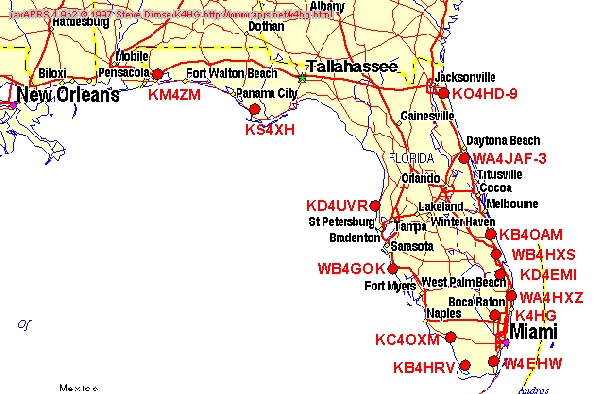
With the development of a nationwide APRS backbone using the Internet, transmitting local APRS traffic can bypass the constraints of limited HF bandwidth. An APRS TELNET session as shown in Listing 1 is interesting, but difficult to understand due to the raw format of the information. To better understand the data being presented, graphically formatted web pages are used. These web sites take the raw information and overlay the location of the stations on a map. Figure 3 is an example of a typical APRS web page. The list of web sites below shows real-time or near real-time (delayed 15 minutes) APRS traffic and requires a Java-enabled Net browser.
http://www.wa4dsy.radio.org/aprs/usa.html (Entire US)
http://www.wa4dsy.radio.org/aprs/soeast.html (Southeastern US)
http://www.wa4dsy.radio.org/aprs/ga-atl.html (Atlanta, GA)
http://www.aprs.net/sfl.html (Southern Florida)
http://sboyle.slip.netcom.com/LIDSAPRS.html (San Francisco, CA)
As we have seen, APRS servers provide raw data, and web browsers can show the information in a graphically interesting and informative manner. However, both are passive applications that require a user.
For many applications, it would be nice to automate the system to perform a specified task automatically. For example, you might wish to be informed by e-mail that the lead float in the Rose Bowl Parade has reached a specific point in the route. Or perhaps you have a mobile tracker and wish to sound an alarm when the tracker reaches a specific location. For this application, you need a program that will examine the raw APRS data and execute a command based on user-specified criteria. This is exactly what PerlAPRS does, and Linux is the perfect platform for this type of application since it supports multitasking so well.
PerlAPRS examines incoming packets and executes a command when a call sign and location match the criteria specified by the user. Location criteria is specified using grid squares, a rectangular area measuring approximately 2.5 by 5 miles.
The best way to understand how PerlAPRS works is to look at an example. The line numbers shown in the left-hand column below are provided for illustrative purposes and are not part of the normal output. Line 1 shows an example packet. PerlAPRS parses the packet and extracts the call sign, latitude and longitude. Line 2 displays the call sign as KD6AZU, the latitude as 3243.700 (32 degrees, 43.700 minutes North) and the longitude as 11707.700 (117 degrees, 7.700 minutes West). Next, PerlAPRS searches a call sign file, previously customized by the user, looking for a match. The first two attempts at a match shown on lines 3 and 4 fail. The third comparison shown on lines 5 and 6 is successful. This match causes the command, cmd3.sh, to be executed. The command may be any UNIX-style command; however, simple shell scripts are used for most applications.
1. Packet= KD6AZU>APRS,KD4DLT-7,N4NEQ-2,WIDE*:
@042327/3243.70N/11707.70W/0
2.  KD6AZU 3243.700 11707.700
3. - KI6MP-10 DM12JV
4. - KC6VVT-9 DM12IT
5. * KD6AZU DM12KR Sun Aug 10 15:56:13 1997 3
6.     Sun Aug 10 15:57:13 1997 1 cmd3.sh
This brief discussion of PerlAPRS is intended to provide a simple overview. The program provides several additional features intended for real time applications. PerlAPRS is distributed under the GNU licensing agreement. The source code and further information on the program can be found at http://people.qualcomm.com/rparry/perlAPRS/.
Linux, amateur radio and the APRS protocol are only part of the system we have discussed so far. The GPS is truly what makes the system practical. Although the details of the GPS are extremely complex, the basic idea is relatively simple. Triangulation is used to pinpoint a receiver.
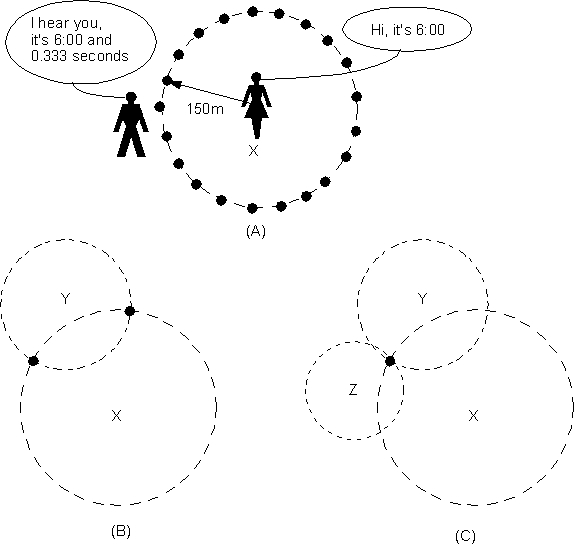
For example, assume you and your friend both have accurate synchronized clocks. At some unknown distance from you, she yells, “It is now 6:00 and 0.000 seconds.” When you hear her, your clock shows the time as 6:00 and 0.333 seconds. You can now compute your distance from her as 100 meters by multiplying the speed of sound (300 meters per second) by the elapsed time (0.333 seconds). With this single test point, you are able to compute your distance from the source. Specifically, you are located in any direction 100 meters from your friend. This scenario is shown in Figure 4A by the multiple dots located on the circumference of the circle.
With a second friend, we can further clarify our position. In Figure 4B, a friend at point Y, also with an accurate clock, takes another measurement. Again you make the computation and find the distance from this friend. You now have your position narrowed to two points shown by the two dots where the circles intersect. Using a third friend at point Z and another measurement, you are able to pinpoint your exact location.
The GPS works on a similar principle; however, the speed of light replaces the speed of sound in the experiment, and your friends are replaced by satellites. In the above explanation we have conveniently assumed that the world is flat to provide a clearer understanding of the concept. When the concept is extended to three dimensions, a single measurement does not produce a circle as shown in Figure 4A, but a sphere. A second measurement does not limit our position to two unique locations as shown in Figure 4B, but a circle that is the intersection of two spheres. Last, a third measurement does not yield a unique location as shown in 4C, but two points which are the intersection of three spheres. Thus, with three measurements, we have two possible locations. The good news is that one of the points can be eliminated since it corresponds to a position above the Earth's atmosphere. So unless you are an astronaut, your unique location on earth has been found with only three measurements.
We made a second convenient assumption, specifically that all parties in the experiment had accurate clocks. Although the GPS satellites have accurate atomic clocks, the receiver on the ground does not have such a luxury, nor would it be practical. Fortunately, by adding a fourth satellite, the person on the ground does not require an atomic clock. This is a simple algebraic problem in four unknowns: latitude, longitude, altitude and time. With four satellites we can solve for all four unknowns and provide an accurate and unique position for the listener on Earth. The experienced GPS user may argue that he has obtained accurate positions with only three satellites. This is true; it is done by letting the GPS receiver assume the altitude is 0 (sea level). Therefore, if we are willing to give up knowing our altitude, which is valid in many applications, the GPS can indeed provide an accurate position using only three satellites, since we have three unknowns and three equations.
The above explanation is in many ways an oversimplification. In real life, numerous variables affect the accuracy of the system. For example, radio frequency transmissions are affected by objects such as buildings and trees. These structures cause reflections, referred to as multi-path. Signals from the satellites are reflected off nearby structures, causing delays which ultimately affect the accuracy of the measurement. Radio frequencies are also affected by rain, sleet, snow, humidity and even the temperature of the air, since the speed of the transmission is affected as well as the attenuation of the signal. All of these variables result in loss of accuracy. However, these inaccuracies are small compared with the deliberate error called Selective Availability (SA).
To understand SA, we must understand that GPS applications fall into two service categories: the Standard Positioning Service (SPS) for civilians, and the Precise Positioning Service (PPS) for military and authorized personnel. PPS GPS receivers remove the adverse affects of SA and are therefore far more accurate. SPS GPS receivers provide less accuracy than the GPS is capable of, and each is generally limited to an accuracy of 100 meters. However, there are ways of overcoming the limitations of SPS receivers by using Differential GPS (DGPS). For those interested in DGPS, the web is an excellent source of further information.
The world has not been the same since the invention of the telephone, radio, television and the computer. The GPS is also destined to make its mark in the technological evolution of mankind; it has given rise to many unique applications. The APRS was developed to allow amateur radio operators to broadcast positions using packet radio. APRS servers and Linux further extend the GPS to uses that were science fiction not too long ago.