
Networking with the Printer Port
PLIP means “Parallel Line Internet Protocol”. It is a protocol used to bring IP traffic over a parallel cable. It works with any parallel interface and is able to transfer about 40KB per second. With PLIP you can connect any two computers at virtually no cost. Although nowadays ISA network cards are readily found and installed, you will still enjoy PLIP as soon as you get a laptop, unless you can afford a PCMCIA network card.
PLIP allows you to connect your computer to the Internet wherever there is a networked Linux box with a parallel port available, as long as you have root access on both systems (only root can load a module or configure an interface).
I find the internal design of PLIP quite interesting on three levels:
It shows how to use simple I/O instructions.
It lets you look at how network interfaces fit in the overall kernel.
It shows in practice how kernel software uses the task queues.
Before showing any PLIP code, I'd like to describe the workings of the standard parallel port, so that you'll be able to understand how the actual data transfer takes place.
The parallel port is a simple device; its external connector exposes 12 output bits and 5 input bits. Software has direct access to the bits by means of three 8-bit ports: two ports for writing and one for reading. Moreover, one of the input signals can trigger an interrupt; this ability is enabled by setting a bit in one of the output ports. Figure 1 shows how the three ports are mapped to the 25-pin connector. The base_addr of a parallel port (the address of its data port) is usually 0x378, 0x278 or 0x3bc. The vast majority of the parallel ports uses 0x378.
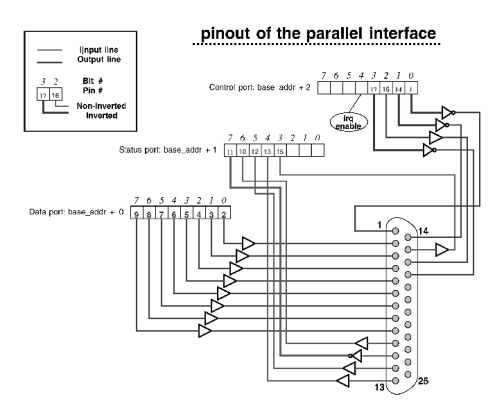
Figure 1. Mapping of Three Ports to Connector
Physical access to the ports is achieved by calling two C-language functions defined in the kernel headers:
#include <linux/io.h>
unsigned char inb(unsigned short port);
void outb(unsigned char value, unsigned short port);
The “b” in the function name means “byte”. Linux also offers inw (word, 16-bit), inl (long, 32-bit) and their output counterparts, but they are not needed to use the parallel port. The functions just shown are in fact macros, and they expand to a single machine instruction on most Linux platforms. Their definition relies on extern inline functions; this means you must turn optimization on when compiling any code using them. The reason behind this is somehow technical, and it is well explained in the gcc man page.
You don't need to be in kernel space to call inb and outb. If you want to access I/O ports from a shell script, you can compile inp.c and outp.c and play games with your devices (and even destroy the computer). For this reason, only root can access ports. The source code for inp.c and outp.c is available by anonymous download in the file ftp://ftp.linuxjournal.com/lj/listings/issue47/2662.tgz.
Based on the description of the parallel port I provided in the previous section, it should be clear that two parties that communicate using PLIP must exchange five bits at a time, at most. The PLIP cable must be specially wired in order to connect five of the outputs of one side to the five inputs at the other side, and vice-versa. The exact pin out of the PLIP cable is described in the source file drivers/net/plip.c and in several places elsewhere, so I won't repeat the information here.
One of the deficiencies of the parallel port is the unavailability of any timing resources in hardware. Compare this with the serial port which contains its own clock. The communication protocol can't exploit any advanced hardware functionality, and any handshake must be performed in software. The chosen protocol uses one of the bits as a strobe signal to signal the availability of four data bits; the receiver must acknowledge receipt of the data by toggling its own strobe line. This approach to data transmission is very CPU intensive. The processor must poll the strobe signal to send its data, and system performance degrades severely during PLIP data transfers.
The time line of a PLIP transmission is depicted in Figure 2, which details the steps involved in the transmission of a single byte of information.
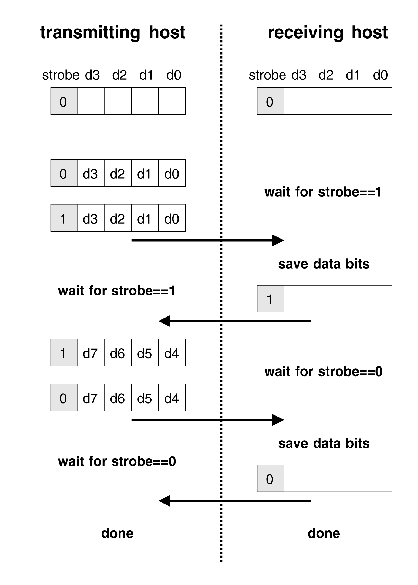
Figure 2. Time Line of PLIP Transmission
As far as the kernel proper is concerned, the PLIP device is just like any other network device. More specifically, it is like any other Ethernet interface even though its name is plipx instead of ethx.
When a datagram must be transmitted through a network interface, it is passed to the transmission function of the device driver. The driver receives a socket-buffer argument (struct sk_buff) and a pointer to itself (struct device).
With PLIP, transmission occurs by encapsulating the IP datagram into a “hardware header” for delivery, not unlike what happens for any other transmission medium. The difference with PLIP is that although it receives a data packet that already includes an Ethernet header, the driver adds its own header. A packet encapsulated by PLIP, as it travels over the parallel cable, is made up of the following fields:
Packet length: Transmission is headed by the length of the data packet in bytes, least significant byte first. The count is transmitted as a 16-bit number that doesn't include the count itself or the final checksum byte.
Ethernet header: PLIP uses Ethernet encapsulation, so that programming the first implementation (in the PC world, when Linux didn't exist) was simplified. These fourteen bytes are almost useless, but they are still present for backward compatibility.
IP data: IP data directly follow the header, just as with Ethernet interfaces.
Checksum byte: The trailing byte of a PLIP transmission is a checksum byte, which must equal the sum modulo 256 of every data byte in the packet, excluding the leading two bytes (the length) and the checksum itself.
Whenever a packet is transmitted, all of the bytes are sent through the cable using the 5-bit protocol described earlier. This is quite straightforward and works flawlessly, unless something goes haywire during transmission.
The interesting part of a PLIP communication channel is how asynchronous operations are handled. Transmission and reception of data packets must fit with other system operations and must be fault tolerant as much as possible. This involves several kernel resources and is quite interesting to anyone interested in kernel internals.
There are three problems to overcome to achieve reliable PLIP transmission. Outgoing packets must be transmitted asynchronously with respect to the rest of the system; even if transmission is CPU bound, it should happen outside of the normal computational flow. Incoming packets must also be received asynchronously, and they must be able to notify the PLIP device driver about their arrival. The last problem is fault tolerance; if one of the parties locks up transmission for any reason, we don't want the peer host to freeze while it waits for a strobe signal.
Asynchronous operation is achieved in PLIP by using the kernel task queues (which were introduced in the June 1996 issue of Linux Journal). Fault tolerance and timeouts are implemented using a state-machine implementation that interleaves PLIP transmission/reception with other computational activities without losing track of the internal status of the transmitter.
Let's look at PLIP cable connecting machines called Tanino and Romeo (Tanino = Tx, Romeo = Rx). The following paragraphs explain what happens when Tanino sends a packet to Romeo.
Tanino sends the signal to interrupt Romeo, disables interrupt reporting for itself and initiates the transmission loop by registering plip_bh in the immediate task queue and returning. When plip_bh runs, it knows that the interface is sending data and calls plip_send_packet.
Romeo, when interrupted (plip_interrupt), registers plip_bh in the immediate task queue. The plip_bh function dispatches computation to plip_receive_packet, which disables interrupt reporting in the interface and starts receiving bytes.
Tanino's loop is built on plip_send (which transmits a single byte) while Romeo's loop is built on plip_receive (which receives a single byte). These two functions are ready to detect a timeout condition, and in this case, they return the TIMEOUT macro to the calling function, which returns TIMEOUT to plip_bh.
When the callee aborts the loop by returning TIMEOUT, the plip_bh function registers a function in the timer task queue, so that the loop will be entered again at the next clock tick. If timeout continues after a few clock ticks, transmission or reception of this packet is aborted, and an error is registered in the enet_statistics structure; these errors are shown by the ifconfig command.
If the timeout condition doesn't persist at the next clock tick, data exchange goes on flawlessly. The state machine implemented in the interface is responsible for restarting communication at exactly the place where the timeout occurred.
As you see, the PLIP interface is fairly symmetrical.
As far as a network driver is concerned, being able to transmit and receive data is not the whole of its job. The driver needs to interface with the rest of the kernel in order to fit with the rest of the system. The PLIP device driver devotes more or less one quarter of its source code to interface issues, and I feel it worth introducing here.
Basically, a network interface needs to be able to send and receive packets. Network drivers are organized into a set of “methods”, as character drivers are (see Dynamic Kernels: Discovery, LJ April 1996). Sending a packet is easy; one of the methods is dedicated to packet transmission, and the driver just implements the right method to transmit data to the network.
Receiving a packet is somehow more difficult, as the packet arrives through an interrupt, and the driver must actively manage received data. Packet reception for any network interface is managed by exploiting the so-called “bottom halves”.
In Linux, interrupt handling code is split into two halves. The top half is the hardware interrupt, which is triggered by a hardware event and is executed immediately. The bottom half is a software routine that gets scheduled by the kernel to run without interfering with normal system operation. Bottom halves are run whenever a process returns from a system call and when “slow” interrupt handlers return. When a slow handler runs, all of the processor registers are saved and hardware interrupts are not disabled; therefore, it's safe to run the pending bottom halves when such handlers return. It's interesting to note that new kernels in the 2.1 hierarchy no longer differentiate between fast and slow interrupt handlers.
A bottom-half handler must be “marked”; this consists of setting a bit in a bit-mask register, so that the kernel will check whether any bottom half is pending or not. The immediate task queue, used by the PLIP driver, is implemented as a bottom half. When a task is queued, the caller must call mark_bh(IMMEDIATE_BH), and the queue will be run as soon as a process is done with a system call or a slow handler returns.
Getting back to network interfaces, when a driver receives a network datagram, it must make the following call:
netif_rx(struct sk_buff *skb)
where skb is the buffer hosting the received packet; PLIP calls netif_rx from plip_receive_packet. The netif_rx function queues the packet for later processing and calls:
mark_bh(NET_BH)Then, when bottom halves are run, the packet is processed.
In practice, something more is needed to fit a network interface into the Linux kernel; the module must register its own interfaces and initialize them. Moreover, an interface must export a few house-keeping functions that the kernel will call. All of this is performed by a few short functions, listed below:
plip_init: This function is in charge of initializing the network device; it is called when init_module registers its devices. The function checks to see if the hardware is installed in the system and assigns fields in the struct device that describes the interface.
plip_open: Whenever an interface is brought up, its open function is called by the kernel. The function must prepare to become operative (similar to the open method for character devices).
plip_close: This function is the reverse of plip_open.
plip_get_stats: This function is called whenever statistical information is needed. For example, the printout of ifconfig shows values returned by this function.
plip_config: If a program changes the hardware configuration of the device, this function is called. PLIP allows you to specify the interrupt line at run time, because probing can't be safely performed when a module is loaded. Most of the parallel ports are configured to use the default interrupt line.
plip_ioctl: Any interface that needs to implement device-specific ioctl commands must have an ioctl method. PLIP allows changing its timeout values, although I never needed to play with these numbers. The plipconfig program allows changing the timeouts.
plip_rebuild_header: This function is used to build an Ethernet header in front of the IP data. Ethernet interfaces that use ARP don't need to implement this function, as the default one for the Ethernet interface does all of the work.
init_module: As you probably already know, this is the entry point to the modularized driver. When a network interface is loaded to a running system, its init_module should call register_netdev, passing a pointer to struct device. Such a structure should be partly initialized and should include a pointer to an init function which completes initialization of the structure. For PLIP, such a function is plip_init.
These functions, along with hw_start_xmit, the one function responsible for actual packet transmission, are all that's needed to run a network interface within Linux. Although I admit there's more to know in order to write a real driver, I hope the actual sources can prove interesting to fill the holes.
My choice to discuss PLIP is motivated by the easy availability of such a network connection, and the do-it-yourself approach that might convince someone to build their own infrared Ethernet link. If you really are going to peek in the sources to learn how a network interface works, I'd suggest starting with loopback.c, which implements the o interface, and skeleton.c, which is quite detailed about the problems you'll encounter when building a network driver.
If you are more keen to use PLIP than to write device drivers, you can refer to the PLIP-HOWTO in any LDP mirror, and to /usr/doc/HOWTO in most Linux installations.


