X-Designer

Manufacturer: Imperial Software Technologies (IST)
E-mail: sales@ist.co.uk
URL: http://www.ist.co.uk
Price: $3445 UK Pounds Sterling for commercial single user
Platform: Virtually any Unix/X platform including Linux
Reviewer: Timotej Ecimovic
X-Designer is a state-of-the-art, multiple-award-winning GUI builder that runs on most Unix/X workstations. It generates native code for the OSF/Motif widget set, with sources either in C, C++ or UIL, the Motif user interface language. Not just for Motif, it can also produce code which compiles on Microsoft Windows platforms, using the MFC class library for GUI elements. Sounds promising, doesn't it? The very edition I had in my hand read X-Designer release 4.6: Java Edition--it can produce Java code as well.
Naturally, my excitement was growing as I opened the stylish box and got ready to install this expensive piece of software on my PC. Inside the box, I found a small manual called “Installation and Release Notes”, a large book of 840 pages with the title “Release 4.6 User Guide”, some advertisements and licensing material, two reference cards and a white CD-ROM containing the software.
The target PC was a 100MHz Pentium with 16MB RAM and 16 bpp XFree3.2 server for the ATI Mach64 graphics adapter with 2MB memory. This was more than enough memory for X-Designer. The Linux residing on the PC disks was a Slackware 3.0 distribution with 2.0.0 kernel. I had no Motif, just freely available lesstif libraries version 0.81. After all, X-Designer manuals claimed that Motif is not needed for running the builder and only Motif version 1.2 is needed for the created applications, not the newer 2.0 version.
Installation was smooth and trouble-free. As soon as the CD-ROM is mounted, X-Designer can be run in demo mode if the ISO 9660 Rock Ridge extensions are supported. The installation is done with a single Install command, where the only mandatory specifications are the location of the LINUX distribution files (e.g., /cdrom/LINUX) and the destination directory (/usr/local/xdesigner/ in my case). The installation took about 21MB of disk space and was accomplished in a robust and straightforward way. No fancy installation options, but you can rely on its successful completion.
Immediately after installation, the X-Designer still ran only in demo mode, which doesn't enable saving the designs or generating any code. I proceeded to the licensing section of the installation manual. To obtain the license, a special host ID must be calculated with a provided program and e-mailed to IST for the license request. The support staff responded within minutes. Using the very good manual section about setting up the license file and running the provided IST licensing daemon, I had X-Designer up and running under full power less than 30 minutes from the time I started the installation.
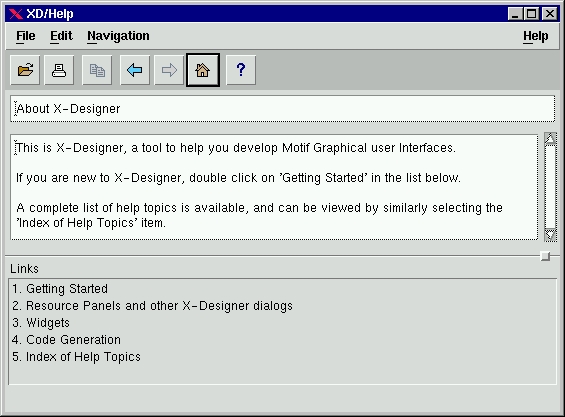
The user interface is appealing and is designed with programmers in mind, not the users who go “aaaah” at every flashy icon that pops up. Help was there, as it should be with any Motif application. By default, the provided XD/Help browser is launched at help request, but there is an option to use Netscape or any other browser for the same purpose. I prefer the provided XD/Help utility, since Netscape offers the same functionality but eats up system resources mercilessly compared to the small XD/Help and even X-Designer itself. Help is all in text mode, but I believe that after using X-Designer for some time, the need for the on-line help slowly vanishes. There is no Motif programming information provided, and the widgets are described only briefly. A Motif reference book should be handy while seriously using X-Designer. I believe the help system serves its purpose very well and is designed with the correct assumption that advanced users do not need a lot of colorful diagrams, examples and tips, but just a quick reminder of what is happening.
Figure 2. Help Utility
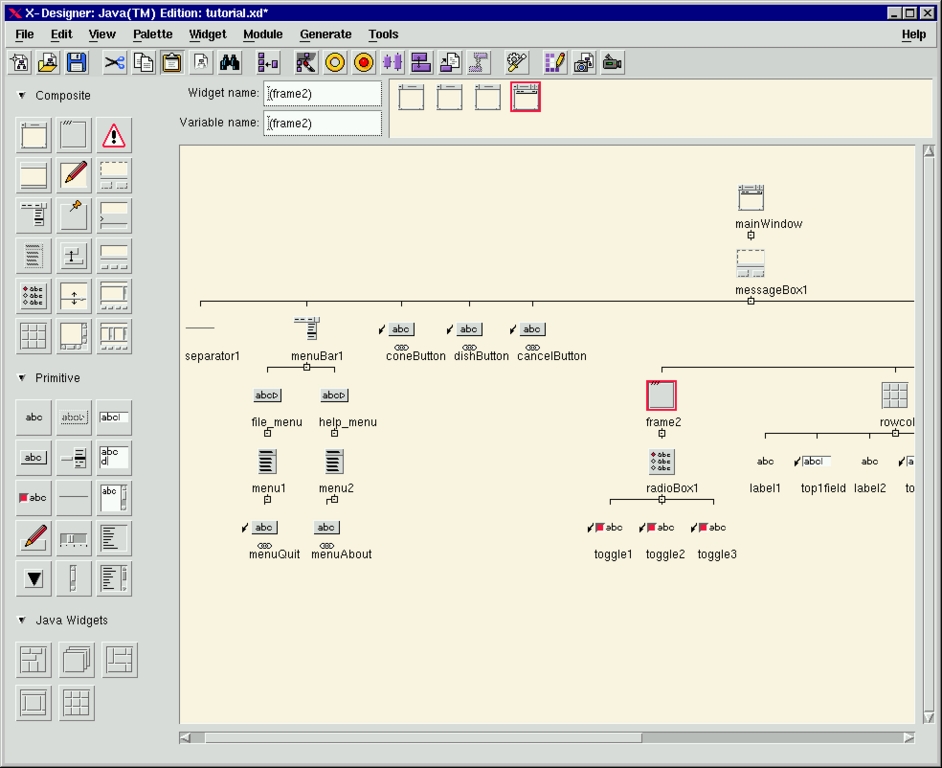
The work area of the main window provides a fair display of the widget instance tree structure. As the widget trees can grow large for larger applications, many options are provided to keep much of the design within visual range. Branches can be collapsed, and the icons for the widgets can be set to a smaller size. The tree can be left-justified and the special annotation bitmaps can be placed beside widgets to visually remind the user of their special properties. The work area has a highly professional design and provides the developer with the needed information about the designed GUI.
The application appearance is built simultaneously as the elements are added to the design tree. X-Designer doesn't simulate the appearance; it actually builds the widget tree from the real widgets. This makes it a sort of WYSIWYG GUI builder, which introduces a dangerous possibility. If the actual widgets created while building the application are connected or configured in a forbidden manner, X-Designer may crash because an unexpected widget condition will appear within the X-Designer executable. Being aware of this problem, I tried to create all kinds of weird designs, but X-Designer is very strict and positively sure it knows more about Motif than I do—it would not allow me to add invalid widget relations to my design.
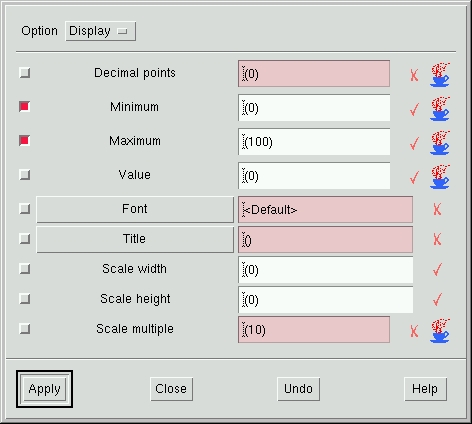
Figure 3. Typical Resource Box
All the standard editing options are present, including support for printing a PostScript image of your widget trees. The resource boxes are available, as one would expect from a GUI builder. A separate resource panel and core resource panel are available for each widget. The panels are aware of the Motif defaults and let you set any resource. The Motif power is not hidden in any way; it is just easier to use.
Callbacks can be manipulated in a similar way. The dialogs for setting callbacks allow you to type in the name of the function and the client data which is to be passed to the callback along with the other parameters. X-Designer does not implement an editor for directly editing the code, but there is an “Edit” button in the callback dialog. It runs your favourite editor as defined by the EDITOR environment variable. As I am an Emacs fan, I use emacsclient as my editor, which connects to the running Emacs server for file editing. At first I was annoyed to find the extra xterm popping up to run emacsclient. However, the User's Guide is very informative, and with its help I quickly found the location of the shell script which X-Designer uses to run the editor. I added the emacsclient, and no more annoying xterm. The configurability of X-Designer is worth all the money you pay for it.
Editing the callbacks actually means editing the stubs file, which is generated during the code-generation process. X-Designer puts a short comment before each callback, which must be left intact if you want to keep your callback code after generating successive stubs files. You can even add some code into the stubs file which has nothing to do with the callbacks, and it will be left there after regeneration of the source files. Just follow the well-documented method by which X-Designer treats those comments.
Besides the usual callbacks, links can be created as well. They are special simple callbacks which can be attached to buttons in order to trigger simple actions like enable/disable, manage/unmanage or show/hide certain widgets. Basically, links are just callbacks which are saved with your design into an .xd file and actually work in the prototype GUI built dynamically by X-Designer. Note that the regular callback code is not saved anywhere other than in the stubs file.
Code generation is the core operation of every GUI builder. Though X-Designer's friendly interface leads you through the GUI design, code generation is the reason you bought it. I think the Motif/C combination for Unix/X workstations is the native configuration. I tried to create a few small GUIs; they all worked and compiled without warnings. All I had to do was manually set the location of the Motif libraries and headers in the Makefile, since I keep them in the /client/lesstif directory. The same applies for the C++/Motif combination, which also worked flawlessly.
Portability is an important issue today, so I set out to explore the Java and Microsoft Windows code generation options. I had a design targeted for a Motif/C combination, and I tried to change it to Java code. Of course, the callback code was useless; I didn't expect X-Designer to translate my C code into Java code, but links also work in Java. The prerequisite for Java designs is to include the path to a set of Java classes, which are provided with X-Designer, in the CLASSPATH variable. The classes are put into the package called uk.co.ist.mwt. They provide components which have counterparts in Motif but are missing in Java. There are also some widgets which are added to the standard Motif set to implement some Java components not present in Motif. They are container widgets, such as the Card Widget, Flow Widget, Border Widget, Grid Widget and GridBag Widget. This enables the WYSIWYG development of Java applications.
Changing my test design for Java required toggling the Java compliance toggle-button under the Module menu. X-Designer then checks the current design, giving you messages about any non-compliant parts. Sometimes the “Fix” button will be enabled, allowing you to trigger the automatic fix for Java Compliance; otherwise, you have to do it yourself. If you know about Java and Motif, the messages generated by X-Designer are more than enough to give you a clue about what is happening. I don't know much about Java, but I know enough to make the design Java compliant within minutes. The Java code generation dialog is different than the C/Motif one in that you must specify which file to create. A file for every class, the top-most application class file and separate sources for string, color, font and other objects are included. Using JDK 1.0.2, I compiled and ran the application without any problems as a Java application. I could have built a Java applet, in which case additional constraints might have popped up.
All of X-Designer's dialogs use the same convention of marking the resources and settings which are relevant for Java. Whenever there is a steaming coffee cup icon next to the resource, it means that it will be honoured in Java code. A very good feature, since at the time you make a change you can note immediately whether or not the change code remains Java compliant.
Using X-Designer for building Microsoft Windows applications is another prime feature. X-Designer must be started in Windows mode to enable this cross-platform development. It can be done via resource, or via running it by typing xdesigner<\!s>-windows. In this case, an additional button is added to the tool bar, to toggle the Windows compliance. The procedure is similar to the one used for Java. If you read an already created Motif design into Windows-aware X-Designer, it prompts you with a dialog containing all the warnings and reasons for Windows non-compliant design. Sometimes it can fix the problems, other times it cannot.
Code for Windows is always generated as C++, in three flavours: Motif, MFC or Motif XP. Motif XP is a set of provided classes similar to Motif, but named to match the Microsoft Foundation Classes. Since Motif is much more flexible and allows more freedom than MFC, the basic task X-Designer must perform is to apply additional constraints on the design to force Windows compliance. This is the only method of MFC code generation. In all the dialogs, a convention is used for the MFC-honoured resources; if the entry field or button is painted pink, it means that the resource is honoured only by Motif and not by MFC.
X-Designer contains very advanced tools for C++ class structure and hierarchy maintenance. A subset of a design can be created as a C++ class, and access control can be applied for any widget member. One can use methods such as callbacks and even create custom preludes into the source code to add additional class members. An interesting feature is definition creation, which can be put on the widget palette as a reusable group of widgets. C++ programmers will find the abundance of features extremely useful, as the class structure becomes the property of the design and can be maintained in cross-platform applications.
All the code-generation options are well beyond the scope of this review, but I am convinced that even though Motif is the native toolkit of X-Designer, Java and MFC support are advanced, and most importantly, they work. For any design information that can be ported to Java or MFC, X-Designer keeps track of it and properly implements it. Every issue is considered, including font inconsistencies, color incompatibilities, different native pixmap formats and problems with long filenames under Windows platforms.
X-Designer hosts many features which deserve a review of their own but will receive only a brief description here.
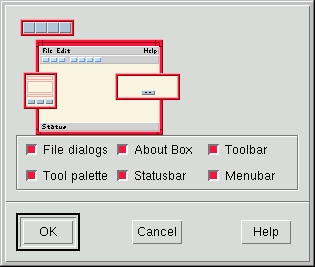
AppGuru is the interface to previously designed templates for GUIs. Initially, it contains the default template which enables you to quickly create applications with standard components, such as a menu-bar, a tool bar and file selection dialogues. At first the AppGuru looks like a cute toy, but its power lies in its configurability. Each design can be changed into a template. Using X-Designer resources, the new template can be incorporated into the AppGuru menu with control over the separate components, which may or may not be added into the new application. The freedom with resources is great, so the X-Designer administrator in a large software company can add pixmaps which represent components. Users can easily select ones which are really needed. I think this is a great tool for a software engineering environment, where several pre-designed interfaces can be set up according to internal policy. Company information dialogues and standard application parts can be automatically inserted into new designs.
User-defined widgets allow the GUIs created with X-Designer to look beyond Motif and use widgets provided by a third party or even custom widgets. When I first saw X-Designer, I noticed the special widget for OpenGL as supplied by the MesaGL package in the palette of X-Designer widget icons. I was curious how it got there since it is not a Motif widget. The basic idea behind this very complex concept lies in the interface between X-Designer and the widgets used in the GUI building process.
Any widgets can be chosen for incorporation into X-Designer. You must run the provided xdconfig utility to create the configuration files which tell X-Designer about resources, constraints and children all new widgets can have. Even icons can be provided in pixmap form for addition to the X-Designer widget palette. Specifying the code generation options for every new widget is a mandatory task. After all this is done, rebuild X-Designer using all the configuration files and the provided xdesigner.o object file. The new binary will contain X-Designer with the newly added widgets.
Installation provides many configurations for common widget sets, and I tested the Athena widget set which worked fine. I can now build GUIs with the Athena widget set, forgetting Motif. The only drawback to this process is the fact that new widgets are compiled into X-Designer itself. If for some reason, the widgets cause segmentation faults or otherwise behave badly, X-Designer may crash. I actually managed to crash it by laying out Athena widgets in an invalid hierarchy. Creating successful widget configurations requires deep knowledge of the widgets, C, make and X-Designer.
With X-Designer, an on-line help subsystem can be created for the new applications. All help is written in HTML files with anchors as documented in the User's guide. You must only decide whether your application will use XD/Help, Netscape or FrameMaker for the help browser—just link an additional provided object file with your application.
The XD Replay/Capture tool is another amazing tool that comes with X-Designer. With Capture, you select the Motif application and capture its widget instance tree. Only the executable of the application is needed; Capture takes a snapshot of its widget structure which you can then drag into X-Designer and reuse. You can then take your old Motif applications, capture them and develop them further with X-Designer. As I understand, the tool works by inserting a sort of parasite shared object into the application which records the widget tree creation. The application must be dynamically linked with Xt for Capture to work. A similar tool is XD Record/Replay; it records any events within the application in an internal script language. These can later be replayed for the purpose of demonstrations, tutorials, testing and other cases where automatic behaviour of an application is desirable.
Figure 5. Record your application behaviour!
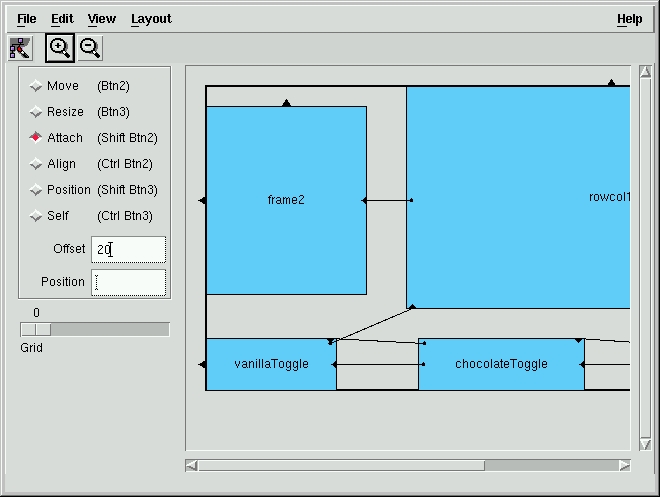
Among simpler design tools are the XmString editor, pixmap editor, font and color selection tools and layout editor. With the XmString editor, arbitrary XmStrings can be generated on a WYSIWYG basis, a fact any Motif programmer will appreciate. The layout editor is a cool tool to define the layout of child widgets within the container widget. As this is a tedious business, the layout editor provides great help with setting up those widgets in a functional and resize-friendly way. Using the pixmap editor, which is functional and serves its purpose well, caused an interesting event. The first time I selected the Pixmap editor entry in the menu bar, X-Designer crashed. Strange behaviour, I thought, but quickly decided to use this crash for testing the IST user support. I sent e-mail to support@ist.co.uk describing my problem, and within less than 30 minutes I got a correct answer to the faulty behaviour. The Pixmap editor clashed with the default .fvwmrc setting for a cryptic Meta 3rd-Mouse-button combination which is locked for FVWM private use. I don't use it, so I removed the line from .fvwmrc, and now the pixmap editor works fine. Well done, IST support team. I can understand a glitch or two in any product, and that's why good user support is necessary.
X-Designer is a mature tool, and its authors have learned all the tricks of the GUI-builder business. It won two Advanced System Magazine Best Product of the Year awards (1993 and 1995) and was the X Advisor Best Product in 1995. Its features make it the most advanced GUI building tool available, to my knowledge. The basic functionality is accessible via a very straightforward and efficient user interface, which never bothers you with unnecessary dialogues, questions and myriad different windows.
X-Designer is highly configurable on multiple levels, so it can be suited to an individual company's internal demand and further tailored to the needs of each user or department subdivision. You can even change the default widget icons into more colorful ones or disable the use of certain Motif widgets, if you wish.
X-Designer is a tool for tough GUI professionals who cannot let the GUI builder dictate their shipping deadlines. For home users, it is a tool from another world, which makes me sigh sadly at the thought of the approaching date when my reviewer's license expires.