
Caching the Web, Part 1
The web is everywhere. Everyone uses it. Everyone talks about it. But in this less-than-perfect world, you know there are problems. Bandwidth is a problem. Web document latency (the time a document takes to arrive at your browser once its URL is requested) is a problem. As more of your bandwidth space is used, latency of documents retrieved from the Internet increases. Bandwidth is expensive, perhaps the most expensive element of an Internet connection.
Despite the fact that the web is growing fast, the same documents get requested and the same web sites are visited repeatedly. We can take advantage of this to avoid downloading redundant objects. You would be surprised to learn how many of your users read the NBA.COM web pages, or how many times the GIFs from AltaVista cross your line.
Even if you know nothing about web caching, you are probably using it with your web browser. Most common browsers use this approach with the documents and objects you retrieve from the Web, keeping a copy of recent documents in memory or disk. Each time you click on the “back” button or visit the same page, that page is in memory and does not need to be retrieved. This is the first level of caching, and the technique can be expanded to the entire web.
The basic idea behind caching is to store the documents retrieved by one user in a common location, and thus avoid retrieving the same document for a second user from its source. Instead, the second user gets the document from the common place. This is very important when you deal with organizations in Europe, where most of the inbound traffic comes from the other side of the Atlantic, frequently across slow links.
The main benefit of this approach is the fact that your users' browsing is now collaborative, and an important number of the documents your users retrieve are served in a very small period of time. In a medium-sized organization (with between 50 to 100 users), you can serve up to 60% of URL requests from the local cache.
The difference between a browser cache and a proxy-cache server is that the browser cache works for only one user and is located in the final user workstation, while the proxy-cache server is a program that acts on behalf of a number of web browser clients, allowing one client to read documents requested by others earlier. This proxy-cache server is located in a common server that usually lies between the local network and the Internet. All browsers request documents from the proxy server, which retrieves the documents and returns them to the browsers. It's the second level of caching in an organization. Figure 1 shows this type of network configuration.
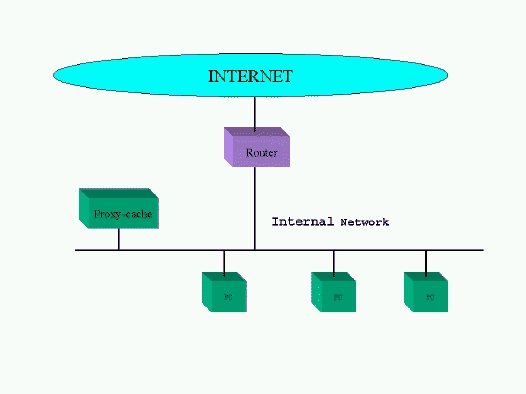
Figure 1. Proxy-cache Server Network Configuration
A proxy-cache is not just a solution to the bandwidth crisis; it is also desirable when a network firewall is needed to guarantee the security of your organization. In this case, the proxy-cache sits on a computer accessible from all local browsers, but isolates them from the Internet at the same time. This computer must have two network interfaces attached to the internal and external networks and must be the only computer reachable from the Internet. Figure 2 illustrates such a configuration. The proxy-cache server must be accessible only by internal systems to ensure that no one on the Internet can access your internal documents by requesting them from the proxy-cache. I will discuss access control to the proxy-cache later in this article.
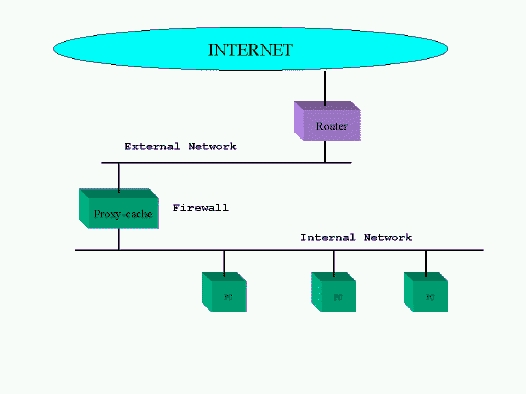
Figure 2. Proxy-cache Network Configuration with Firewall
One step forward from this approach is the concept of a cache hierarchy, where two or more proxy-cache servers cooperate by serving documents to each other. A proxy-cache can play two different roles in a hierarchy, depending on network topology, ISP policies and system resources. A neighbor (or sibling) cache is one that serves only documents it already has. A parent cache can get documents from another cache higher in the hierarchy or from the source, depending whether it has more parent or neighbor caches in its level. A parent cache should be used when there are no more opportunities to get the document from a cache on the same level.
Choosing a good cache topology is very important in order to avoid generating more network traffic than without web caching. An organization can choose to have several sibling caches in its departmental networks and a parent cache close to the network link to the Internet. This parent cache can be configured to request documents from another parent cache in the upstream ISP, in case they have one (most do). Agreements can be made between organizations and ISPs to build sibling or parent caches to reduce traffic overload in their links, or to route web traffic through a different path than the regular IP traffic. Web caching can be considered an application-level, routing mechanism, which uses ICP (Internet Cache Protocol) as its main protocol. Figure 3 is an example of how an organization can implement multi-level web caching.
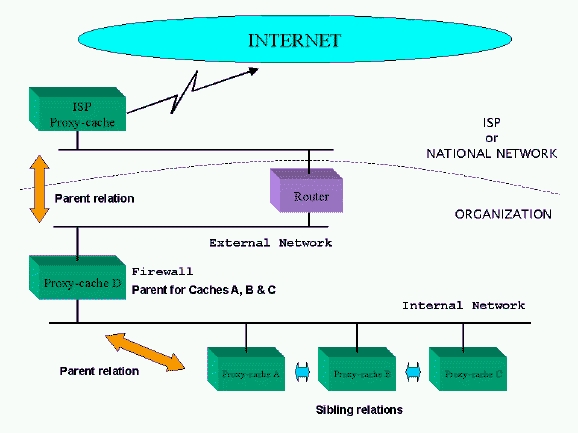
Figure 3. Multi-level Web Caching Organization
ICP, Internet Cache Protocol, is a protocol used for communicating among web caches. A lightweight protocol built on top of UDP, ICP is used to locate specific web objects in neighboring caches. Most transfers of objects between caches are done with the TCP-based HTTP protocol, but making the decision of where to retrieve an object must be done with a simpler and faster mechanism. Other information needed is which caches are down or have congested links.
One cache, in order to find the best location from which to download an object, sends an ICP request packet to all of its siblings and parent caches, and they send back ICP replies with a HIT or MISS code. A HIT code means this cache has the object and agrees to serve it. A MISS code means it doesn't have the object. Thus, the cache now knows who has the object it needs, and, combining this information with other factors such as round-trip times of each response, can perform the cache selection and make the request via HTTP to its choice. If all the caches reply with MISS packets, it requests the document from its parent cache. An ICP request/reply exchange should occur in a second or two, so the latency increases this time for the browser, but this is usually not noticed by the end user.
If the object requested via ICP is small enough, it can be included in the ICP HIT reply, like an HTTP redirect, but this is not a very common situation. Of course, ICP is needed only in a multi-level cache environment with multiple siblings and parent caches. Using ICP is not necessary in situations like the ones in Figures 1 and 2. When only one cache is involved, or when one cache always requests documents from the same higher-level cache, ICP would only add unwanted overhead.
At this point, we must realize that not all objects in the web are cacheables. Most FTP files are, as well as most static web pages, but a large number of CGI-generated web pages (dynamic documents) are not. This kind of document is non-cacheable, because it is different each time you request it. Two good examples of this kind of object are access counters and live database queries. Caching a reply from a flight reservation system is senseless, since the next query will most likely return more up-to-date values. Other kinds of documents which should not be cached include SSL documents (securely transmitted documents).
Even if you do not have a proxy-cache server, you must be aware of the effects other proxy-cache servers are causing on the Internet. You may be publishing information on your web server that other caches are storing and serving for more time than you probably want. This is particularly true if you periodically update your site and it's important to you that a final user never gets out-of-date pages or graphics.
A document in a cache server can have three different states: FRESH, NORMAL and STALE. When an object is FRESH, it is served normally when a request for it arrives without checking the source to see if the object has been modified since its last retrieval. If it's in NORMAL state, an If-Modified-Since GET request is sent to the source, so the cache server downloads the object from the source only if it has changed since its last retrieval. A STALE document is no longer valid, and it's retrieved from the source again.
Normally, when a web server sends a document, it adds an HTTP header called Last-Modified containing the date the object was created or last modified. This data is used by cache servers to heuristically calculate how much time may pass for the object to still be considered FRESH. Usually, a proportion of the time elapsed between the date the document was last modified and the date when the document was received is used. A normal proportion is 10% to 30% of this time. If this proportion is set to 20%, a document modified 10 days ago will remain in the cache only two days before being checked for changes.
Webmasters who frequently update their information need more control over the time their documents remain unchecked in web caches. In this case, the Expires HTTP header in the documents served by your server can be used to indicate when this document must be dropped by any cache server. This header explicitly gives the caches the expiration date of a document. A valid RFC1123 time format should be used with this header, for example:
Expires: Mon, 25 Aug 1997 10:00:00 GMT
This header can be generated easily in CGI scripts or the mod_expires module included in Apache 1.2. For example, the following Apache directives (in a <Directory> </Directory> or a .htaccess) would do it:
ExpiresActive On
ExpiresByType image/gif A432000
ExpiresByType image/jpeg A432000
ExpiresByType text/html A10800
The Expires header is activated for all subsequent documents with a value of five days for JPEG and GIF images and three hours for HTML documents.
If you have documents which should never be cached in any server or browser, use the HTTP header called:
Pragma: no-cache
Of course, a cache may expire an object sooner, based on site configuration, lack of free disk space, LRU (less recently used) policies, etc., but it can never cache an object beyond its Expires time.
Next month, we will discuss Squid, the best free software solution for building proxy-cache servers.

