Linux in a Scientific Laboratory
Our laboratory, the NIST Center for Neutron Research (NCNR) at the National Institute of Standards and Technology, uses neutron beams to probe the structure and properties of materials. This technique is in many respects similar to its better-known relative, X-ray scattering, but offers some unique advantages for studies of materials as diverse as semiconductors, superconductors, polymers and concrete.
Our work could not be done without computer technology. Computers help us collect experimental data: they interface with the real world, controlling and recording various physical parameters such as temperature, flux and mechanical position. The collected measurements need to be displayed, analyzed and communicated to others. All these stages require sophisticated and flexible computer tools. In this article we will describe how Linux helps us solve many needs that arise in our everyday work. We believe that our experience might be typical of any scientific or engineering research and development laboratory.
The main advantage we get from using Linux is its amazing flexibility. Because of the open development model and open source code, there are no “black box” subsystems; when something doesn't work correctly, we can usually investigate the problem and fix it to our satisfaction. The significant spirit of cooperation and mutual support found in Linux is important to us—a consequence of the general philosophy of open software as well as the practical result of source code being available for anyone to fix. Also, Linux is rather robust, in the sense that once something is set up, it stays set up; Linux shows none of the brittleness that, unfortunately, we have learned to expect from mainstream computer operating systems.
Unfortunately, sometimes we run into a lack of support for some useful hardware or software. Since few manufacturers actively support Linux, the driver availability on Linux lags behind Windows 95, although it is probably better than any other environment thanks to the excellent work of many people who contribute their hardware drivers. We avoid unsupported hardware by checking the availability of drivers before purchasing, and by staying away from the manufacturers who do not publish engineering specifications for their products.
In the end, we use whichever environment does the job better. Since some tools are available on Windows and not on Linux, we sometimes use the former. For instance, the LabView software, available on Windows, is an integrated graphical tool for rapid prototyping of data acquisition, with an impressive collection of instrumentation hardware drivers. It is sometimes the platform of choice, especially for exploratory work, although it doesn't scale well for more complex tasks.
Overall, we have about 25 computers running Linux. We have been very happy with their operation and have saved taxpayers a bundle of money in the process. We have seen Linux grow from a virtual unknown, perceived as risky and devoid of support, to its current status as a serious contender with brand-name UNIX and NT boxes, and we definitely see Linux in our future.
Real-world data acquisition usually requires endlessly repeated high-precision measurements, and so it is ideally suited for a computer, as long as the data is available in computer-readable form. Unfortunately, data acquisition is not a mass-market application, so the acquisition hardware tends to be expensive and hard to obtain, even for the ubiquitous PC/x86 platform. Consider a sound card: it has high quality analog-to-digital and digital-to-analog converters, timers, wave-table memory, etc., all for around $100 US. Similar hardware with relatively small modifications to make it suitable for data acquisition will probably cost around $1000 US.
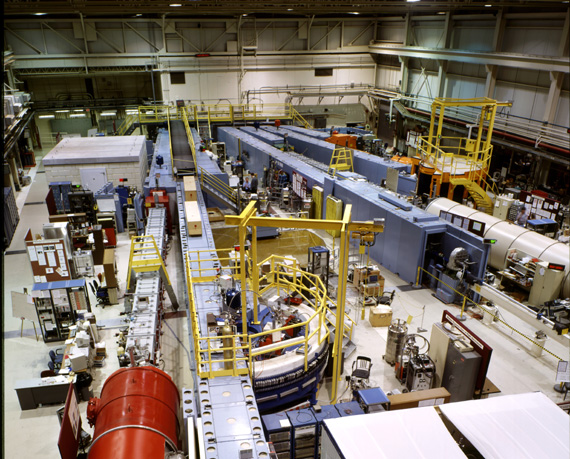
The scientific instruments we use at the NCNR are quite diverse and interesting on their own; a lot of mechanical and electronic engineering is involved even before computers get into the picture. Some of our instruments are quite impressive in size and weight—we actually use decommissioned battleship gun turret components to support them. You can get a feel for the scale of our instrumentation by looking at Figures 1 and 2; the experiment hall measures approximately 30 by 60 meters.
For the purpose of this article, let us assume all the hard work of designing and constructing an instrument has been done, including providing the appropriate sensors that measure the interesting physical quantities such as temperature, radiation intensity or position. Our task is to read data from these sensors into the computer. (Because of concerns for cost and availability of hardware, PC/x86 platform is the practical choice for data acquisition tasks.)
The easiest and quite common situation is for the instrument to have a built-in serial port. We can then talk to it using regular serial communication, just like talking to a modem. Examples of such instruments in our lab include stepper motor controllers, temperature controllers and various precise time measurement apparatus.
The simplicity of a serial-line (RS-232) interface has a cost: a serial connection is rather slow and unsuitable for situations requiring quick response or large amounts of data. It also has the annoying feature of being a very loosely defined standard. There are many variations: DTE vs. DCE configuration; hardware vs. software handshake; various settings of data, stop and parity bits. With so many possibilities, the probability that two randomly selected devices will talk to each other right after plugging in the cable is vanishingly small. The ubiquitous “break-out box” is helpful here: it is a small enclosure connected in series with our serial cable, showing the status of data lines and allowing us to reroute individual signal lines with jumper wires.
Compared to the difficulty of figuring out the proper cabling and communication parameters, the actual programming of serial-port communications is trivial, since Linux already provides good quality serial-port drivers. (Linux, of course, does not rely on serial-port routines in PC BIOS and MS-DOS, since they are so inadequate that a whole cottage industry was created providing so-called “communication libraries”.)
One problem with serial-port communications: RS-232 is inherently a point-to-point link—there is no standard and reliable way of connecting multiple devices to the same serial line. There is a scheme where several devices are daisy-chained, i.e., the computer's transmit line goes to the receive input of device 1, its transmit goes to device 2's receive, and so on, until the transmit line of the last device returns to the computer's receive pin. This requires that all devices cooperate by passing on data not destined for them; it is also not reliable when there can be asynchronous responses from devices in the chain. One of the two standard serial ports usually provided on a PC platform is occupied by the mouse, so we need a multi-port expansion board if we need more than one serial line. Fortunately, Linux has built-in support for several inexpensive multi-port boards. We have used Cyclades and STB boards; they are very easy to configure, and their drivers present themselves to the programmer as a regular serial port.
For initial exploration and testing, we normally use either the Seyon or Kermit terminal emulators. Seyon comes with most Linux distributions, while Kermit has to be obtained from Columbia University's FTP site, as its license terms prohibit third-party distribution. The minicom program is harder to configure, so we do not use it much.
Nick wrote a Tool Command Language (Tcl) serial communication extension for flexible serial-port I/O, with timeouts and terminator characters. Tcl fits well within our environment because it can be conveniently embedded as a scripting tool for heavy-duty FORTRAN and C programs, and it allows for rapid development, while being robust enough to be deployed in a production environment. We will discuss the benefits of scripting in our environment later in the article.
Another hardware interface popular in scientific and engineering communities is the GPIB—General Purpose Interface Bus. It was designed and popularized by Hewlett Packard (hence its original name HP-IB), and later became an official industry standard, IEEE-488. It is a medium-speed parallel bus, capable of over 100Kbps bandwidth. Many scientific instruments support it, and there are relatively inexpensive controllers for PCs, made by Hewlett Packard, National Instruments and others. Fortunately, Linux kernel drivers, written by Claus Schroeter, already exist for most common GPIB cards. (See “GPIB: Cool, It Works With Linux” by Timotej Ecimovic, Linux Journal, March 1997.)
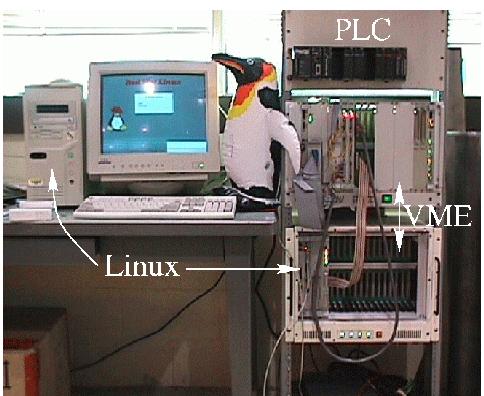
For those applications requiring very fast data transfer, the VME bus is a common choice. VME is popular in the telecommunications industry, as well as for industrial and military test and measurement applications. It is typically housed in large (and expensive) backplane crates, containing 24 card slots. Usually one of these slots is occupied by a controller that controls the I/O modules in the remaining slots. Originally, VME was designed to work with Motorola 68k-series CPUs, and so most crate controllers were 68k-based, but recently PowerPC and even Pentium-based controllers seem to be more popular.
It turns out that there are Linux ports to all of these architectures, but again, it was simplest for us to use an x86-based VME controller. In most respects, it is a standard Pentium/PCI miniature motherboard, with the only unusual feature being an on-board PCI-VME bridge chip. We use a controller made by VMIC with a VIC bridge chip set; Nick wrote a driver for it, based on another VME-bridge driver we found on the Net.
All VME I/O is done via memory mapping. The I/O modules are accessed by reading and writing their specific memory locations; the VME bridge chip is needed to translate CPU native bus cycles onto the VME bus. A program simply needs to map the appropriate memory area (using mmap), and it can then execute regular memory load and store operations to access the VME peripherals.
We are currently completing a large data-acquisition system that collects precise timing information from events observed at over 800 detectors. We have designed a front-end processor on a VME card module that handles 32 detectors, and another module which multiplexes data from these front-end modules into the crate controller. As the maximum possible data rate in this application is 300,000 events per second, VME is an appropriate platform.
PLC are widely used in the industrial process control environments. (See “Using Linux with Programmable Logic Controllers” by J. P. G. Quintana in Linux Journal, January 1997.) They are descendants of relay-based control systems and are built out of modular I/O blocks governed by a dedicated microcontroller. The available modules include digital and analog I/O, temperature control, motion control, etc. They trade off simplicity and low speed for low cost and industrial grade reliability; they are also very nicely integrated mechanically—individual modules pop into a mounting rail and can be installed and removed easily. There are several PLC systems on the market; we currently use the KOYO products.
Typically, a simple control program is developed in a proprietary cross-compiling environment (usually in the form of a relay “ladder diagram”, a method that dates back to days of electromechanical relays), and downloaded via a serial link. Typically such programs run under Windows, but they need be run only for development. After storing the control program in the flash memory, the microcontroller communicates with our Linux boxes, sending data and receiving commands via a built-in serial link.
The parallel port provides another popular computer interface. As Alessandro Rubini explained in “Networking with the Printer Port” (Linux Journal, March 1997), the parallel port is basically a digital I/O port, with 12 output bits and 4 input bits (actually, the recent enhanced parallel port implementations allow 12 input bits as well). To a dedicated hobbyist that is a precious resource, which can drive all kinds of devices (D/A and A/D converters, frequency synthesizers, etc); unfortunately, there is usually only one such port in a computer, and it tends to be inconveniently occupied by the printer. The serial port can also be used in a non-standard way; its status lines may be independently controlled and therefore provide several bits of digital I/O.
Such digital I/O can be used to “bit-bang” information to serial bus devices such as I2C microcontrollers. (I2C is a two-wire serial protocol used by some embedded microcontrollers, sometimes even available in consumer products.)
USB is another type of interface, appearing in terms of both available hardware and Linux support. Although designed for peripherals such as keyboards, mice or speakers, it is fast enough to be useful for some data-acquisition purposes, and some manufacturers have already announced future products in this area. One nice feature of USB is that a limited amount of power is available from the USB connector, thereby eliminating the need for extra power cables for external devices.
With the decreasing cost of hardware and the flexibility afforded by Linux, we have been planning to use distributed hardware control. Instead of having one workstation linked to all the peripherals, we can deploy several stripped-down computers (hardware servers), equipped with a network card but no keyboard or monitor. Each of these would talk to a subset of hardware, executing commands sent by the main control workstation (controlling client) over the network. For the servers we can use either older, recycled 486-class machines, or even the industry standard PC-104 modules (a miniature PC format composed of stackable modules around 10 cm by 10 cm in size). In this case, the Ethernet becomes our real-world interface.
Of course, we have also used Linux in the more traditional role as a general-purpose graphics workstation. Here, we are no longer limited to x86 architecture. Since we don't have to contend with hardware issues, we have a choice of several platforms, including Digital's Alpha-based computers. Currently (February 1998), it is possible to buy a 533MHz Alpha workstation for just over $2000 US; the prices seem to be going down, while the clock speed is going up into the reputed range of 800MHz. Alpha Linux is ready for serious computations at a very low price. Alpha is an excellent performer, especially for floating-point calculations—the SPEC benchmark shows an integer computation speed (SPECint95) of 15.7, and floating-point computation speed (SPECfp95) of 19.5 for a slightly slower 500MHz Alpha. By comparison, Pentium II at 233MHz exhibits SPECint95 of 9.49 and SPECfp95 of 6.43, one third the floating-point performance of the Alpha chip.
We have been using Linux-based PC stations since 1995. Often they simply serve as capable remote clients for our departmental computer servers, providing better X terminal functionality at prices lower than some commercial X terminals and for light local office computing. More and more, however, we have used them to perform local computations. An intriguing project we are currently considering is installing networked server processes for a certain kind of calculation often performed here (non-linear fitting) and distributing parallel calculations to servers which are not currently used by other clients. Since an average personal computer spends most of its cycles waiting for keystrokes from the user, we are planning to profitably use those free cycles.
This approach is, of course, inspired by the Beowulf cluster project, where ensembles of Linux boxes are interconnected by dedicated fast networks, to run massively parallel code. (See “I'm Not Going to Pay a Lot for This Supercomputer!” by Jim Hill, Michael Warren and Pat Goda, Linux Journal, January 1997.) There are several Beowulf installations in the Washington DC area including Donald Becker's original site at NASA, and the LOBOS cluster at National Institute of Health. In contrast, we plan to use non-dedicated hardware, connected by a general purpose network. We can get away with this because our situation does not require much inter-process communication.
Unfortunately, we don't have much space to discuss the scientific visualization; it is a fascinating field both scientifically and aesthetically; it involves modern 3-D graphics technologies, and some of the images are very pretty. Computer visualization is a new field, and consequently the development tools are as important as end-user applications. In our judgment, the best environment for graphics is provided by the OpenGL environment. OpenGL is a programming API designed by Silicon Graphics for their high-performance graphics systems, which is beginning to appear on Windows; on Linux it is supported by some commercial X servers. Also, Mesa is a free implementation of OpenGL that runs on top of X and makes OpenGL available on Linux. This involves a tradeoff—3-D graphics are significantly slower without the hardware assist provided by high-end graphics hardware and matching OpenGL implementation, but the X Window System's advantage of not being tied to any particular terminal is very significant.
Building on Mesa/OpenGL, there are many excellent visualization programs and toolkits, some referenced in the Mesa page. In particular, the VTK visualization widgets and their accompanying book are worth mentioning. Another application is GeomView, a generic engine for displaying geometric objects, written at the University of Minnesota's Geometry Center.
We have found the scripting-software methodology is very useful for both scientific computing and data acquisition. Scripting is a style of writing software where, instead of constructing a monolithic program with a hardwired control flow, we restructure the code by dividing it into modules which perform parts of the work. To glue these modules together, we compile them with a command-language interpreter.
High-Level Language (HLL) interpreters have been around for a long time (Scheme, Basic, Perl, Tcl, Python), but only recently has there been an emphasis on embedding them within users' programs. Even without such embedding, interpreters are still useful for prototyping, but they tend to run out of steam for larger projects. The key is to put together the flexibility of an interpreted system and the speed and functionality of the compiled HLL code.
For example, let's imagine a program that opens and processes a configuration file, asks the user for input and calculates some results. Traditionally, the control flow of such a program is hardwired in its main routine; each I/O phase is programmed separately with a separate syntax for each phase's data. (The configuration file might be a table of numbers, and the user input might have a form of simple ASCII strings representing commands.)
To rewrite this program in a scripting style, we would recast configuration and calculation phases as separate modules invoked by a scripting interpreter. The data for work modules would be kept in interpreter's variables, while the I/O would be handled by interpreter's native facilities. In order to complete the program, we have to write a short interpreter script that reads the configuration file, stores and processes the values, obtains user input, launches the calculation and outputs the result. The important point, and the one that takes a little while to get used to, is that there is no longer a hardwired control flow in the program: when it is started, the interpreter takes over and awaits the script (either from the command line or from a script file) to set the modules in motion.
Of the several modern scripting languages, we have chosen to use Tcl/Tk. Others, such as Python and Perl, are equally good and have similar capabilities. We have written a significant number of Tcl extensions, dealing with abstractions for platform-independent self-describing data files, binary data matrices and image processing, arithmetic expressions and others.
There are several benefits to the scripting approach. First, it provides for more flexibility: it would be trivial to change the interpreted script to perform two rounds of computations instead of one. Also, it is much easier to decouple the user-interface code from the computational code—all that is needed to add GUI data input is to rewrite the user-interface portions of the script so that it uses the interpreter's GUI widgets.
Second, the interpreter usually provides general-purpose linguistic constructs, such as macros/procedures, and looping and conditional statements. This makes it possible to write sophisticated and flexible batch processing scripts.
Note that a properly designed scriptable application reconciles an artificial and unnecessary distinction between command-line and GUI-based programs. The premise behind graphical user interfaces is to provide visual cues for all operations; however, the tradeoff is often that other operations, for which no GUI element was included, are impossible. In other words, a GUI promises a “What You See is What You Get” operation, but it often delivers “What You Get is What You Get”.
With scripting, the GUI is set up to invoke predefined command lists; at the same time, the interpreter can be directed to accept user-typed commands or file input, allowing for arbitrary command sequences. It is nice to be able to select a file using a file selector dialog, but anyone who has had to negotiate such file selection for a hundred files must appreciate the utility of typing process *.dat on the command line.
The final benefit of an extensible scripting language is that it is well-suited to create abstractions for complex objects or actions. Such abstractions are good for two reasons: they make complex manipulations easier to understand and perform, while at the same time they enable high performance since they are compiled extensions. A good example might be BLT, a Tcl graphing extension we often use. It is a sophisticated graphing tool with dozens of options. Its complex internal structure is simply encapsulated: the advanced options are available, but don't have to be used. All that is needed for a simple plot is to provide values for the X and Y coordinates of the plot. At the same time, because it is a compiled extension to Tcl, BLT enjoys quite good performance, even on large plots, comparable to visualization tools written entirely in C.
Thanks to the dynamic loading of shared libraries and extensions, an existing program can be enhanced with graphing capability by simply loading the BLT package. This creates the new graph command in the Tcl interpreter, which can then be used in the script that constructs the GUI.
Another example of a useful software abstraction that pops up in several places in our work is the numerical array. Such arrays are extremely important in science: they may contain vectors of data, geometrical coordinates, matrices, etc. The standard HLLs usually have a concept of such an array, but it is usually a second-class object. Arrays provide space for storage of data, but it is not possible to perform infix arithmetic operations on them in the same way as on simple, scalar variables. The array processing in such languages is done one element at a time, which is prohibitively slow for large matrices (see example below). (Of course, FORTRAN90 and as C++ with appropriate matrix algebra libraries allow writing computations like A*B for the matrices as well as scalar variables, but these environments aren't common yet, either on Linux or on commercial platforms.)
Typical C (HLL) code for doing a matrix multiply is as follows:
for( i=0 ; i<N ; i++)
    for( j=0 ; j<N ; j++)
      for( k=0 ; k<N ; k++)
        C[i][j] = A[j][k] * B[k][i]
      }
    }
  }
For Matlab/Octave (VHLL), the code looks like this:
C = A * BThe VHLL code is obviously easier to write. Also, in an interpretive language, the loop iterations are interpreted one by one; in VHLL, the whole operation is executed in machine code at full speed.
The term “Very High-Level Languages” refers to such problem domain-specific languages. For numerical computation, there is a commercial VHLL called Matlab. It provides a sophisticated environment for calculation and display of numerical data, with array variables as first-class objects. It is a very nice toolkit and is supported on Linux. Interestingly, there is a free clone of Matlab, called Octave, that provides a large part of its functionality; Matlab code typically runs unchanged in Octave. (See “Octave: A Free, High-Level Language for Mathematics” by Malcolm Murphy, Linux Journal, July 1997.) Those systems are addictive; once you use them for a while it is hard to go back to FORTRAN.
The above remarks are equally relevant on any OS platform, whether it is different flavors of UNIX or even on Windows or Macintosh. However, Linux provides the most complete software development environment. Various native scripting systems exist on individual platforms: Visual Basic on Windows, Hypercard and Metacard on a Macintosh; however, the commercial offerings are never complete. For instance, Visual Basic requires a separate C compiler to create binary extensions. On the other hand, Linux provides all the tools (Tcl/Tk libraries and header files, GCC compiler, etc.) out of the box.
Przemek Klosowski is a physicist working at National Institute of Standards and Technology. Since he stumbled onto the Internet 13 years ago, Linux 6 years ago and founded Washington DC Linux User Group 4 years ago, he is beginning to feel like an old geezer. This feeling is reinforced by his failure to get excited by Java. Still, his youthful enthusiasm is maintained by the success of Linux and other Open Software initiatives that he supports and sometimes contributes to. He can be reached via e-mail at przemek@nist.gov.
Nick Maliszewskyj is a physicist at the NIST Center for Neutron Research in Gaithersburg, MD, where he loves to play with the big toys to be found there. His current mission is to write software that will let hordes of other people play with them too. Activities in the non-binary world include Aikido, home repair, watching his 3-year-old son with amazement and preparing for the arrival of his second child. Nick can be reached by e-mail at nickm@nist.gov.
Bud Dickerson has always worked for physicists because they let him play with cool toys. He sleeps too well at night, however to be any better with Linux than he is. He can be reached at bud.dickerson@nist.gov.