PPPui: A Friendly GUI for PPP
PPP, the Point-to-Point Protocol, is today's protocol of choice for network connectivity over a serial line. For Linux users, the tools of choice are the PPP utilities. The utilities—pppd, chat and a collection of scripts and utilities—nicely manage the connection from startup to shutdown: dialing and logging in, starting up the protocol, adding routing information and closing the connection.
What the PPP utilities do not have is a good user interface. If you use the utilities, you know the routine: execute a script called something like /etc/ppp/scripts/ppp-on, listen to your modem make noise and wait while your network connection attempts to start working. If nothing happens, check the process list. If pppd isn't running, the login attempt failed and you need to try again. If the connection goes down, you eventually figure it out by checking the process list and starting a new connection. Things improve after you've used the PPP utilities awhile—you begin to recognize the state of the connection by the sounds of disk activity.
PPPui was written out of my frustration with the utilities' low-tech interface. It's an X-based (specifically, Tcl/Tk-based) GUI that provides very simple control over a PPP connection. The goal was to provide easy startup and shutdown and useful visual feedback about the connection.
The scenario for a PPPui session looks something like this:
Start PPPui. I've defined a window manager action, described below, that makes this a one-click operation.
A window comes up and reports the progress of the login process. If login fails, the window disappears and you must try again.
Once login succeeds and the PPP route is added, PPPui displays a running clock of your connect time. The clock is visible even when you iconify PPPui.
To terminate the connection, press PPPui's “Quit” button.
PPPui is implemented as a wish (WIndowing SHell—part of the Tcl/Tk package) script and requires wish4.2. It does not replace the PPP utilities, but does require some very minor changes to them—discussed later in detail.
The PPPui script was developed on a Slackware system using the PPP utilities source distribution. In the following description and in the script itself, there are assumptions about locations (scripts and executables) and permissions that do not necessarily apply to other distributions. The script takes two required arguments and two optional arguments. The basic invocation takes a PPP startup command, a PPP shutdown command and optionally the name of the PPP device being opened (defaults to ppp0). For example:
PPPui /etc/ppp/scripts/ppp-on\
        /etc/ppp/scripts/ppp-off ppp0
The startup and shutdown commands are interpreted by /bin/sh when they are invoked and can contain multiple arguments and anything else the shell will recognize. For example:
PPPui /etc/ppp/scripts/ppp-on\
        '/etc/ppp/scripts/ppp-off ppp0' ppp0
The other optional argument, -small, is
described in the section “Interacting with the Window Manager”.
After parsing the command line, PPPui sets the shell command to use when interpreting startup and shutdown commands. It then sets up a simple GUI containing a label, a “quit” button and a scrolled text console for displaying status information. PPPui also sets up a named pipe to the console, whose purpose is explained in the section “Changes Required in PPP Utilities”, and it initiates the startup command and captures the output. After setup, PPPui's most important job is to wait around for something to happen. Here are the things it is waiting for:
The startup command generates output or output is received through the named pipe. The output is captured by HandleStartOutput{} or HandleFIFOInput{} (respectively) and sent to the console by calling ToConsole{}.
The PPP connection is established. PPPui calls CheckPPPDevice{} every 1/2 second to examine the contents of /proc/net/route until a route appears for the device (the third argument to the script names the device). Once the route appears, PPPui starts a running display of the connect time, calling PostTime{} once a second to update the clock. The clock is displayed in the label at the upper-left corner of the GUI and also in the window's title. This allows the clock to be visible even when the window is iconified.
The user asks to close the connection by pressing the “Quit” button or closing the window. PPPQuit{} is called to invoke the shutdown command. After the invocation, PPPui resumes waiting. Any output from the shutdown command is captured by HandleStopOutput{} and sent to the console.
The startup command terminates. This is usually in response to execution of the shutdown command, but can also occur if the connection dies or the login fails. The death of the startup command results in an EOF condition detected by HandleStartOutput{}, at which point PPPui terminates and its window disappears.
PPPui works with the existing PPP utilities as is—almost. There is one required change and one optional change to effect the interface from the utilities to PPPui:
Required: The startup script must not terminate until the connection is closed. Normal pppd behavior is to run in the background as a daemon—this does not work for use with PPPui. You need to add the -detach option to the invocation of pppd in the ppp-on script. In my version of ppp-on, based on the 2.2.0f distribution of the PPP utilities, the pppd invocation appears thus:
     exec /usr/sbin/pppd debug lock modem crtscts\
     /dev/modem 38400 asyncmap 20A0000 escape FF\
     kdebug 0 -detach $LOCAL_IP:$REMOTE_IP\
     noipdefault netmask $NETMASK defaultroute\
     connect $DIALER_SCRIPT
Optional: The chat program, which handles the dialing and login responsibilities, has the option of logging all text received from the remote modem to stderr—that is, to display what you would see if you were logging in from a terminal. If this option is enabled with the -V command, the resulting stderr provides a nice display of the progress of the login, which would be useful feedback on the PPPui console. Unfortunately, chat's stderr is eaten by pppd for logging purposes. So PPPui provides an alternate route to the console: a named pipe whose name it advertises through the PPPUI_PIPE environment variable. By adding -V to the chat invocation and redirecting stderr to the named pipe, you capture the login sequence on the console. An excerpt from my version of the ppp-on-dialer script:
     if [ "$PPPUI_PIPE" != "" ] ;
     then exec 2>"$PPPUI_PIPE" ; fi
     exec /usr/sbin/chat -V
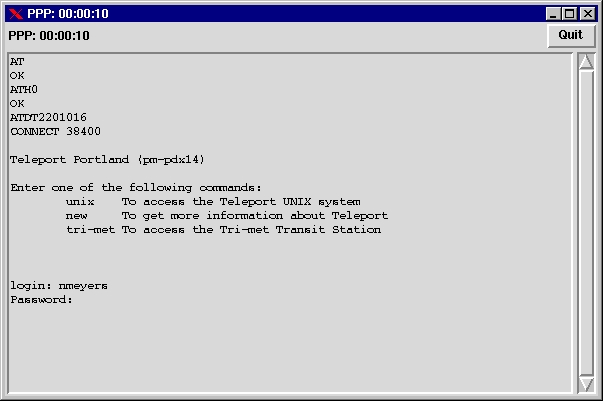
Figure 1 is a screen dump of PPPui taken ten seconds after I established a connection with Teleport, my ISP in Portland. The login sequence is captured in the console, and the clock ticks away in the upper left corner and on the title bar. If I iconify the client, the running clock appears with the icon or in the task bar (depending on your choice of window manager).
What about security and permissions? One more change to the utilities seems appropriate, and it is addressed in the sidebar, “PPP Security and Those Pesky Run-Only Scripts”.
By adding a PPPui action to the window manager, you can make starting your PPP connection a one-click operation. I use FVWM95 as my manager; this line in my .fvwm95rc adds PPP startup to the FvwmButtons panel:
*FvwmButtons(Title 'teleport', \
Action 'Exec "Teleport Connect" \
PPPui -name "Teleport Connect" \
"/etc/ppp/scripts/ppp-on" \
"/etc/ppp/scripts/ppp-off" ppp0 &')
PPPui has an additional option to facilitate interaction with FVWM95. The -small windowname argument causes the following two operations to occur after the connection is established:
The console is unmapped and the clock and quit button repacked into a very small area.
The window title is changed to the window name specified as part of the option.
To support the “swallowing” function of FvwmButtons, the following entry is needed in .fvwm95rc:
*FvwmButtons(Title 'teleport', Swallow \
        (Useold Respawn) "pppui_swallow"\
        Nop, Action 'Exec PPPui -name \
        "Teleport Connect" -small pppui_swallow\
        "/etc/ppp/scripts/ppp-on" \
        "/etc/ppp/scripts/ppp-off" ppp0 &')
It creates an invocation of PPPui that is swallowed into the button panel after the connection is established, as shown in Figure 2. (Unfortunately, the semantics of FvwmButtons cause the button to appear in a constantly-pressed state when the connection is not active, which is a bit distracting.)
PPPui replaces a hard-to-use and obscure user interface with a simple, intuitive graphical interface. The code for the PPPui program and the rscript utility are available by anonymous download in the file ftp.linuxjournal.com/pub/lj/listings/issue50/2491.tgz.