AfterStep 1.3.1
It seems like only yesterday that I was asked to write an article about AfterStep for LJ's special issue on GUIs (graphical user interfaces), and now here it is. The main points I will focus on are the following:
History of window managers and in particular AfterStep
The future of AfterStep
Desktop philosophy of AfterStep 1.3.1
My conclusion is that the best GUI is the most productive one, but only if it remains user friendly. Users must be free to do anything easily using their window manager.
The first window manager was TWM from Evans and Sutherland, and it was the base upon which Robert Nation created FVWM. FVWM has been used to create most of the modern window managers: FVWM2, Enlightenment, amiWM and Bowman. FVWM2 was used as the basis for FVWM95, and Bowman evolved into AfterStep. In this “tree” hierarchy, some exceptions appear: WindowMaker, the NeXT emulation window manager; and KWM, the KDE project window manager. Both of these managers were written from scratch.
Is starting at the beginning better than modifying an already existing window manager? It may bring personal satisfaction, but it will also create duplication of effort. Since all of these programs (FVWM, Bowman, etc.) are freely redistributable, there's no need to write the same code twice. If a feature you want already exists in another window manager, just take the code and patch it into yours. This method will save you both time and effort. FVWM already had most of the features of the modern window managers. The concept has progressed only slightly, while the appearance has radically changed.
AfterStep, derived from both FVWM and Bowman, was first written by Dan Weeks, Frank Fejes and Alfredo Kojima to emulate the NeXT GUI. When they realized they couldn't put all the features they wanted into AfterStep, a new project was started—WindowMaker. WindowMaker is targeted at Gnustep (GNU approach to NeXT programming and interface) with very innovative concepts, e.g., dock, DnD and “sticky” menus.
Even if it limits you in some ways, the ability to build on a good base is very useful. You don't spend most of your time coding a good equivalent of FVWM with many bugs. AfterStep is now evolving toward new heights, including simpler and more powerful configuration. Rather than maintaining AfterStep and allowing other managers to pass it, we (the developers) want it to become the most innovative window manager. For example, we're planning to add a few new features. First, concepts that already exist in other window managers that we plan to incorporate into AfterStep:
A file manager in the root window (see Win95 and KDE) with an Irix-like desktop
WindowMaker Dock and “sticky” menus
Enlightenment-like window decorations with pixmaps
FVWM95 task bar
OS/2-like voice recognition (see the ear voice recognition project on Sunsite)
The code for these features from other window managers can be copied under the GPL (GNU Public License). I strongly believe in and encourage maximum source code re-usage. I like the FVWM95 task bar, Enlightenment decorations and WindowMaker dock DnD; they're very useful and easy to use. Mixing and matching concepts from several window managers will ultimately result in a “best-of-all-worlds” situation. That goal is why some people install and configure everything they find. Merging these features into a single program is a much more efficient solution. Therefore, the idea is to make AfterStep more friendly by including many features into a homogeneous work. I hope we'll be able to meet most individual tastes. And there's no need for coding in a new way (C++, Gnustep, Qt, etc.) to meet such goals since most of these cool features exist in FVWM parented window managers.
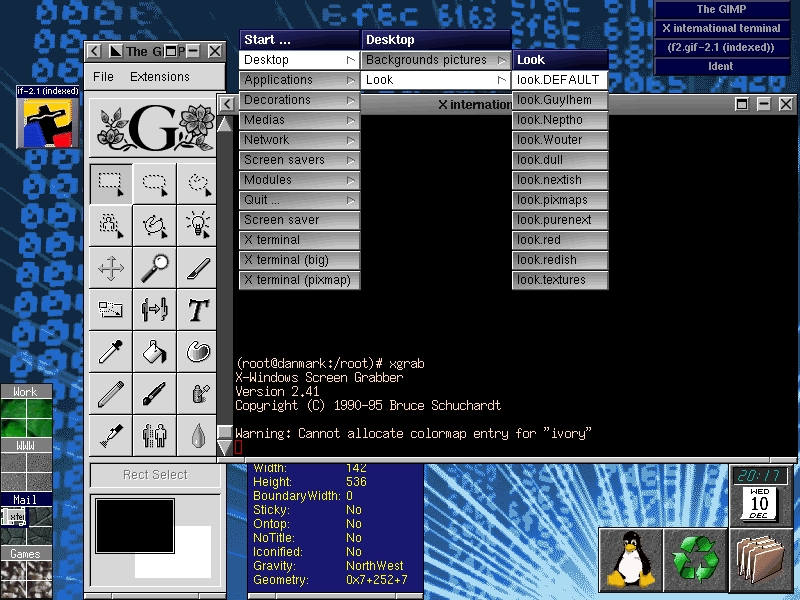
Figure 1. AfterStep Screenshot
I'd also like to see some new features that are not yet implemented in any window manager, with maybe a new way of coding. That's why AfterStep will first integrate the FVWM family features and then take a different path. New concepts that we wish to add are as follows:
NeXT desktop, in collaboration with the WindowMaker team
Module compatibility with FVWM2 and other window managers
Object-oriented management of AfterStep elements (title bar)
Animated icon and opaque window rotation
Total mouse configurability
Icons/help files/programs database (For example, a painting program without a nice default icon would “auto-magically” use a database icon containing a button for calling xman with the program's help file.)
Source code optimization to keep AfterStep from becoming slow
The sky is the limit. If you implement a good option in AfterStep, just send me your patch and if it's freely redistributable it'll be in the next version. If you think AfterStep is going to become 100MB, don't worry—all of these are compile time options. A patch is put in the executable program only if you request it (that's what we call meeting personal tastes). We're making AfterStep for ourselves, but one thing we also want is features we haven't already imagined. All this may seem quite ambitious, and we agree, we are. AfterStep's “pilgrim fathers” already did a lot, making such a good program, so it's not easy to make it even better.
AfterStep 1.3.1 already includes user-friendly configuration and “look sharing”. Here are some examples of the new features already working:
Take your personal look file, rename it to look.your-name and post it to your friends. They can put it in desktop/looks and select it in the start menu to easily get the appearance of your desktop without losing their own menus, configuration or bindings.
The start menu is simply a directory in ~/gnustep/Library/AfterStep in which each subdirectory is a menu entry and each file a menu option. If you want to add Ghostview, just type:
echo "gv &" >\
~/gnustep/Library/AfterStep/start/Programs/Ghostview
Spaces are allowed and you can specify command-line options. When you restart AfterStep, Ghostview will be added to the start menu.
Backgrounds are put in the directory ~/gnustep/Library/AfterStep/desktop/backgrounds. Put the picture you want there and when you restart AfterStep, the Desktop/Backgrounds/Pictures menu will contain this option. Of course, if you select it, AfterStep will remember it for the next session, just like colors (in desktop/colors) and look files.
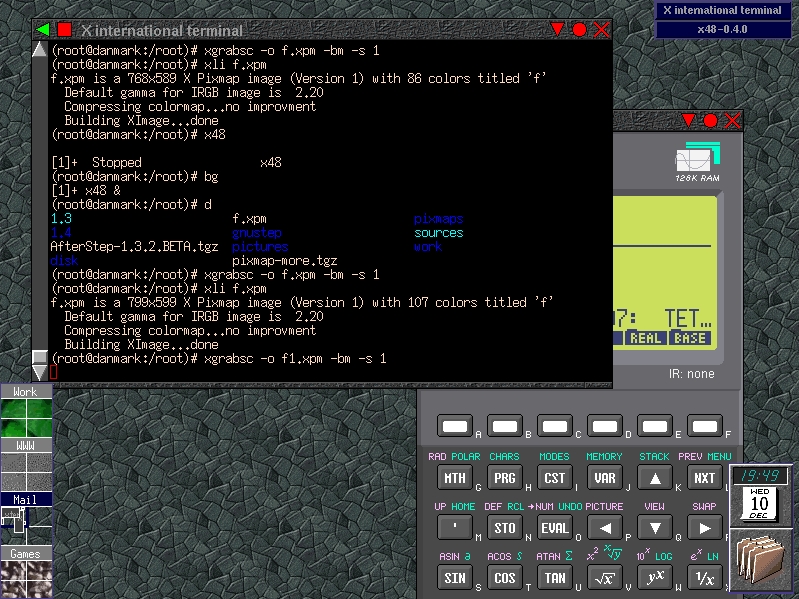
An included patched rxvt called xiterm allows pictures to be displayed in the background with Offix DnD compatibility (just like the Wharf). Select a file in xfm, drag it to xiterm, and its name will appear on the command line you're typing. It's lighter than xterm, supports color and will be more linked with AfterStep in version 1.3.2, becoming a standard part of its GUI, like title bars, Wharf and Pager. Configure-time options are made via menuconfig (just like the Linux kernel); this will also be true for future versions of AfterStep.
Four 2x2 pagers (that's sixteen screens, but you can configure it if you want more or less space on your desktop) with individual background pixmaps and names to allow you to use many programs at the same time (the task-list is very useful too).
Jump button allows you to focus on the next window by clicking on the right triangle in the right part of the title bar.
As you have learned in this article, AfterStep is strongly linked to the FVWM family but is no longer restricted to NeXT GUI emulation. Before moving to totally new concepts, we're first trying to put in all the nice features that already exist without making AfterStep hard to use. I hope you'll find 1.3.1 as simple to use as I think it is. But remember, if you think of a missing option, code it and send in the patch. With look files and other configuration files, AfterStep can turn into anything you want it to be.