
Disk Hog: Tracking System Disk Usage
A job that most system administrators have to perform at one stage or another is the implementation of a disk-quota policy. Being a maintainer of quite a few machines (mostly Linux and Solaris, but also AIX) without system enforced quotas, I need an automatic way of tracking disk quotas. To this end, I created a Perl script to regularly check users' disk usage and compile a list of the biggest hogs of disk space. Hopefully, in this way, I can politely convince people to reduce the size of their home directories when they get too large.
The du command summarizes disk usage for a given directory hierarchy. When run in each user's home directory, it reports how much disk space that directory is occupying. At first, I wrote a shell script to run du in a number of user directories, with an awk back end to provide nice formatting of the output. This method proved difficult to maintain when new users were added to the system. Users' home directories were unfortunately located in different places on each operating system.
Perl provided a convenient method of rewriting the shell/awk scripts into a single executable, which not only provided more power and flexibility but also ran faster. Perl's integration of standard Unix system calls and C-library functions (such as getpwnam() and getgrname()) makes it perfectly suited to this sort of task. In this article, I will describe how I used Perl as a solution for my particular need. The complete source code for my Perl script is available by anonymous download in the file ftp://ftp.linuxjournal.com/pub/lj/listings/issue44/2416.tgz.
The first thing I did was make a list of the locations in which users' home directories resided and put this list into a Perl array. For each subdirectory of the directories in this array, a disk-usage summary was required. This summary was obtained by using the Perl system command to spawn off a process running du.
The du output was redirected to a temporary file using the common $$ syntax, which is replaced at run time by the PID of the executing process. This guaranteed that multiple invocations of my disk-usage script (while unlikely) would not clobber each other's temporary working data.
All of the subdirectories were named after the user who owned the account. This assumption made life a bit easier in writing the Perl script, because I could skip users such as root, bin, etc.
I now had, in my temporary file, a listing of disk usage and a user name, one pair per line. I wanted to split these up into an associated hash of users and disk usage, with users as the index key. I also wanted to keep a running total of the entire disk usage and the number of users. Once Perl had parsed all this information from the temporary file, I could delete it.
I decided the Perl script would dump its output as an HTML formatted page. This allowed me great flexibility in presentation and permitted the information to be available over the local Intranet—quite useful when dealing with multiple heterogeneous environments.
Next, I had to decide which information I needed to present. Obviously, the date when the script ran is important, and a sorted table listing disk usage from largest to smallest is essential. Printing the GCOS (general comprehensive operating system) information field from the password file allowed me to view both real names and user names. I also decided to provide a hypertext link to the user's home page, if one existed. To do this, I extracted their official home directory from the password file and added the standard, user directory extensions to it (typically, public_html or WWW).
Sorting in Perl usually involves the use of the “spaceship” operator (<=>). The sort function sorts a list and returns the sorted list value. It comes in many forms, but the form used in my code is:
sort sub_name list
where sub_name is a Perl subroutine. sub_name is called during element comparisons, and it must return an integer less than, equal to or greater than zero, depending on the desired order of the list elements. sub_name can also be replaced with an in-line block of Perl code.
Typically, sorting numerically in ascending order takes the form:
@NewList = sort { $a <=> $b } @List;
whereas sorting numerically in descending order takes the form:
@NewList = sort { $b <=> $a } @List;
I decided to make the page a bit flashier by adding a few of those
omnipresent colored ball GIFs. Green indicates that the user is
within allowed limits. Orange indicates that the user is in a
danger buffer zone—no man's land—in which they are dangerously
close to the red zone. The red ball indicates a user is over quota,
and, depending on the severity, multiple red balls may be awarded
to truly greedy users.
Finally, I searched, using all the web-search engines, until I found a suitable GIF image of a piglet, which I placed at the top of the page.
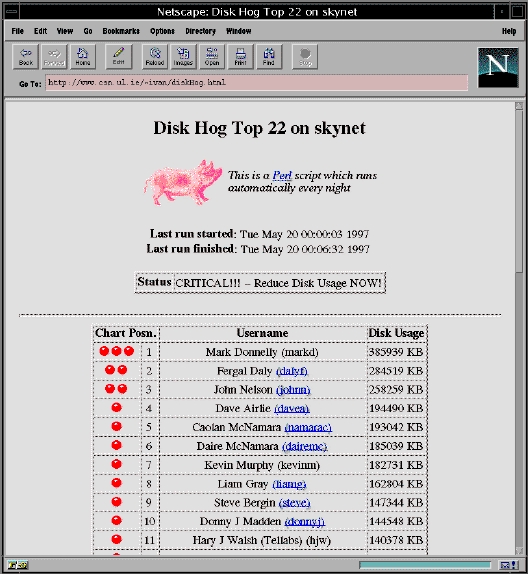
Figure 1. Disk Hog Screen Shot
The only job left was to arrange to run the script nightly as a cron job. This job must be run as root in order to accurately assess the disk usage of each user—otherwise directory permissions could give false results. To edit root's cron entries (called a crontab), first be sure you have the environment variable VISUAL (or EDITOR) set to your favorite editor, then type:
crontab -e
Add the following single line to any existing crontab entries:
0 0 * * * /home/sysadm/ivan/public_html/diskHog.plThe format of crontab entries is straightforward. The first five fields are integers, specifying the minute (0-59), hour (0-23), day of the month (1-31), month of the year (1-12) and day of the week(0-6, 0=Sunday). The use of an asterisk as a wild card to match all values is permitted, as is specifying a list of elements separated by commas or a range specified by start and end (separated by a dash). The sixth field is the actual program to be scheduled.
A script of this size (with multiple invocations of du) takes some time to process. As a result, it is best scheduled with cron—I have it set to run once a day on most machines (generally during the night, when user activity is low). I believe this script shows the potential of using Perl, cron and the WWW to report system statistics. I have also coded a variant of it that performs an analysis of web-server log files. This script has served me well for many months, and I am confident it will serve other system administrators too.
This article was first published in Issue 18 of LinuxGazette.com, an on-line e-zine formerly published by Linux Journal.

Ivan Griffin (ivan.griffin@ul.ie) is a research postgraduate student in the ECE department at the University of Limerick, Ireland. His interests include C++/Java, WWW, ATM, the UL Computer Society (http://www.csn.ul.ie/) and of course Linux (http://www.trc.ul.ie/~griffini/linux.html).

